Plans at a glance
| Plan | Price | What it is |
| Hobby | Free | Capped Tab and Agent use, plus a short Pro trial |
| Pro | $20 / mo | The core plan for daily individual developers |
| Pro+ | $60 / mo | Same features as Pro, about 3x the usage |
| Ultra | $200 / mo | Same features, about 20x usage, priority access |
| Teams | $40 / user | Standard seat; Premium is $120 / user |
| Enterprise | Custom | Pooled usage, SCIM, invoicing, security controls |
I have paid for Cursor out of my own pocket since early 2025, and I have watched the bill move around more than once. When I started, pricing was a plain count of requests. By mid-2025 it became a pool of usage credits, and Anysphere took some heat for a Pro change that surprised people (the company apologised and issued refunds). In 2026 it settled into a two-pool system with a router, per-model rates, and a token surcharge that only touches business plans.
If you landed here unsure what Cursor really costs, that instinct is correct. The plan names are simple. The number on your card at the end of the month is not, because it depends on which models you run and how hard you lean on the agent. This is the reference I wish someone had handed me. Every figure below is checked against Cursor's official models and pricing page for September 2026, and I have marked where money tends to leak.
The short version · Hobby is free forever with capped Tab and Agent use, plus a short full-Pro trial for new accounts. · Pro at $20/mo (about $16/mo annual) is the right plan for most working developers. · Pro+ ($60) and Ultra ($200) are the same features as Pro with a larger usage pool, roughly 3x and 20x. · Teams runs $40/user/mo for Standard or $120/user/mo for Premium, which grants 5x the agent limits. · Enterprise is custom and adds pooled usage, SCIM, invoicing, and security controls. · Two quiet costs: the Cursor Token Rate on business plans, and the August 2026 Auto change that ended flat-rate routing. |
How Cursor pricing actually works in 2026
Get this part right and every plan below makes sense.
Cursor stopped counting requests a while ago. Each paid individual plan now gives you a monthly allowance of model usage, split across two pools that reset with your billing cycle. You spend those pools as you prompt the agent, and the model you pick decides how fast the pool drains.
Pool 1 Cursor Models Generous included usage for Cursor's own models: Grok 4.6, Grok 4.5, and Composer 2.5. Cheap per token and exempt from the token surcharge, so they stretch furthest. | Pool 2 Other Models Third-party models such as Claude, GPT, and Gemini, billed at each model's API rate. Pro, Pro+, and Ultra include this pool. Pick Claude Opus for everything and it empties fast. |
When the pool runs out
Nothing breaks. You either turn on on-demand usage and keep going at the same API rates (Cursor adds no markup on overage), or you move up a tier for a bigger allowance. Requests are never slowed or downgraded when you switch to pay as you go. The free Hobby plan is the exception: it has no overage path, so it simply pauses at the cap until the next reset.
Hobby: the free plan
Free forever, no card required. A real tier, not just a trial.
Hobby $0 / forever Best for: students, occasional coders, and anyone kicking the tyres before paying. Hobby gives you the full editor with capped AI: limited Tab completions and limited Agent requests each month, with no credit card. New accounts also get a short window of the complete Pro experience (about a week) so you can feel unlimited completions and full agent mode before deciding. Cursor's public page no longer lists a single fixed quota for Hobby, so check the usage view in your editor for the numbers tied to your account. Good fit if you: write code a few evenings a week, mostly want autocomplete, or are learning and want to understand your own edits. Skip it if you: code professionally every day, run repo-wide agent tasks that burn the cap quickly, or need Auto mode, which is not on the free tier. |
My honest test for whether to pay: if you miss agent mode on the first day after the trial ends, buy Pro. If you never notice the downgrade, Hobby is genuinely enough.
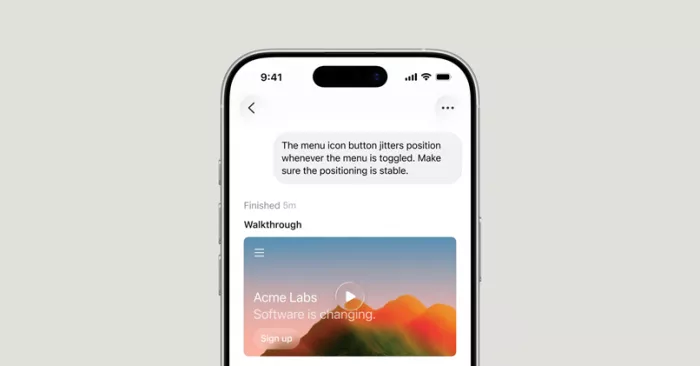
Cursor for iOS, included on paid plans: launch and review agents from your phone. Source: Cursor.
Pro, Pro+, and Ultra: the individual plans
Same features across all three. The only thing that changes is how much usage you get before you pay more.
Pro $20 / mo [ most popular ] Best for: individual developers using AI assistance every day. Around $16/mo on annual billing. Pro is the plan the product is built around. You get unlimited Tab completions, extended agent limits, both usage pools, frontier model access, MCP servers, skills, hooks, Cloud Agents, and Bugbot on usage-based billing. For most people, Pro plus the occasional on-demand top-up covers a full month. |
Pro+ $60 / mo Best for: daily agent users who keep hitting the Pro ceiling. Roughly 3x the usage of Pro. If you exhaust Pro's pool most months and would rather not manage overage line by line, Pro+ buys headroom at a flat rate. Cursor's own usage guidance puts a daily agent user at around $60 to $100 of total monthly usage, which is exactly the band where Pro+ starts paying for itself. |
Ultra $200 / mo Best for: power users running multiple agents and automations. About 20x Pro usage, plus priority access. Ultra is for people whose total usage regularly clears $200 a month anyway. The math is simple: if you would otherwise pay that much in Pro plus overage, the flat rate removes the surprise and adds early access. If you are not already brushing against that number, Ultra is more than you need. |
India only: the Start plan Developers in India can use Start at Rs 649/mo (tax inclusive). It covers the Cursor Models pool and Cloud Agents but leaves out the Other Models pool, Auto, Bugbot, on-demand usage, and the SDK. It is a lower-cost on-ramp for building with Grok and Composer, not a full Pro substitute. |
Individual plans compared
Features are identical from Pro upward. Read this table as a usage ladder, not a feature ladder.
| Plan | Monthly | Annual (approx) | Included usage | Both pools |
| Hobby | $0 | $0 | Capped Tab + Agent | No overage |
| Pro | $20 | ~$16/mo | Baseline pool | Yes |
| Pro+ | $60 | ~$48/mo | ~3x Pro | Yes |
| Ultra | $200 | ~$160/mo | ~20x Pro | Yes |
| Start (India) | Rs 649 | Monthly only | Cursor Models only | No |
Annual billing saves roughly 20% across the paid tiers. Prices shown before tax.
Teams: Standard and Premium
Two seat types, plus the administration and security layer that individual plans do not have.
| Seat | Per user / mo | Annual (approx) | Agent limits |
| Standard | $40 | ~$32 | Baseline team limits |
| Premium | $120 | ~$96 | 5x Standard on Agent |
The $20 per-seat premium over individual Pro is not buying more raw intelligence. It buys the org layer: centralized billing and admin, a team marketplace for shared rules, skills, and plugins, agentic code review with Bugbot, cloud agents with shared team context, usage analytics, team-wide privacy mode, and SAML or OIDC single sign-on. A team can mix seat types, so two heavy agent users on Premium alongside eight Standard seats is a common and much cheaper setup than putting everyone on Premium.

The quiet cost: the Cursor Token Rate On Teams and Enterprise, every third-party model request carries a $0.25 per million tokens surcharge on top of the model's own API price. It applies to included usage, on-demand usage, and even bring-your-own-key usage. The takeaway: bringing your own API key no longer means paying Cursor nothing. Cursor's first-party models (Grok and Composer) are exempt, a strong reason to default teams to Composer 2.5 and reserve Claude or GPT for tasks that truly need them. |
Enterprise
Custom pricing, for organizations that need more than self-serve.
Enterprise Custom Best for: larger orgs with procurement, compliance, or support requirements. Cursor recommends Teams for anyone happy self-serving, and Enterprise for anyone who needs priority support, pooled usage across the org, invoicing, SCIM provisioning, or advanced security controls. The published $40 Teams rate is a starting point at scale; at 100-plus seats it is worth negotiating volume discounts and asking whether pooled credits beat per-seat allocation. Enterprise also carries the same Cursor Token Rate on third-party models. |
The August 2026 Auto change you need to know
This one moved real bills, so it deserves its own heading.
For a long time, Auto mode (Cursor picking the model for you) was effectively flat rate. That ended on 24 August 2026. Every Auto request now bills at the list price of whatever model it routes to, drawn from the matching pool, with the token surcharge added on third-party routes for business plans. Enterprise kept legacy flat Auto slightly longer, until 7 September 2026, and that window has now closed too.
Auto still has three modes, Cost, Balance, and Intelligence, that trade price against capability. If your monthly usage jumped without your habits changing, this is almost certainly why. The fix is to check which modes and models your requests are landing on, then set spend controls in the dashboard.
What the models cost per token
Your plan sets the allowance. Your model choice sets the burn rate.
| Model | Input | Output | Pool |
| Composer 2.5 | $0.50 | $2.50 | Cursor Models |
| Grok 4.6 | $2.00 | $6.00 | Cursor Models |
| GPT-5.6 Luna | $0.20 | $1.20 | Other Models |
| Gemini 3.1 Pro | $2.00 | $12.00 | Other Models |
| Claude Sonnet 5 | $2.00 | $10.00 | Other Models |
| Claude Opus 5 | $5.00 | $25.00 | Other Models |
Prices per million tokens, from Cursor's official pricing docs, September 2026.
Look at the spread. Composer 2.5 output costs $2.50 per million tokens; Claude Opus 5 costs ten times that. Run Opus on autopilot for every small edit and a $20 Pro pool disappears in days. Reach for the expensive models when the task genuinely rewards the extra reasoning, and let the cheaper first-party models carry the routine work.
What will you actually spend?
Cursor's own usage bands, which match what I see on my invoices.
| Usage profile | Total / mo | Notes |
| Daily Tab user | In pool | Autocomplete rarely leaves the included usage |
| Light agent user | In pool | Occasional agent runs stay within Pro |
| Daily agent user | $60 to $100 | Pro+ territory |
| Power user, many agents | $200+ | Ultra removes the overage surprise |
The pattern is clear. Autocomplete-first workflows almost never exceed the included pool, so Pro is plenty. Once you live in agent mode across a real codebase, plan for $60 to $100 a month and treat Pro+ as the sensible flat-rate version of that. Only cross into Ultra when you are already spending like an Ultra user.
Is Cursor worth the premium over Copilot?
A fair question, because Cursor is not the cheapest option.
At $20/mo, Cursor Pro sits at roughly double GitHub Copilot Pro (around $10/mo), and Teams at $40/user is more than double Copilot Business. What the extra money buys is agentic depth: autonomous multi-file changes, cloud agents that run tasks in the background, and MCP integrations. Copilot's edge is its tight coupling to GitHub's own platform, issues, pull requests, and Actions, plus a broader extension ecosystem.
My read after using both: if you mostly want strong autocomplete and chat, Copilot is the better value. If you want the agent to plan and execute real feature work while you review, Cursor earns its premium, and the price gap stops feeling large the first time an agent finishes something that would have taken you an afternoon.
My verdict, after three months in it
I have run Cursor across two of these tiers this year, most of it in Pro with a stretch on Pro+ during a heavy build. If you take nothing else from this guide, take the model-choice discipline: the plan you buy matters far less than the models you let the agent reach for. That single habit decided whether my month landed at $20 or well past it. Learning or casual: Start on Hobby. It is a real free tier. Upgrade only when you miss agent mode. Most developers: Pro at $20. Pay annually for the 20% cut once you know you are staying. The default, and correct for a reason. Agent all day: Pro+ at $60. If you clear the Pro pool most months, the flat rate is calmer than watching overage tick up. Power user: Ultra at $200, but only if your usage already lives there. Otherwise it is dead money. Small teams: Teams Standard, with a couple of Premium seats for the heaviest users. Default everyone to Composer to dodge the surcharge. Large orgs: Enterprise, and negotiate. The list price is a floor at scale. Cursor is the most capable AI-native editor I have used, and it charges like it. Buy the tier that matches how you work, keep an eye on the usage dashboard, and the premium is easy to justify. Ignore the dashboard and pick Opus for everything, and you will fund that premium several times over. |
Comments