Table of Contents
- Slidesgo vs Gamma at a Glance
- What Each Tool Actually Does
- How the AI Generation Compares
- Pricing, and Where the Money Actually Goes
- The Market Behind the Decision
- Design, Exports, and the Friction Nobody Mentions
- What Real Users Say
- Collaboration, Speed, and the Learning Curve
- Which Tool Fits Which User
- The Final Verdict
There is a particular dread that arrives the night before a big presentation, when the deadline is close and the slides are still a wall of empty rectangles. For years the only cure was strong coffee and a template borrowed from a colleague who owed a favor. In 2026, two names keep surfacing in that same panicked search for help: Slidesgo and Gamma.
They fix the blank-slide problem in almost opposite ways. Slidesgo hands over a finished-looking design and asks for the words. Gamma writes the words from a single sentence and handles the design on its own. Both are genuinely good. Neither suits everyone. What follows is a close look at where each one earns its place, grounded in current pricing, documented features, and what real users are saying across G2, Capterra, and Trustpilot.
Slidesgo vs Gamma at a Glance
For anyone short on time, here is the shape of the decision before the details fill it in.
| Category | Slidesgo | Gamma |
|---|---|---|
| Best known for | A huge library of designer-made templates | Prompt-to-deck AI in under a minute |
| Core approach | AI fills a chosen template | AI generates content and layout from scratch |
| Launched | 2019, part of Freepik and Magnific | 2020, founded in San Francisco |
| Free plan | 3 downloads a month, attribution slide required | 400 one-time AI credits, watermark on shared decks |
| Paid entry price | About $5.99/mo, roughly $3/mo billed yearly | Plus from about $8 to $10/mo |
| Output formats | Editable PPTX and Google Slides | Web cards, PPTX, PDF, docs, sites, social |
| Ideal user | Students, teachers, budget-conscious creators | Founders, marketers, link-first sharers |
| Biggest weakness | Template match feels surface-level | PPTX export breaks the card layout |
Table 1. Quick snapshot of how the two tools differ before the deep dive.
What Each Tool Actually Does
Slidesgo, the Template Library That Learned to Write

Slidesgo started in 2019 as a repository of ready-made slides for Google Slides and PowerPoint, and it still carries that DNA. It now sits inside the Freepik and Magnific creative group, which is why the login screen reads "Slidesgo by Magnific" and why its visuals lean on the same enormous stock of illustrations, icons, and photos. Premium members get access to more than 15,000 templates, one of the largest such libraries anywhere.
The AI Presentation Maker is the newer headline feature, and it works differently from most rivals. Instead of designing from nothing, it picks a fitting template from that library and pours AI-written content into it. The result appears in roughly a minute. What comes with it:
• Template-first generation that keeps output visually consistent and proven
• A PDF-to-PPT converter that turns an uploaded document into editable slides
• Classroom tools such as lesson-plan, quiz, icebreaker, and exit-ticket generators
• Clean export to editable PPTX and direct hand-off to Google Slides
The inputs are more flexible than the template-first label suggests. The generator accepts:
• A prompt on its own, or an uploaded PDF, Word file, or text document up to 25 MB as source material
• A chosen tone, from professional to casual, plus an image style such as photo, illustration, or 3D render
• Freepik's asset stock for premium members, reachable without leaving the editor
Gamma, the Deck That Thinks in Cards
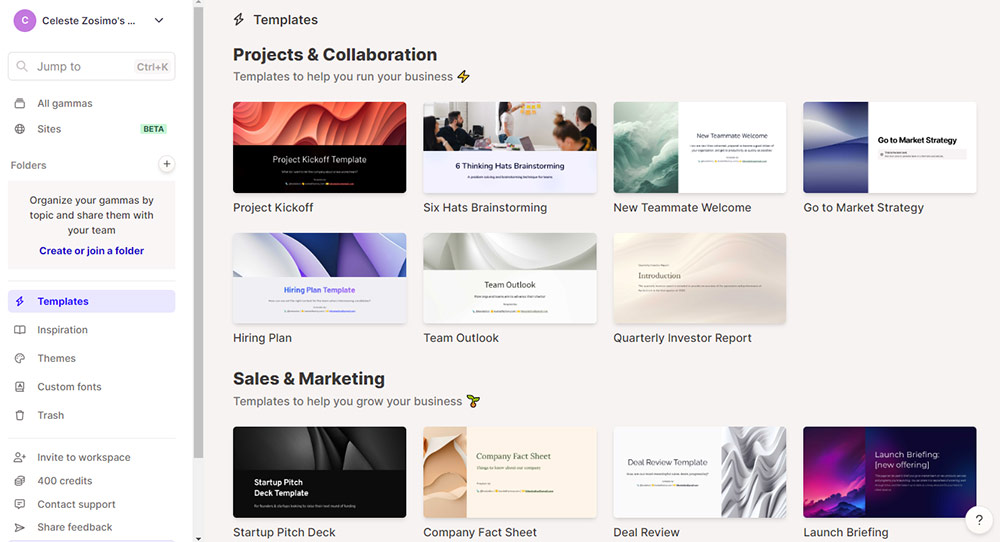
Gamma launched in 2020, built by Grant Lee, James Fox, and Jon Noronha, and it treats a presentation less like a stack of fixed slides and more like a scrollable set of cards that stretch to fit their content. That single design choice is why a Gamma deck can just as easily publish as a web page. Its content engine draws on a mix of OpenAI and Anthropic models depending on the task.
By 2026 the tool has grown well past slides. It generates presentations, long-form documents, one-page websites, social graphics, and, since the March 2026 launch of Gamma Imagine, AI-made marketing images. The scale is hard to ignore:
• More than 70 million users and around 700,000 creations generated each day
• Gamma Agent, an AI partner that researches, restyles a whole deck, and gives design feedback in plain language
• Import and Transform, which rebuilds a PDF, Word file, PPTX, or web URL into a finished deck
• Viewer analytics on paid tiers and a public generation API released in January 2026
The release cadence has been relentless. A few markers from the past year:
• Gamma 3.0 (September 2025) widened the tool from AI slides into decks, docs, sites, and social, and introduced the Agent
• SOC 2 Type II certification landed in October 2025, alongside a Zapier link to more than 8,000 apps
• Paid credits roll over up to twice the monthly grant, and each referral adds 200 more, easing the credit ceiling
How the AI Generation Compares
The gap between the two shows up fastest in the raw output. Slidesgo hands back structure; Gamma hands back structure and substance. This is how they line up on the details that decide how much work is left.
| Generation | Slidesgo | Gamma |
|---|---|---|
| Method | Fills a chosen template with AI text | Writes content and builds layout together |
| First-draft text | Outline with placeholder-grade copy | Coherent draft, usable on the first pass |
| Editing needed | Moderate to heavy before presenting | Light to moderate refinement |
| Strongest at | Clean, consistent visual design | Informational, well-structured decks |
| Weak spot | Content can feel surface-level | Broad text on data-heavy topics |
Table 2. Where the two engines diverge once a prompt turns into a draft.
A concrete test makes it tangible. Given a prompt such as a Q3 marketing recap for an executive team, Slidesgo returns a themed deck with tidy placeholders waiting for the real numbers, while Gamma returns section-by-section copy that is closer to usable straight away. Neither knows the actual figures, so both still need a human check, but the amount of typing left afterward is where they part ways.
The short version: Slidesgo gives a beautiful shell and expects the words. Gamma gives the words and the shell, then invites refinement. Design-led users lean toward the first, content-led users toward the second.
Pricing, and Where the Money Actually Goes
On headline price, Slidesgo is the cheaper habit. Its Premium plan runs about $5.99 a month, dropping to roughly $3 a month when billed yearly, with a discounted education tier near $3.50. Gamma opens with a genuinely useful free tier, then climbs through Plus, Pro, and the newer Ultra plan as generation limits and brand controls unlock.
| Plan level | Slidesgo | Gamma |
|---|---|---|
| Free | 3 downloads a month, attribution slide, limited AI runs | 400 one-time AI credits, watermark, web publishing |
| Entry paid | About $5.99/mo, or ~$3/mo billed yearly | Plus, about $8 to $10/mo, watermark removed |
| Mid tier | Education plan near $3.50/mo for schools | Pro, about $18 to $20/mo, analytics and brand kit |
| Top tier | Full library, 15,000+ ad-free assets | Ultra near $90 to $100/mo, plus team seats |
| Metering | Fair-use cap around 150 templates a month | Credit system, roughly 40 credits per deck |
Table 3. Pricing verified against live pricing pages and 2026 review sources. Figures vary slightly by region and billing cycle.
The catch on each side is worth naming before committing:
• Gamma free credits do not refresh, so once the 400 are gone the choice is upgrade or stop
• Slidesgo meters by downloads, and its unlimited premium tier still caps around 150 templates a month
• Slidesgo offers a 30-day refund on the standard plan, but only if nothing has been downloaded
Set against the wider field, both look inexpensive. Canva Pro runs near $13 to $15 a month, and PowerPoint bundled with Copilot climbs past $30 per user, which makes a roughly $3 Slidesgo habit or an $8 Gamma Plus seat feel modest. The deciding factor is rarely the sticker price. It is the metering model underneath, because a credit ceiling and a download cap fail in different ways once real deadlines start stacking up.
The Market Behind the Decision
Neither tool exists in a vacuum, and the money flowing into this category explains why both keep shipping features at speed. The AI presentation software market was worth about $1.94 billion in 2025 and is projected to reach $4.79 billion by 2029, a compound annual growth rate of 25.4 percent, according to Research and Markets.
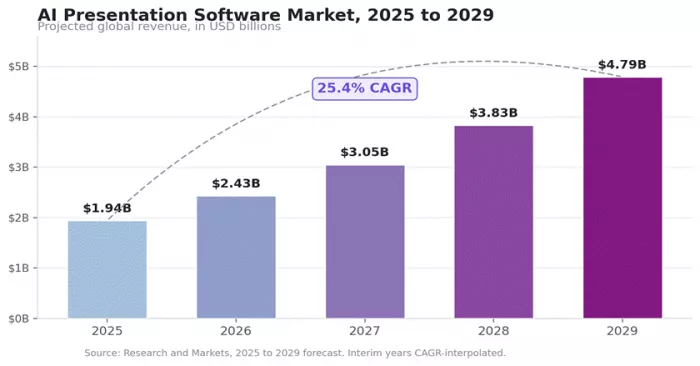
Figure 1. The category nearly triples in four years, which is why Slidesgo and Gamma keep racing to add capability.
That trajectory is the quiet backdrop to every pricing change and every new feature. A market growing at more than a quarter each year rewards tools that move fast, and it explains why a template library added an AI writer and why an AI writer added image generation, websites, and an autonomous agent. The competition is not slowing, which is good news for anyone choosing between them.
Design, Exports, and the Friction Nobody Mentions
Both tools look great in a demo. The friction shows up later, in the details that only surface once a deck has to leave the browser.
| What to watch | Slidesgo | Gamma |
|---|---|---|
| PPTX export | Clean, editable slides that open reliably | Card layout often breaks in the 16:9 conversion |
| Design freedom | Strong templates, limited brand-rule control | Fast restyling, weaker fine-grained control |
| Brand consistency | No true brand kit for strict rules | No workspace-level brand enforcement |
| Originality risk | Popular free templates get over-downloaded | Repeated prompts can produce similar looks |
| Sharing | File-first, drops into existing tools | Link-first, web-native with viewer analytics |
Table 4. The practical trade-offs that rarely appear on a landing page.
The export line is the single most important one. A Slidesgo deck lands as a normal PowerPoint file, which is exactly what a client or a professor usually expects. A Gamma deck is happiest as a shared link, and the moment it becomes a .pptx, its scrollable cards can splinter into broken text boxes and resized images. The decision often comes down to one question: will the final deck be sent as a file, or opened as a link?
What Real Users Say
Star ratings tell a split-screen story for both tools, and the split is revealing once the reasons behind it come into view.
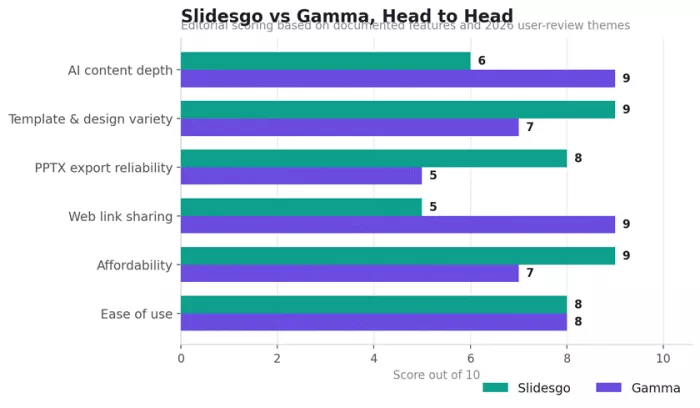
Figure 2. An editorial head-to-head across six dimensions, drawn from documented features and 2026 review themes.
Slidesgo Reviews
On G2 the tool holds about 4.7 out of 5, with roughly 73 percent of reviewers giving five stars, and Capterra sits even higher near a perfect 5.0. Teachers in particular praise the sheer volume of classroom-ready designs and the time saved. Trustpilot tells a harsher tale, landing somewhere between 2.4 and 3.8 depending on the month, and almost every low score points at the same thing: billing. Auto-renewals that are hard to stop, charges after cancelling, and the free tier's three-download cap dominate the complaints, rather than the quality of the slides.
Gamma Reviews
Gamma also splits by platform. Across G2's thousand-plus verified reviews it averages around 4.7, praised for ease of use, generation speed, and clean first drafts. Capterra sits near 3.7, and Trustpilot drops to about 2.0. The pattern is consistent: users who share decks as links love it, while those who need a polished PowerPoint file or who wrestled with cancellation drive the low scores. One G2 reviewer captured the ceiling neatly, noting that formatting control stays limited next to PowerPoint or Google Slides.
| Review source | Slidesgo | Gamma |
|---|---|---|
| G2 | 4.7 / 5, about 73% five-star | 4.7 / 5, 1,000+ verified reviews |
| Capterra | 5.0 / 5 | 3.7 / 5 |
| Trustpilot | 2.4 to 3.8 / 5, varies by month | 2.0 / 5 |
| Loudest praise | Template variety and time saved | Speed and clean first drafts |
| Loudest complaint | Billing and cancellation | PPTX export and cancellation |
Table 5. Ratings pulled from each platform. High marks reward design and speed, while low marks cluster around billing and exports.
The through-line across both: the design and speed win warm reviews, while billing and export friction earn the angry ones. Reading a one-star review usually reveals a checkout problem, not a slide problem.
Collaboration, Speed, and the Learning Curve
Speed is close to a tie. Both tools turn a prompt into a full draft in roughly 30 to 60 seconds, fast enough that the real bottleneck becomes editing rather than waiting. The learning curve is gentle on either side too, since the entire premise is that no design background should be required to get a clean result.
Teamwork is where they separate. Gamma allows real-time co-editing on its paid plans, letting several people shape the same deck at once, and its enterprise posture, including that SOC 2 Type II audit, points toward larger organizations. Slidesgo leans on tools people already use, copying templates straight into Google Drive so collaboration happens inside Google Slides rather than in a dedicated workspace. Neither approach is wrong. One builds a home; the other moves into the neighborhood that already exists.
A few practical notes worth keeping in mind:
• Slidesgo runs entirely in the browser, with a lightweight editor for quick fixes when PowerPoint is not open
• Gamma recommends Chrome and stays web-first, so offline work is essentially off the table
• Both skip the blank page, yet Gamma removes more of the writing while Slidesgo removes more of the designing
Which Tool Fits Which User
Both tools are worth keeping bookmarked. The right default depends on the work.
Reach for Slidesgo when:
• The content already exists and only needs a polished, professional skin
• The deck is for a classroom, a lecture, or a student project on a tight budget
• A clean, editable PowerPoint or Google Slides file is the required deliverable
• Education-specific templates, icons, and illustrations save real time
Reach for Gamma when:
• The starting point is a single sentence and the tool must write the content
• The deck will be shared as a web link, with viewer analytics attached
• One platform for decks, docs, sites, and social graphics is appealing
• Speed to a coherent first draft matters more than exact formatting control
The Final Verdict
After sitting with both, the honest conclusion is that this was never really a fair fight, because they are not chasing the same job. Slidesgo is the tool to open when the words are ready and a blank canvas feels like the enemy. It rewards anyone who wants a beautiful, downloadable deck without hiring a designer, and at roughly $3 a month that value is hard to argue with.
Gamma is the one to open when there is nothing but a topic and a deadline. It writes the first draft, arranges it, and hands back something presentable before the coffee has gone cold, as long as that deck can live as a link rather than a file. For 2026, the smartest move is not picking a winner at all. It is knowing which of the two to reach for, and letting the panic of the blank slide become a thing of the past.
Comments