MOST AI-TOOL REVIEWS are lightly reworded marketing copy. This one is not. I made an account, gave Gamma a single, deliberately awkward prompt, watched it build a finished presentation in under a minute, then exported the result four ways to see what survived.
Every figure here is verified against Gamma’s pricing page, its documentation, and independent reporting, not the brochure. The short version is first; the full reasoning follows.
THE SHORT VERSION Gamma turns a single sentence into a finished, good-looking presentation in well under a minute. The output genuinely surprised me. The images, the typography, and the motion when presenting were far ahead of what I expected from a free account. The trade-offs are real but predictable: the free plan stamps a watermark on your work, the starting pool of credits runs out fast, and the design language, while polished, leans on a recognizable house style. For speed and a strong first draft, it is one of the best tools in its class right now. For pixel-level brand control, you will still be cleaning things up afterward. |
What Gamma actually is
Gamma is a browser-based, AI-native tool for creating presentations, documents, and simple web pages from a prompt. Instead of opening a blank canvas the way PowerPoint or Google Slides forces you to, you describe what you want, and the AI assembles the structure, writes the copy, lays out each section, and pulls in imagery automatically. You then refine the draft rather than building it from nothing.

The core unit in Gamma is not a “slide.” It is a “card.” A card is a flexible block that can stretch to fit whatever content you put on it, which is why Gamma decks feel more like scrollable web pages than fixed rectangles. That single design decision shapes almost everything about how the tool behaves, including how it exports, which I will come back to.
The platform produces three formats from the same engine: presentations in a sequential slide style, documents in a flowing long-form style, and single-page websites built for sharing and embedding. In late 2025 the company pushed further into pure design work with a feature for generating standalone assets such as logos, infographics, and social posts, which signals where the product is heading: beyond decks and into general visual communication.
The numbers behind the product
70M USERS WORLDWIDE | $100M ARR, PROFITABLE | $2.1B VALUATION | 400M+ ASSETS CREATED | <60s TO A DRAFT |
Those headline figures matter because of how Gamma earned them. In November 2025 it crossed 100 million dollars in annual recurring revenue, raised a 68 million dollar Series B led by Andreessen Horowitz at a 2.1 billion dollar valuation, and did it all profitably, with only about 50 employees and under 90 million dollars raised in total. That is rare discipline by current AI standards.
The usage is just as striking. Users have generated more than 400 million assets to date, over a million new pieces every day. Founded in late 2020 and launched in 2022, Gamma took off once it added generative AI in 2023 to kill the blank-page problem.
It is also still moving fast. Gamma 3.0 (September 2025) added an agentic assistant that restyles or rewrites a whole deck by chat, and the generation API went generally available in January 2026. The takeaway for a buyer: this is a profitable, well-funded, actively developed platform, not a weekend project that might vanish, which lowers the risk of building a workflow around it.
Hands-on: how my test actually went
This is the part that matters most, so I am going to walk through exactly what happened, step by step.
I started by creating an account with a fresh email address. Signup was clean and quick, with no friction and no credit card required to begin. Within moments I was looking at the dashboard.
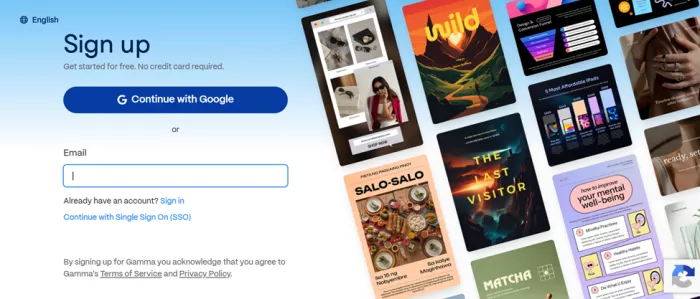
From there I clicked Create new, which opened the creation options. One of them was a Create with AI section, and inside it I chose Generate. This dropped me onto a generation page with a clear text field for describing the topic I wanted, along with controls for shaping the output.
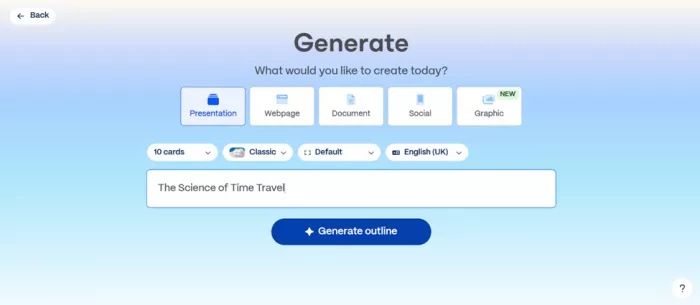
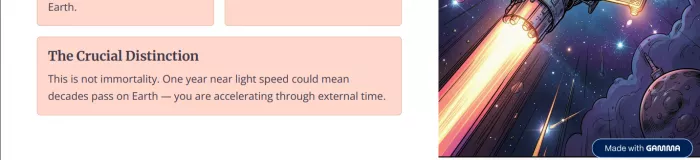
For the prompt, I deliberately picked something abstract and a little awkward to visualize: “The Science of Time Travel.” I wanted to see how the tool handled a subject that is conceptual rather than concrete, the kind of topic that usually trips up automated layout tools because there is no obvious set of stock images to lean on.
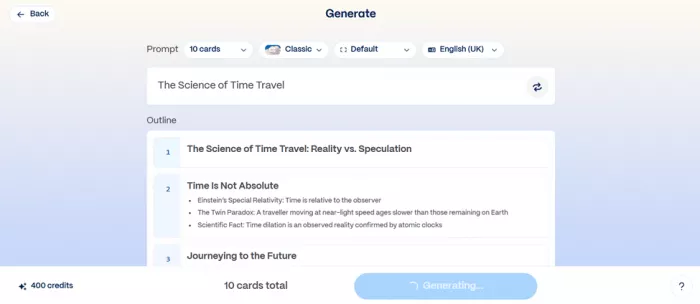
When I hit Generate, the tool drew on the pool of AI credits attached to my account and began building. On the free plan, Gamma grants 400 AI credits at signup, and this single generation pulled from that pool, which is worth flagging early because those starting credits do not renew over time. More on the credit math in the pricing section, because it is the single most important thing to understand before you commit.
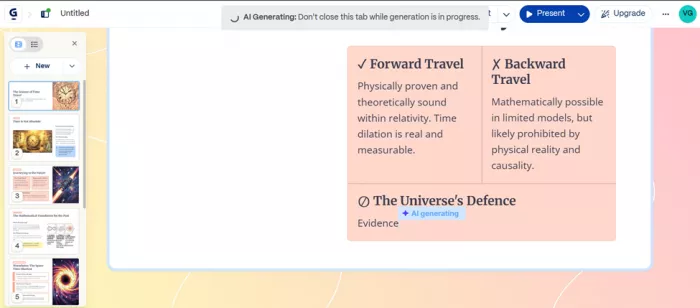
Then came the genuinely impressive part. Gamma did not just spit out a finished file and make me wait behind a loading spinner. It built the deck in front of me, card by card, in real time. I could watch each section take shape, get populated with text, and receive its layout and imagery as the AI worked down the outline. The whole thing came together in well under a minute, which matches the company’s own claim that a working draft is typically ready in roughly 30 to 60 seconds.
When I clicked Present, I was genuinely surprised by the quality. I went in expecting something serviceable but flat, the usual fate of free AI output. Instead it looked considered and polished. The decisions that stood out:
| IMAGERY | Relevant, not filler. The visuals were well-chosen, not random clip art bolted on to fill space. For an abstract topic like time travel, that is harder than it sounds, and Gamma handled it. |
| TYPE | Designed, not templated. The typography mixed different fonts and weights with real intent. Headlines, body text, and accents all related to each other sensibly. |
| MOTION | Smooth and tasteful. The animations and transitions in present mode revealed cleanly, adding a layer of professionalism I did not expect to get for free. |
Taken together, the result did not feel like something a machine had hastily assembled.
“It felt like a draft a competent designer might hand you, which is exactly the bar Gamma is trying to clear. On this test, it cleared it.”
Here is the Link to view the Presentation - https://gamma.app/docs/The-Science-of-Time-Travel-eq5sy4wabyp58zg
Exporting and sharing what I made
A presentation that only lives inside one app is only half useful, so I checked how portable the finished deck was. Gamma let me download the work in four formats, which covers essentially every real-world need, from printing and emailing a static file to dropping it into a colleague’s existing slide workflow to grabbing a single card as an image for social media.
| ↓ PowerPoint | ↓ Google Slides | ↓ PNG |
A few honest notes from verifying how each format behaves, because they are not perfectly equal. PDF is the most faithful, since Gamma’s cards translate naturally into pages, so it preserves the design and prints well. PowerPoint works, but the card layout does not always map cleanly onto fixed slide dimensions, so complex arrangements can need minor cleanup, custom fonts may substitute if the recipient lacks them, and interactive elements flatten into static equivalents. Google Slides is supported, though the smoothest route has historically been to export to PowerPoint first and import that file into Slides, accepting that some formatting can shift. PNG is handy for pulling out individual cards as standalone images.
⚠ THE WATERMARK CAVEAT One caveat applies to everything you make on the free tier: a “Made with Gamma” badge appears on shared and exported content. It is harmless for personal projects and testing, but it is not something you want on a deck headed to a client, an investor, or an executive. Removing it requires a paid plan, and for any external use, the watermark alone is what pushes most serious users to upgrade. |
Pricing and the credit system, explained
This is where you need to pay attention, because Gamma’s value depends entirely on understanding how credits work. Prices shift over time and vary by billing cycle and region, so treat the figures below as the verified picture at the time of writing and confirm current rates on the official pricing page before you pay. Gamma runs on a freemium model layered with AI credits, and the structure breaks down like this.
FREE · Try it $0 ▪ No credit card required ▪ 400 AI credits at signup (one-time, no refresh) ▪ Up to 10 cards per generation ▪ Basic AI image generation ▪ PDF & PowerPoint export, unlimited users ▪ Carries the “Made with Gamma” watermark | PLUS · MOST POPULAR $8 /mo billed annually · ~$10 monthly ▪ Unlimited AI creation (no credit pool) ▪ Removes the Gamma watermark ▪ Advanced AI image generation ▪ Up to 20 cards per generation ▪ Priority support & early access | PRO · For pros $15 /mo billed annually · ~$20 monthly ▪ Everything in Plus ▪ Premium AI image generation ▪ Up to 50 cards per generation ▪ Custom domains, fonts & password protection ▪ Detailed per-viewer analytics & API |
Beyond these, Gamma offers a higher individual tier (often near $100/mo for the heaviest users) and per-seat team plans, commonly around $20/seat for Team and $40/seat for Business, with seat minimums that make them inefficient for very small groups. Confirm current pricing at gamma.app.
THE PRACTICAL TAKEAWAY The free plan is a real trial, not a crippled demo. You can produce genuinely useful decks on it. But the 400 credits go quickly, and a single rich generation can take a meaningful bite out of them, so if you intend to make presentations regularly, plan to move to Plus sooner rather than later. |
06 / THE BALANCE
Strengths and limits, side by side
▲ WHAT IT DOES WELL + Genuinely fast. Going from a one-line idea to a designed, image-rich draft in under a minute eliminates the blank-page paralysis that eats the first hour of most projects. + Strong default design. For users with no design training, it produces professional-looking work out of the box, which is the entire promise, and the reason it has 70 million users rather than 70 thousand. + Real format flexibility. One engine makes decks, documents, and web pages, embeds live content from tools like Figma, Airtable, and Loom, accepts a wide range of imports, and exports broadly, so your work is never trapped inside the app. | ▼ WHERE IT FALLS SHORT − A recognizable house style. Independent reviewers note that layouts repeat across decks, varying mostly the colors. Generate a lot, and a certain sameness creeps in; a fully bespoke look is harder than with a dedicated design tool. − An editor learning curve. Slash commands, an AI chat panel, a main toolbar, and menus tucked between cards mean arrivals from PowerPoint or Slides should expect time getting comfortable. − PowerPoint export fidelity. Because flexible cards do not match fixed slide dimensions, exported files can need cleanup and interactivity drops. For native-PowerPoint shops with strict governance, that friction matters. − Free-tier economics. The 400 credits do not renew, the watermark rules out professional use, and credits do not roll over month to month on paid plans either. None of it is hidden, but budget for it honestly. |
Who Gamma is for
✓ A GREAT FIT Founders, freelancers, educators, marketers, students, and anyone who needs a good-looking presentation, document, or web page quickly without a designer on call. If your priority is getting from idea to polished draft in minutes, it is hard to beat. | × A WEAKER FIT Teams that require pixel-perfect brand control inside native PowerPoint, organizations with heavy governance requirements, or anyone who needs deeply customized templates rather than a strong house style. Those users should weigh dedicated enterprise-focused alternatives. |
The verdict
4.5 / 5 ★★★★½ MY RATING | Gamma delivers on its core promise better than I expected. After making an account, generating a deck on a deliberately difficult topic, watching it build in real time, presenting it, and exporting it four ways, my conclusion is clear. The moment that sold me was clicking Present on “The Science of Time Travel” and finding genuinely thoughtful imagery, varied and intentional typography, and smooth animation, all from a free account and all produced in under a minute. That is a real leap over what AI presentation tools were doing even a short time ago. The deductions are the watermark on free output, the fast-draining one-time credits, the recognizable design language, and the cleanup PowerPoint exports sometimes need. None are dealbreakers, but they are why I would not call it flawless, and why most serious users will end up on Plus. My recommendation: if you make presentations and have not tried it, the free plan costs nothing but a few minutes and a fresh email. Start there, generate two or three decks to judge the output against your own standards, and upgrade to Plus only once the watermark or the credit limit actually gets in your way. |
Comments