Table of Contents
- The five at a glance
- Jasper: the polished pick for brand-driven teams
- Writesonic: built for SEO and the new AI-search game
- Wordtune: the editor that sharpens your own voice
- Blaze: one workspace for the solo marketer doing everything
- Toolbaz: the free way to beat the blank page
- How to choose: pick by the job, not the logo
- The short version
The first time AutoDraft AI turned a page of messy bullet points into a clean first draft, I was sold. By the second month, when that blank-page magic started reading like the same flat hum under every article, I went shopping. That is the quiet pattern with AI drafting tools. The honeymoon is real, and so is the morning you realize you have outgrown it.
AutoDraft built its name on one trick done well. You dump half-formed thoughts into it, and its Draftify feature returns something with an intro, sections and a conclusion. Layer on brand voice profiles and shared editing, and it became a tidy home for small content teams. People still leave for predictable reasons: pricing that is hard to pin down, thin SEO muscle, a wish for something genuinely free, or the opposite problem, a need for heavier long-form firepower.
So I pulled the five alternatives that actually earn a switch, verified their June 2026 pricing, and weighed each against real review data instead of marketing copy. None of them is best for everyone. Each one wins a specific kind of writer. Yours is somewhere in the table below.
The five at a glance
| Tool | Best for | Starts at | Free tier | Our score |
|---|---|---|---|---|
| Jasper | Brand-led marketing teams | $39/mo (annual) | No, 7-day trial | ★★★★½ 4.6 |
| Writesonic | SEO and AI-search content | ~$39/mo* | Yes, limited | ★★★★½ 4.4 |
| Wordtune | Polishing what you wrote | $6.99/mo (annual) | Yes | ★★★★☆ 4.3 |
| Blaze | Solo multi-channel creators | ~$26/mo (annual) | Yes, limited | ★★★★☆ 4.2 |
| Toolbaz | Free first drafts, fast | $0, paid from ~$5.99 | Yes | ★★★½☆ 3.5 |
*Writesonic re-tiers around its AI-search features often; treat the figure as a starting point and confirm live pricing.
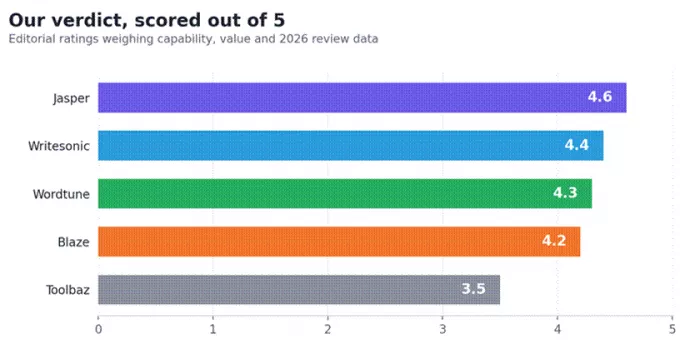
Figure 1. Our editorial scores, weighing capability, value and 2026 review data.
Jasper: the polished pick for brand-driven teams
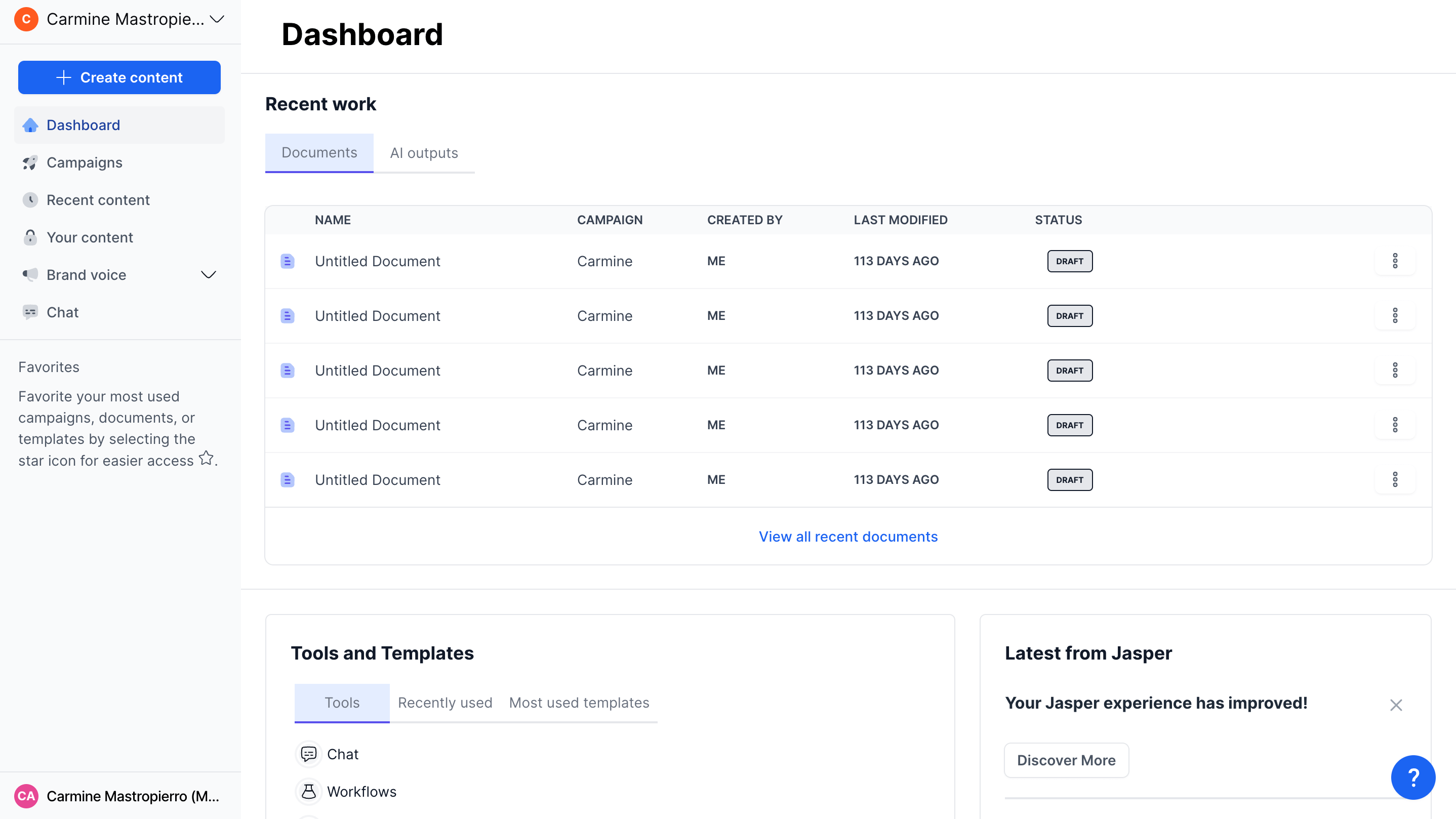
★★★★½ 4.6/5 · Premium output, genuine brand control, priced for businesses that publish at scale
Jasper which competes with Writesonic is essentially AutoDraft's voice-profile idea taken to its enterprise conclusion. You train a Brand Voice on your existing writing, attach Knowledge assets so the model knows your products and facts, define Audiences, then write inside Canvas, a workspace built for long campaigns rather than one-off paragraphs. Where AutoDraft gives a small team a shared draft, Jasper gives a marketing department an operating system.
It earns its keep when consistency at volume is the whole game. Output lands closer to on-brand than most rivals, paid plans place no cap on word count, and it plugs into Surfer SEO and Grammarly with a Chrome extension that follows you into Google Docs and email. On G2 it holds a 4.7 out of 5 across more than 1,260 reviews, which is unusually steady for this category.
The friction is money and the on-ramp. There is no permanent free plan, only a 7-day trial, and the leap from solo Pro pricing to the multi-seat Business tier is steep and quote-based rather than a tidy per-seat add. For a single blogger it is overkill. For a team shipping daily, it is the safe bet.
Features that matter
| Capability | What you actually get |
|---|---|
| Brand Voice | Trains tone from your samples. 1 voice on Creator, 2 on Pro, unlimited on Business |
| Canvas workspace | Long-form and campaign editor, not just a prompt box |
| Knowledge & Audiences | 5 multi-modal Knowledge assets and 3 Audiences on Pro for context-aware output |
| Integrations | Surfer SEO, Grammarly, Chrome extension, plus API and webhooks on Business |
| Reach | 30+ languages and team collaboration on shared projects |
| Word output | Unlimited on every paid plan, no per-month text cap |
Pricing
| Plan | Monthly | Annual /mo | Who it suits |
|---|---|---|---|
| Creator | $49 | $39 | Solo writer, one brand, 1 seat, 1 Brand Voice |
| Pro | $69 | $59 | Multi-brand creators, 2 Brand Voices, 5 Knowledge, 3 Audiences |
| Business | Custom | Custom | Teams needing unlimited voices, SSO, API and a success manager |
| Trial | 7 days | 7 days | No permanent free plan |
Pros and cons
| What works | What to watch |
|---|---|
| + Strongest on-brand consistency in the group | – No free tier, only a 7-day trial |
| + Unlimited word output on all paid plans | – Big, opaque jump from Pro to Business |
| + Deep integrations and a useful Chrome extension | – Overpriced for a single casual user |
| + High, well-distributed review scores (G2 4.7) | – Output still needs a human pass for nuance |
Review snapshot
| Signal | Reading |
|---|---|
| Aggregate score | G2 4.7/5 from 1,268+ reviews, skewing small-business |
| What users praise | Clean interface, on-brand output, real time savings |
| What users flag | Price, and the cost of moving to team features |
| Verdict | Worth the premium for teams publishing on-brand content daily |
Writesonic: built for SEO and the new AI-search game
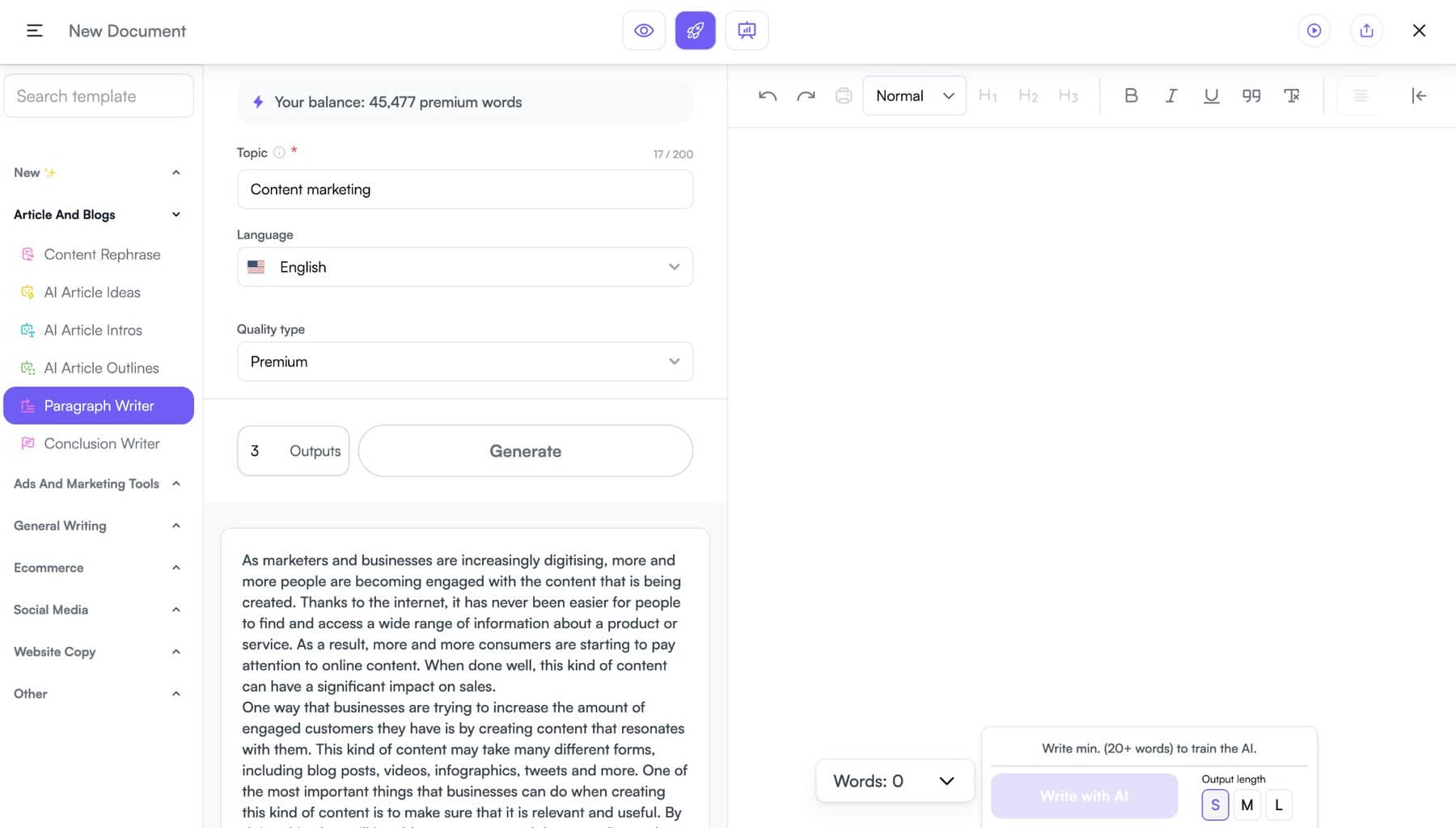
★★★★½ 4.4/5 · Fast long-form plus AI-search visibility, wrapped in a credit model worth reading closely
Writesonic spent 2026 leaning hard into something AutoDraft does not touch at all: generative engine optimization. Beyond writing articles, it tracks whether your brand actually surfaces inside ChatGPT, Gemini and Google's AI Overviews, flags where competitors beat you, then helps close the gap. If your traffic increasingly comes from AI answers rather than ten blue links, that shift is the whole reason to look here.
On the writing side it is quick and flexible, letting you swap between models such as GPT-4o and Claude, and it publishes into WordPress and automates through Zapier. The proof is in the review volume: 4.7 on G2 across roughly 2,200 reviews, 4.8 on Capterra from about 2,100, and 4.7 on Trustpilot from well over 5,000. Few writing tools carry that much corroboration.
Two cautions. First, usage runs on credits, and reviewers note that even small edits can nibble at them while raw output sometimes reads generic until you shape it. Second, Writesonic renames and re-prices tiers more often than anyone would like, so a plan name today may mean something different next quarter. Read the live pricing page before you commit.
Features that matter
| Capability | What you actually get |
|---|---|
| AI Article Writer | Long-form blogs and landing pages from a brief, with SEO structure |
| AI search visibility | Tracks brand mentions across ChatGPT, Gemini and AI Overviews (GEO/AEO) |
| Model choice | Switch between GPT-4o, Claude and others depending on plan |
| SEO workflow | Keyword inputs, site audits and content refresh suggestions |
| Integrations | WordPress, Google Chrome and Zapier in the official catalog |
| Extras | Chatsonic and Botsonic exist but are billed separately |
Pricing (approximate, June 2026)
| Plan | Price | What it unlocks |
|---|---|---|
| Free | $0 | Trial-style access to core writing, capped; AI-search tools mostly locked |
| Starter | from ~$39/mo* | Entry AI-search tracking (ChatGPT only), 1 user and 1 project |
| Basic | mid-tier* | More articles, multi-engine tracking, small-team seats |
| Growth | ~$399/mo annual* | Around 50 AI articles a month, 50 site audits, broad GEO coverage |
| Enterprise | Custom | Custom models, onboarding and priority support |
*Writesonic restructures tiers frequently. Names and caps shift between releases, so verify exact pricing on writesonic.com before purchase.
Pros and cons
| What works | What to watch |
|---|---|
| + Genuinely useful AI-search visibility tracking | – Credit system can feel stingy on small edits |
| + Fast long-form and multiple model options | – Raw output often needs editing to lose a generic tone |
| + Enormous, consistently strong review base | – Tier names and prices change often |
| + Publishes straight into WordPress | – Deeper SEO may still want a Surfer-style add-on |
Wordtune: the editor that sharpens your own voice

★★★★½ 4.3/5 · Not a drafter, a refiner, and the best in class at making sentences read better
Wordtune, from AI21 Labs, is the deliberate opposite of AutoDraft, and that is exactly why it belongs on this list. It will not spin a 1,200-word post out of a one-line prompt. Instead it takes text you have already written and rewrites it, shortens it, makes it formal or casual, or simply clears the fog. If your real bottleneck is polish rather than blank pages, this is the cheaper, more surgical tool.
It lives where you write, with extensions for Chrome, Edge, Google Docs and Slack, and it summarizes long documents and even videos into something skimmable. At under seven dollars a month on the annual Advanced plan, it is the lowest-cost serious tool here, and its G2 score sits at a healthy 4.7.
The limits are real and worth knowing. The free tier allows ten rewrites a day, and even paid Advanced caps you at thirty, which heavy editors hit fast. There is no from-scratch long-form generation, so most people pair Wordtune with a drafting tool rather than replacing one. Think of it as the finishing layer, not the foundation.
Features that matter
| Capability | What you actually get |
|---|---|
| Rewrite engine | Multiple alternatives per sentence, with length and tone control |
| Tone shifts | Switch between formal, casual, concise and expanded in a click |
| Summaries | Condenses long articles and videos into short takeaways |
| Where it works | Chrome, Edge, Google Docs, Slack, plus iOS and API access |
| Grammar & clarity | Corrections, vocabulary and fluency suggestions on higher tiers |
| Scope | Refines existing text only; it is not a long-form generator |
Pricing
| Plan | Monthly | Annual /mo | Key limits |
|---|---|---|---|
| Free (Basic) | $0 | $0 | 10 rewrites/day, 3 summaries/month |
| Advanced | $13.99 | $6.99 | 30 rewrites/day, around 15 summaries/month |
| Unlimited | $19.99 | $9.99 | Unlimited rewrites and summaries, fluency and premium support |
| Business | Custom | ~$15.99/seat | SSO, central billing and admin controls |
Paid plans include a 3-day trial; annual billing roughly halves the monthly rate.
Pros and cons
| What works | What to watch |
|---|---|
| + Best refiner in the group for tightening prose | – Cannot draft net-new long-form content |
| + Cheapest serious paid plan at $6.99/mo annual | – Daily rewrite caps on free and Advanced tiers |
| + Lives inside the apps you already write in | – Business pricing is quote-only |
| + Solid summaries of long content | – You will still need a drafting tool alongside it |
Blaze: one workspace for the solo marketer doing everything
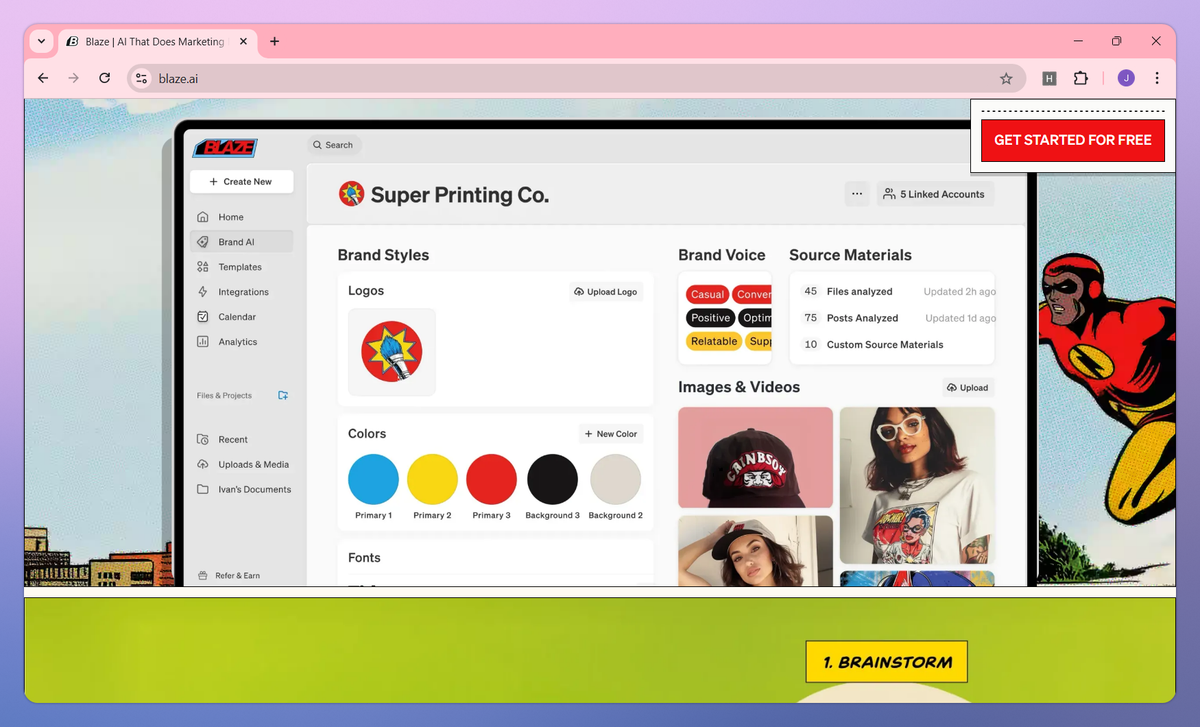
★★★★☆ 4.2/5 · Brand voice, content and scheduling for one person wearing five hats
Blaze overlaps AutoDraft on the things that matter most to small operators, brand voice and content generation, then keeps walking. From a single brief it produces blog posts, emails, ad copy and social captions, builds a rough content calendar, makes simple graphics in a visual editor, and schedules the posts out. For a one-person marketing department it quietly replaces a small stack of subscriptions.
The brand-voice training is the standout. Feed it a few samples and the tone holds across formats, which is the same promise that made AutoDraft sticky. The Creator plan ships a generous word allowance of roughly 100,000 a month, and there is a learning loop that watches which published posts perform and nudges future content toward them. For social-first creators that loop is more useful than for deep long-form work.
Watch the credit and word caps on lower tiers, the per-account add-on costs, and the fact that Blaze content sometimes trips AI detectors, so a human edit is wise before publishing. It also re-prices fairly often, and it runs separate higher-touch managed packages on top of the self-serve plans below. As a do-everything hub for one person it is excellent. As a dedicated long-form engine it is merely good.
Features that matter
| Capability | What you actually get |
|---|---|
| Brand voice | Learns your tone from samples and holds it across content types |
| Multi-format output | Blogs, emails, ad copy and social captions from one brief |
| Content calendar | Builds a rough multi-month posting plan to work against |
| Visual editor | Create simple graphics without leaving for Canva |
| Scheduling | Publish and auto-post across multiple social platforms |
| Learning loop | Adjusts future posts toward your best performers |
Pricing (approximate, June 2026)
| Plan | Price | What you get |
|---|---|---|
| Free | $0 | Watermarked and very limited; best treated as a look around |
| Creator | $34/mo, $26 annual | 1 user, ~100k words/month, brand voice and scheduling |
| Team | $79/mo, $59 annual | 3 users, unlimited words, approval workflows |
| Agency | $200/mo, $150 annual | 5 users (up to 10), dedicated onboarding |
| Enterprise | $399/mo annual | Custom limits and integrations |
Annual billing saves about 25%, with 30% off for verified non-profit and education accounts. Separate managed, done-for-you packages are priced higher; confirm current tiers before buying.
Pros and cons
| What works | What to watch |
|---|---|
| + Replaces a stack: writing, design and scheduling in one place | – Credit and word caps on lower tiers |
| + Reliable brand-voice consistency from samples | – Per-account add-ons inflate the real cost |
| + Generous word allowance on the Creator plan | – Output can trip AI detectors without editing |
| + Annual and non-profit discounts soften the price | – Not a substitute for a dedicated long-form tool |
Toolbaz: the free way to beat the blank page
★★★½☆ 3.5/5 · Unbeatable price, broad toolkit, and output you will want to edit
If your honest objection to AutoDraft is simply why am I paying for this, Toolbaz is the rebuttal. It bundles more than seventy free AI writing tools, an article writer, essay and story generators, an email composer, even code and lyrics, most of them usable without creating an account. Under the hood it rotates through a cast of models including GPT-5, Claude and Gemini, which is a surprising amount of horsepower to give away.
For students, hobby bloggers and anyone who needs a fast rough draft to react to, it is hard to argue with free. The breadth alone makes it a useful scratchpad, and there is no commitment to test whether AI drafting even suits how you work.
The honest part: quality is inconsistent, and across roughly twenty-eight third-party reviews Toolbaz averages about 2.5 out of 5, below the norm for this category. The paid tier lands near ten dollars a month, which is close enough to stronger tools that the math gets hard to defend. Use it as a brainstorming pad and a blank-page breaker, not as a finishing tool you trust to publish.
Features that matter
| Capability | What you actually get |
|---|---|
| Tool library | 75+ writing tools across articles, essays, stories, emails and more |
| No login | Most tools run free in the browser without an account |
| Model rotation | Taps GPT-5, Claude, Gemini and others behind the scenes |
| Extras | AI images, voiceovers, chat with PDF, CSV and URLs |
| Customization | Tone and length controls on generated text |
| Best role | Quick first drafts and idea generation, not final copy |
Pricing
| Plan | Price | What you get |
|---|---|---|
| Free | $0 | 75+ tools, no login required, multiple models, capped word limits |
| Paid (Standard) | from ~$5.99 to $9.99/mo | Higher word limits and priority access to premium models |
Pros and cons
| What works | What to watch |
|---|---|
| + Free, with no account needed for most tools | – Inconsistent output quality |
| + Remarkable breadth for the price | – Below-average review average (around 2.5/5) |
| + Fast for first drafts and brainstorming | – Paid tier nears the cost of stronger tools |
| + Low-risk way to test AI drafting | – No team, brand-voice or enterprise features |
How to choose: pick by the job, not the logo
Strip away the homepages and these five barely compete with each other. They solve different problems. The fastest way to choose is to name your actual situation, then read across to the tool built for it. Price matters too, so it helps to see where each one starts before you decide.
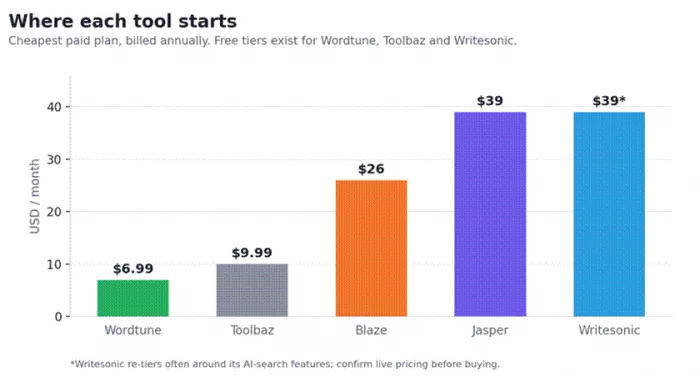
Figure 2. Entry pricing, cheapest paid plan billed annually. Free tiers exist for three of the five.
| Your situation | Start with | Why it fits |
|---|---|---|
| You run content for several brands and want it on-voice at scale | Jasper | Brand Voices, Canvas and team controls built for volume |
| Search traffic is the point, and AI answers now matter | Writesonic | Long-form writing plus AI-search visibility in one platform |
| You write well and just want tighter, faster edits | Wordtune | The best refiner, about $7/mo, living inside your apps |
| You are a solo marketer juggling blog, email and social | Blaze | One workspace to create, design and schedule |
| You want capable drafting for nothing | Toolbaz | 75+ tools, no login, genuinely free to start |
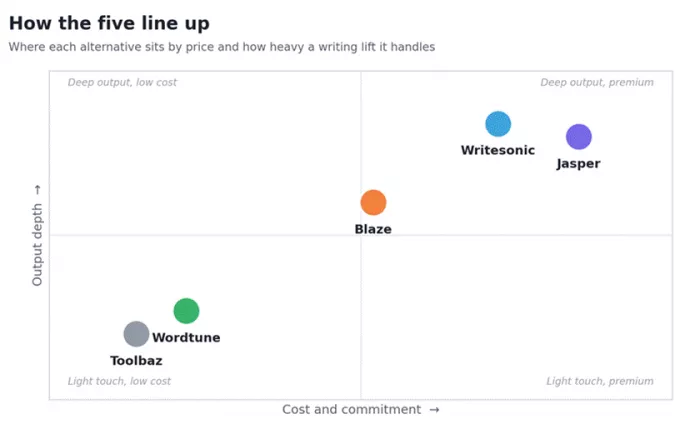
Figure 3. Where each alternative sits by cost and how heavy a writing lift it handles.
The short version
If you want my honest shortlist: I would hand Jasper to a team, Writesonic to anyone whose traffic depends on search, and Wordtune to writers who already have a voice and just want it to land cleaner. Blaze is the quiet winner for the one-person shop, and Toolbaz is the no-risk way to find out whether AI drafting fits your process at all.
Whatever you choose, run one real project through it during the trial before a card touches the checkout. The tool that survives your actual workflow is the right one, and it is rarely the one with the loudest homepage.
Comments