
Creating engaging video content has traditionally required a mix of technical expertise, editing software, and significant time investment. For many creators, marketers, and educators, these requirements can make professional video production feel out of reach. Hypernatural AI aims to simplify this process by turning simple prompts, scripts, or ideas into complete videos within minutes. By combining automated visuals, narration, and scene generation, the platform allows users to move from concept to finished video far more quickly than traditional editing workflows.
What Makes Hypernatural AI Stand Out
At its core, Hypernatural is not just another video editing tool, it's an AI-driven video generation ecosystem. Users can start by simply providing a script, prompt, or text-based idea. The platform’s advanced algorithms then generate visuals, narration, and animations that align seamlessly with the input. What’s remarkable is the platform’s ability to interpret context and create videos that are visually engaging, coherent, and polished, all without demanding prior editing knowledge.
One of the most compelling aspects of Hypernatural is its versatility. It allows the creation of videos across a variety of styles and formats. Users can customize characters, select distinct visual themes, and adjust storytelling styles to match the tone of their message. AI-generated voiceovers, captions, and background visuals come together to produce a professional-quality result, eliminating the need for multiple tools or extensive post-production work.
Character consistency can matter even more when the project moves from short social clips into full animated storytelling. AutoDraft AI vs Hypernatural AI shows the difference clearly: AutoDraft gives creators more of a scene-by-scene animation workflow, while Hypernatural prioritizes getting from a script or idea to a finished narrated video quickly.
Hypernatural’s intuitive storyboard-style editor further enhances the experience, offering creators the flexibility to refine sequences, adjust scene lengths, and incorporate additional elements without ever leaving the platform. From short social media snippets to comprehensive explainer videos, Hypernatural streamlines the process while maintaining creative control.
Hypernatural Has Become More Editable
One of the biggest changes to Hypernatural is that it no longer stops at generating a first draft from a prompt. The newer experience gives creators considerably more control after generation, combining a storyboard with a more conventional timeline and a chat-based editing system.
Individual shots can now be reordered, shortened, extended, regenerated or replaced without rebuilding the entire video. Audio has also become a separate part of the timeline, so narration and music can be moved and adjusted independently of the visuals.
These capabilities are becoming increasingly important for AI-assisted movie production, where creators need more control than simply generating a complete video from a single prompt. A modern AI video generation tool can bring scene generation, shot-by-shot editing, regeneration, replacement, timeline control, narration, music, and other audio elements into one workflow. This makes it possible to refine individual parts of a movie without having to recreate the entire project whenever something changes. As AI movie generation tools evolve, this level of control is helping creators move from basic video generation toward more flexible, production-style workflows.
The most interesting addition is conversational editing. Instead of searching through several editing panels, creators can ask Hypernatural to change a particular shot, rewrite narration, add another scene, switch a product or character, adjust music or alter the overall visual direction. Manual controls remain available, but chat now acts as another editing layer rather than simply a way to generate the first video.
This makes Hypernatural noticeably different from a basic prompt-to-video generator. AI still handles much of the initial production, but the newer workflow gives creators more room to correct what the first generation gets wrong.
Choosing How Hypernatural Generates a Scene
The newer version also exposes more of the AI stack behind a video. Instead of forcing every project through one generation model, Hypernatural allows separate choices for still-image generation and animation.
| Setting | How it works | Best suited to |
|---|---|---|
| Auto | Hypernatural automatically balances generation quality and credit cost | Users who want the simplest workflow |
| Individual image model | A specific image model can be chosen before visuals are generated | Projects needing a particular visual style or cost level |
| Individual animation model | Users can choose the model used to animate generated shots | Projects where motion quality, audio or generation cost matters |
| Lower-credit model | A less expensive model can be selected manually | Drafts, testing and frequent iteration |
| Higher-end model | More capable models generally consume more credits | Final scenes where visual quality matters more than generation cost |
A useful detail here is that Auto does not necessarily select the cheapest option. Hypernatural says it weighs both cost and quality, so creators working within a strict credit budget may get more predictable spending by selecting a lower-cost model manually.
Some animation models can also generate their own dialogue, ambience, music or sound effects, while others create visuals only. Hypernatural currently identifies that capability directly inside its model picker rather than maintaining one permanent model list.
User Experience: Simplicity Meets Sophistication
When it comes to designing a video platform that both beginners and experienced creators can enjoy, Hypernatural AI strikes a remarkable balance between ease and power. Rather than throwing users into a labyrinth of timelines and technical menus — as many traditional editors do Hypernatural invites you to start with what matters most: your idea or script. From that starting point, the platform’s AI helps construct scenes, narration, visuals, and captions automatically, simplifying the creative workflow significantly.
An Interface That Feels Natural
One of the standout aspects of Hypernatural’s user experience is how approachable it feels. Users don’t need to understand complex editing jargon to begin creating. Instead of cliched toolbars and layers of effects, the interface presents options like visual styles, character creation, and storyboard views in a way that feels intuitive and logical. You start with your script or idea, and from there, the system builds a first draft of your video, letting you refine rather than reconstruct. This approach turns what can be a daunting task into an almost conversational process between creator and AI.
Real Feedback From Creators
Actual users on platforms like Reddit confirm this feeling of effortless creation. For example, in discussions about AI video tools, several creators describe Hypernatural as a tool that eliminates many of the tedious steps in traditional editing like hunting for stock footage, manually placing captions, or balancing audio replacing them with automated generation that just works. One Redditor specifically contrasted this approach with traditional editing “blank timeline paralysis,” highlighting how Hypernatural lets users focus on storytelling rather than technical labor.
That said, real user conversations also show that not every output is perfect out of the box. Some users note that generated scenes or pacing can occasionally miss the mark and require minor tweaking, especially if prompts aren’t detailed enough. But even here, the sentiment leans toward “good, not perfect,” with creators appreciating that the bulk of work is already done significantly reducing the need for deep technical edits.

Ratings Reflect Accessibility: With Honest Nuance
If you look at broader user ratings, a similar picture emerges. According to aggregated review data from Android app stores, Hypernatural: AI Video Stories has maintained an average rating around 4.66 stars across thousands of users, demonstrating widespread satisfaction with its ease of use and output quality.
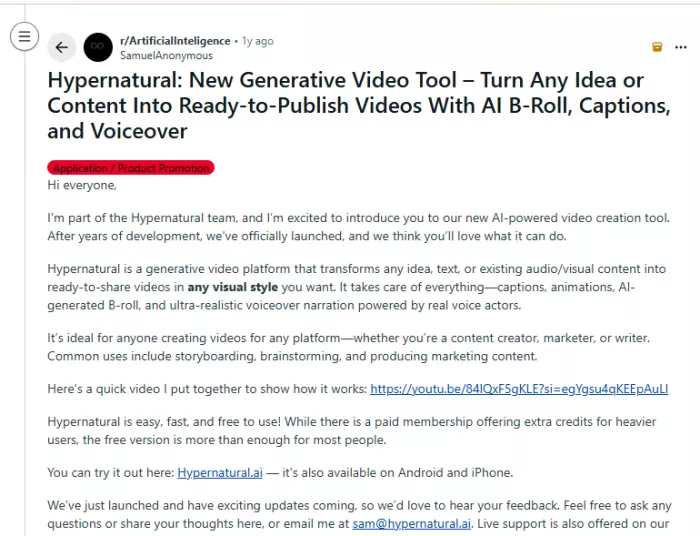
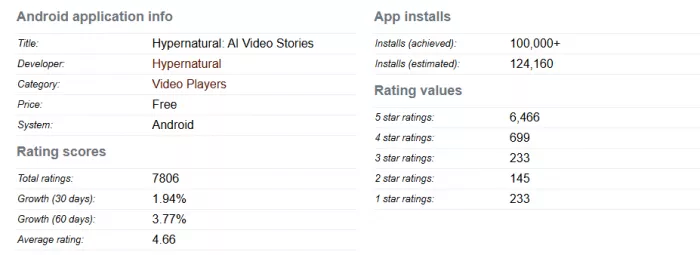
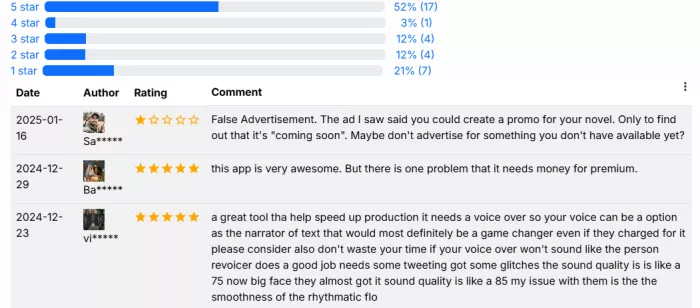
However, deeper review summaries also highlight some common pain points. Users frequently praise how quickly quality AI-generated videos can be produced and how simple the interface is, but several reviews point out limitations in free credits, occasional glitches, and the fact that the free plan may leave you wanting more before you truly test the platform’s full potential. Some reviewers even mention that the videos, while impressive, can feel closer to animated compilations than fully cinematic productions, especially in the free tier.
AI Assistance That Doesn’t Feel Overbearing
What truly makes Hypernatural feel “sophisticated” isn’t just its advanced AI it’s how the AI supports creators without overwhelming them. Features like automatic B‑roll generation, voice narration, and animated scenes are baked into the workflow instead of being optional add‑ons that require deep learning. For a user who simply wants to get a compelling video out the door, this means spending less time wrestling with technical details and more time shaping the message and story.
Cross‑Platform Flexibility
Another underrated part of the experience is accessibility. Because Hypernatural is available on web and mobile, creators can draft, edit, and finalize projects from wherever they are whether that’s a desk, a coffee shop, or on the go without needing a powerful desktop or specialized hardware. This kind of flexibility is often missing in traditional video tools, where mobile support if available is usually limited.
In summary, Hypernatural’s user experience works because it flips the traditional video creation model on its head. Instead of asking you to learn the tool first, it asks you what you want to create and then helps you actually do it. The result feels both friendly enough for casual users and sophisticated enough for serious creators, supported by a growing community of real feedback and strong user ratings.
Video Creation From AI Assistants
Hypernatural is also expanding beyond its own editor through Model Context Protocol, or MCP. Once connected, supported AI assistants can create and modify Hypernatural projects without requiring the creator to work entirely inside the Hypernatural interface.
According to Hypernatural, its MCP integration can be used with assistants including ChatGPT, Claude, Cursor, Claude Code and Codex. A creator can describe a video or provide a shot-by-shot idea, generate it, then continue asking for changes such as adjusting narration, replacing shots or changing the visual direction.
The same reusable characters, products and logos can also be referenced from these workflows. Credits still come from the user's Hypernatural account, so MCP changes where the instructions are given rather than creating a separate free generation route.
For teams already working heavily inside AI assistants, this is a meaningful change. Hypernatural is gradually becoming a video-generation service that can sit inside a broader AI workflow, rather than remaining a completely isolated creation app.
Pricing and Plans: What You Get at Every Level
Hypernatural AI runs on a tiered, credit-based subscription model. You can start free and scale up as your output grows. Credits are spent whenever the AI generates custom visuals, animations, or premium narration — so videos with more scenes, animation, or premium voices use more credits. The plans below reflect monthly billing as of July 2026; switching to annual billing saves roughly 20%.
| Plan | Price (monthly)* | Generation credits | Custom characters | Highlights |
|---|---|---|---|---|
| Free | $0 | Stock Mode only (no custom credits) | — | 6 basic AI narrators · ~30-second videos · watermark on exports |
| Creator | ~$19/mo | 500 / month | 4 | 40+ premium narrators · no watermark · unlimited video length · ~4 hrs transcription |
| Pro | ~$22/mo | 1,500 / month | 12 | 40+ premium narrators · no watermark · ~10 hrs transcription · advanced voice options |
| Ultimate | ~$99/mo | 8,000 / month | 48 | All premium features · multiple custom voices · ~10 hrs transcription |
| Enterprise | Custom | Custom | Custom | Production services · campaign management · dedicated account support |
How the credits work. Credits refresh each month on your billing date and do not roll over — anything unused expires at the end of the cycle. If you run out mid-cycle, you can upgrade to a higher monthly limit or buy one-off credit packs without changing your plan. Note that the Free plan is limited to Stock Mode (stock footage) and does not include credits for custom AI generation, so a paid plan is required to unlock custom visuals, animation, and premium voices.
Which plan fits whom.
- Free — trying the platform and making a few watermarked test clips.
- Creator — solo creators posting regularly who want watermark-free, full-length videos.
- Pro — active creators and small teams who regenerate scenes often and need more monthly credits and characters.
- Ultimate — agencies, teams, and power users producing at high volume.
- Enterprise — organizations that need hands-on production support and custom terms.
Pros and Cons
No tool is perfect. Here's an honest look at where Hypernatural AI shines and where it falls short, based on hands-on reviews and aggregated user feedback.
Pros
- Idea to finished video in minutes. Type a script or prompt and the AI builds scenes, narration, visuals, and captions automatically — turning what used to take hours into a few minutes.
- Natural-sounding narration. The AI voices land more natural intonation and pacing than many competing tools, so videos feel less robotic.
- Consistent characters across scenes and videos. Define a character once and reuse it — useful for building ongoing series, franchises, or a recognizable brand identity.
- Strong on stylized storytelling. It leans into visual genres like anime, comic panels, fantasy, gothic horror, and cinematic realism, with 200+ style templates to start from — a genuine differentiator versus generic explainer-video tools.
- Automation baked in. Auto-generated B-roll and timed captions are part of the workflow, not paid add-ons, so there's no hunting for stock footage or manually placing subtitles.
- No editing skills required. The storyboard-style editor lets you refine scene lengths and sequences without touching a traditional timeline.
- Watermark-free, unlimited-length exports on paid plans, plus the ability to repurpose blog posts, podcasts, and audio into short-form video.
Cons
- The credit model can feel restrictive. Every generation and regeneration consumes credits, small tweaks add up quickly, and unused credits don't roll over month to month.
- The free tier is limited. It's Stock Mode only, capped at short lengths, and watermarked — so you can't fully test custom AI generation without upgrading.
- Not built for cinematic, Hollywood-level production. It's excellent for social and marketing content but still evolving for high-end filmmaking; outputs can feel closer to polished compilations than fully cinematic productions.
- Output isn't always perfect on the first pass. Pacing or scene choices sometimes need manual tweaking, especially when prompts aren't detailed enough.
- The top tier is pricey. At around $99/month, Ultimate is a real commitment for heavy or agency-level use.
- Platform availability can be confusing. Hypernatural markets a web (and, per some sources, mobile) experience, while other reviews report it's desktop-browser only — worth confirming for your own workflow. Also steer clear of any third-party "mod APK" downloads; they aren't official and carry security risks.
- Short-form focus. For frame-level editing control or long-form projects, dedicated tools like Runway or Premiere Pro still offer more.
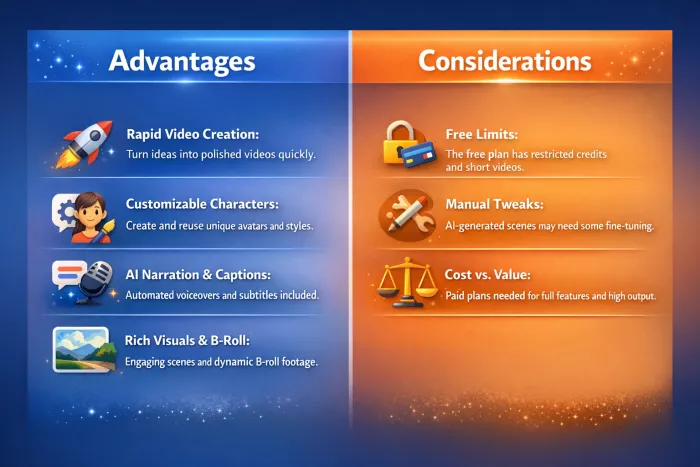
Advantages and Considerations
Privacy and Uploaded Content
Hypernatural can work with uploaded photos, videos, recordings, scripts, and other creative material, so it is worth thinking about what you put into the platform. Its Privacy Policy says uploaded photos, videos, and recordings may be processed to provide, customize, and improve the service, with some data also handled by service providers.
For normal creative projects, that may not be a major concern, but I would avoid uploading confidential client footage, unreleased campaign material, or sensitive personal recordings without first checking the latest policy. Hypernatural says personal data is retained for as long as necessary for the service or its stated business purposes, with longer retention possible where legally required.
On ownership, Hypernatural's terms state that, to the extent permitted by law, it assigns its rights in generated output to the user. You are still responsible for ensuring that uploaded material and resulting videos do not infringe someone else's copyright or other rights.
Alternatives and Competitors
| Tool / Platform | Primary Strengths & Features | Ideal For | How It Differs from Hypernatural AI |
| Runway ML | Advanced text-to-video, image-to-video conversion, motion brushes, background removal, and professional editing tools. Offers creative control with sophisticated effects and generative tools. | Creative filmmakers, professional editors, visual designers | Much more control over frame-level edits and motion; stronger suite of professional editing tools but steeper learning curve than Hypernatural. |
| Pika Labs | Very fast video generation with creative effects (e.g., Pikaffects), 1080p output, simple interface for quick iterations. | Social media content creators, quick visual ideation | Offers faster generation speed and stylized clips, but less cinematic realism and creative direction than Hypernatural. |
| Synthesia | Script‑to‑video with AI avatars in 100+ languages, extensive template library for explainer, training, and corporate videos. | Corporate communications, training and onboarding content | Focuses on avatar‑led videos and structured templates rather than creative story‑driven AI video; ideal for business content rather than artistic generation. |
| HeyGen | Large library of realistic avatars, voice dubbing, multilingual support, and face‑swap features. | Global marketing, translated video campaigns | Excels in multilingual avatar videos and lip‑syncing; more specialized than Hypernatural’s broader video creation. |
| Colossyan | Story‑based video creation with flexible actor emotions, branching roles, and scenario‑based training videos. | E‑learning, instructional and training simulations | Focuses on role‑play style and interactive narratives, positioning itself differently from Hypernatural’s broader creative toolkit. |
| InVideo AI | Template‑driven video generation with integrated editing tools, best for repurposing written content like blogs into videos. | YouTube and long‑form content creators | Combines traditional editing features with AI enhancements more template + editor hybrid compared to Hypernatural’s AI‑first generation approach. |
| Veed.io AI | Builtin subtitles, auto editing, and smart repurposing features for shorts and social media formats. | Social media editors needing simple editing + AI enhancements | Focused more on enhancing existing footage rather than pure AI‑generated video from prompt. |
| Lumen5 | Blog‑to‑video conversion and marketing‑focused video generation with brand templates. | Marketing teams, small businesses | Simplifies conversion of text content into video with good branding options, less creative depth than Hypernatural. |
| HeyGen (avatar focus) | Offers 175+ avatars and advanced voice cloning optimized for corporate and global audience. | Teams running global campaigns | Built especially for avatar‑style presence and localization, rather than open creative video generation. |
| Other emerging tools | Includes tools like Sora, Google Veo, Kling, and Hailuo AI (discussed in broader AI video tool comparisons). | Experimental and cutting‑edge use cases | These often push cinematographic realism, cross‑model integration, or advanced motion control, offering a different creative frontier compared to Hypernatural’s balanced ease + power. |
Synthesia is less of a direct replacement than the feature list might suggest. The choice becomes much clearer in a Hypernatural vs Synthesia comparison: Hypernatural suits stylized social storytelling and fast script-to-video production, while Synthesia makes more sense when the finished video needs an AI presenter, localization or a structured business-training format.
Hypernatural is only one approach to AI-assisted video creation, and the better choice can change considerably depending on whether you care most about animation, realistic motion, social clips or editing control. A wider comparison of Hypernatural AI alternatives makes those differences easier to see before committing to a paid plan.
Ideal Users and Use Cases
Hypernatural AI is especially beneficial for:
Content creators who need quick, engaging videos for social media or platforms like YouTube.
Educators and trainers looking to convert lesson plans or scripts into interactive videos.
Small businesses and marketers who aim to produce promotional videos without hiring dedicated editors.
Authors and storytellers who want to visualize narratives and presentations effortlessly.
Its combination of automation and customization makes it suitable for nearly anyone seeking to communicate visually with impact.
Conclusion
Hypernatural AI is most convincing when speed matters more than frame-by-frame control. Starting with an idea or script and getting scenes, narration, characters, captions, and animation inside one workspace removes much of the setup that makes traditional video production slow.
It is not completely hands-off. Generated visuals can still miss the intended direction, and every regeneration matters when credits are part of the cost. The redesigned editor gives creators more control over individual shots, but users who need precise compositing or detailed manual animation will still find dedicated editing software more flexible.
For social videos, visual storytelling, educational content, and creator-led projects, Hypernatural offers a practical middle ground between one-click AI generation and traditional editing. Its strongest advantage is not that it replaces professional video production entirely, but that it can get a usable first version on screen much faster.
Comments

Sharon Walter
1 week agoJust turned a 2,000 word blog post into a polished video in under five minutes. The script to caption pipeline is genuinely impressive. No more bouncing between CapCut and ElevenLabs. For content repurposing at scale, this is the closest thing to a magic button I have found.
Login To Reply ↪
Allie Ramsay
1 month agoHypernatural surprised me most when I gave it a pretty plain paragraph and it turned it into something that actually felt watchable. The scene choices weren’t perfect but the pacing, captions and narration gave the script much more energy than I expected. I ended up changing a few visuals and shortening one section but the rough cut was already doing most of the heavy lifting. It still needs a human pass, especially if you care about tone but as a starting point for short videos it saved me a ridiculous amount of setup.
Login To Reply ↪
Roman Mathews
2 months agoSigned up for the Creator plan at $19 thinking I could actually make videos. Nope. Credits vanish faster than advertised. One 3 minute video ate 400 of my 500 monthly credits. Then I realized unused credits dont roll over. So I paid $19 for one video basically. Thats insane. The AI voices sound robotic as hell despite marketing claims. Had to re record narration myself which defeats the purpose. And the "custom characters"? They look like generic stock avatars with different hair colors. Nothing custom about it. Free tier is a joke. Watermarked garbage capped at 30 seconds. Cant even test if the paid version is worth it. Classic bait and switch. Requested refund within 48 hours. Still waiting 2 weeks later. Support is a black hole. Back to Premiere Pro. At least that works.
Login To Reply ↪
Brandon Jacobs
1 week agoI signed up for what I believed to be a seven-day trial as stated in the listing, but was charged $150 for a full year right away and no refund was available. Although the app itself functions well, the billing transparency is at best misleading. Be careful when looking at your receipts and should subscribe via the website, not through the app store. The markup is ridiculous and the way to cancel is hidden.
Login To Reply ↪