In the modern digital era, video content has become a cornerstone for communication, marketing, education, and entertainment. Yet, producing professional-quality videos often demands time, technical expertise, and resources. Enter HeyGen, a cutting-edge AI-driven platform that transforms how videos are created, offering a seamless blend of technology, creativity, and accessibility. With HeyGen, users can generate engaging, lifelike videos without cameras, actors, or complex editing software.
Understanding HeyGen
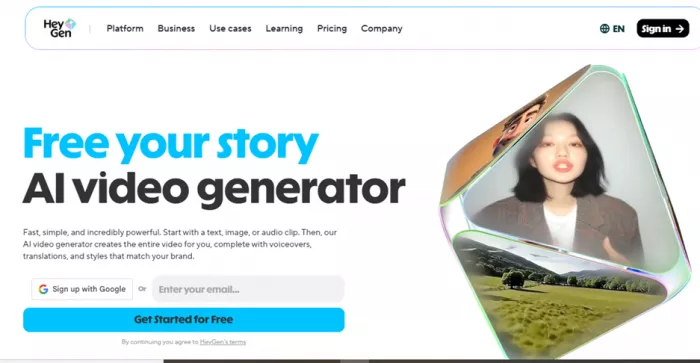
HeyGen is a web-based platform designed to leverage the power of artificial intelligence for video creation. At its core, HeyGen allows users to convert text, images, or audio into fully animated videos featuring AI avatars that deliver content naturally and convincingly. These avatars, which can either be selected from pre-designed options or generated from user-submitted photos and videos, are central to HeyGen’s promise: enabling anyone, regardless of technical skill, to produce polished and visually appealing video content.
The platform’s appeal lies in its simplicity. By automating the complex processes of video production scripting, voiceovers, facial animations, and lip-syncing—HeyGen allows creators to focus purely on content quality. This combination of AI technology and intuitive design positions HeyGen as a formidable tool for marketers, educators, influencers, and business professionals.
How HeyGen Works: Step-by-Step
Step 1: Sign Up and Access the Platform
The first step is to create an account on HeyGen. You can sign up using an email address or other available authentication methods. Once logged in, the user is presented with a dashboard that displays available templates, avatars, and video creation tools. The interface is designed to be intuitive, ensuring even beginners can navigate effortlessly.
Step 2: Select or Create an AI Avatar
HeyGen’s core feature is its AI avatars. Users have two primary options:
- Choose a Pre-Made Avatar: HeyGen provides a library of realistic avatars, each with distinct appearances, voice styles, and expressions. These avatars are ready to deliver content immediately.
- Create a Custom Avatar: Users can upload a photo or short video of themselves to generate a personalized avatar. HeyGen’s AI analyzes the visual input and animates the avatar to mimic natural speech, facial movements, and gestures.
This step allows users to establish the on-screen presence for their video, whether for personal branding, business communication, or educational purposes.
Step 3: Enter Your Script or Text
Once the avatar is ready, the next step is to provide the content the avatar will speak. HeyGen allows you to enter text directly into its editor. The platform supports long scripts and multiple paragraphs, which can be formatted for pacing, emphasis, or pauses.
The AI processes the text and converts it into natural-sounding speech. Users can select the voice style, accent, and tone to match the intended audience or context. For example, a formal corporate video may use a neutral professional voice, while a casual social media clip might benefit from a more engaging, lively tone.
Step 4: Customize Video Settings
After inputting the script, users can refine their video in HeyGen’s studio editor. Key customization options include:
- Backgrounds and Scenes: Choose from pre-designed settings or upload your own images/videos.
- Branding Elements: Add logos, color schemes, or overlays to align with corporate identity.
- Visual Effects: Adjust gestures, facial expressions, and movements of the avatar to enhance realism.
- Audio Settings: Modify speech pace, volume, or background music for added effect.
This step ensures the video not only conveys the message accurately but also matches the desired visual and stylistic aesthetics.
Step 5: Generate the Video
With the script and customizations in place, the user initiates video generation. HeyGen’s AI seamlessly animates the avatar to deliver the script, synchronizing lip movements, facial expressions, and gestures. The system produces a polished video file ready for preview, editing, or sharing.
Video processing time can vary depending on length, complexity, and the plan chosen (free vs premium), but most short to medium-length videos are generated within a few minutes.
Step 6: Review and Edit
Once the video is generated, users can preview it and make further edits if necessary. HeyGen allows you to adjust timing, re-record specific lines, modify visuals, or enhance audio quality. The platform also supports re-generating portions of the video without starting from scratch, saving time for iterative improvements.
Step 7: Export and Share
The final step is exporting the completed video. HeyGen provides multiple resolution options and file formats suitable for different platforms, including social media, websites, and presentations. Users can directly download the video or share it via a link, ensuring easy distribution to the intended audience.
Additional Features in the Workflow
- Language and Translation Support: Users can generate videos in multiple languages or translate an existing video, maintaining accurate lip-sync.
- Voice Cloning: Premium users can replicate a specific voice, allowing avatars to speak in a consistent personal or brand tone.
- Team Collaboration: HeyGen allows multiple users to collaborate on video projects within the same workspace, streamlining production for businesses or content teams.
In essence, HeyGen transforms text or media inputs into engaging, realistic videos through a smooth seven-step workflow: account setup, avatar selection, script input, customization, generation, editing, and sharing. This approach removes traditional barriers to video production while maintaining professional quality.
Key Features and Capabilities
- Text-to-Video Generation
HeyGen allows users to transform written scripts into fully animated videos. The AI handles voiceovers, lip-sync, and avatar gestures automatically, making content creation fast and effortless. - AI Avatar Library
Users can select from a wide variety of pre-designed avatars, each with unique appearances, expressions, and voice styles, providing an instant on-screen presence. - Custom Avatar Creation
HeyGen enables the creation of personalized avatars using user-uploaded photos or short videos, allowing for individual branding or a realistic digital representation of oneself. - Multilingual and Accent Support
The platform supports over 175 languages and dialects, enabling content to reach a global audience with accurate accents, speech patterns, and natural intonation. - Video Translation and Lip Sync
Existing videos can be translated into other languages, and HeyGen automatically adjusts the avatar’s lip movements to match the translated dialogue for a natural look. - Studio Editor for Customization
The integrated editor allows users to refine backgrounds, add logos, insert branding elements, tweak facial expressions, and adjust visual effects to align with the desired style. - Voice and Tone Selection
Users can choose different voice types, emotions, and speech patterns to ensure the video’s delivery matches the intended tone and audience. - Branding and Professional Features
HeyGen provides options to add corporate logos, brand colors, and other visual elements, making it suitable for business communications, marketing videos, and professional presentations. - Fast Video Generation
AI processing converts scripts into fully animated videos within minutes, significantly reducing the time and resources compared to traditional video production. - Export and Sharing Options
Completed videos can be downloaded in multiple resolutions and formats, or shared directly via links for easy distribution across social media, websites, or presentations. - Team Collaboration
Multiple users can collaborate on video projects within a shared workspace, making it ideal for teams or organizations producing frequent video content. - Voice Cloning (Premium Feature)
Premium users can replicate a specific voice to maintain consistent messaging across multiple videos, enhancing brand or personal identity.
Who Can Benefit from HeyGen
Content Creators and Social Media Influencers
HeyGen allows creators to produce engaging videos quickly without needing cameras, actors, or extensive editing skills, making it ideal for YouTube, TikTok, Instagram, or other platforms.
Businesses and Marketing Teams
Companies can create promotional videos, product demos, and explainer videos efficiently, saving costs on traditional video production while maintaining professional quality.
Educators and Trainers
Teachers and corporate trainers can develop instructional videos, tutorials, or e-learning content using AI avatars to present lessons in a visually appealing and interactive manner.
Startups and Small Businesses
HeyGen helps startups with limited resources create high-quality marketing content or investor presentations without hiring a production team.
HR and Corporate Communication Teams
Internal communications, onboarding videos, or training modules can be produced quickly for employees across multiple locations, in multiple languages.
Anyone Seeking Professional-Looking Videos Without Technical Skills
Individuals or small teams with no prior video editing experience can create polished videos for personal branding, presentations, or social media outreach.
Pricing and Accessibility
HeyGen has been designed to cater to a wide range of users from beginners who want to experiment with AI‑generated videos to professionals and businesses requiring advanced capabilities. Its pricing structure reflects this diversity, offering tiered plans with increasing features, export quality, and usage limits.
Free Plan – Try HeyGen at Zero Cost
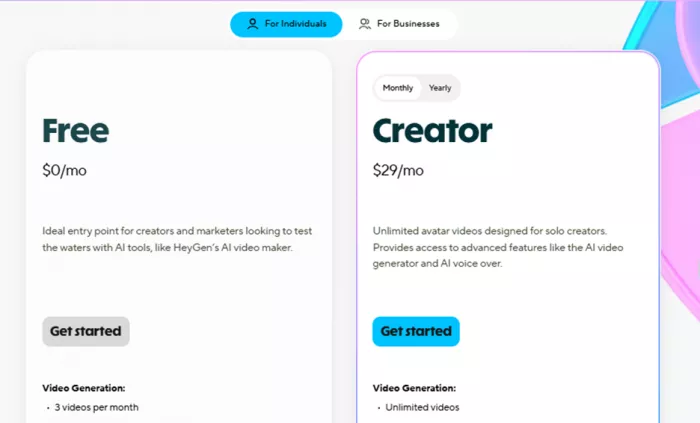
Anyone can start using HeyGen without spending a rupee. The Free plan is a great entry point for beginners, students, or casual users who want to explore AI video generation without commitment.
Under this plan:
- You can create up to three videos per month, with each video lasting up to three minutes.
- The videos export at 720p resolution, which is suitable for social posts or personal use.
- You have access to a large library of 500+ stock video avatars, and you can create one custom avatar.
- Basic voice and translation support is included, offering over 30 languages.
- Videos can be shared and downloaded directly from the platform.
This plan is ideal if you want to test the platform, learn how AI video generation works, or produce occasional content without paying. However, it has limitations in export quality, monthly usage, and advanced features compared to the paid plans.
Creator Plan – Unlimited Videos for Solo Creators
The Creator plan is tailored for individual content creators, influencers, and marketers who produce content regularly. It costs around $29 per month (or approximately $24 per month if billed annually), making it an accessible option for most creators.
With this plan, you get:
- Unlimited video generation, so you’re no longer capped at a strict number of monthly videos.
- Support for videos up to 30 minutes in length, enabling longer presentations, tutorials, or narratives.
- 1080p HD export quality, which is ideal for professional content shared on YouTube or websites.
- Fast video processing, significantly reducing the time it takes to generate videos.
- 700+ stock video avatars plus the ability to create unlimited photo avatars.
- Support for 175+ languages and dialects, so content can reach global audiences.
- Features like voice cloning, watermark removal, and brand kits for consistent visual identity.
This tier also includes access to advanced AI features like Avatar IV generation and video translation with synchronized lip movements.
For creators who rely on frequent video production such as educators, vloggers, or niche influencers this plan strikes a strong balance between capability and affordability.
Pro and Business Plans – For Higher Volume and Team Use
Beyond the Creator plan, HeyGen offers more advanced options for users who need higher performance, premium export quality, or collaborative tools.
Pro Plan
This tier is ideal for advanced individual creators or small teams that demand more power and quality. It typically costs around $99 per month.
Highlights include:
- Up to 4K video export, allowing for cinema‑grade visuals.
- Faster video processing compared to lower tiers.
- Increased access to premium AI features like translation script editing and more extensive Avatar IV usage.
This plan suits users producing high‑value content, brand promotions, or professional tutorials with a need for crisp visuals and maximum impact.
Business Plan
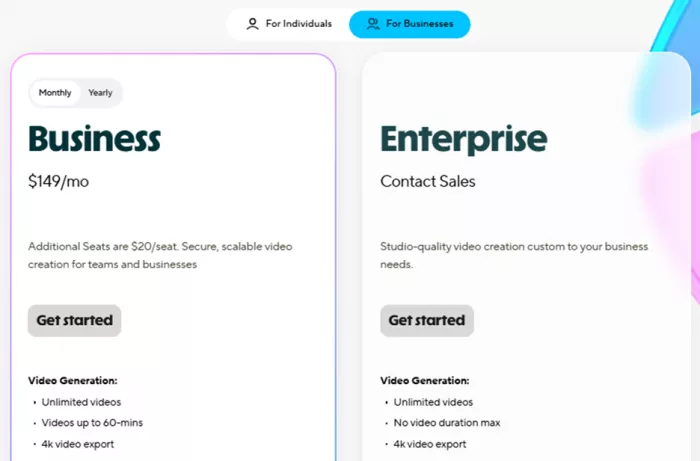
For organizations and teams, the Business plan (starting around $149 per month, with additional seats available) offers significant enhancements.
Key advantages include:
- Unlimited video generation with longer durations (up to 60 minutes).
- Collaboration tools like workspace sharing, commenting, and team management.
- 4K exports and faster processing to handle frequent, large‑scale video production.
- Multiple custom avatars for branding, centralized assets, and administrative controls.
- Advanced features for translation editing and integration with tools like LMS, Zapier, and others.
This plan is well‑suited for marketing teams, corporate trainers, or agencies that need to produce professional quality video content at scale and collaborate effectively across many users.
Enterprise Plan – Custom Solutions for Large Organizations
For businesses with specific, large‑scale needs, HeyGen also offers an Enterprise tier with custom pricing. This plan goes beyond the standard tiers by providing:
- Unlimited video length and export quality.
- Enterprise‑grade security, priority support, and dedicated account management.
- Multi‑workspace control and advanced user provisioning.
- Tailored onboarding and service levels based on corporate requirements.
This option is designed for large enterprises producing high volumes of content globally, where integration, security, and dedicated support are critical.
Accessibility and Payment Options
HeyGen’s pricing is designed with flexibility in mind. Users can choose between monthly and annual billing, with annual subscriptions typically offering a discounted effective rate.
Payment methods supported include credit cards, Google Pay, Stripe, and local payment options depending on your region. There is no long‑term commitment for monthly plans, and users can upgrade or downgrade their subscription from within the HeyGen dashboard at any time.
Once a subscription is active, users retain access to their plan features until the end of the billing cycle, even if they cancel before renewal.
Pros and Considerations
| Aspect | Details |
| Pros | Fast AI Video Generation: Converts text into videos quickly, reducing production time compared to traditional methods. |
| No Cameras or Actors Needed: Ideal for solo creators or businesses without access to professional studios. | |
| Realistic AI Avatars: Pre-designed and custom avatars provide lifelike expressions, gestures, and natural speech. | |
| Multilingual Support: Over 175 languages and dialects available, allowing global audience reach. | |
| Customizable Branding: Add logos, color schemes, and backgrounds to align videos with brand identity. | |
| User-Friendly Interface: Intuitive dashboard and editor make video creation accessible to beginners. | |
| Flexible Plans: Free to Enterprise plans cater to individual creators, teams, and large organizations. | |
| Considerations | Processing Time for Longer Videos: Video generation for long scripts may take more time, especially on free plans. |
| Limited Customization in Free Plan: Access to avatars, video length, and export quality is restricted. | |
| Learning Curve for Advanced Features: Studio editor and advanced avatar customization may require time to master. | |
| AI Limitations: Avatars may not perfectly replicate all human gestures or subtle emotional cues. | |
| Cost for High-End Plans: Premium features and team plans may be expensive for small-scale users. | |
| Data Privacy Responsibility: Users should avoid uploading sensitive personal content and review terms of service. |
Safety, Privacy, and Trust in HeyGen
HeyGen is a powerful AI video generation platform, but like any tool that handles personal data and creates digital content, users must understand its safety measures, privacy protocols, and trustworthiness. Here’s a detailed breakdown:
1. Data Privacy and Security
HeyGen collects and processes the information users provide such as uploaded photos, videos, scripts, and account data to generate AI-powered videos. The platform emphasizes secure handling of this data:
- Encryption: User data is typically encrypted during transfer and storage to prevent unauthorized access.
- Controlled Access: Only the AI system and authorized platform processes interact with uploaded media to generate the video.
- Retention Policies: While HeyGen does store user-created avatars and videos to allow editing and reuse, users are advised to review their account settings for deletion or export options.
Best Practice: Avoid uploading sensitive personal or confidential information (such as identity documents or private financial details) into AI platforms to minimize risks.
2. Intellectual Property and Content Ownership
- User Ownership: Generally, the content created by a user (scripts, custom avatars, and videos) belongs to that user.
- Platform Rights: HeyGen may retain certain rights for internal processing or service improvement. Users should review the platform’s Terms of Service to understand licensing and usage rules.
- Copyright Compliance: Users are responsible for ensuring that uploaded media (images, videos, or music) does not violate third-party copyrights.
Trust Tip: Use royalty-free or personally created assets when generating videos to avoid potential legal complications.
3. Responsible AI Use
HeyGen employs AI avatars and synthetic voices, which can create realistic content. While this is highly beneficial, it also requires responsible usage:
- Avoid Misinformation: Do not create content that falsely represents people, spreads misinformation, or misleads viewers.
- Consent for Avatars: If you use someone else’s image or likeness to create a custom avatar, ensure you have explicit consent.
- Ethical Considerations: Be mindful of cultural sensitivity, political implications, and the potential impact of AI-generated media.
4. Platform Trustworthiness
HeyGen’s reputation in the AI content community emphasizes innovation and accessibility. Users have reported positive experiences with video quality, multilingual support, and ease of use. However, it’s important to:
- Verify Platform Authenticity: Always access HeyGen through the official website (heygen.com) to avoid phishing or scam versions.
- Review User Feedback: Checking forums and community discussions can provide insight into service reliability, responsiveness, and updates.
- Monitor Updates: HeyGen regularly updates features and security measures, so staying informed ensures safe and optimal usage.
5. Security Recommendations for Users
To enhance safety and trust while using HeyGen:
- Use strong, unique passwords and enable any available two-factor authentication.
- Regularly review uploaded avatars and videos, removing any outdated or unnecessary content.
- Avoid sharing sensitive personal or confidential corporate information in AI-generated videos.
- Keep your software and browser updated to protect against vulnerabilities.
- Educate team members if using a Business or Enterprise plan, ensuring everyone understands safe AI practices.
6. Conclusion
HeyGen provides a secure, trustworthy environment for AI video creation when used responsibly. The platform takes privacy and data security seriously, but users must remain vigilant about the type of content uploaded and how it is shared. By adhering to best practices, respecting intellectual property, and using AI ethically, individuals and businesses can maximize the benefits of HeyGen while maintaining safety, privacy, and trust.
Overall Public Sentiment
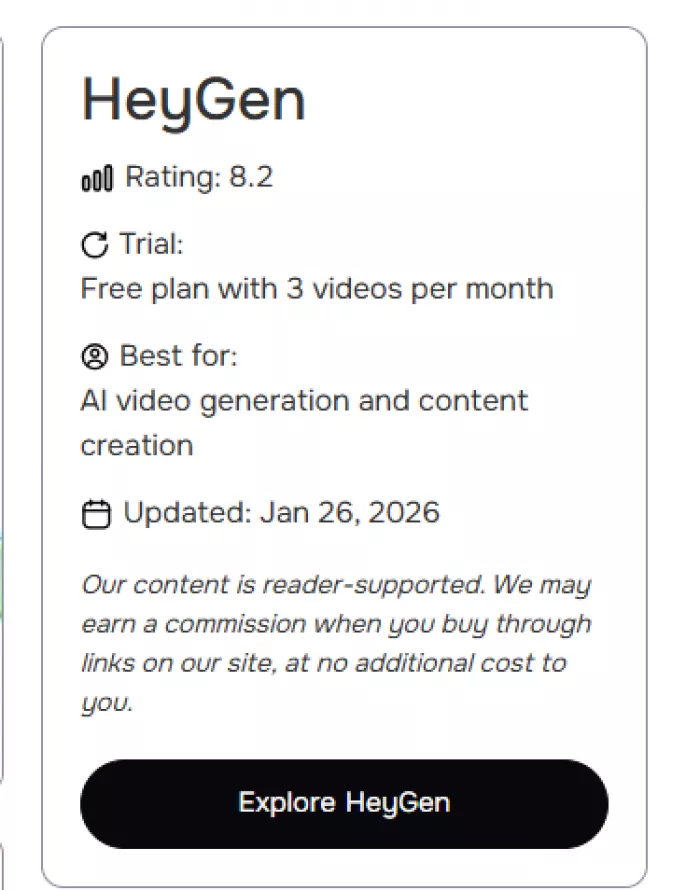
Public sentiment around HeyGen is mixed and polarized. Some users appreciate its AI capabilities and ease of use, while others express strong frustration around pricing, performance, and support. Third‑party review summaries contrast sharply:
- Certain industry analysis sites rate HeyGen highly claiming excellent user sentiment across aggregated reviews. (SelectHub)
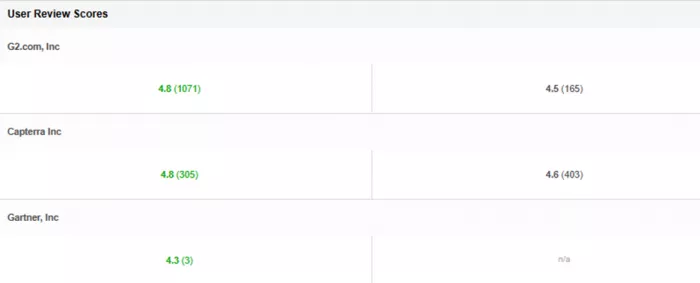
- However, many individual user reviews on platforms like Trustpilot lean negative, with average scores around 2.6 out of 5.
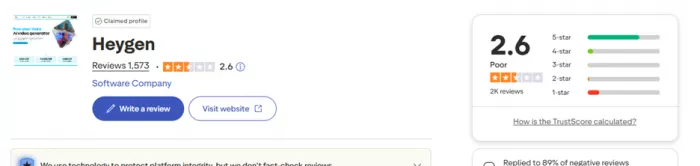
This variation highlights that experience depends heavily on user expectations, use case, and plan choice.
Positive User Feedback
Despite the mixed overall score, many users praise specific aspects of HeyGen:
1. Ease of Use & Accessibility
A common theme among satisfied users is how approachable HeyGen is for beginners and non‑technical creators. People report being able to generate videos quickly without prior video‑editing experience.
2. High‑Quality AI Avatars
Some users specifically note that the AI avatars look very life-like, with convincing facial expressions and good lip‑synchronization when paired with supported voices.
One review specifically praised the avatar quality and ease of creating training or presentation videos.
3. Time and Cost Savings
Professionals using HeyGen for repetitive or high‑volume video tasks appreciate its ability to replace expensive traditional production saving on actors, cameras, and editing tools.
4. Useful Multilingual Support
Several users like HeyGen’s language and translation tools, which allow videos to be produced in several languages although features like lip‑sync quality vary by language.
Negative Sentiments and Concerns
At the same time, many users voice strong complaints particularly around pricing clarity, performance, and customer service:
1. Pricing & “Unlimited” Claims
Many users feel misled by subscription messaging. They report being told a plan offers “unlimited” features but later discovering hidden limits (like credit caps, restricted avatar minutes, or extra fees for certain outputs).
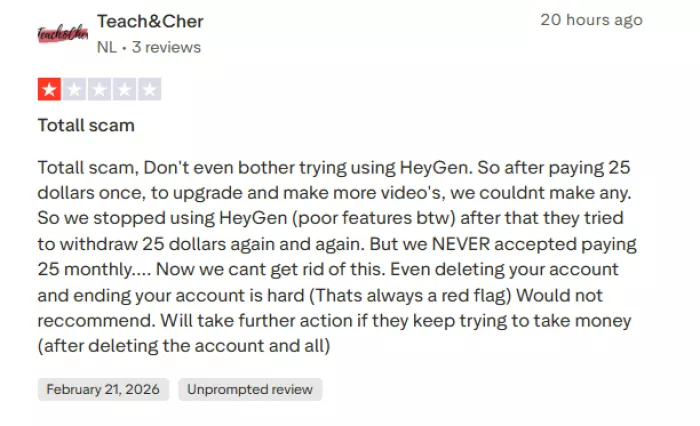
These complaints often center on lack of transparency for example, users saying a feature seemed inclusive but required additional purchases or limits were buried in fine print.
2. Customer Support Issues
A frequent complaint is slow or unhelpful customer support. Users report delays, generic responses, or unresolved issues even after days of waiting.
This has led to frustration, especially when dealing with billing or technical problems.
3. Performance and Reliability Glitches
Some users describe performance issues such as:
- Long or unpredictable render times.
- Avatars behaving unnaturally in generated videos.
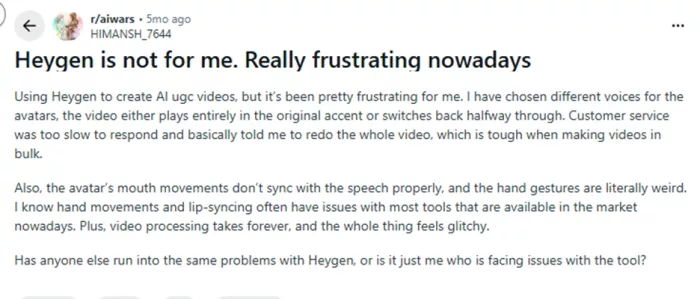
- Voice or accent inconsistencies part‑way through a video.
One Reddit user specifically describes accents shifting mid‑video and slow support responses.
4. Technical/Workflow Frustrations
There are reports of:
- Projects disappearing after exporting.
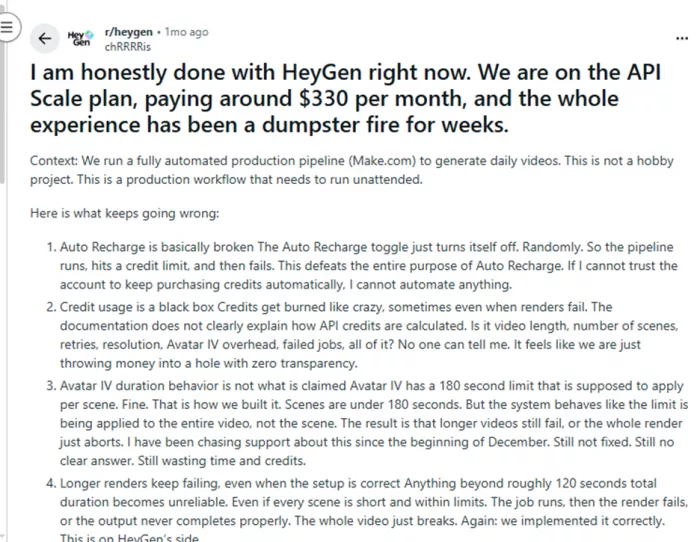
- Credits being consumed even when renders fail.
- Lack of clarity on why certain tools cost extra.
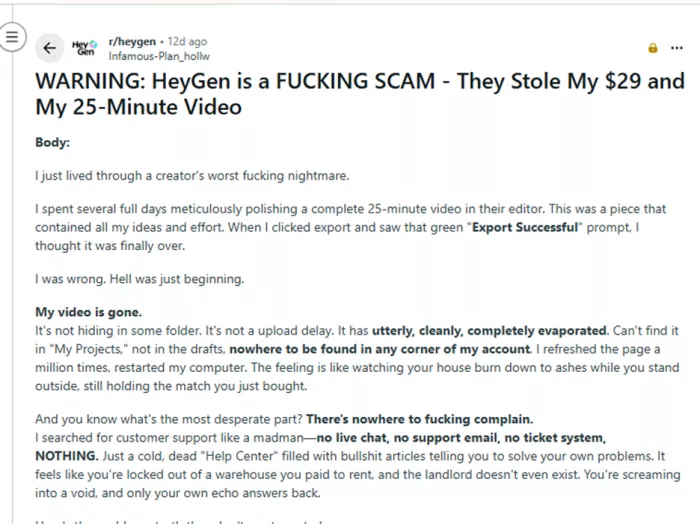
These kinds of grievances appear in multiple user‑generated threads.
5. Mixed Experience Based on Subscription Level
Many criticisms seem tied to specific plans or premium features. Users on higher plans sometimes report “workflow blockers” or confusing credit usage, especially around advanced avatar features.
Conclusion
HeyGen represents a significant advancement in AI-driven video creation. By blending intuitive design, powerful AI, and flexibility, it allows users to generate high-quality videos quickly and efficiently. From content creators to educators, marketers, and businesses, HeyGen offers a transformative approach to video production, making professional-grade content accessible to a wider audience. In an age where video communication is paramount, HeyGen empowers users to bring ideas to life effortlessly, bridging the gap between creativity and technology.
For more details and to explore the platform, visit the official website at HeyGen.
Comments