Picture a Friday afternoon, an ad campaign that goes live Monday, and a landing page that still does not exist. That deadline is where most of these tools get chosen, and where most of them get regretted.
The temptation in that moment is to grab whichever AI builder has the loudest homepage and the boldest 'live in 60 seconds' promise. Sometimes that works out. Often the page appears fast, looks fine, and then fights every change at four in the afternoon when the copy needs one more pass and the form will not behave. The tool that wins the demo is rarely the tool that survives the campaign. That gap, between the first impression and the fifth revision, is the only thing worth evaluating, and it is exactly what most roundups skip.
So this guide skips the hype and sorts seven tools by what they actually hand back. Code-output builders such as Lovable and v0 give a real codebase the user owns. Chat builders such as Wegic, Durable, and Hostinger give a finished hosted site with no code in sight. Conversion specialists such as Unbounce and Framer trade raw speed for the testing and routing that move revenue. Pricing was reverified in May 2026, and the credit meters, visitor caps, and hidden seat or domain fees are called out everywhere, because those are what turn a $12 plan into a $40 invoice when nobody is watching.
How this was evaluated Each tool was scored on five weighted criteria: generation quality, iteration friction, output ownership, conversion and SEO readiness, and true cost once credits and add-ons are counted. Self-reported vendor metrics are labeled as such. Nothing here is sponsored. |
The Field, Sorted by Philosophy
Before the deep dives, the distinction that decides everything: what each tool hands back when it finishes generating.
| Camp | Tools | Hands Over | Buy It When |
|---|---|---|---|
| Code output | Lovable, v0 | Owned React codebase | Page needs logic or ownership |
| Chat builder | Wegic, Durable, Hostinger | Hosted finished site | Speed and simplicity rule |
| Conversion specialist | Unbounce, Framer | Tuned, testable page | Traffic is paid and measured |
Own the engine, own the result, or own the conversion rate. Few buyers need more than one camp at once.
The Lineup at a Glance
| Tool | Camp | From / mo | Free Tier | Overall |
|---|---|---|---|---|
| Lovable | Code output | $25 | Yes | ★★★★☆ 4.4 |
| v0 by Vercel | Code output | $20 | Yes | ★★★★☆ 4.3 |
| Wegic | Chat builder | $0 | Yes | ★★★★☆ 4.0 |
| Durable | Chat builder | $12 | Yes | ★★★½☆ 3.9 |
| Hostinger AI | Chat builder | $2.24 | Trial | ★★★½☆ 3.8 |
| Unbounce | Conversion | $74 | Trial only | ★★★★☆ 4.4 |
| Framer | Conversion | $10 | Yes | ★★★★½ 4.5 |
Pricing reflects entry paid tiers, annual billing, verified May 2026. Scores weight generation, iteration, ownership, conversion readiness, and true cost.
Lovable
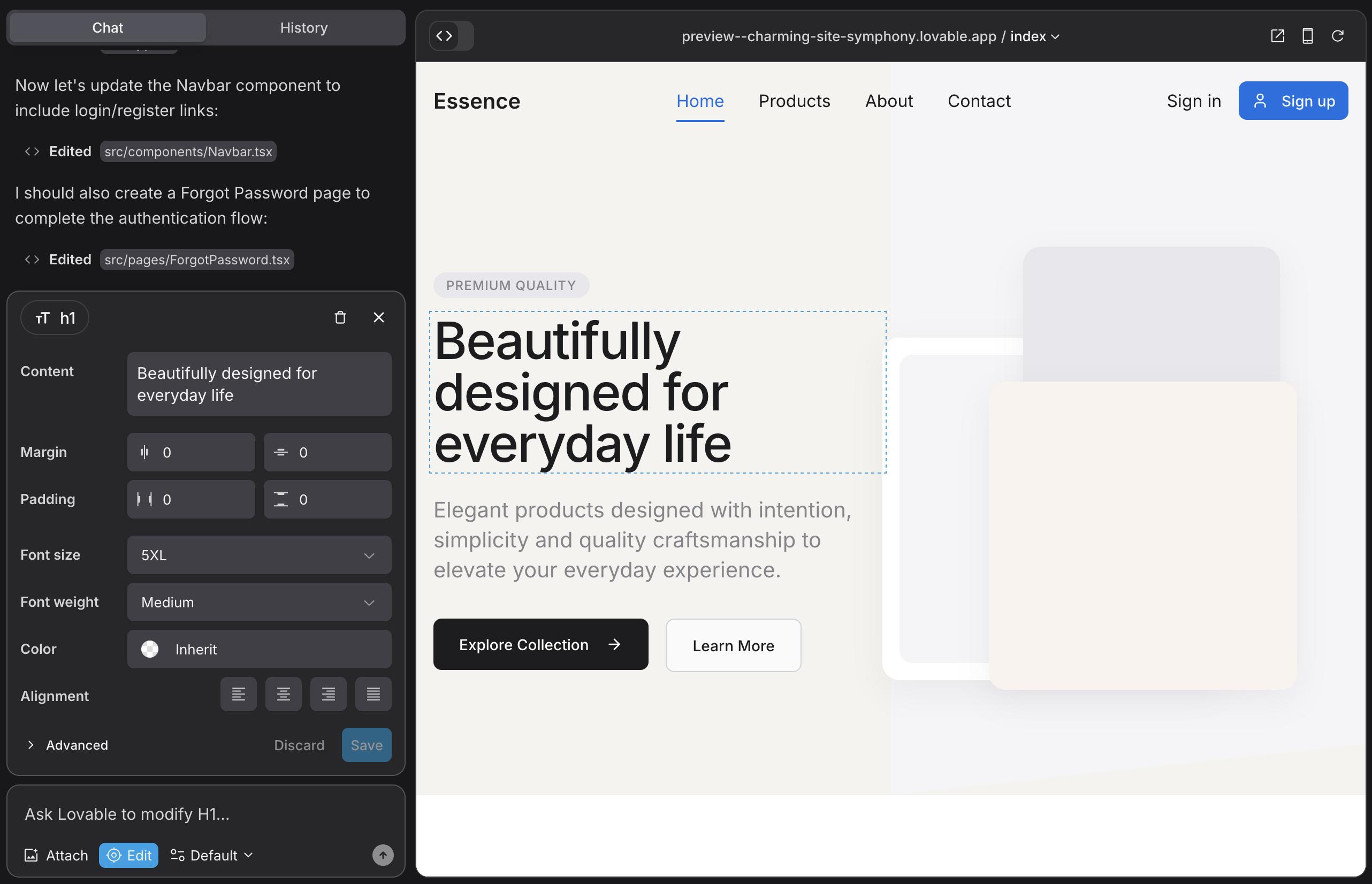
The builder that hands over the source code
Lovable is technically an AI app builder, and that framing is the point. It generates full-stack React and Tailwind applications, so a landing page built here is a real application with code the user can export, host anywhere, and extend without limits. For a static one-screen page, that is overkill. For a page that needs an ROI calculator, a multi-step signup, or a live demo, it does things page builders cannot. The honest catch is the meter: every prompt and fix spends credits, and debugging cycles burn them unpredictably.
| Plan | From / mo | Credits | Fits | |
|---|---|---|---|---|
| Free | $0 | ~5 daily, up to 150/mo | Testing, tiny projects | |
| Pro | $25 | 100/mo plus daily | Active solo founders | |
| Business | $50 | Higher, plus SSO/teams | Small teams, client work | |
| Enterprise | Custom | Volume-based | Compliance, org rollout | |
Mind the credit burn Per Lovable's own docs, a styling tweak runs about 0.5 credits, an auth feature around 1.2, and a full-page generation roughly 1.5. Debugging is the wild card; community reports describe fix cycles draining credits fast. Budget a buffer beyond the headline allowance. | ||||
| Where Lovable wins | Where it falls short | |||
| True code ownership, zero lock-in | Overkill for a simple static page | |||
| Handles app-level interactivity natively | No native A/B testing or routing | |||
| Visual edits plus full code, rare combo | Credit burn spikes when debugging | |||
Rating ★★★★☆ 4.4 / 5 The right call when the landing page is really a small product: interactive, dynamic, worth owning as code. Pick Lovable when the page needs to do something, not just say something. | ||||
v0 by Vercel

The code generator with production-grade output
v0 started as a UI component generator and, after a February 2026 overhaul, became something closer to a full development environment, complete with a VS Code-style editor, Git integration, and database connectivity. Its calling card is output quality: the React, Next.js, Tailwind, and shadcn/ui code it produces reads like an experienced developer wrote it, with accessibility and responsive design baked in. Image-to-code is a standout, turning a screenshot or Figma export into matching markup. The tradeoff is its tight coupling to the Vercel and Next.js ecosystem, and a token-based meter that makes complex generations harder to predict.
| Plan | From / mo | Credits | Fits |
|---|---|---|---|
| Free | $0 | $5/mo in credits | Learning, simple components |
| Premium | $20 | Token-based, custom domain | Solo frontend builders |
| Team | $30/user | Shared workspace credits | Next.js teams |
| Business / Enterprise | $100+ | Higher, SSO, SOC 2 | Larger orgs |
| v0 scored by dimension | ||
|---|---|---|
| Code quality | ████████████████████████████████████████████ | 9.2 |
| Design polish | ████████████████████████████████████████ | 8.8 |
| Vercel-native deploy | ██████████████████████████████████████████ | 9.0 |
| Backend completeness | ████████████████████ | 5.0 |
| Cost predictability | ████████████████ | 4.5 |
v0 excels at the front end and leans on external tools for auth and database logic.
| Where v0 wins | Where it falls short |
|---|---|
| Best-in-class React/Tailwind output | Locked to Vercel/Next.js ecosystem |
| One-click deploy, image-to-code | Token billing is hard to forecast |
| Free tier real enough to evaluate | Needs external backend for full apps |
Rating ★★★★☆ 4.3 / 5 The sharpest choice when the deliverable is a React landing page worth owning and the team already lives in Next.js. Less ideal for non-coders or anyone wanting a backend handed over complete. | |
Wegic

The AI web team that lives in a chat window
Wegic takes the opposite bet from the code tools. No canvas, no code, no menus. Describe the site in plain language and an AI designer, developer, and manager assemble it together, publishing in around a minute. More than 600,000 users have run pages through it, and its sweet spot is the audience that finds traditional builders exhausting. It is genuinely fast and beginner-friendly, but the interface gets fiddly once requests turn specific, it cannot reach product-level complexity, and credits quietly govern how much generating the plan allows.
| Plan | From / mo | Credits | Headline Inclusions |
|---|---|---|---|
| Free | $0 | 70 credits | 3 pages, SSL, subdomain |
| Starter | ~$24 | 600 / mo | Remove branding, code download, ~10k visitors |
| Premium | Higher | 2,000 / mo | Custom domain, unlimited visitors, buy extra credits |
Starter sits near $23.90/mo billed annually. Custom domains require Premium. Source: Wegic listings, verified May 2026.
| Strengths | Watch-outs | Best fit |
|---|---|---|
| Live site in about a minute | Interface fiddly on detail | Non-technical founders |
| Real free tier, multilingual | Cannot reach product complexity | Simple business sites |
| Code download on paid tiers | Custom domain locked to Premium | Speed-first marketers |
Rating ★★★★☆ 4.0 / 5 Best when the requirement is a clean, conventional page live fast and the user never wants a settings panel. Not the tool for a distinctive brand statement or a complex funnel. | ||
Durable
Thirty seconds from business name to live site
Durable is built around speed for service businesses. Enter a few details and it generates a site in under a minute, bundling hosting, SSL, a custom domain, plus a CRM and invoicing under one subscription. That all-in-one model is the appeal: it replaces several separate tools for a plumber, consultant, or small studio. The recurring criticism is design flexibility. Sites generate fast but look templated, and customization options are thinner than design-led tools, which makes it a weak fit for a brand that needs to stand out.
| Plan | From / mo | What It Includes |
|---|---|---|
| Free | $0 | AI Business Partner, AI Studio, unlimited traffic, hosting |
| Starter | $12 ($15 mo.) | Custom domain, unlimited pages, CRM, blog, invoicing |
| Business | $20 ($25 mo.) | CRM, invoicing, 5 team members, marketing tools |
| Mogul | $80 ($95 mo.) | Up to 5 businesses, 5 domains, 1:1 onboarding |
Annual billing shown first, monthly in parentheses. Pricing is per published website except Mogul. Source: Durable and TechRadar, verified May 2026.
| Where Durable wins | Where it falls short |
|---|---|
| Fastest setup, ~30 seconds to live | Templated, limited design flexibility |
| Bundles CRM, invoicing, hosting | Steep for a young, unproven platform |
| Unlimited traffic on every tier | Thin conversion and testing features |
Rating ★★★½☆ 3.9 / 5 Strong for a service business that wants a working site and back-office tools in one place, today. Wrong for anyone whose page has to look distinctive or convert against paid competition. | |
Hostinger AI Builder

The budget entry that bundles hosting
Hostinger is the value play, repeatedly cited as the cheapest credible AI builder in 2026 at roughly $2 to $3 a month with hosting, SSL, a domain, and email included. Describe the business and it generates a site with 150-plus templates and eCommerce support for up to 1,000 products. The economics are the headline. The tradeoffs are real too: the AI output is functional rather than distinctive, deeper customization can mean wrestling with the broader Hostinger panel, and the rock-bottom price typically reflects a long multi-year commitment up front.
| Tier | From / mo | Designed Around |
|---|---|---|
| Premium | ~$2.24 | Single site, AI builder, hosting, free domain year one |
| Business | ~$3.99 | More resources, eCommerce, daily backups |
| Higher tiers | Varies | Traffic-heavy sites, more stores and storage |
Lowest rates require multi-year prepayment; renewal prices rise. Source: Hostinger and aggregator listings, verified May 2026.
| Where Hostinger wins | Where it falls short |
|---|---|
| Unbeatable price with hosting bundled | AI output is generic, not standout |
| eCommerce and templates included | Cheap rate needs multi-year prepay |
| All-in-one hosting plus builder | Customization means the wider panel |
Rating ★★★½☆ 3.8 / 5 The pick when budget is the hard constraint and a clean, functional page is enough. Not the tool for a design-led campaign or a conversion-critical funnel. | |
Unbounce
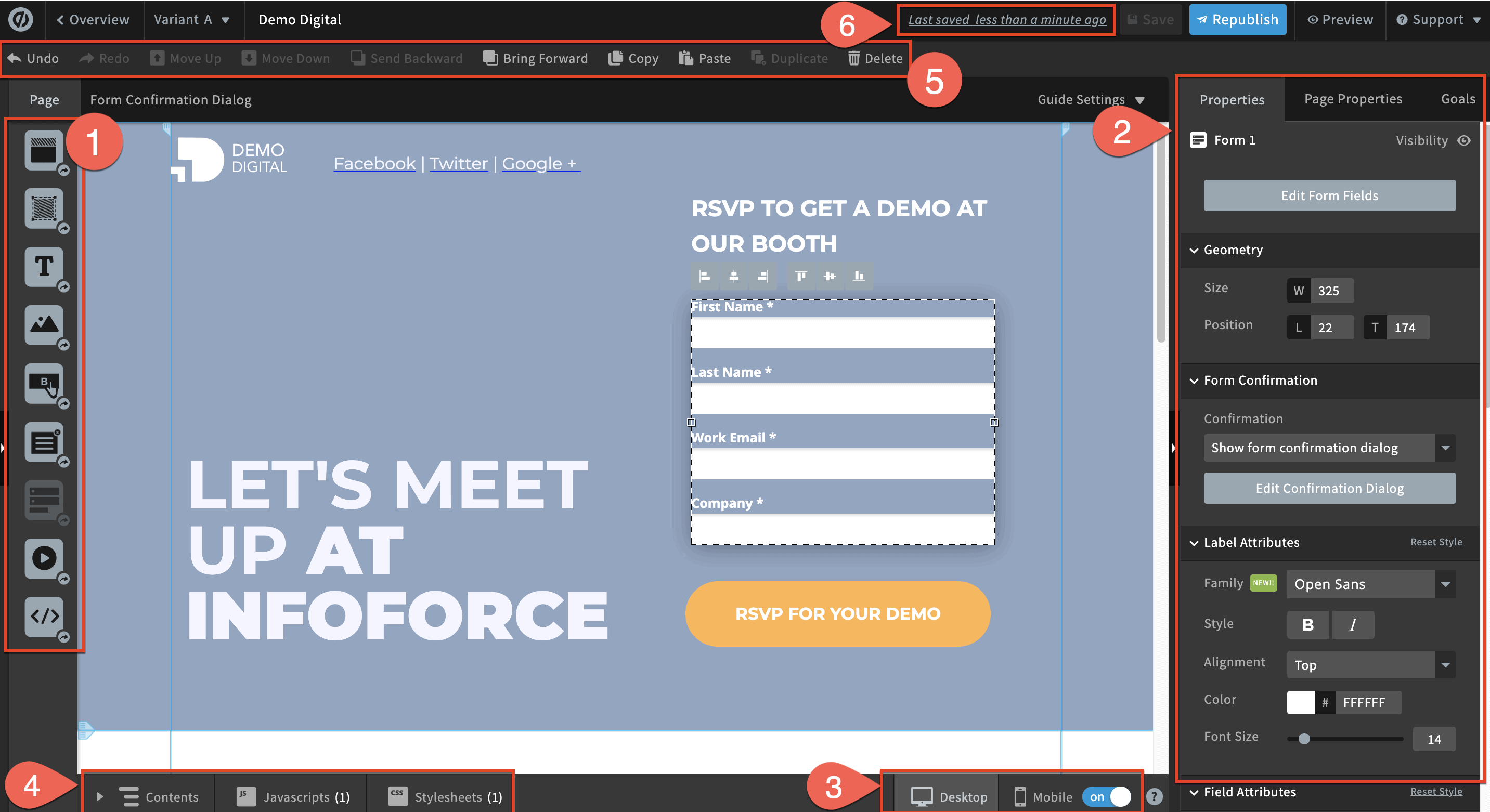
The conversion specialist that optimizes on autopilot
Unbounce is not really a page generator, it is a conversion platform. Its signature is Smart Traffic, an AI layer that reads each visitor and routes them to whichever page variant is most likely to convert that exact person, with a claimed lift of up to 30 percent. Smart Builder drafts layouts and copy, but the premium is earned after launch through A/B testing, dynamic text replacement, and personalization. For a marketer spending real money on ads, that machinery can pay for itself. For everyone else, the $74 entry and visitor-based overage fees are a genuine conversation.
| Plan | Annual / mo | Visitor Cap | Fits | |
|---|---|---|---|---|
| Build | $74 | 20,000 | Solo marketers, one campaign | |
| Experiment | $112 | 30,000 | Teams running multiple tests | |
| Optimize | $187 | 50,000 | Personalization-heavy ops | |
| Concierge | Custom | High volume | Agencies, multi-brand | |
Watch the overage Traffic above a plan cap bills at roughly $80 per additional 10,000 visits, cumulative. A strong month can add hundreds on top of the base fee. Budget for the spike, not the average. | ||||
| Where Unbounce wins | Where it falls short | |||
| Smart Traffic is near set-and-forget | No free plan, steep $74 entry | |||
| Mature A/B and personalization stack | Caps push growing teams up a tier | |||
| Strong fit for paid search and social | Overage can dwarf the base price | |||
Rating ★★★★☆ 4.4 / 5 Worth it when traffic is paid and intentional, since Smart Traffic can lower cost-per-lead all by itself. Hard to defend when traffic is light or organic. | ||||
Framer
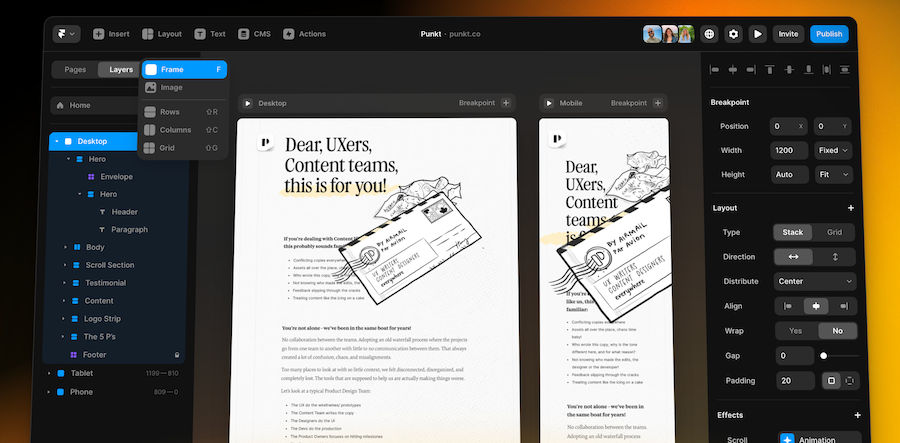
When the page has to look like a designer made it
Framer is the design-first outlier. AI generates layouts and copy, but the real draw is pixel-level visual control most landing page tools cannot match, paired with strong SEO handling and clean output. It started offering free custom domains in early 2026, sharpening its entry appeal. Two honest caveats: it is a website builder adapted to landing pages rather than a conversion-first tool, so native A/B testing is limited, and its per-site, per-seat pricing with CMS caps trips up teams who skip the fine print.
| Plan | From / mo | Custom Domain | Suits | |
|---|---|---|---|---|
| Free | $0 | No (subdomain) | Prototyping, exploration | |
| Basic | ~$10 to $15 | Yes (1) | Portfolios, single pages | |
| Pro | ~$30 to $45 | Yes | SaaS and marketing sites | |
| Scale | ~$100 | Yes | High-traffic, multi-team | |
Read the seat and CMS math Framer bills per site, annually, with monthly billing running 30 to 40 percent higher. Extra editor seats and CMS overages add up fast, and CMS items count per locale, so a bilingual site doubles toward the cap. Price the seats and content, not just the plan. | ||||
| Where Framer wins | Where it falls short | |||
| Highest visual design ceiling here | Limited native A/B and routing | |||
| Strong SEO, clean exportable output | Per-seat and CMS fees compound | |||
| Low $10 entry, free custom domains | Harder for non-designers to nail | |||
Rating ★★★★½ 4.5 / 5 The pick for teams that refuse to ship a generic-looking page. Framer trades native conversion tooling for design control, a fair swap when the layout itself does the persuading. | ||||
Across the Field, Head to Head
The choices that matter once the novelty fades, lined up on the dimensions that separate the seven.
| Tool | Time to Live | Ownership | Conversion Tools | Real-Cost Risk |
|---|---|---|---|---|
| Lovable | ~30 min | Full code | None native | Credit burn |
| v0 | ~Minutes | Full code | None native | Token billing |
| Wegic | ~1 min | Hosted | None native | Credit caps |
| Durable | ~30 sec | Hosted | Thin | Renewal pricing |
| Hostinger | ~1 min | Hosted | Thin | Multi-year prepay |
| Unbounce | Moderate | Hosted | Strong | Visitor overage |
| Framer | Moderate | Exportable | Limited | Seat + CMS fees |
The shared blind spot Only Unbounce ships serious native A/B testing and traffic routing. The five AI-native builders are brilliant at producing a page and mostly indifferent to optimizing one. Teams that live by conversion rate will pair them with a CRO layer or pick the specialist outright. | ||||
What the Numbers Say
The Friday-deadline scramble is not anecdotal, it is structural. One market analysis pegs landing page builder software at roughly $725 million in 2025, climbing toward $2.83 billion by 2035 at about a 14.6 percent annual clip, though estimates across research firms vary widely. The demand pressure underneath is the consistent part: building pages by hand remains one of the slowest steps in launching a campaign. Three signals explain why conversational builders filled that gap so fast.
| Category signals, 2025 to 2035 | ||
|---|---|---|
| Market 2025 | ████████████████████████████████ | $725M |
| Market 2035 (proj.) | ████████████████████████████████████████████ | $2.83B |
| Marketers citing slow builds | ████████████████████ | 47% |
| Reported Smart Traffic lift | ██████████████ | ~30% |
Market sizing from industry projections; build-time figure from marketer surveys; lift figure self-reported by Unbounce, not independently audited.
The deeper current is generative engine optimization. As AI answer engines increasingly read pages before humans do, builders that output clean, semantic, machine-readable structure age better than those that bury content in proprietary formats. The code-output tools have a quiet edge here. The chat builders trade some of that portability for convenience. That tension between ownership and ease is the whole category in one line.
The 30-Second Decision Layer
Skip the deliberation. Match the situation to the tool.
| If this describes the situation | Reach for | Why |
|---|---|---|
| Page needs calculators, demos, or logic | Lovable | App-level output |
| Want owned React code, live on Vercel | v0 | Best code quality |
| Non-technical, want a clean page today | Wegic | One-minute setup |
| Service business needing CRM plus a site | Durable | All-in-one bundle |
| Budget is the hard constraint | Hostinger | Cheapest with hosting |
| Running paid ads, need A/B and routing | Unbounce | Smart Traffic |
| Design must look exceptional | Framer | Visual ceiling |
The Honest Closing Note
Back to that Friday afternoon. The right pick was never the tool with the fastest demo, it was the one that matched the actual job sitting on the desk. A consultant who needs a clean page and an invoice tool by Monday is served by Durable in a way Unbounce would only complicate. A founder shipping a product page with a live calculator is better off in Lovable than in any one-minute chat builder, the extra setup notwithstanding. And the marketer burning real budget on paid traffic should not be anywhere except Unbounce or Framer, where the page can actually be tuned. The mistake is not picking the wrong camp. The mistake is picking for the launch and forgetting about the three weeks that follow it.
Speed gets the first draft live by Monday. Ownership and optimization decide whether it still earns its keep by spring. Build for the version of the page that exists after the excitement fades, not the one that shows up in the first sixty seconds.
Comments