Table of Contents
- Why a Free Course Is Worth Your Time
- Step 1: Pick a Topic People Actually Want
- Step 2: Validate the Idea Before You Build
- Step 3: Outline It Like a Syllabus
- Step 4: Create Your Lessons With Free Tools
- Step 5: Choose a Free Hosting Platform
- Step 6: Publish and Promote for Zero Dollars
- Four Mistakes That Sink First Courses
- Your Move
My first course outline sat in a notebook for almost a year. Not because building it was hard, but because I kept assuming I needed things I didn't have: a camera, a paid platform, a budget. Turns out I needed none of it.
Every stage of course creation, from planning and recording to hosting and promotion, now has a genuinely free option, and some of those free tools are better than the paid software they replaced. This guide walks through the whole process in order, with the current free platforms verified for 2026, because a few big names quietly killed their free plans and most articles haven't caught up.
QUICK ANSWER Pick one specific topic people already search for, confirm demand with free research, outline 4 to 6 short modules, record lessons with free tools like OBS Studio and Canva, host everything on a free platform such as systeme.io, Udemy, or YouTube, then promote it through communities, search, and a simple email list. Total cost: zero. Total time: one or two focused weekends. |

A notebook, a laptop, and a clear plan. That's the entire startup cost of a free online course.
Why a Free Course Is Worth Your Time
Giving away hours of teaching sounds like charity. In practice, it's one of the smartest first moves a creator, freelancer, or teacher can make.
■ It grows your email list Every student is a warm lead. Someone who finishes your free course already trusts your teaching, which makes them the easiest person to offer a paid product later. | ■ It builds authority fast A finished course signals real expertise better than a hundred social posts. It gives people a concrete reason to remember your name. |
■ It tests before you invest You'll learn exactly which lessons land and which fall flat, before you spend six months building a paid flagship on a guess. | ■ It creates a feedback loop Real student questions become your future content: blog posts, videos, and the modules of your next, bigger course. |
Step 1: Pick a Topic People Actually Want
The biggest mistake here isn't picking the wrong subject. It's picking a subject that's too big. "Photography" is a shelf. "Smartphone photography for small business owners" is a course. Specific topics attract specific searches, and specific searches are how strangers find you.
Your ideal topic sits where three things overlap: something you can do, something people ask about, and something you can demonstrate on screen. Run your idea through this quick test:
- People ask you about it in real life, at work, or in your DMs
- You can teach a visible result in under three hours of content
- Search results show demand, but the free content out there is scattered or outdated
- You could talk about it for twenty minutes without notes
For research, the free stack is more than enough: Google autocomplete, Google Trends, AnswerThePublic (a few free searches per day), Reddit and Quora threads in your niche, and the Udemy search bar to see what already sells. You're looking for repeated questions, not perfect silence. A topic nobody teaches is usually a topic nobody wants.
Step 2: Validate the Idea Before You Build
An afternoon of validation saves a month of wasted recording. You don't need surveys with a thousand responses. You need a couple of honest green lights from the table below.
| Validation method | How to do it (free) | Green light looks like |
|---|---|---|
| Keyword check | Google Trends plus autocomplete suggestions | Steady or rising interest over 12 months |
| Community listening | Read Reddit, Facebook groups, Discord servers | The same question keeps appearing |
| Competitor scan | Search Udemy and YouTube for your topic | Courses exist, and reviews mention gaps you can fill |
| Pre-launch page | Free one-page site on Carrd or systeme.io | 30+ email signups from light sharing |
| Direct outreach | Message 10 people who fit your audience | At least half say "yes, I'd take that" |
If two or three of these light up, build it. If none do, change the angle, not the dream. "Excel for beginners" might be saturated while "Excel dashboards for HR teams" is wide open.
Step 3: Outline It Like a Syllabus
Start from the finish line. Write one sentence: "By the end of this course, you will be able to ___." Every lesson either moves students toward that sentence or gets cut. Course designers call this backward design, and it's the difference between a course and a pile of videos.

Outline on paper first. Editing a bullet point costs nothing; re-recording a video costs an evening.
Here's what a tight free-course outline looks like, using smartphone photography as the example:
| Module | Lesson focus | Format | Length |
|---|---|---|---|
| 1. Foundations | How your phone camera actually works | Talking-head video | 8 min |
| 2. Composition | Three framing rules that fix 90% of photos | Video + cheat sheet | 10 min |
| 3. Light | Shooting indoors without flash | Live demo | 12 min |
| 4. Editing | Free editing apps, start to finish | Screen recording | 15 min |
| 5. Project | Shoot and edit one final photo | Assignment | Self-paced |
TEACHER'S NOTE One lesson, one takeaway. If you need the word "and" to describe a lesson, split it in two. Keep videos between 5 and 10 minutes; completion rates fall off a cliff after that. |
Step 4: Create Your Lessons With Free Tools
Forget the studio. You need a quiet room, a window for light, and the free stack below. Honestly, half of the successful courses you've watched were recorded with exactly this setup.
| Task | Free tool | Why it works |
|---|---|---|
| Slides & workbooks | Canva Free, Google Slides | Polished templates, zero design skill needed |
| Screen recording | OBS Studio | Fully free, open source, no watermark, no time limit |
| Video editing | CapCut, DaVinci Resolve (free version) | Cuts, captions, and transitions without a subscription |
| Audio cleanup | Audacity | Removes background hiss and evens out volume |
| Thumbnails & covers | Canva Free | Consistent branding across every lesson |
| Captions | YouTube auto-captions, CapCut captions | Accessibility plus a real SEO boost |
| Video hosting | YouTube (unlisted) | Free unlimited hosting you can embed anywhere |
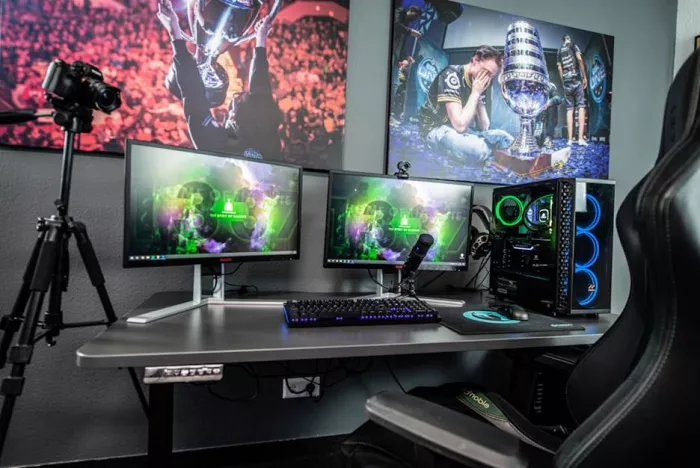
A basic home setup is plenty. Students stay for clear audio and a clear plan, not cinema-grade footage.
TEACHER'S NOTE Record a 60-second test clip before anything real, and check the audio first. Viewers forgive average video. They never forgive bad sound. Also, skip the word-for-word script; talk from bullet points and you'll sound like a person instead of a press release. |
Step 5: Choose a Free Hosting Platform
This is where most guides steer you wrong, because the free-platform landscape changed hard in 2025. Here's what genuinely costs nothing to start on right now:
| Platform | What the free plan includes | Fees | Best for |
|---|---|---|---|
| systeme.io | 1 course, up to 2,000 contacts, email marketing and sales funnels built in | 0% transaction fee | An all-in-one setup with email capture |
| Udemy | Publish free or paid courses on a marketplace with built-in traffic | Revenue share only if you charge | Reaching students without an audience |
| TimTis | Tutor signup with recorded lessons, live classes, and student certificates | Free to join as a tutor | Teaching AI tools to a ready-made audience |
| YouTube | Unlimited video hosting, playlists as course modules | None | Discoverability and long-term search traffic |
| Google Classroom | Classes, assignments, and feedback tools | None | Teachers and private cohorts |
| Payhip | Unlimited courses and students, coupons, affiliates | 5% per sale on the free plan | Selling courses alongside digital products |
HEADS UP Teachable and Thinkific both retired their free plans in 2025. If an article tells you to start there for free, it was written before the change. Their cheapest options now start around $29 to $36 per month. |
One row up there deserves a quick note. TimTis is a niche marketplace built entirely around AI skills, from image and video generation to coding and marketing tools, and courses run as both recorded lessons and live classes with certificates for students. Teaching there puts your course in front of people who came specifically for that subject, which quietly solves the cold-start problem of being one course among thousands on a general marketplace.
Step 6: Publish and Promote for Zero Dollars
Before you hit publish, tighten four things: a title that contains the exact phrase people search, a description that says who the course is for and what they'll be able to do, a clean thumbnail, and captions on every video. Those four take an hour and quietly do more for your ranking than anything else on this list.
Short clips from your lessons are free ads that never expire. One course can feed months of content.
Then promote where your students already spend time. No ads required:
| Channel | What to do | Time cost |
|---|---|---|
| Communities | Answer real questions on Reddit, Facebook groups, and Discord; link only when it genuinely helps | 20 min a day |
| Companion blog post | Publish a written version of your course targeting your main keyword | One afternoon |
| Short clips | Cut three lessons into 60-second verticals for Shorts, Reels, and TikTok | Two hours |
| Email welcome series | Free landing page plus three automated emails for new students | One evening |
| Collaborations | Swap guest lessons or shoutouts with creators around your size | Ongoing |
Set a realistic bar: for a validated topic promoted consistently, your first 100 students within four to eight weeks is a fair target. Slower than that usually means a positioning problem, not a quality problem.
Four Mistakes That Sink First Courses
I've watched more first courses die from these four than from anything technical:
■ Teaching everything you know Scope creep is the silent killer. A free course should solve one problem well. Save the rest for course number two. | ■ Waiting for better gear The phone in your pocket records better video than most paid course studios did a decade ago. Gear is a stall tactic wearing a disguise. |
■ Skipping email capture Hosting somewhere you can't collect emails means renting your audience. Pick a platform, or add a landing page, that lets you keep the relationship. | ■ Vague outcome titles "Introduction to Marketing" tells nobody anything. "Get Your First 10 Customers From Instagram" fills seats. Name the result, not the subject. |
Your Move
The gap between people who have a course and people who want one has nothing to do with money anymore. It comes down to a finished outline and one recorded lesson. You now have the topic test, the free tool stack, the platform table, and the promotion plan.
So: pick your topic tonight. Outline it tomorrow. Record lesson one this weekend, even if it's rough. Rough and published beats perfect and stuck in a notebook. I say that from experience, and my notebook agrees.
Comments