There is a specific kind of fatigue that comes from staring at a 70-minute podcast recording, knowing somewhere inside it are five clips worth posting, and dreading the slow scrub through every minute to find them. That ache is exactly what 2Short and Opus Clip promise to erase. Feed either one a long video, wait a few minutes, and a stack of vertical, captioned clips drops out the other end.
The two get lumped together constantly, and on the surface they do the same job. Spend a few late nights running the same webinars and interviews through both, though, and they start to behave like different animals: one lean and quick, the other broad and opinionated. The gap shows up most in price, in the way clips are metered, and in what happens after the first cut lands.
What follows reflects hands-on testing across podcast, webinar, and talking-head footage, with every price and rating checked against each vendor's published information in June 2026. The aim is simple: work out which tool earns a place in a real posting routine, and for whom.
What each tool is built for
Both products live in the same category of AI clippers that turn long-form video into short-form posts, yet they aim at opposite ends of it.
2Short in brief
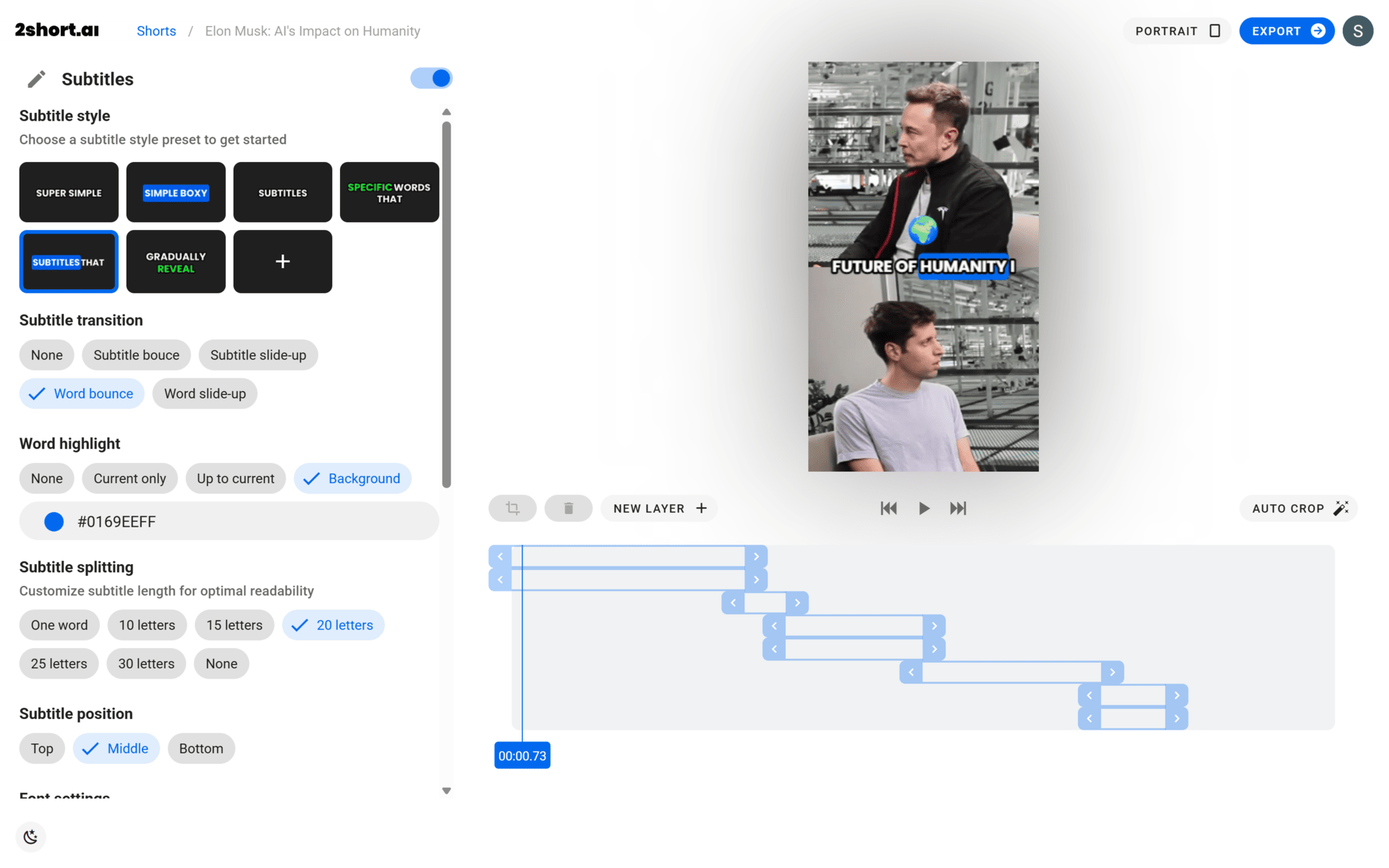
2Short is the lean option, built first and foremost around YouTube. Paste a link, or pull from Google Drive or a public URL, and the AI scans the spoken audio, picks the moments most likely to land, and returns vertical clips with animated subtitles and the speaker kept centered by face tracking. Exports run up to 1080p with no watermark on paid plans, and a light editor handles cropping, branding, logos, and quick fixes. It covers roughly eleven languages and runs entirely in the browser. What it will not do is invent footage or schedule posts; it clips what already exists, and stops there.
Opus Clip in brief

Opus Clip is the broader platform. Its ClipAnything model reads more than words alone, weighing visuals, sound, and emotional beats and leaning on genre-specific models to decide what to cut. Every clip comes back with a Virality Score that grades hook, flow, engagement, and trend fit, alongside captions in twenty-plus languages, reframing with moving-object tracking, AI B-roll, filler-word removal, and a full text-and-timeline editor. Footage can arrive from more than ten sources, finished clips can be scheduled straight to social platforms, and the Pro and Business tiers add team seats, an API, and exports to Premiere Pro and DaVinci Resolve. It is less a clipper than a repurposing studio.
Pricing
Price is where the two part company first. 2Short undercuts Opus Clip at every comparable rung, and the free tiers tell different stories: 2Short's grants a slim fifteen minutes of monthly analysis, while Opus Clip's hands over sixty credits but stamps a watermark on exports and deletes the clips after three days.
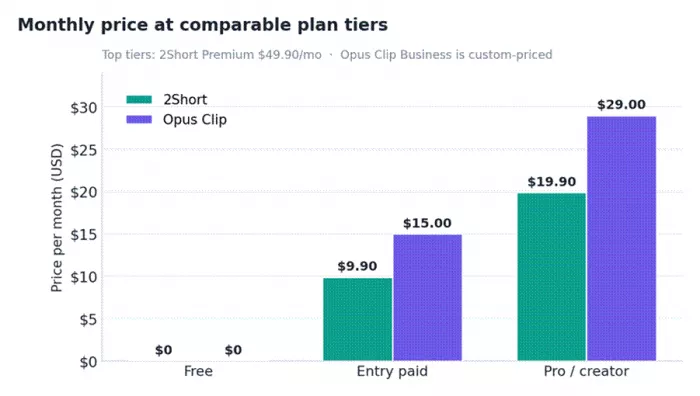
Figure 1. Monthly price at comparable plan tiers. 2Short sits below Opus Clip at every published rung.
| Tier | 2Short | Opus Clip |
|---|---|---|
| Free | $0 15 min of AI analysis / month; export already-generated clips | $0 60 credits / month; up to 1080p; watermarked; clips expire after 3 days |
| Entry | Lite: $9.90 / mo ~5 hrs analysis; watermark-free; no ads | Starter: $15 / mo 150 credits; watermark-free; editor; auto-post |
| Creator | Pro: $19.90 / mo ~25 hrs analysis; unlimited fast exports; priority support | Pro: $29 / mo ($14.50 billed yearly) 300 credits; AI B-roll; 2 seats; NLE export; scheduler |
| Top | Premium: $49.90 / mo ~100 hrs analysis; priority support; beta access | Business: custom Full API; priority processing; SSO; dedicated support |
How the billing models differ
The sticker price is only half the picture, because the two meter usage in opposite ways. Opus Clip runs on credits, where roughly one credit equals one minute of source video, so a single 60-minute podcast burns 60 of a Pro plan's 300 monthly credits, about a fifth of the month, whether it yields one clip or fifteen. 2Short meters hours of analysis instead, and its allowances are far larger: the $19.90 Pro plan covers around 25 hours of source video a month, roughly five times what Opus Clip's $29 Pro tier processes. For anyone clipping long podcasts, webinars, or livestreams in volume, that difference compounds fast, and it is the single biggest reason to weigh raw throughput against everything Opus Clip layers on top. A creator publishing two long episodes a week will feel the credit ceiling on Opus Clip long before a 2Short subscriber notices their hours running low.
Features compared
On capability, the order flips. Opus Clip simply does more, and the feature sheet makes the gap plain.
| Capability | 2Short | Opus Clip |
|---|---|---|
| AI clip selection | Yes: reads spoken transcript | Yes: words, visuals, sound, emotion |
| Virality / engagement score | No | Yes |
| Face tracking & auto-reframe | Yes: center-stage tracking | Yes: with moving-object tracking |
| Animated captions | Yes: 1-click, ~11 languages | Yes: 20+ languages, emoji, speaker colors |
| AI B-roll | No | Yes: added in under a minute |
| Filler / silence removal | Manual only | Yes |
| Built-in editor | Basic crop & branding | Full text + timeline editor |
| Import sources | YouTube, Drive, public URL | 10+ (YouTube, Drive, Dropbox, Vimeo, Zoom, Twitch…) |
| Social scheduler / auto-post | No | Yes: YouTube, TikTok, IG and more |
| Export to Premiere / DaVinci | No | Yes: Pro and above |
| Team seats & API | No | Yes: seats on Pro; full API on Business |
| Generate original video | No: repurposing only | No: repurposing only |
Ratings and reputation
The review records sit far apart, and not only in score. Opus Clip carries a deep, well-trafficked footprint, while 2Short barely registers on the major review sites at all.
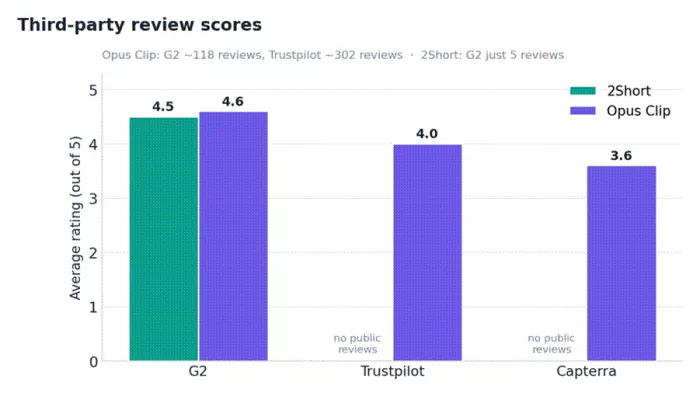
Figure 2. Average third-party scores. Opus Clip carries hundreds of reviews; 2Short's footprint is tiny.
| Platform | Opus Clip | 2Short |
|---|---|---|
| G2 | 4.6 / 5 ~118 reviews | 4.5 / 5 5 reviews, unclaimed |
| Trustpilot | 4.0 / 5 ~302 reviews, ~1 in 5 are one-star | No public profile |
| Capterra | 3.6 / 5 smaller sample | No public profile |
| Overall read | Powerful and well reviewed, but billing draws steady complaints | Liked and beginner-friendly, but too little data to be sure |
The numbers reward reading with context. Opus Clip's volume reflects a far larger user base (the company reports more than two million creators and a million businesses, with teams at companies such as Univision, HubSpot, and LinkedIn), which means its scores carry real weight but also collect more documented friction. 2Short's handful of reviews average well, yet the sample is too small to treat as a verdict. A four-and-a-half-star average across five reviews and the same average across five hundred are not the same claim, and the gap matters when a tool is meant to anchor a posting routine. The score gap, in other words, is partly a popularity gap, and the more useful signal lives in what people write.
What real users are saying
Stripped of star ratings, the written feedback settles into a few clear themes. The praise is broadly similar across both tools; the complaints are where they separate, and almost all of the recurring ones attach to Opus Clip's billing rather than its output.
What earns praise
● Hours saved every week. The single most repeated compliment for both tools is speed: an afternoon of manual scrubbing collapses into a few minutes of skimming ready-made clips.
● Clean, accurate captions. Reviewers note that the animated subtitles seldom need correcting on clear audio, which removes one of the most tedious manual steps in short-form editing.
● Strong hook detection on Opus Clip. Users credit the scoring with surfacing punchy openings they say they would have scrolled straight past while editing by hand.
● A gentle start with 2Short. Beginners highlight how little there is to learn: paste a YouTube link, wait a moment, and usable clips appear without a setup ritual.
● Responsive support on Opus Clip. Several reviews call out quick, helpful replies when a project, export, or billing question comes up.
Common gripes
● Credit billing on Opus Clip. The loudest complaint is that credits count source minutes rather than clips kept, so a long upload drains an allowance whether one clip or twenty come out of it.
● Losing access after a lapse. Reviewers report that projects can lock within a few days of a subscription ending, even when unused credits remain on the account.
● A cancellation flow with too many steps. Ending an Opus Clip plan is described as more drawn-out than it should be, with the path to cancel buried behind several screens.
● Failed jobs that still cost. Processing errors sometimes consume credits without returning a clip anyone can use, which stings most on the metered plans.
● Occasional context misses on 2Short. Busier or multi-speaker footage can produce a clip that needs a manual trim before it is ready to post.
● Thin independent signal on 2Short. With only a few public reviews, there is little outside evidence to weigh, so its rating is hard to lean on with confidence.
Taken together, the written record points the same way the feature sheet does. Opus Clip's complaints are real but mostly operational, the kind a careful buyer can plan around rather than dealbreakers about clip quality, and its praise speaks to genuine capability. 2Short's lighter footprint cuts both ways: far fewer cautionary tales, but also far less proof that it holds up under heavy or unusual workloads.
Where the market is heading
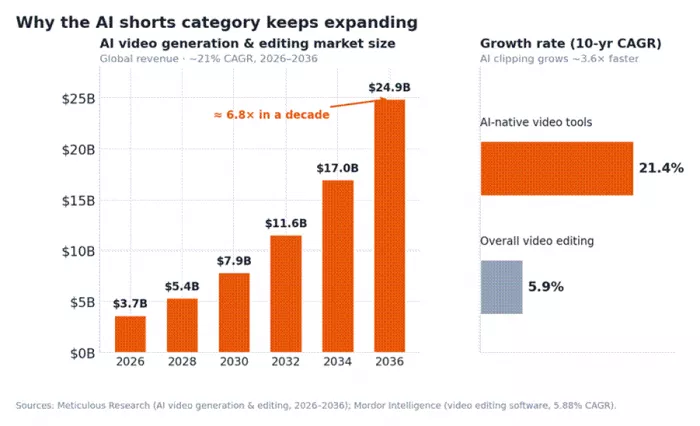
Figure 3. The AI-native video segment is compounding several times faster than traditional video editing.
Context helps explain why both tools keep adding features while trimming prices. The broader video-editing software market is growing at a sleepy six percent or so a year, but the AI-native slice it sits inside is on a different trajectory entirely. Analysts at Meticulous Research peg the AI video generation and editing software market at $3.67 billion in 2026, climbing to nearly $24.9 billion by 2036 at roughly a 21 percent compound annual rate, close to six-and-a-half times larger in a decade and about three-and-a-half times the growth pace of the traditional editing tools tracked by Mordor Intelligence.
The pull is structural rather than hype. Short-form video keeps eating attention across YouTube, TikTok, and Reels, and the cost of producing it has collapsed. With well over a hundred million people already using AI video platforms every month, the clipping space is crowding quickly, which is precisely why the choice between a lean tool like 2Short and a full platform like Opus Clip now turns on fit rather than novelty.
Which one to pick
The two tools answer different questions, so the decision comes down to the shape of the work rather than a single winner.
| Choose 2Short when… | Choose Opus Clip when… |
|---|---|
| Most content is YouTube talking-head, podcast, or commentary | Footage is varied: panels, gameplay, b-roll, livestreams |
| Budget matters and the volume of source hours is high | Clip sophistication matters more than raw volume |
| A simple paste-and-clip routine is the whole need | B-roll, scheduling, and a real editor belong in the workflow |
| One person is running the channel | A team or agency needs seats, templates, and an API |
Best fit by use case
Stepping back from features and scores, the cleanest way to choose is to match the tool to the work in front of it. The scenarios below cover the cases that come up most often.
| Use case | Better fit | Why |
|---|---|---|
| Solo podcaster watching the budget | 2Short | Low price and generous analysis hours suit long, regular episodes |
| Gaming or sports highlight channel | Opus Clip | Visual and sound cues plus object tracking handle fast, busy footage |
| Agency editing for many clients | Opus Clip | Team seats, brand templates, an API, and a scheduler fit a production line |
| Single-speaker educator on YouTube | 2Short | Transcript-based clipping is a clean match for talking-head video |
| Multi-language or global audience | Opus Clip | Captions in twenty-plus languages and speaker colors widen reach |
| Occasional, very low-volume clipper | 2Short Free / Lite | Cheapest way in, with no need for heavier modeling |
| Repurposing webinars and livestreams at scale | 2Short | Hour-based allowances stretch much further per dollar on long sources |
| Posting straight to social from one place | Opus Clip | A built-in scheduler and auto-post remove the export-and-upload step |
None of these are hard rules, but they hold up well in practice. The lighter the workflow and the tighter the budget, the more 2Short makes sense; the more the footage varies and the more a posting pipeline matters, the more Opus Clip earns its price.
Final verdict
After enough hours with both, the verdict is less about a champion than a fit, but it is not a coin toss. For a solo creator working mostly from YouTube and watching the budget, 2Short is the easier yes: it costs less, its hour allowances are generous enough to clip aggressively, and the paste-link-get-clips loop has almost no friction. Nothing about it feels lavish, and that is rather the point.
Opus Clip earns its higher price the moment the work gets demanding. The sharper hooks on difficult footage, the B-roll and scheduler that fold a posting workflow into a single tab, and the team seats and editor exports that suit an agency: that breadth is real, and for anyone whose clips are a business rather than a hobby, it is worth the credits and the occasional billing annoyance. The simple rule of thumb is to reach for 2Short to clip a channel cheaply and quickly, and for Opus Clip when short-form is the product, not the side quest.
Comments