A Quick Confession Before We Begin
Picture this. It's 11:47 PM on a Tuesday. You're hunched over your laptop like a goblin guarding stolen treasure, replying to the seventeenth email of the night, drafting a client report, googling "how to convince yourself sleep is for the weak," and quietly wondering if a houseplant has a better work-life balance than you do. Spoiler: it does. The fern in the corner has been thriving on neglect since 2022 and looks better than most of us on a Monday.
Now imagine telling that exhausted, caffeine-poisoned version of yourself that in 2026, you can hand off the boring half of your job to a piece of software that does not need lunch breaks, vacation days, or therapy. You would probably have called it science fiction, an MLM pitch, or both. And yet here we are.
Welcome to the era of AI agents, where the calendar invites send themselves, the leads get nurtured while you sleep, and the spreadsheet that used to ruin your weekends is now somebody else's problem. Specifically, an AI agent's problem. Which means it is no longer a problem.
This guide is for the absolute beginner. The person who has heard the words “agentic AI” thrown around in LinkedIn posts and assumed it was a new dance move. We will keep things plain, practical, and grounded in real numbers from real research. You will learn what an AI agent actually is, why 2026 is the year they finally moved out of the demo lab and into your inbox, and exactly seven tools that beginners can pick up this week to either stop working so much, start earning more, or, if you want to be greedy about it, both.
Note: All pricing, statistics, and feature claims in this article have been verified against vendor pricing pages and primary research sources (Gartner, McKinsey, Grand View Research, Forrester, IDC, and others) as of April 2026. Sources are cited inline.
Section 1: What on Earth is an AI Agent? (Plain English Edition)
Let's clear something up immediately, because the AI industry has a habit of inventing four new buzzwords every Tuesday. An AI agent is not the same as a chatbot. A chatbot answers your question and then sits there politely, like a Labrador waiting for treats. An AI agent does the thing.
More formally: an AI agent is a software system that takes a goal you give it, plans the steps required to reach that goal, and uses tools (a browser, your email, a database, a CRM) to actually carry those steps out, usually without you having to babysit each move. It can read your inbox, draft a reply, look up information, update a record, schedule a meeting, and do all of that in one flow. According to Lindy's 2026 industry report, you can think of them as digital coworkers that do not get tired, do not forget, and do not miss steps. The catch is they sometimes get confused, but we will get to that.
Chatbot vs Agent: A Three-Second Mental Model
| Capability | Chatbot | AI Agent |
|---|---|---|
| Answers questions | Yes | Yes |
| Plans multi-step tasks | No | Yes |
| Uses external tools and apps | Limited | Yes |
| Recovers from errors | No | Yes (mostly) |
| Works while you sleep | No | Yes |
Section 2: The 2026 Numbers That Should Make You Pay Attention
If you are still on the fence about whether AI agents are a fad, the receipts are in. The market data from 2026 is not subtle. Several independent research firms have all reached roughly the same conclusion: this is the largest enterprise software shift since the cloud, and we are still in the early innings.
Market Size and Growth

Figure 1. Global AI agents market size projected from 2024 through 2030.
According to Grand View Research, the global AI agents market reached USD 7.63 billion in 2025, is projected to hit USD 10.91 billion in 2026, and is on track for USD 50.31 billion by 2030. That is a compound annual growth rate of roughly 45.8 percent. Other research firms publish slightly different numbers, but they all sit between 44 percent and 50 percent CAGR. There is no major analyst calling this anything less than explosive.
MarketsAndMarkets pegs the same market at USD 52.62 billion by 2030 with a 46.3 percent CAGR. Precedence Research is more aggressive, projecting USD 196.6 billion by 2034. Even the most conservative forecasts assume that within five years, this is a hundred-billion-dollar category.
Adoption Is No Longer a Question of If, But When
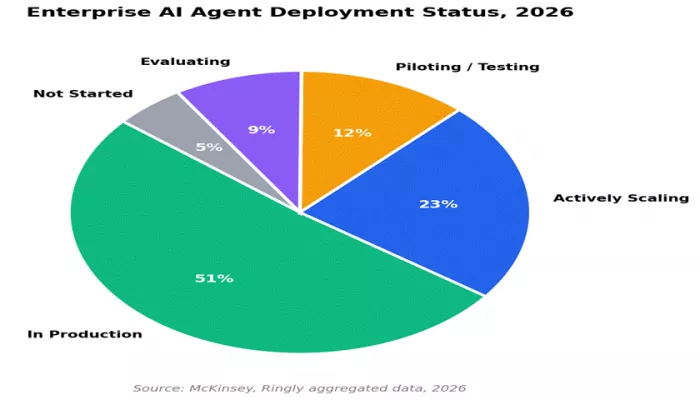
51 percent of enterprises already have AI agents running in production as of 2026, with another 23 percent actively scaling them, according to data aggregated by Ringly from McKinsey, Gartner, Salesforce, Deloitte, and IBM. Gartner forecasts that by the end of 2026, 40 percent of enterprise applications will include task-specific AI agents, up from less than 5 percent in 2024.
The geographic split is interesting. North America leads with 70 percent of larger companies actively using agentic AI, per an Nvidia industry report. The Asia-Pacific region is right behind: 77 percent of APAC workers say their companies are experimenting with or deploying AI agents, and 73 percent believe agents will be critical to their work within three to five years.
Where Are People Actually Using Them?
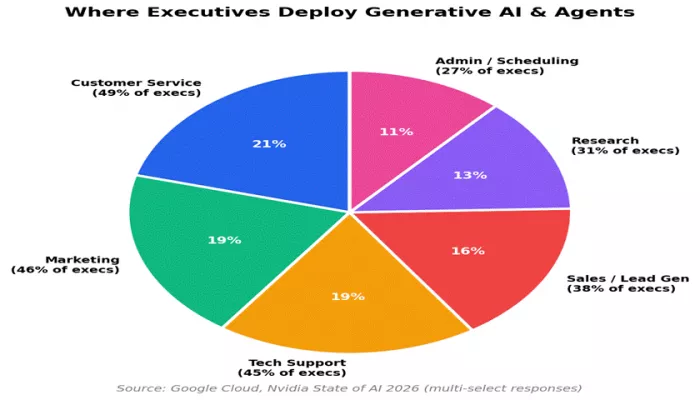
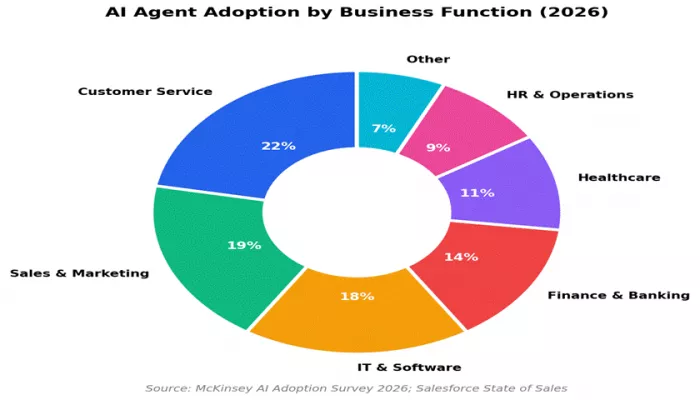
Figure 3. The most common use cases for generative AI and agents inside organizations.
Per Google Cloud and Nvidia's State of AI 2026 reports, 52 percent of executives who use generative AI deploy it across multiple business functions. The most common are customer service (49 percent), marketing (46 percent), and tech support (45 percent). Sales and lead generation, research, and administrative work round out the top six. Notice that all of these are knowledge work tasks that used to be done by humans on a salary.
Time and Money Saved
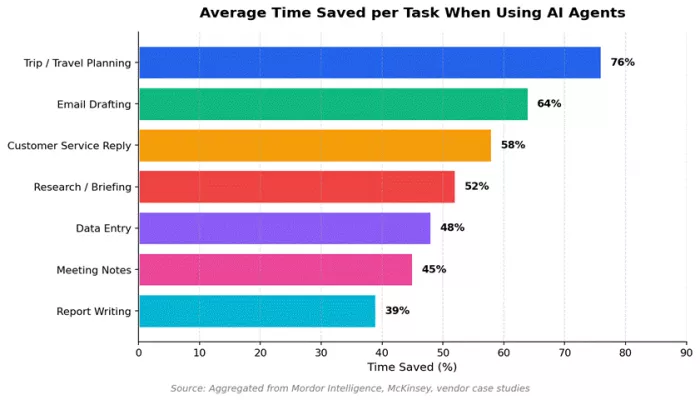
Figure 4. Average time saved per task category when AI agents are used.
Mordor Intelligence reports that agentic tools can complete trip planning in 9.2 minutes versus 38.5 minutes manually, a 76 percent time saving. Forrester's Total Economic Impact analysis of Microsoft 365 Copilot found 116 percent ROI for enterprises and up to 353 percent for small businesses over three years, with each user gaining roughly 9 hours of productivity per month. Organizations also reported a 34 percent productivity increase among lower-skilled workers using AI tools, which is particularly striking because that group has historically been the slowest to benefit from new technology.
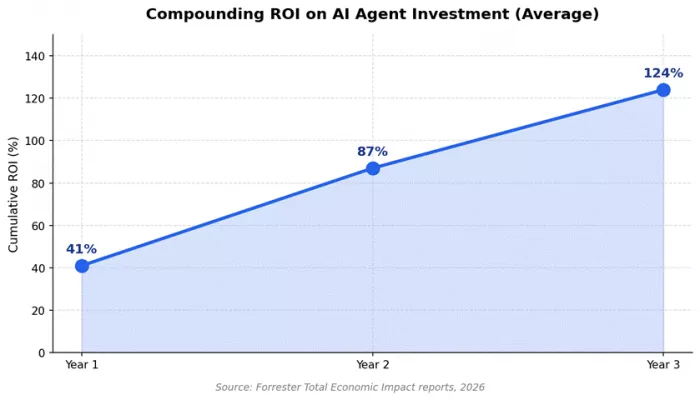
Figure 5. Compounding ROI on AI agent investments across three years (averaged across enterprise deployments).
And here is the killer stat for anyone still calling this a bubble. Conversational AI is on pace to save an estimated USD 80 billion in contact-center labor costs by 2026 alone, according to research aggregated by Ringly. That is not theoretical. That is real money already being moved out of the column labelled "customer support payroll" and into either profit margins or, in the more optimistic versions, reinvestment.
A Brief Reality Check
Lest we sound like we are reading from a vendor pitch deck, the same research firms have been candid about the bumps. Gartner expects over 40 percent of agentic AI projects to be cancelled by the end of 2027 due to costs, unclear value, or weak governance. Only 21 percent of companies have a mature governance model in place. About 62 percent of practitioners cite security as a top deployment challenge. We will come back to this later. The point for now is that the technology is real, the gains are real, and so are the failures. Picking the right tool matters more than ever.
Section 3: The 7 AI Agents Every Beginner Should Know
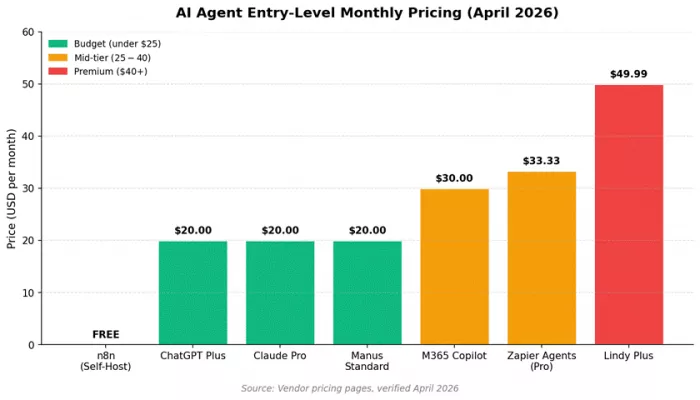
These seven tools were selected based on three criteria: how easy they are for someone with zero technical background to start using, how clearly they help you either save time or earn more money, and how well-supported they are with documentation, integrations, and an active user community. Pricing reflects vendor-listed amounts as of April 2026 and is subject to change.
ChatGPT (with Agent Mode and Operator)
Best for: general-purpose research, writing, idea generation, and basic browser automation.
Pricing as of April 2026: Free tier available. ChatGPT Plus is USD 20 per month. ChatGPT Pro is USD 200 per month and includes the Operator agent. Enterprise pricing is custom.
What It Actually Does
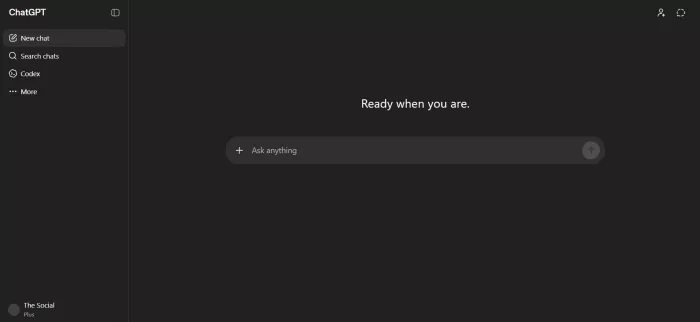
ChatGPT is the application that introduced normal humans to large language models in late 2022, and it remains, by a wide margin, the most-used AI tool on the planet. In 2026 it has evolved into a genuine agent platform. The big shift is Agent Mode, which lets ChatGPT operate a virtual browser, fill out forms, click buttons, and complete multi-step tasks online. According to Zapier's 2026 enterprise comparison, ChatGPT Agent operates inside a sandboxed virtual browser rather than your local computer, which is a better fit for online tasks like data scraping, research, and travel booking.
There is also Operator, OpenAI's standalone browser agent, which is more autonomous than Agent Mode and is bundled into the ChatGPT Pro tier. The difference matters: Agent Mode is the right choice for most beginners, while Operator is for power users who want longer-running, more independent tasks.
Standout Features for Beginners
•Custom GPTs let you create your own narrowly focused mini-agents with no code, just plain English instructions.
•Image generation through DALL-E and video creation through Sora are bundled in.
•Canvas mode is a structured side panel for collaborative writing, code editing, and document drafting.
•Native voice mode handles spoken conversation and transcription.
•Memory feature retains key facts about you across sessions, although it is much more limited than dedicated personal-assistant tools.
Real Ways Beginners Use It to Earn More
1.Freelance copywriting. New writers are using ChatGPT to draft first versions of blog posts, email sequences, and social copy. The realistic earning bracket for beginner freelancers is USD 500 to USD 3,000 per month within six months, based on rates documented across Upwork and Contra in early 2026.
2.Dropshipping product research. Custom GPTs can be configured to scrape trending products, summarize competitor pricing, and draft product descriptions. This shaves hours off the front end of an e-commerce launch.
3.AI-powered tutoring. Subject-matter experts (math, languages, coding) build custom GPTs trained on their materials and sell access to students. This is a small but growing creator-economy niche.
4.Resume and cover letter optimization as a side service. Charge USD 30 to USD 100 per resume and use ChatGPT to do most of the rewriting and ATS optimization.
Honest Limitations
Agent Mode is impressive but slow on long tasks, and it can lose its place mid-flow. The Plus tier has usage caps that power users will hit. Memory is improving but still inferior to Lindy or other purpose-built personal assistants. And as Knack's 2026 comparison notes, ChatGPT does not yet match Claude on long-context reasoning or coding benchmarks.
Verdict for Beginners
If you only ever use one AI tool, this is still the safest bet. The free tier is good. The USD 20 Plus tier is, in our view, the highest-value AI subscription available to a non-technical user in 2026. Start here.
Claude (with Cowork and Computer Use)

Best for: long-form writing, complex reasoning, coding tasks, and trustworthy analysis when accuracy matters.
Pricing as of April 2026: Free tier with daily message limits. Claude Pro is USD 20 per month. Claude Max is USD 100 per month. Computer use is included in Pro with usage limits. Cowork (the desktop agent app for non-developers) reached general availability on April 9, 2026.
What It Actually Does
Claude is built by Anthropic, a company founded by former OpenAI researchers with a heavy focus on AI safety. In practical terms, that translates to two things you will actually feel as a user. First, Claude tends to give more cautious, more carefully reasoned answers, which makes it a favourite for work where being right matters more than sounding clever. Second, the company has invested aggressively in agentic capabilities for desktop work, not just web.
The Claude 4.7 family launched in early 2026, with Sonnet 4.6 having recently hit 72.5 percent on the OSWorld benchmark (a test of real-world computer use across apps like Google Drive and Excel). For context, in February 2025 Claude scored just 28 percent on the same test. That is the kind of leap that explains why, per Zapier's reporting, Anthropic owned an estimated 54 percent of the enterprise AI coding market by early 2026.
Standout Features for Beginners
•Cowork is a desktop tool that lets non-developers automate file management, spreadsheet work, and multi-app workflows. Released April 2026.
•Computer Use lets Claude open apps, navigate browsers, and fill in spreadsheets directly on your machine.
•Projects feature stores reusable context, files, and instructions so you do not retype background every session.
•Claude Code is the terminal-based agent that has become the default for many professional developers in 2026.
•Massive 200K-token context window means you can paste entire books, contracts, or codebases into one conversation.
•Artifacts feature lets Claude generate runnable code, websites, and documents in a side panel.
Real Ways Beginners Use It to Earn More
5.Long-form content packages. Ghostwriters use Claude to draft 5,000+ word ebooks and white papers, charging USD 500 to USD 5,000 per project. Claude's long context and stronger writing voice make it the preferred tool for this work.
6.Code consulting and "vibe coding" gigs. Beginners with no formal CS training are using Claude Code to build small apps, Chrome extensions, and automation scripts for clients on platforms like Upwork.
7.Research-as-a-service. Charge USD 100 to USD 500 to produce summarized research briefs on a topic. Claude reads PDFs and generates structured outputs much better than most alternatives.
8.Legal and compliance review for small businesses (with a human checker). Claude's reasoning is strong enough to flag issues in standard contracts, lease agreements, and policy documents. Always combine with human review.
Honest Limitations
No native image generation. If you want pictures, you will still go to ChatGPT or a dedicated tool. The free tier has stricter daily message limits than ChatGPT's. Native integrations are smaller than Zapier's, which is why most teams use Zapier MCP to extend Claude into business apps. Computer Use is occasionally clunky and is described by Anthropic itself as still maturing.
Verdict for Beginners
If your work involves writing, analysis, or coding, Claude Pro at USD 20 is genuinely the best value in the AI subscription market right now. Many beginners run both ChatGPT Plus and Claude Pro side by side, switching between them depending on whether they need creativity or rigour.
Microsoft 365 Copilot

Best for: anyone who already lives inside Outlook, Word, Excel, PowerPoint, and Teams.
Pricing as of April 2026: Copilot Chat is free for users with eligible Microsoft 365 subscriptions. Copilot Pro for individuals is USD 20 per month. Microsoft 365 Copilot Business is USD 18 per user per month (promotional rate through June 2026, standard USD 21). Enterprise is USD 30 per user per month. The new E7 Frontier Suite, launching May 2026, is USD 99 per user per month and bundles Copilot, Entra Suite, Agent 365, and M365 E5.
What It Actually Does
If your daily work happens in Outlook, Excel, and Teams, Copilot is the AI agent already standing next to your desk. Copilot is woven directly into every major Microsoft 365 application. According to Microsoft's December 2025 announcement, more than 90 percent of Fortune 500 companies are now using Microsoft 365 Copilot, and Microsoft has shipped over 1,100 features across the Copilot ecosystem in the past year.
The 2026 release that matters most is Agent Mode, which is now generally available in Word and Excel and rolling out to PowerPoint. Agent Mode lets you give Copilot a goal like "Build a Q3 financial model from this raw data" and have it iterate, ask clarifying questions, and produce a finished spreadsheet rather than a single response. Copilot Studio is the no-code platform for building your own custom internal agents, and it is included with all Copilot licences.
Standout Features for Beginners
•Agentic drafting in Word: ask for a status report, and Copilot pulls context from your emails, Teams chats, and SharePoint files automatically.
•Excel Agent Mode: now supports model choice, letting you pick between OpenAI and Anthropic reasoning models for harder problems.
•Outlook prioritization, summarization of long email threads, and one-click drafted replies.
•Teams meeting recap, action item extraction, and live caption translation.
•Pre-built specialized agents like Researcher, Analyst, and Facilitator come included on the Enterprise tier.
•Work IQ is the personalization layer that learns your communication style and relationships over time.
Real Ways Beginners Use It to Earn More
9.Reclaim 9 hours per month per employee. Forrester's 2026 data shows this productivity uplift across enterprise users, which translates directly into either more billable hours or earlier weekends.
10.Excel Agent Mode for finance freelancers. Junior analysts and bookkeepers are charging USD 50 to USD 150 per hour to build dashboards, pivot tables, and forecasts that previously took days.
11.Faster proposal turnarounds. Sales reps using Copilot in Word are reportedly cutting proposal time by 40 to 60 percent, which means more deals per quarter.
12.Internal Copilot Studio agents as a service. Some IT consultants are now charging SMBs USD 1,500 to USD 5,000 to build a handful of custom agents for HR FAQs, expense reporting, or onboarding.
Honest Limitations
Copilot only works inside the Microsoft ecosystem. If your workplace is on Google Workspace, this tool is irrelevant. Per IntuitionLabs' 2026 licensing analysis, most companies waste 30 to 40 percent of Copilot licences within 90 days because they buy them and never train staff to use them properly. Pricing is also opaque: between Copilot Chat, Copilot Pro, Copilot Business, Copilot Enterprise, Copilot Studio, and the new E7 Frontier Suite, even seasoned IT buyers can struggle to figure out what they are paying for.
Verdict for Beginners
If you spend most of your day in Microsoft apps, Copilot is the lowest-friction agent on this list. Start with the free Copilot Chat tier to build familiarity, then upgrade to Copilot Pro at USD 20 for full Word, Excel, and PowerPoint integration. For non-Microsoft users, skip this one entirely.
Zapier Agents

Best for: connecting AI to the rest of your software stack and automating repetitive cross-app workflows.
Pricing as of April 2026: Free tier with 400 activities per month. Pro plans start at USD 33.33 per month (billed annually) for 1,500 activities. Enterprise pricing is custom. Multi-step Zaps and AI features require the Professional plan at USD 73.50 per month.
What It Actually Does
Zapier started as a glue layer between SaaS apps. In 2026, it has become one of the most important AI orchestration platforms in the world, powering workflows across more than 8,000 to 9,000 integrated applications, depending on which plan you are on. Zapier Agents are the company's flagship AI offering: self-directed digital teammates that take multi-step actions across your tech stack, drafting emails, preparing reports, updating CRMs, and posting summaries to Slack.
The Zapier Model Context Protocol (MCP) layer launched in 2025 and went mainstream in 2026, letting Claude, ChatGPT, and other AI apps call into Zapier's integration library with enterprise-grade controls. Translation: any AI you use can now reach into 9,000-plus apps through Zapier as a back-end.
Standout Features for Beginners
•Copilot is a natural language workflow builder. Type "summarize new leads in Slack every morning," and it drafts the workflow for you.
•Tables is a flexible spreadsheet-style database for storing data your automations and agents rely on.
•Chatbots by Zapier let you build no-code customer-support bots trained on your own content.
•Chrome extension lets you trigger agents from anywhere on the web.
•Sub-Zaps are reusable mini-workflows that can be plugged into any Zap, saving you from rebuilding the same logic.
•Conditional paths and branching let you build genuinely complex workflows.
Real Ways Beginners Use It to Earn More
13.Lead-routing automations as a service. Charge SMBs USD 500 to USD 2,500 to set up automated lead capture, enrichment, and CRM routing. Recurring monthly maintenance is another USD 100 to USD 300.
14.Newsletter automation packages. Build content pipelines that pull from RSS feeds, summarize with AI, and schedule out to email and social. Charge USD 1,000 to USD 3,000 per setup.
15.E-commerce order automations. Connect Shopify, accounting software, fulfilment, and customer support into one flow. Common gigs run USD 500 to USD 1,500.
16.AI agent consultancy. With Zapier MCP, you can deliver "Claude or ChatGPT plus Zapier" packages to clients without building anything from scratch. Hourly rates of USD 75 to USD 200 are realistic for someone with 60 to 90 days of practice.
Honest Limitations
As Lindy's 2026 comparison and Spectrum AI Lab's testing both note, Zapier is fundamentally trigger-based. It does excellent work when something specific happens (a form submission, a new email, a CRM update), but it is not always-on autonomous in the way Lindy or Manus are. Pricing scales sharply once you go past 2,000 tasks per month. Make.com offers more operations per dollar at the lower end, and n8n is materially cheaper if you are willing to self-host.
Verdict for Beginners
If you want to actually plug AI into the rest of your business and not just use it inside one chat window, Zapier is the most beginner-friendly orchestration tool available. Start free, build two or three small workflows, then upgrade only when you genuinely hit limits.
Lindy AI
Best for: an always-on personal executive assistant for email, scheduling, meetings, and lead generation.
Pricing as of April 2026: Free tier with limited tasks. Plus is USD 49.99 per month, Pro is USD 99.99 per month, Max is USD 199.99 per month, Enterprise is custom. Confirmed via Lindy pricing page in April 2026.
What It Actually Does
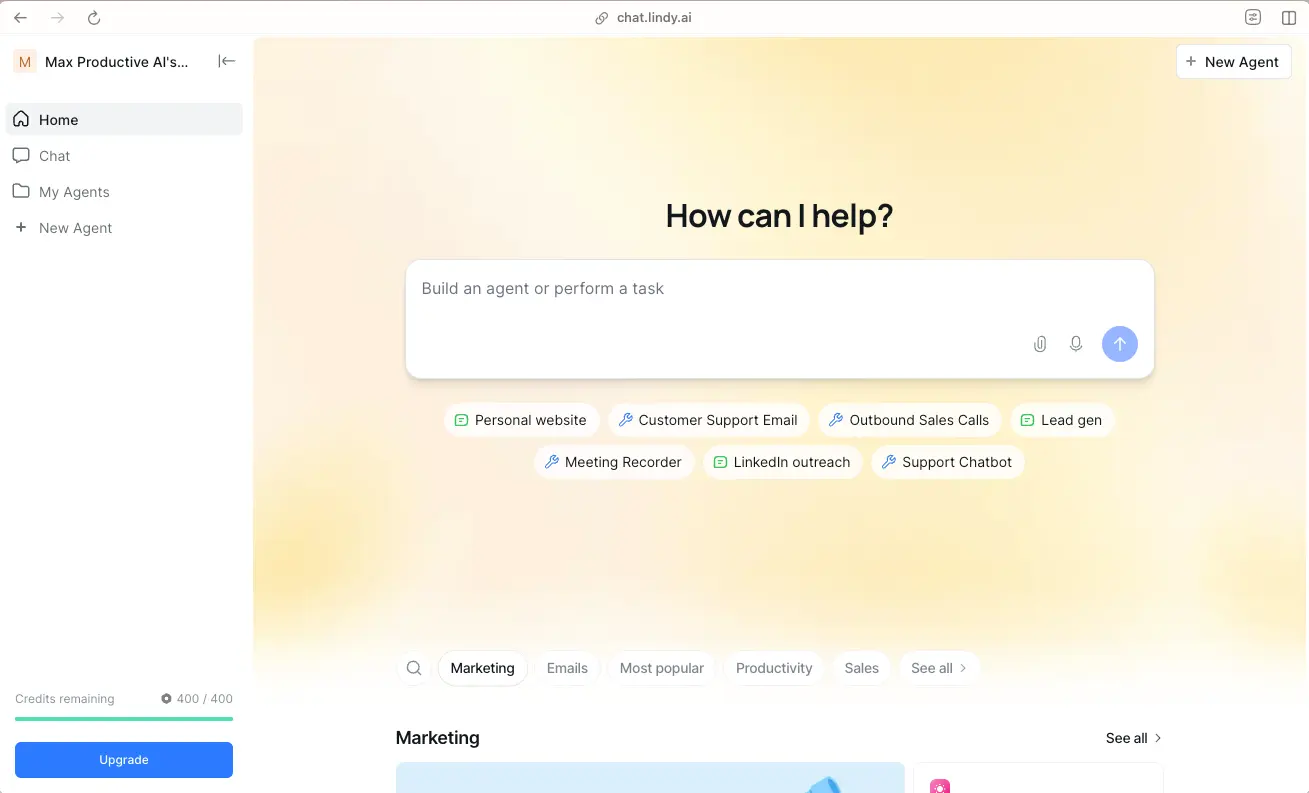
Lindy is the closest thing in 2026 to having a chief of staff in your phone. The product’s defining feature is that it lives inside iMessage, SMS, or your inbox: you text it the way you would text a human assistant. It then proactively manages your inbox, prepares meetings, schedules calls, and runs lead generation in the background, surfacing only the items that need your attention.
Lindy was founded by Flo Crivello (formerly of Uber and Teamflow) and has spent 2025 and 2026 leaning hard into personal-assistant territory. Its 4,000-plus integrations let it operate across CRMs, calendars, email, Slack, voice agents, and project management tools. Per the Arahi AI scoring rubric updated April 2026, Lindy ties for the top spot in the Memory + Agency benchmark among personal AI assistants.
Standout Features for Beginners
•Text-based interface: SMS or iMessage. No new app to learn.
•Lead Generator pulls leads from sources like People Data Labs and qualifies them automatically.
•Voice agents handle inbound and outbound calls in 30+ languages, including phone-based customer support.
•Meeting attendance with auto-summary, action item extraction, and CRM field updates with no manual entry.
•Specialized AI employees: separate agents for sales, recruiting, support, billing, and operations, each with their own scoped tool access.
•Multi-agent collaboration where specialist agents hand off to each other.
•Self-improving agents that write their own skills and memories over time.
Real Ways Beginners Use It to Earn More
17. Solo founders save 10 to 15 hours per week on inbox triage and scheduling. That is enough to add one more billable client.
18. Lead generation services. Configure Lindy to scrape, qualify, and outreach to leads on behalf of clients. Common pricing for this service is USD 1,000 to USD 5,000 per month per client.
19. Customer support automation for Shopify and DTC stores. Lindy handles tier-1 questions through email and chat, and the consultant who set it up keeps a recurring monthly retainer.
20. Cold-calling SDR replacement for small B2B teams. Voice agents in 30 languages mean you can run outbound for tiny budgets compared to hiring human reps.
Honest Limitations
Lindy is more expensive than Zapier on a base subscription, and it is optimized for individual productivity rather than organization-wide process automation. The text-only interface is a feature for some and a frustration for others. As Zapier’s 2026 comparison points out, Lindy lacks the branching logic and fallback paths that make heavy-duty automation truly reliable. If your needs cross from “personal EA” into “shared business process”, Zapier or n8n is the better tool.
Verdict for Beginners
If your day is mostly email, calls, scheduling, and follow-ups, Lindy is worth its USD 49.99 price tag. If your work is primarily app-to-app data movement, stick with Zapier. Many users run both.
Manus AI
Best for: open-ended autonomous research tasks, prototyping, and "hand it a goal and walk away" jobs.
Pricing as of April 2026: Free tier with 300 daily credits and 1,000 starter credits. Standard is USD 20 per month for 4,000 credits. Customizable is USD 40 per month for 8,000 credits. Extended is USD 200 per month for 40,000 credits. Team and Enterprise tiers are custom. Credit consumption is unpredictable: complex tasks regularly burn 500 to 900 credits each.
What It Actually Does
Manus is the autonomous-agent platform that broke into the public consciousness in 2025 and was acquired by Meta in late 2025 for an estimated USD 2 billion. The team is the same one behind Monica.im. The pitch is that, unlike chatbot-style AI which waits for your next prompt, Manus independently plans multiple steps, browses the web, writes code, analyzes data, and delivers finished results.
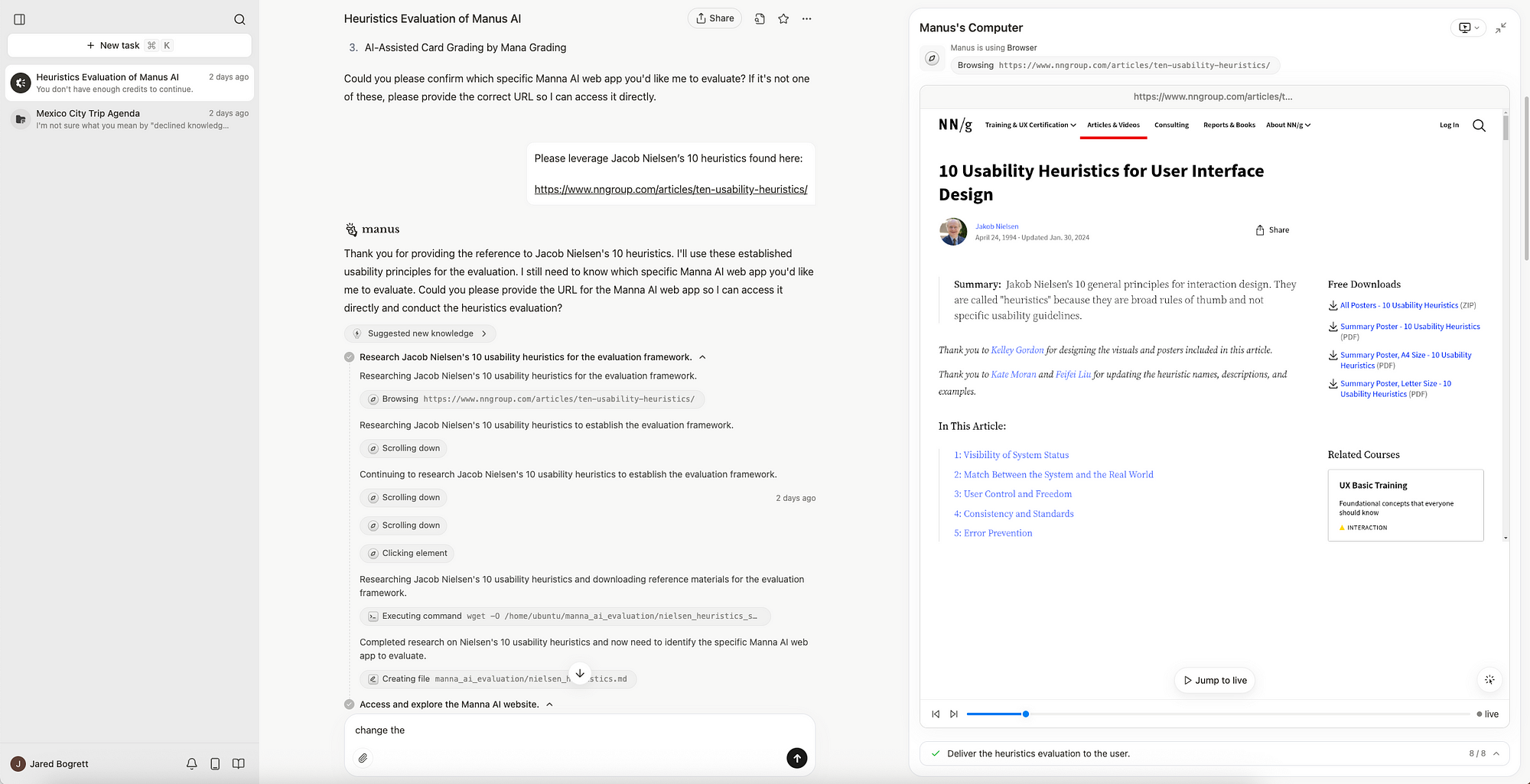
Manus operates in a sandboxed virtual machine that gives it real browsers, real terminals, and a real file system. You can watch it work in a live dashboard that shows the pages it opens, the searches it runs, the snippets it copies, and even the code it writes. As of March 2026, Manus also includes a Web App Builder, AI-powered slide creation, a desktop app with local access, and integrations with Slack, WhatsApp, and Telegram.
Standout Features for Beginners
•Multi-agent system: separate sub-agents for browsing, data analysis, and coding work in parallel.
•Background operation: long tasks run while you do other things, no need to keep a tab open.
•Live intervention: pause the agent mid-task, redirect it, swap sources.
•Wide Research mode for deep multi-source synthesis.
•Web App Builder produces full websites with built-in database, Stripe integration, and SEO.
•Slide generation from a single prompt.
•CSV upload and automated data analysis with charts.
Real Ways Beginners Use It to Earn More
21. Market research reports. Charge USD 200 to USD 1,500 per delivered report. Manus produces eight-page comparative analyses in roughly 15 minutes.
22. Travel concierge as a side hustle. Detailed multi-day itineraries with bookings cost roughly 150 credits each, and people will pay USD 50 to USD 200 for the time savings.
23. Prototype web apps for clients. Use Manus for the research, planning, and first-draft build, then polish in Cursor or Claude Code.
24. Slide deck production. Investor decks and sales decks built largely by Manus, polished by you, sold for USD 300 to USD 1,500 each.
Honest Limitations
The credit system is the most-criticized aspect of Manus. According to Spectrum AI Lab’s 2026 review and confirmed by Till Freitag’s testing, complex tasks consume 500 to 900 credits each, meaning the USD 20 Standard plan often supports only 4 to 8 real tasks per month. Unused credits do not roll over. There is no granular pre-task cost estimate, so budgeting is reactive. As Taskade’s 2026 review puts it bluntly, the underlying LLMs are powerful but unreliable at multi-step planning, and the virtual computer architecture does not solve that. Expect occasional broken loops and incomplete deliverables.
Verdict for Beginners
Manus is the most exciting autonomous agent on this list and also the most expensive in real terms. Treat the free tier as a one-task-per-day demo. If you want to use it seriously, the USD 40 Customizable plan is more honest than the USD 20 Standard. Best for research-heavy work, not for daily admin.
n8n (Free / Self-Hosted Option)
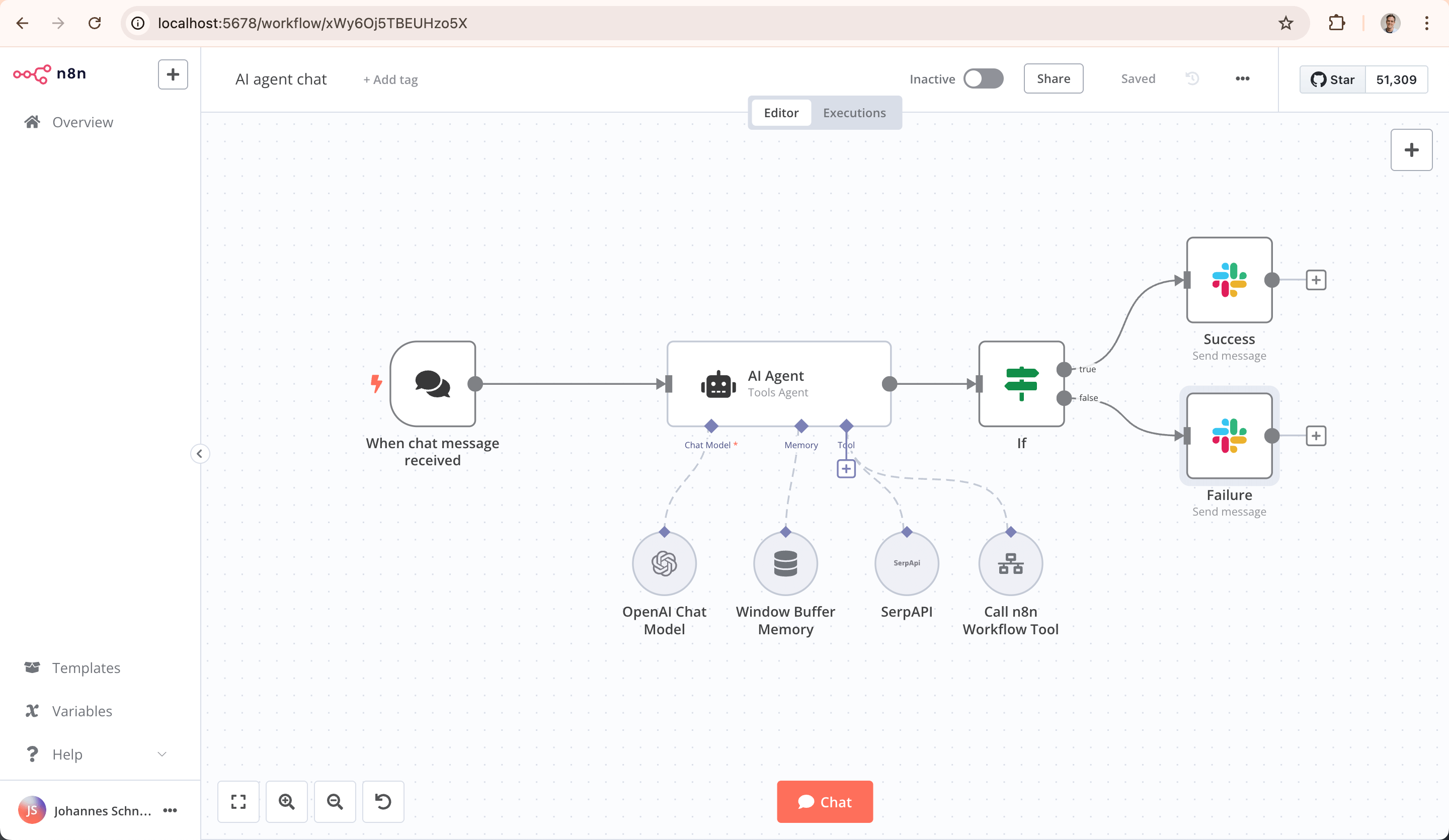
Best for: technically curious beginners who want to build their own AI workflows without paying monthly fees, or who care about data privacy.
Pricing as of April 2026: Free if you self-host on your own server. Cloud plans start at USD 20 per month. Source-available licence (not strictly open source, but free for most uses).
What It Actually Does
n8n is the rebel sibling to Zapier and Make. It is a workflow automation tool with first-class AI features, hundreds of native integrations, and the major distinction that you can self-host it on a USD 6-per-month cloud server and pay nothing else for the platform itself. You still pay for the LLM API calls, but those are typically pennies per workflow run.
In 2026, n8n has become the favourite of technical solo operators, indie hackers, and small agencies that want full control over their data and infrastructure. It supports the Model Context Protocol, complex branching, AI agent nodes, and memory primitives, and it ships with a visual drag-and-drop builder that is genuinely usable for non-developers willing to learn the basics.
Standout Features for Beginners
•Free self-hosting. Pay only for the small server you run it on (typically USD 6 to USD 24 per month).
•AI Agent node lets you define multi-tool agents inside any workflow.
•Connects to all major LLM providers: OpenAI, Anthropic, Google, Cohere, local models, and more.
•Strong support for vector databases (Pinecone, Weaviate, Qdrant) for retrieval-augmented generation.
•Visual workflow builder, no code required for most use cases.
•Active community templates: thousands of pre-built workflows you can copy and modify.
•Full data ownership: your workflows run on your servers, no third party sees the data.
Real Ways Beginners Use It to Earn More
25. Build and sell n8n workflow templates. The community marketplace pays creators a share of revenue.
26. Privacy-conscious automation services. Charge a premium (USD 1,500 to USD 5,000) to clients in healthcare, legal, or finance who cannot send data to third-party SaaS.
27. White-label automation agency. Beginners with three to six months of n8n practice are running solo agencies that bill USD 5K to USD 15K per month, fulfilled almost entirely with n8n plus a couple of LLM API keys.
28. Custom internal tools for SMBs. Replace expensive SaaS subscriptions with internal n8n flows. One small business might pay USD 2,000 to set this up to save USD 500 a month in software fees.
Honest Limitations
n8n is the steepest learning curve on this list. You will see logs, error codes, and JSON. The free self-host option requires basic comfort with a Linux server, although the cloud option removes that barrier. Per the OpenClaw 2026 security analysis, 63 percent of self-hosted automation instances run with insecure default configurations, so security hardening is your responsibility. There is also less hand-holding than with Lindy or Zapier.
Verdict for Beginners
If you can handle a slightly steeper ramp, n8n is the highest-leverage tool on this entire list. It is the closest thing to having an unfair advantage over peers who are paying USD 100+ per month for the same outcomes. Best paired with Claude or ChatGPT API for the actual AI reasoning.
Section 4: Side-by-Side Comparison Matrix
Here is a single-glance summary of the seven tools across the dimensions that matter most for someone deciding what to actually pay for this month.
| Tool | Entry Price | Best For | Watch Out For | Difficulty | Beginner Score |
|---|---|---|---|---|---|
| ChatGPT | Free / $20/mo | Generalist research, writing, ideas | Memory weaker than rivals | Easy | 9.5/10 |
| Claude | Free / $20/mo | Writing, coding, analysis | No image generation | Easy | 9.5/10 |
| M365 Copilot | Free chat / $30/mo | Office workers, Excel, Word | Microsoft-only ecosystem | Easy | 8.5/10 |
| Zapier Agents | Free / $33.33/mo | Cross-app workflow automation | Costs scale fast at high volume | Easy-Medium | 9.0/10 |
| Lindy AI | $49.99/mo | Personal EA, email, scheduling | Higher per-user cost | Very easy | 8.5/10 |
| Manus AI | Free tier / $20/mo | Autonomous research tasks | Unpredictable credit usage | Easy | 7.5/10 |
| n8n | Free self-host | Custom workflows, data privacy | Steepest learning curve | Medium | 7.0/10 |
Section 5: How to Pick the Right AI Agent (Without Wasting Money)
If we have done our jobs in the previous section, you may now have the opposite problem. You know about all seven tools. You have no idea which one you actually need. Here is the cheap-and-fast version of the decision framework.
Match the Tool to the Job, Not the Hype
1.You spend most of your time writing, researching, or coding: start with Claude Pro or ChatGPT Plus. Both are USD 20.
2.You live in Outlook, Word, Excel, and Teams: Microsoft 365 Copilot is the lowest-friction option.
3.Your work is mostly email, calls, and scheduling: Lindy is built precisely for this.
4.You want to automate workflows across multiple apps: Zapier Agents (easy) or n8n (advanced).
5.You want an autonomous research agent that goes off and finishes a project: Manus AI.
6.You are technical and care about data privacy: n8n self-hosted, with Claude or OpenAI on the back end.
A Simple Three-Step Filter
Step 1. Define the single most expensive thing on your weekly to-do list. Not the most annoying. The most expensive in actual hours or revenue. ("Drafting client proposals" is more expensive than "folder cleanup.")
Step 2. Pick the one tool from the seven that maps best onto that single task. Ignore everything else for now.
Step 3. Use that tool aggressively for 30 days before considering a second one. Beginners almost always sabotage themselves by trying to learn three platforms at once.
Five Beginner Mistakes That Kill Time and Money
•Subscribing to four AI tools in the first month. You will not learn any of them deeply. Pick one.
•Treating an AI agent like a chatbot. You will get chatbot-quality results out of agent-priced products. Use Agent Mode.
•Ignoring the human review step. Per Cyntexa’s 2026 statistics, 40 percent of agentic AI projects fail by 2027 largely because nobody bothered to check the output. Always have a human in the loop.
•Dumping sensitive data into free tiers. Read the privacy policy. Many free tiers train on your data.
•Confusing automation with intelligence. A Zapier flow with one ChatGPT step is automation. An agent that adapts to changing inputs is intelligence. Pay for the latter when it is actually needed.
Section 6: A Realistic 30-Day Beginner Roadmap
Plenty of guides will tell you to “just experiment.” That is not advice. That is filler. Here is a concrete week-by-week plan that has been informed by what early adopters in 2025 and 2026 did to actually monetize this skill set.
Week 1: Build Your Baseline
•Sign up for ChatGPT Plus or Claude Pro (whichever your work skews toward). Use it daily for at least one real task.
•Do not pay for any other tool yet.
•Keep a simple log of every task you tried, how long it took, and how good the output was.
Week 2: Add an Automation Layer
•Open a free Zapier account. Build two simple automations connecting your AI tool to email or a spreadsheet.
•Document one repetitive task in your job. Estimate hours per week.
•Build a Zapier or n8n workflow that handles 80 percent of that task automatically.
Week 3: Specialize
•Pick one of the seven tools that maps to your highest-value task and learn it deeply.
•Read the official documentation. Yes, all of it. People skip this and lose money to obvious gotchas.
•Find one paying client or one internal stakeholder you can deliver something for using the new tool.
Week 4: Earn
•Deliver one real outcome: a report, a workflow, an agent, a saved-time number.
•Put a price on it. Even if it is internal, attach a dollar value to what you saved.
•Either monetize it externally (freelance, consulting) or use it as evidence to negotiate at your existing job.
By the end of 30 days, conservative beginners are reporting USD 500 to USD 2,000 in additional monthly income, plus 5 to 15 hours of time reclaimed per week. None of this requires you to be a coder. None of this requires advanced math. It does require you to actually open the tool every day for four weeks.
Section 7: The Reality Check You Will Not Get From Vendor Marketing
Lest this article become indistinguishable from a glossy product brochure, here is the part that the AI industry would prefer you skim past. AI agents in 2026 are powerful but flawed. Knowing the flaws is the difference between using them effectively and being burned by them.
Where AI Agents Genuinely Struggle
•Multi-step planning. Even the best agents trip on tasks longer than five or six steps without supervision. Per Ringly’s 2026 benchmarks, scores on open-ended computer-use tests are still in the single digits for the most autonomous tasks.
•Recovering from genuine confusion. When an agent does not understand what it is looking at, it often hallucinates a solution rather than admitting defeat.
•Anything involving real-time human judgment. Agents do not know when something feels wrong. They will execute a clearly bad idea politely.
•Trust over time. Per Ringly’s consumer data, 78 percent of consumers have used AI to research products, but only 17 percent trust it to complete a purchase.
Security and Privacy
AI agents need access to your data to be useful. That access is a security surface. Per MarketsAndMarkets, nearly 60 percent of enterprises cite data governance and compliance as the top barrier to AI agent adoption. Beginners should treat AI agent passwords and integrations with the same seriousness they would treat their bank account credentials. Use a password manager, set up scoped permissions where possible, and avoid pasting truly sensitive data (medical records, social security numbers, client legal documents) into free tiers that may train on inputs.
The Job Question (Honest Answer)
The World Economic Forum projects 85 million jobs will be displaced by 2026 but 170 million new roles created by 2030, for a net gain of 78 million. McKinsey estimates that 30 percent of total work hours in the US could be automated by 2030. IDC reports 90 percent of organizations expect a critical skills shortage in AI-related roles by the end of 2026. The translation: the people who learn these tools in 2026 will be in dramatically higher demand than the people who do not. The roles that disappear will mostly be the ones built around tasks that AI agents now do faster and cheaper. The roles that emerge will be the ones that involve managing, prompting, and improving these agents.
The Bottom Line
AI agents in 2026 are no longer a science-fair experiment. The market is genuinely worth USD 10.9 billion this year and is on track for fifty-plus billion by 2030. Half of large enterprises already run agents in production. Forty percent of all enterprise applications will embed task-specific agents by the end of this year. The technology is here, the prices are accessible, and the gap between people who use these tools and people who do not is widening, something increasingly reflected across emerging AI-focused platforms and ecosystems like Timtis.
For a beginner, the practical advice is simple. Pick one tool from the seven listed above. Use it for 30 days on real work. Track your hours saved. By the end of the month you will know whether to add a second tool or double down on the first. The compounding gain over a year is enormous. The cost of inaction is not.
Now go close the laptop, take a walk, and let the agents handle the rest of your inbox. That is what they are here for.
Comments