
| 6.4 /10 | Smooth to start, slow to finish, and not quite what it sells. A genuinely friendly on-ramp for beginners, held back by render waits and a free-tier output that pans over still images instead of animating them. |
A login that actually felt safe
MagicLight pitches itself as a long-form, story-to-video studio: paste an idea, pick a style, and it storyboards, narrates, captions and renders for you. My first impression came from the door, not the demo.
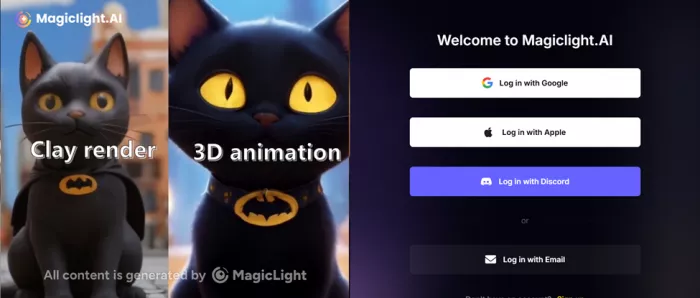
The sign-in screen offered four routes: Apple, Google, Discord, and plain email. I went with email, dropped in my address, and the app fired back a one-time passcode instead of asking me to invent yet another password. OTP-based entry feels more deliberate and more secure than the social-only flows some tools force on you. Within about thirty seconds I was inside, looking at a community feed, my project history, and a balance of 300 free credits. No card required to look around.

| Test parameter | What I used |
|---|---|
| SIGN-IN METHOD | Email plus one-time passcode (felt secure) |
| STARTING BALANCE | 300 credits, free, no card |
| TOOL | Story to Video |
| DURATION SETTING | Auto |
| MODEL | Gemini Flash 3.1 |
| OUTPUT FORMAT | Narrated video plus subtitles plus background SFX |
One underdog, one prompt
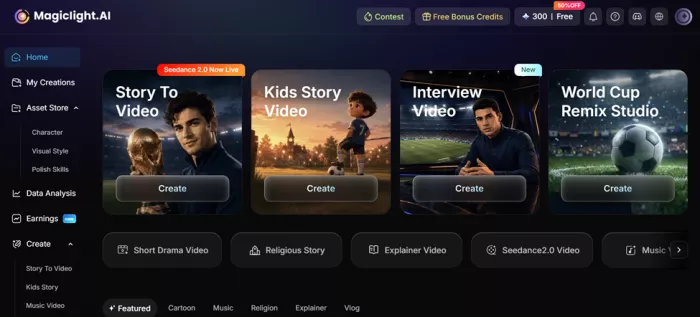
I kept the input simple and emotional: the kind of story a creator would realistically throw at a tool like this to test it.
MY INPUT PROMPT “Leo was a young footballer who lived in a small town. Ever since he was a child, he dreamed of becoming a professional player. Every day before school, he woke up early and practiced on an old dusty field. While other kids were sleeping, Leo worked on his dribbling, passing, and shooting. Many people doubted him because he was small and not the strongest player, but he never gave up.” |
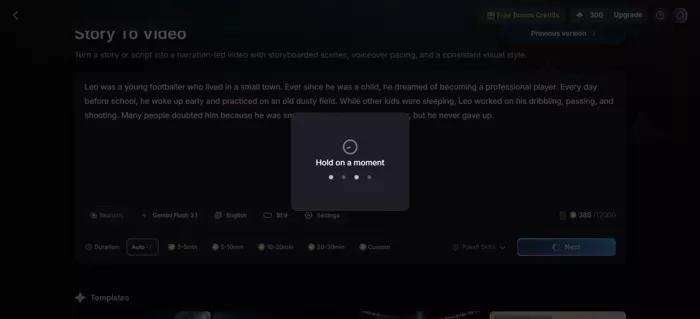
Left the duration on Auto, kept the model on Gemini Flash 3.1, and hit generate. Then the clock started, and the clock turned out to be the real story of this test.
How long it actually took
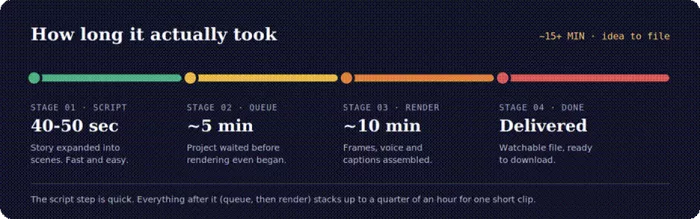
The 40-50 second script step is impressive. Everything after it asks for patience: a queue, then a render, stacking up to a quarter of an hour for a single short clip. Fine for a hobby project; less fine if you are producing on a deadline.
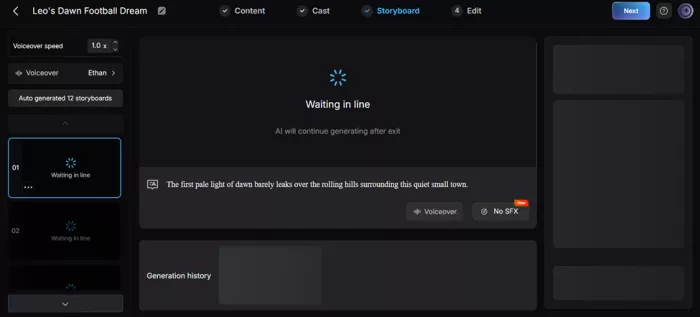
Subtitles, narration, SFX, and the catch
The finished file was clean and complete. The disappointment was in one specific gap between what I pictured and what played back.

Technically, the deliverable ticked the boxes. Burned-in subtitles tracked the story line by line. A voice narrated Leo’s journey from start to finish. Background sound effects filled the space and gave it a bit of atmosphere. As a packaged thing, it was finished and watchable.
But the visuals were the problem. What I got was essentially moving images with narration over them: a slow camera drift across mostly static frames rather than characters that actually move. Leo did not dribble. The ball did not travel. I had expected animation; I got a narrated, captioned slideshow with a cinematic pan. For a tool that leans so hard on the word “animated,” that is the gap that stings.
WHAT WORKED
• Accurate, well-timed burned-in subtitles.
• Full narration that followed the story cleanly.
• Background SFX added real atmosphere.
• A genuinely finished, shareable file at the end.
WHAT DIDN’T
• “Animation” was really a pan over still images.
• Characters and the ball never truly moved.
• About 15 minutes of waiting for one short clip.
• The result felt safe and a touch generic.
The paid-model gallery is a different tool
Here is the twist that complicates a simple thumbs-down. Scrolling the community feed, several clips made on MagicLight’s higher-end paid models looked noticeably better than mine. One that stuck with me was a video of Neymar crying: emotive, well-composed, and clearly a step up from my free-tier slideshow. Was it perfectly real? No. It carried that faint, unmistakable AI sheen around the edges. But for what it is, it was good, and honestly, about what you would expect from generative video right now.
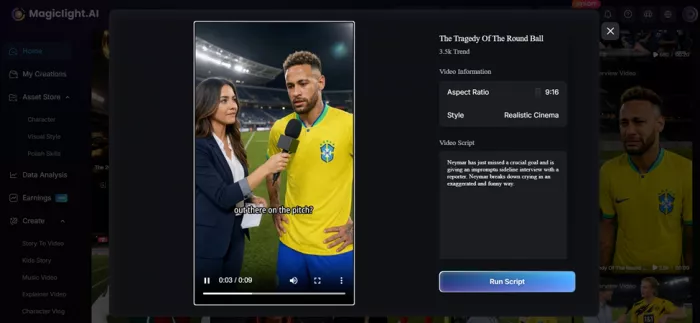
WORTH FLAGGING The gap between my free Gemini Flash 3.1 result and those gallery clips is the whole story: the model and tier you pick changes the output dramatically. The free run shows you the workflow. It does not show you the ceiling. |
I checked the review sites so you don’t have to
You will see MagicLight mentioned alongside Capterra, G2 and Trustpilot. Before quoting any of them, I went and looked. Two of those three do not have what you would assume, and that is worth knowing before you trust a glowing roundup.
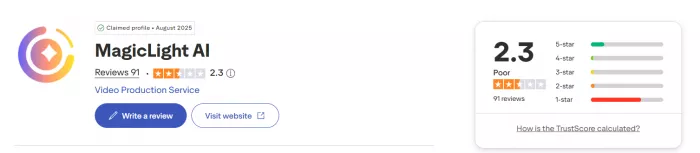
Trustpilot ≈2.3 / 5 ~91 reviews · skews negative REAL REVIEWS EXIST | G2 No rating yet Listing says “Be the first to review” NO REVIEWS | Capterra No listing found Its “Magical AI” page is a different product NOT LISTED |
So the only real review pool is Trustpilot, and it is rough
Across roughly seventy-four reviews, the average sits near the bottom of the scale, and an independent analysis that hand-sorted dozens of them found the large majority negative. The complaints cluster tightly, and they rhyme with parts of my own test:
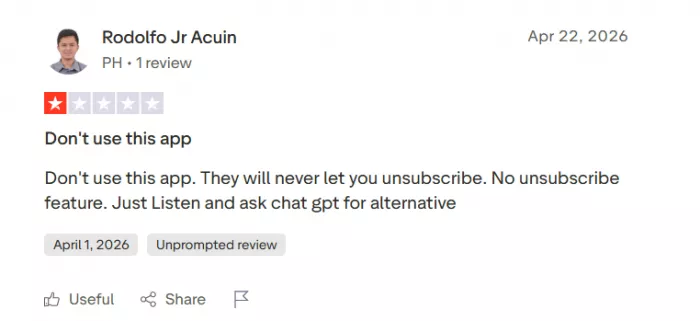
• Billing and cancellation friction: the most common grievance, with users describing a hard-to-exit subscription and surprise charges.
• Credits burn fast: several say the headline credit counts translate into far fewer finished videos than expected.
• Consistency wobbles: characters drifting between scenes, broken motion, and the same moving-image feel I ran into.
• Slow or thin support: long response times from a small team.
One reviewer summed up the output as “a voiceover documentary kind of video.” VERIFIED TRUSTPILOT REVIEWER, PARAPHRASED CONTEXT |
It is not all scorched earth. The positive reviews that do exist tend to come from people running simple projects, especially kids’ stories and short explainers, where low credit use and modest expectations meet the tool where it actually performs.
Beyond the badges
App-store ratings are more mixed than Trustpilot, swinging between went-viral-with-zero-editing-skills praise and the same credit-and-speed gripes. Independent hands-on reviews agree: strong for long-form, character-driven storytelling and faceless YouTube; weak for realism and tight control. Listed pricing starts around $8 a month, videos run up to 50 minutes, and roughly a minute of finished video can eat about 1,200 credits, which is why the credits-run-out-fast chorus exists.
VERIFICATION NOTE If an article quotes a MagicLight “G2 score” or a “Capterra rating,” be skeptical: at the time of writing, neither platform hosts real MagicLight reviews. Trustpilot is currently the only major site with a genuine review pool, and the app stores fill in the rest. |
Scored on what I actually experienced
Weighted toward the things a creator feels day to day: output quality and trust count for more than first impressions. Review trends are used as a sanity check, not the verdict.
| Criterion | Score | What it reflects |
|---|---|---|
| Onboarding and account security | 9.0 | OTP login felt secure and quick |
| Ease of use and guided flow | 8.0 | Beginner-friendly, little setup |
| Free starting credits (value to try) | 8.0 | 300 credits, no card needed |
| Generation speed (queue + render) | 4.5 | About 15 minutes for one clip |
| My free-tier story-to-video result | 5.0 | Moving stills, not real animation |
| Visual ceiling (paid-model gallery) | 7.0 | Paid clips looked clearly better |
| Trust and billing transparency | 4.0 | Review trend flags billing issues |
If MagicLight is not your fit, start here
MagicLight is not the only way to turn words into video, and the right rival depends on what frustrated you. I have grouped the strongest options by the problem they solve, with a table for each. Prices are mid-2026 starting points; like MagicLight, every one of them shifts pricing often, so confirm before you pay.
If your real problem was realism
If the slideshow feel was the dealbreaker, you want tools built for motion, not narration. These produce footage that actually moves, the thing my Leo clip lacked, in exchange for shorter clips you stitch and edit yourself.
| Tool | Best for | Starts at | The catch |
|---|---|---|---|
| Runway | Realistic clips; many models in one plan | ~$12/mo | Short clips, no narration tools |
| Kling | Multi-shot cinematic scenes, native audio | ~$8/mo | You stitch the shots together |
| Luma / Pika | Quick, realistic short clips | ~$8/mo | No story structure or voice |
If you liked the format, just done better
What MagicLight produced for me was narration over moving images with captions. These two tools do the same format with far larger stock libraries and steadier billing, though neither animates original characters.
| Tool | Best for | Starts at | The catch |
|---|---|---|---|
| Pictory | Script or blog to captioned video | ~$19/mo | Stock footage, not animation |
| InVideo AI | Faceless social video from a prompt | Free / $30 | Same style, bigger library |
If you want a presenter or scene control
Different needs, different tools. HeyGen and Synthesia put a photorealistic avatar on screen to read your script, and HeyGen even rates 4.8 on G2 and 4.7 on Capterra, the sites MagicLight is missing from. LTX Studio instead gives you MagicLight-style storytelling with scene-by-scene control.
| Tool | Best for | Starts at | The catch |
|---|---|---|---|
| HeyGen | Talking-head avatar explainers | $29/mo | Not for fictional or animated stories |
| Synthesia | Corporate training and L&D | ~$22/mo | Avatar-led; premium tiers pricey |
| LTX Studio | Storyboard-level story control | Free tier | Steeper learning curve |
Pros and Cons
A quick summary that blends my hands-on test with the broader review picture, so you can weigh it at a glance.
| PROS | CONS |
|---|---|
✓ Secure email-and-OTP login with a generous 300 free credits and no card. ✓ Beginner-friendly, guided flow from prompt to finished file. ✓ Genuinely long-form: videos up to about 50 minutes, rare among rivals. ✓ Many models in one dashboard, from free Gemini Flash to premium engines. ✓ Strong on character consistency and faceless, narration-led content. ✓ Polished extras: auto subtitles, voiceover, background SFX and templates. | ✕ Free-tier output drifts over still images instead of truly animating. ✕ Slow to deliver: queue plus render stacked to about 15 minutes per clip. ✕ Credits burn faster than the headline numbers suggest. ✕ Trustpilot skews heavily negative, mostly on billing and cancellation. ✕ Thin, slow customer support from a small team. ✕ No reviews on G2 or Capterra yet, so independent signal is thin. |
My Final Verdict
| MY HANDS-ON SCORE 6.4 / 10 |
Based purely on my own run, the secure login, the generous free credits, the friendly flow, the long wait, and that narrated-slideshow result, MagicLight earns a solid-but-honest 6.4. The on-ramp is one of the nicest I have used: nothing about getting started felt risky or confusing. The finish line is where the air comes out. Fifteen-plus minutes for one short clip, and an output that drifts over still frames instead of animating them, makes the free experience feel more like a polished proof-of-concept than the cinematic story video the marketing implies.
The paid-model gallery, that Neymar clip among them, tells me the ceiling is higher than my test showed. But the Trustpilot trend keeps me cautious: if you upgrade, do it with eyes open about credit burn and the billing complaints, and treat the free tier as your real audition before any card details change hands. And if the slideshow feel is a dealbreaker rather than a quirk, one of the alternatives above will serve you better than waiting for MagicLight to animate.
WORTH IT IF YOU’RE
• A beginner who wants results without editing skills.
• Making kids’ stories or short explainers.
• Building faceless, narration-led content.
• Happy to test patiently on free credits first.
SKIP IT IF YOU
• Need true character animation, not panning stills.
• Work to tight, same-day deadlines.
• Want predictable, transparent billing.
• Expect realism or fine creative control.
Comments