If you’ve ever opened your Replit usage dashboard, done a small double-take, and thought “wait, how did a $20 plan turn into that?”, this guide is for you. I’ve spent a lot of the last couple of years living inside browser IDEs and AI app builders, shipping small tools, prototypes, and the occasional thing that accidentally became real. Replit earned its place in that rotation, because few tools get you from a blank page to a live URL faster.
But “fastest to a live URL” and “best fit for your project” aren’t always the same thing. Maybe the credit meter is stressing you out. Maybe you’ve outgrown prototype mode and want a real editor or your own infrastructure. Maybe you just want the prettiest front end possible, or you’re a non-coder who needs a working MVP by Friday. There’s a better-fitting tool for each of those, and this is the honest, hands-on rundown of the five worth your time.
I’ve grouped them into the two families that matter (prompt-to-app builders and developer IDEs or AI editors), given each a fair pros-and-cons treatment, and ended with my actual opinion on what to pick. Let’s get into it.
First, let’s be fair to Replit
Switching guides love to trash the incumbent. I won’t, because Replit is genuinely good at what it does. Before you leave, it’s worth being honest about what you’d be giving up.
What Replit still does better than almost anyone
• Truly all-in-one: a code editor, an AI agent, a database, hosting, and real-time collaboration in a single browser tab.
• The fastest zero-setup path from idea to a shareable live app, which is why classrooms and hackathons love it.
• Recent improvements help. In February 2026 Replit dropped Core to $20/month and added cost-control modes (Economy, Power, Turbo), plus a Pro plan at $100/month for up to 15 builders.
The reasons people still go looking
• Bill shock. Effort-based credits with no default spending cap mean a heavy week can run several times your subscription. Multiple reviewers document $100 to $300 months on a plan they expected to be $25.
• You pay even when the AI whiffs. Agent interactions are billable whether it ships working code, just answers a question, or errors out mid-task.
• Browser compute has a ceiling. Big, complex projects start to feel the limits of the hosted environment.
• Hosting is extra. Always-on and autoscale deployments cost on top of your plan, so production is a separate line item.
| The short version: Replit is a fantastic place to learn, prototype, and move fast. If your reason for leaving is cost predictability, code ownership, backend depth, or professional workflows, one of the five tools below will fit you better. |
The five alternatives at a glance
A quick map before the deep dives. “Entry price” is the cheapest paid plan that unlocks serious work; several tools also have usable free tiers. Ratings are representative figures from the sources listed later, so treat them as directional, not gospel.
| Tool | Best for | Entry price | Built-in hosting | Rating |
|---|---|---|---|---|
| Lovable | Non-coders shipping a full-stack MVP fast | $25/mo | Yes | ~4.8/5 |
| Bolt.new | Browser-native full-stack with framework freedom | $20/mo | Yes | ~4.1/5 |
| Cursor | Pro developers coding daily in real repos | $20/mo | No | ~4.5/5 |
| v0 by Vercel | Beautiful, production-grade React UI | $20/mo | Yes* | ~8.2/10 |
| GitHub Codespaces | GitHub-native teams wanting a real cloud env | Usage | N/A | Editor’s pick |
* Deploys within its own ecosystem (Vercel). “N/A” means it is an editor or environment, not a host. “Usage” means metered pay-as-you-go.
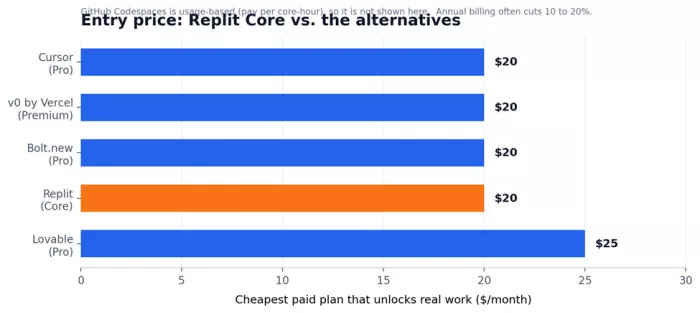
Entry pricing for the tools with a flat paid tier. Most cluster around $20; Lovable is a touch higher.
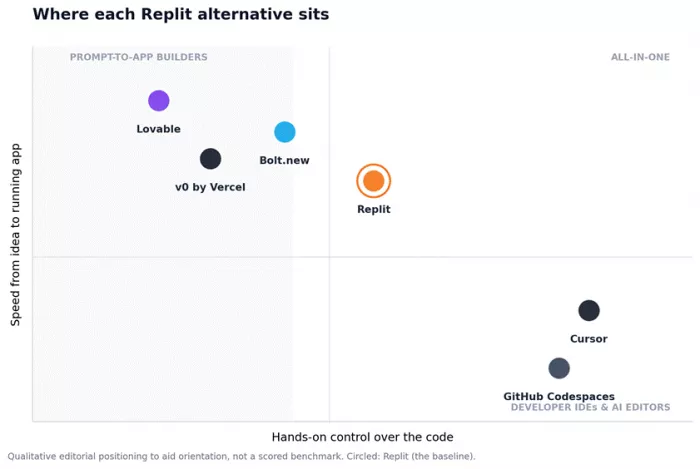
Two families, one question: how much do you want to prompt vs. control the code? (Qualitative, not a benchmark.)
How they rate across platforms
Star ratings only tell part of the story, and they’re scattered across half a dozen platforms. Here’s the picture pulled together, with the caveat that these are rounded, representative figures that shift over time (and some tools simply aren’t listed everywhere).
| Tool | G2 | Capterra | Other aggregate | What the community says | Our score |
|---|---|---|---|---|---|
| Lovable | ≈4.8/5 | ≈4.8/5 | Very high (small sample) | Loves the speed; flags credit burn | 9/10 |
| Bolt.new | ≈4.2/5 | n/a | ≈4.0-4.2/5 (16k+ reviews) | Loves the speed; flags token cost | 8/10 |
| Cursor | ≈4.5/5 | n/a | 9/10 in hands-on tests | r/cursor: praise, plus pricing gripes | 9/10 |
| v0 by Vercel | n/a | n/a | ≈8.2/10 (UI 9.5/10) | Praises the UI; wants a backend | 8/10 |
| GitHub Codespaces | ≈4.5/5 | n/a | “Gold standard” in roundups | Loved by GitHub-first teams | 8.5/10 |
Figures are rounded, representative numbers gathered from the named platforms and independent 2026 reviews. “n/a” means the tool has little or no presence on that platform. “Our score” is my editorial take after hands-on use, not an average of the others.
Lovable
Best for: non-technical founders who need a working MVP this week
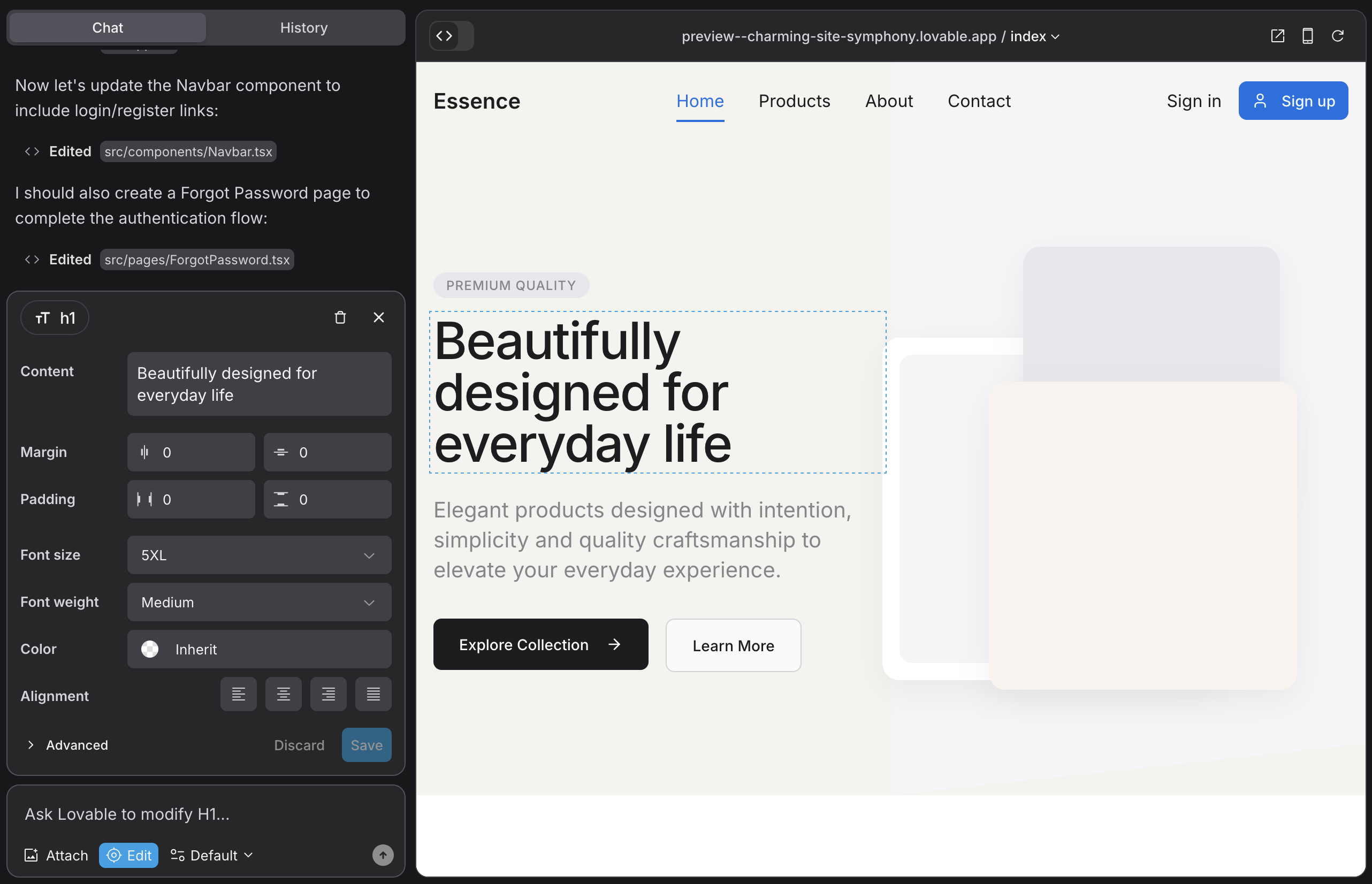
Lovable is the poster child of the whole “vibe coding” moment, and for good reason. You describe your app in plain English and it generates a genuinely full-stack React application, with Tailwind on the front and Supabase (Postgres, auth, storage) on the back, then deploys it to a live URL, often in minutes. The traction is hard to argue with: it went from zero to roughly $300M ARR in under a year and passed 8 million users. When the core loop lands this well, it’s because the product nails the first ten minutes.
Standout features
• Prompt-to-full-stack: a real front end and back end, not just a static mockup.
• Draw-to-Build: sketch UI on a canvas and watch it turn into working components.
• Two-way GitHub sync, so your code stays yours and you can edit locally.
• Claude MCP integration, one-click deploy, custom domains, and unlimited collaborators, even on paid plans.
| What’s great | Where it falls short |
|---|---|
|
|
Pricing
| Plan | Price | What you get |
|---|---|---|
| Free | $0 | 5 credits/day (about 150 a month), public projects, unlimited collaborators. |
| Pro | $25/mo | About $21 billed annually. 100 monthly credits, private projects, custom domains. |
| Business | $50/mo | SSO, team workspace, and per-user credit limits. |
| Enterprise | Custom | Advanced security, controls, and support. |
What real users say
★ ≈4.8 / 5 across G2 and Capterra samples, with near-universal “would recommend.”
The praise is remarkably consistent: people love how fast a plain-language prompt becomes a clickable product, and they call out the GitHub connection specifically. The friction is just as consistent, because the credit model gets expensive when you iterate, and layouts can come out generic. One independent survey is the best reality check I’ve seen: satisfaction ran about 85% for landing pages and 80% for prototypes, but dropped to the 18% to 25% range for complex, multi-user SaaS. Match your project to that curve and you’ll be happy.
| Bottom line: If you don’t code and want to validate an idea now, this is my default recommendation. Budget for credits, and plan to graduate to a real editor for the hard final 20%. |
Bolt.new (by StackBlitz)
Best for: builders who want prompt speed but still want to open the hood
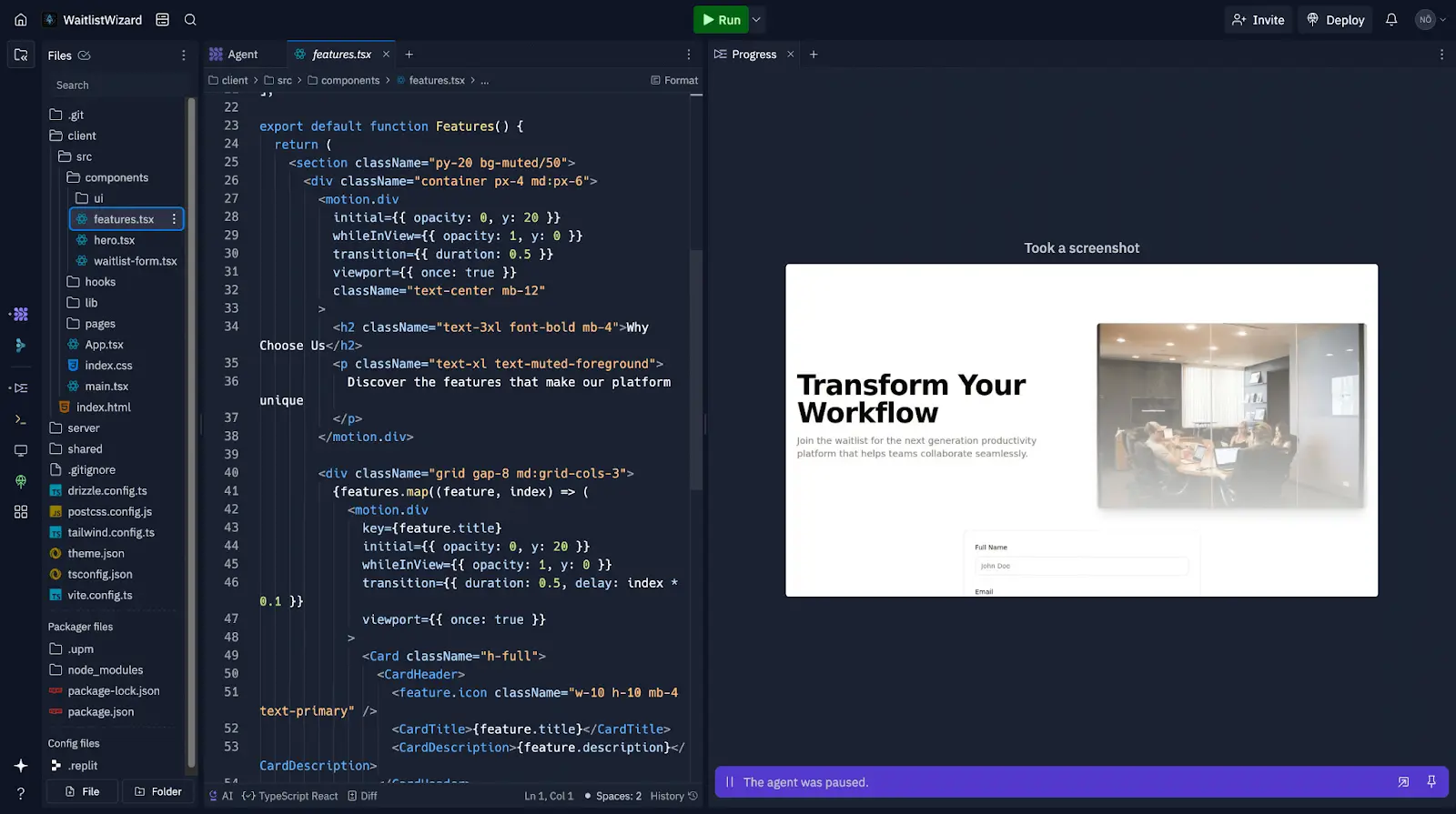
Bolt’s trick is architectural: it runs a complete Node.js development environment right inside your browser using StackBlitz’s WebContainers, so there’s no cloud VM to spin up and near-zero latency. You prompt, it scaffolds a real project (package.json, dependencies, component structure), and you can pop open a terminal and edit files directly. Over a million apps have shipped from it, and the 2025 “v2” release added a real backend layer. It’s the builder that feels most like a developer tool.
Standout features
• WebContainers: full in-browser Node.js with instant preview and a real terminal.
• Framework flexibility most builders lack: React, Vue, Svelte, Astro, Next.js.
• Bolt Cloud adds a built-in database, auth, hosting, edge functions, and analytics.
• Expo integration builds iOS and Android apps from a single prompt, plus Figma import and Claude under the hood.
| What’s great | Where it falls short |
|---|---|
|
|
Pricing
| Plan | Price | What you get |
|---|---|---|
| Free | $0 | Roughly 1M tokens a month (about 150K to 300K per day), with Bolt branding on hosted sites. |
| Pro | $20/mo | More tokens; higher Pro tiers scale up to about $50/mo. Unused tokens roll over one extra month. |
| Teams | ~$30/user/mo | Team features; tokens are per-user rather than pooled. |
| Enterprise | Custom | Advanced needs and support. |
What real users say
★ ≈4.0 to 4.2 / 5 aggregated across review platforms (tens of thousands of reviews).
Developers rave about the WebContainer speed, and the “everything runs client-side, zero latency” comments are everywhere, along with praise for the framework flexibility. The recurring complaint is the same one that haunts every credit-based builder: tokens vanish faster than expected on ambitious builds, so keep an eye on the meter.
| Bottom line: The best pick when you want to start from a prompt but keep the freedom to switch frameworks, ship mobile, and edit real code. Just watch the token counter on big projects. |
Cursor
Best for: professional developers who want AI as a force multiplier, not a replacement
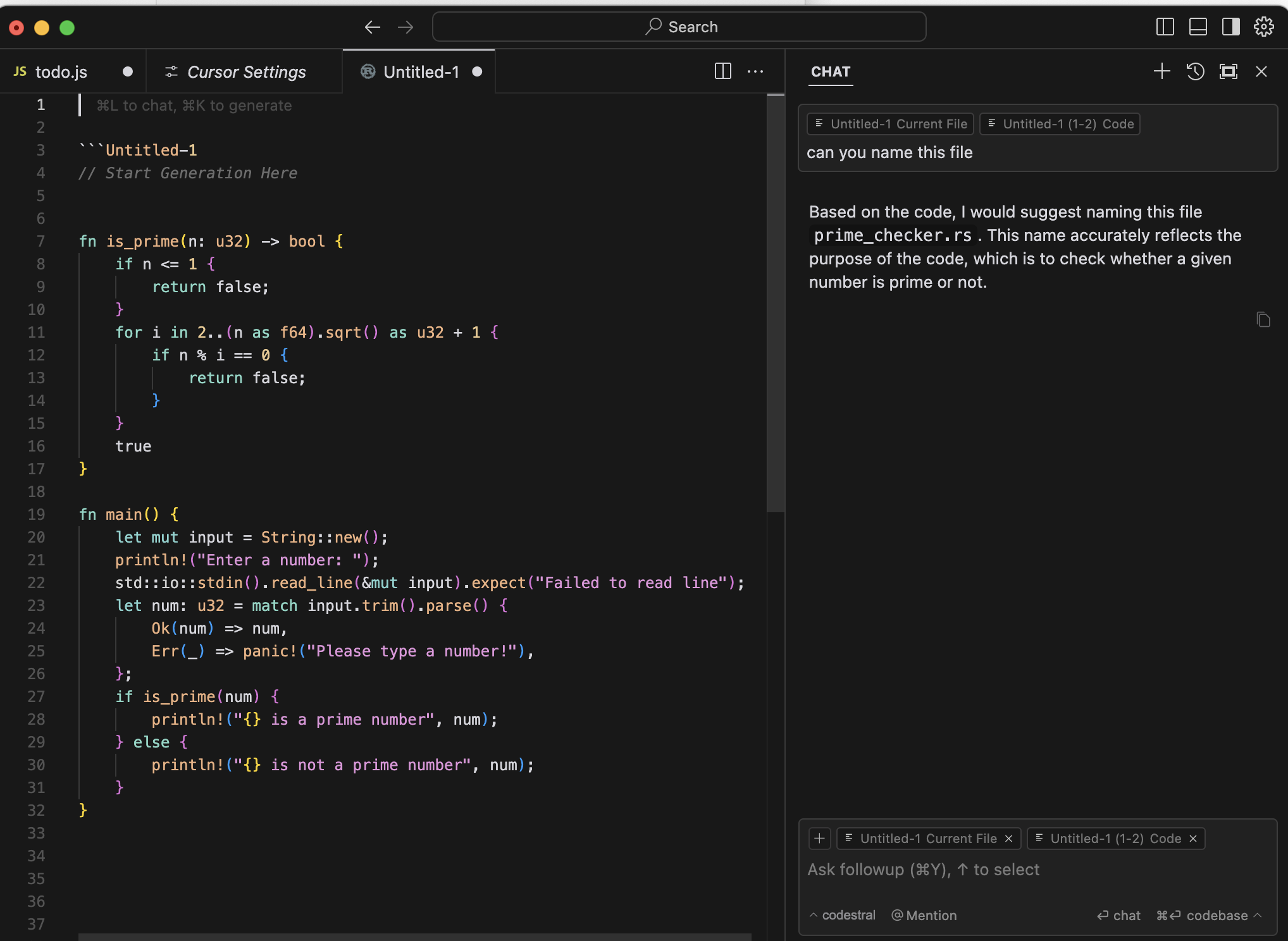
Cursor is the odd one out here, and deliberately so. It isn’t a browser IDE, it’s a desktop editor built as a fork of VS Code, with AI woven through the core rather than bolted on the side. The trade is clear: you give up “runs anywhere in a tab” for the most capable AI coding experience available today. It reached roughly $2B in annualized revenue in early 2026 with over a million paying users, and it’s the tool most working engineers actually reach for.
Standout features
• Composer or Agent mode: coordinated, multi-file edits that used to take hours.
• Best-in-class Tab autocomplete (Supermaven) that predicts your next edit.
• Codebase-aware chat (@codebase) that understands your entire project, not just the open file.
• Multi-model access (Claude, GPT, Gemini) in one place, with an unlimited “Auto” mode.
| What’s great | Where it falls short |
|---|---|
|
|
Pricing
| Plan | Price | What you get |
|---|---|---|
| Hobby | $0 | Limited: about 2,000 completions and 50 slow requests, enough to evaluate. |
| Pro | $20/mo | $16 annually. Unlimited Auto mode, frontier models, and a $20 credit pool. |
| Pro+ / Ultra | $60 / $200/mo | Roughly 3x and 20x the usage for heavier and power users. |
| Teams | $40/user/mo | $32 annually. SSO, admin controls, analytics. Enterprise is custom. |
What real users say
★ Consistently high on G2 (about 4.5/5) and commonly 9/10 in hands-on reviews.
Reviewers describe the planning and debugging as “in a different class,” and the Tab autocomplete alone often pays for the subscription in saved keystrokes. The near-universal gripe: the best models draw down credits fast, and usage can be hard to predict, so lean on Auto mode and most people stay comfortably inside the plan.
| Bottom line: If you already write code, this is the one to beat. It’s the least “Replit-like” option, but for engineers who want leverage rather than hand-holding, that’s exactly the appeal. |
v0 by Vercel
Best for: the best-looking, production-grade React front end you can generate
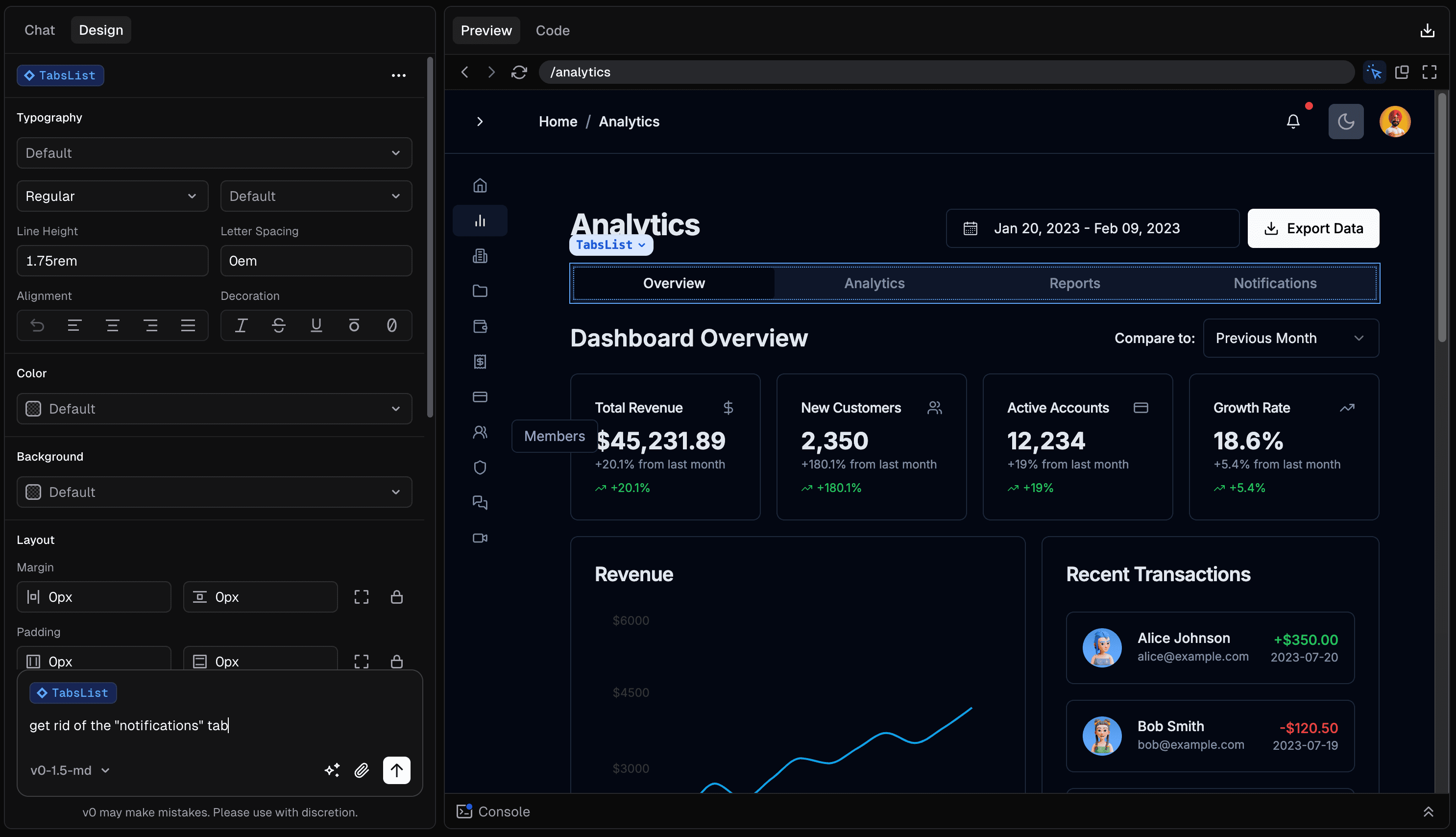
v0 (now living at v0.app) turns a prompt, a screenshot, or a Figma file into clean React, Next.js, and shadcn/ui code, and honestly, nobody produces better-looking output. A February 2026 update pushed it well past “component generator,” adding a code editor, Git integration, database connectivity, and agentic workflows. It’s a legitimate development tool now, though it’s still unapologetically frontend-first.
Standout features
• Natural-language UI to production React, Tailwind, and shadcn components and full page layouts.
• Figma and screenshot import, plus a visual design mode before you export.
• One-click deploy to Vercel with automatic SSL, CDN, and serverless functions.
• Three model tiers (Mini, Pro, Max) so you can trade cost against quality.
| What’s great | Where it falls short |
|---|---|
|
|
Pricing
| Plan | Price | What you get |
|---|---|---|
| Free | $0 | $5 monthly credits, base model, GitHub sync, Vercel deploy. |
| Premium | $20/mo | $20 in credits plus Figma import. |
| Team | $30/user/mo | Shared workspace and collaboration. |
| Business / Enterprise | $100/user/mo / Custom | Org controls and higher limits. |
What real users say
★ ≈8.2 / 10 overall, with UI-generation quality rated around 9.5/10.
The consensus is tidy: reviewers call the UI output essentially unmatched and the React code quality excellent, while flagging full-stack depth as the weak spot and the token pricing as hard to predict. It’s a specialist that’s outstanding at its specialty.
| Bottom line: If your bottleneck is a gorgeous, on-brand front end and you live in the React and Vercel world, v0 is in a class of its own. Pair it with a backend and you’ve got a complete stack. |
GitHub Codespaces
Best for: GitHub-native teams who want a real cloud environment, not an app-builder
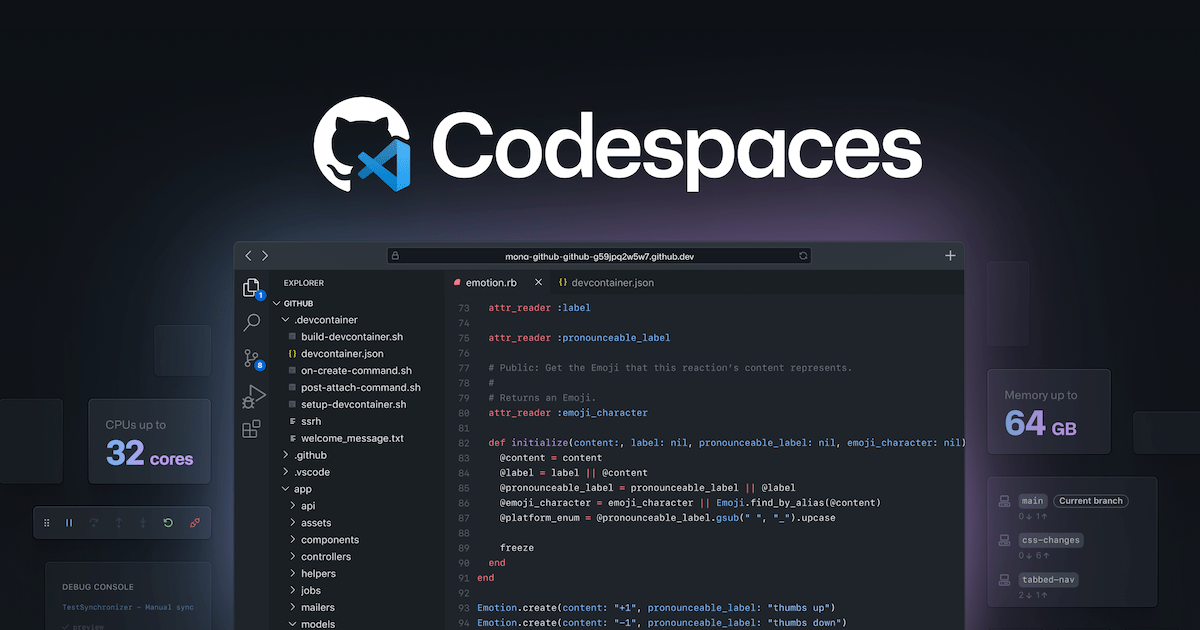
Codespaces is the closest thing to “your local VS Code, but in the cloud.” Click “Code” on any repository and you’re inside a full Linux environment within seconds, with your extensions and settings already there. It’s less about AI app-building and more about reproducible, professional development, which, for a lot of teams, is precisely the point of leaving Replit’s all-in-one model behind.
Standout features
• Full VS Code in the browser, or connect it to your desktop VS Code.
• A devcontainer.json file defines runtime, extensions, and ports once, so every teammate gets an identical setup.
• Deep GitHub integration: pull requests, issues, Actions, secrets, and prebuilds.
• Any language or stack, and VMs that scale up to 32 cores and 64GB of RAM.
| What’s great | Where it falls short |
|---|---|
|
|
Pricing
| Plan | Price | What you get |
|---|---|---|
| Free (personal) | $0 | 120 core-hours plus 15GB storage per month. |
| GitHub Pro | Included | 180 core-hours plus 20GB with a Pro account. |
| Pay-as-you-go | Usage | From about $0.18 per core-hour (2-core) and $0.07 per GB-month after your free quota. |
| Org / Enterprise | Usage | No free quota; usage billed to the account, with policy controls. |
What real users say
★ Repeatedly named the default “gold standard” cloud IDE in 2026 roundups.
For teams already living in GitHub, reviewers describe the transition as seamless and the devcontainer workflow as an industry standard. The two honest knocks: it only pays off if your whole world is GitHub, and there’s no self-hosted path.
| Bottom line: If your work already revolves around GitHub and you want an environment rather than an app-builder, this is the cleanest, most durable switch. Add Copilot for the AI layer. |
Side-by-side comparison
Enough prose. Here are the five, plus Replit as the baseline, lined up on the things that actually decide a purchase.
Comparison 1: What each tool can actually do
| Tool | Runs in browser | AI prompt-to-app | Full backend | Built-in hosting | Free tier |
|---|---|---|---|---|---|
| Replit | Yes | Yes | Yes | Yes | Yes |
| Lovable | Yes | Yes | Partial | Yes | Yes |
| Bolt.new | Yes | Yes | Yes | Yes | Yes |
| Cursor | No | Partial | Yes | No | Yes |
| v0 by Vercel | Yes | Yes | Partial | Yes | Yes |
| GitHub Codespaces | Yes | No | Yes | No | Yes |
“Yes” = fully supported. “Partial” = possible but not the tool’s strength (for example, Cursor builds whatever backend you code, and v0 is frontend-first). “No” = not built in (Codespaces has no native AI agent or hosting; you add Copilot and deploy elsewhere).
Comparison 2: Pricing side by side
| Tool | Free tier | Entry paid | Team plan | Billing model |
|---|---|---|---|---|
| Replit | 1 app, limited Agent | Core $20/mo | Pro $100/mo (15 builders) | Credits (effort-based) |
| Lovable | 5 credits/day | Pro $25/mo | Business $50/mo | Credits |
| Bolt.new | ~1M tokens/mo | Pro $20/mo | ~$30/user/mo | Tokens |
| Cursor | 2,000 completions | Pro $20/mo | Teams $40/user/mo | Flat + usage credits |
| v0 by Vercel | $5 credits/mo | Premium $20/mo | Team $30/user/mo | Tokens |
| GitHub Codespaces | 120 core-hours/mo | Usage from $0.18/hr | Org (usage) | Metered usage |
Free tiers are usable but limited. The billing model is the real budgeting variable, and it is worth understanding before you commit.
The part everyone underestimates: pricing models
If there’s one thing to internalize before you switch, it’s this. The sticker price barely matters; the billing model is what determines whether you get a surprise at the end of the month. Here’s how the three approaches actually behave.
| Model | How you’re billed | Tools that use it | Predictability |
|---|---|---|---|
| Flat subscription | One fixed monthly fee, effectively unlimited within reason. | Cursor (Auto mode) | High |
| Credits / tokens | You pay per AI generation; unused credits may expire or roll over. | Lovable, Bolt.new, v0, Replit | Low to Medium |
| Metered usage | You pay for core-hours, storage, and deployments you actually use. | GitHub Codespaces | Medium |
The pattern the whole industry has settled into by 2026 is telling: use a credit-based builder for the fast first 70% to 80% of a project, then move the complex, iterative work to a flat-rate editor where debugging loops don’t cost you per attempt. That single habit fixes most “AI coding is too expensive” complaints.
So which one should you actually pick?
Skip the paralysis. Find the row that sounds like you.
| If this is you... | Go with |
|---|---|
| You don’t code and want a full-stack MVP this week | Lovable (or Bolt.new for more framework control) |
| You want the prettiest UI possible in React or Next.js | v0 by Vercel |
| You write code daily and want maximum AI leverage | Cursor |
| You live in GitHub and want a real cloud environment | GitHub Codespaces |
| You want a browser-native full-stack builder you can edit | Bolt.new |
My honest verdict
After all of this, here’s the thing I most want you to take away: there is no single “Replit killer,” and anyone selling you one is skipping the important question, which is why you’re leaving in the first place.
If your reason is the bill: move the AI-editor part of your workflow to Cursor ($20 flat, lean on Auto mode) and host on your own infrastructure or Codespaces. You’re trading a little convenience for a lot of predictability, and for most people that trade is worth it.
If your reason is capability for non-coders: Lovable is my default recommendation for MVPs, with Bolt.new the moment you want framework freedom or a mobile app. Both are wonderful for the fast, fun 80%, so just don’t expect either to carry a complex, multi-user production app on its own.
If your reason is professionalism and reproducibility: GitHub Codespaces is the cleanest, most durable choice, especially for a team. It’s the least flashy option here and the one you’re least likely to outgrow.
The workflow I’d actually recommend isn’t “pick one tool forever.” It’s this: prototype fast in a builder (Lovable, Bolt, or v0), then graduate to Cursor or Codespaces for the hard backend logic and long-term maintenance. “Build fast, then own it” beats forcing a single tool to do everything, and it’s cheaper too.
Whatever you choose, two rules never hurt: export your code early, and keep an eye on the meter. Do those, and you can switch tools whenever your project outgrows the last one, which, if you’re building anything real, it eventually will.
| The one-line answer: Non-coder building an MVP, go Lovable. Developer who wants AI leverage, go Cursor. Team that lives in GitHub, go Codespaces. Want the best UI, go v0. Want a browser builder you can edit, go Bolt.new. |
Comments