Table of Contents
- What Good Clipping Requires
- AI Clipping Tools Compared
- 1. OpusClip : Built for Repeatable Repurposing
- 2. Vizard : Built for Broader Clip Batches
- 3. Descript : Built for Editorial Control
- 4. Riverside : Built Into Podcast Production
- 5. Klap : Built for Fast Vertical Output
- 6. Captions : Built for Mobile-First Production
- 7. Adobe Express Clip Maker : Built for Branded Campaign Clips
- Match the Tool to the Video
- Review the First Cut
- The Bottom Line
A useful short clip needs more than an interesting sentence. It must establish the subject quickly, preserve the speaker’s meaning and reach a natural ending without depending on the full podcast, webinar or interview.
AI clipping tools can find promising moments, create captions and reformat horizontal footage for vertical platforms. The difference lies in what happens after that first cut. Some tools prioritise volume and automation. Others provide more control over transcripts, layouts, branding or publishing.
This guide compares seven platforms based on the type of long-form footage they handle best and the amount of editing their clips usually need before publication.
What Good Clipping Requires
The hardest part of repurposing a long video is identifying a section that can survive outside its original context. An energetic quotation may be useless if the question has been removed. A strong opening may lead nowhere when the software cuts the answer before its conclusion.
Reframing creates another problem. Keeping a speaker’s face centred is useful for an interview, but it can damage a software demonstration if the screen disappears from the crop. Captions also need more than correct transcription. Their timing, position and line breaks affect whether the clip remains readable on a phone.
A capable AI clipper should therefore handle four connected tasks:
● It should identify complete ideas rather than extracting isolated sentences with high emotional intensity.
● It should let editors extend or shorten the selected section without rebuilding the clip from the original timeline.
● It should adapt the layout to the actual subject, whether that is a speaker, shared screen, product or presentation.
● It should produce captions that can be corrected and repositioned before export.
The best tool is not necessarily the one that returns the largest batch. It is the one that reduces the work between generation and publication.
AI Clipping Tools Compared
| Tool | Best For | Standout Strength | Starting Paid Price | Main Compromise |
| OpusClip | Regular creator repurposing | Strong combination of clipping, formatting and publishing | $15 per month | Credit use rises with source duration |
| Vizard | Webinars and large batches | Generates many candidates with a capable browser editor | From $29 per month | A large batch creates more review work |
| Descript | Editorially sensitive clips | Detailed transcript-based control | $24 monthly or $16 on annual billing | Requires more manual involvement |
| Riverside | Video podcasts and interviews | Recording and clipping remain in one project | $29 monthly or $24 on annual billing | Best value depends on recording in Riverside |
| Klap | Fast talking-head clips | Direct workflow with clear output limits | $29 per month | Higher starting price than several rivals |
| Captions | Mobile-first social creators | Vertical editing and generative finishing in one app | $24.99 per month | AI credits cover several different features |
| Adobe Express | Branded marketing clips | Strong design and brand tools after clipping | $ 4.17 per month | Highlight selection is less specialised |
Prices were checked on 29 July 2026. It might change with time and place of your area, so please check the latest pricing and plan before using the tools.
1. OpusClip : Built for Repeatable Repurposing
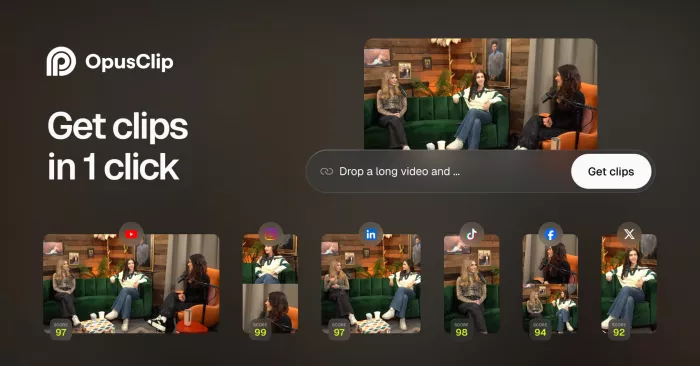
OpusClip is designed for creators who turn every podcast, interview or YouTube upload into several social posts. It accepts direct uploads as well as links from platforms and storage services including YouTube, Google Drive, Vimeo, Zoom, Twitch, LinkedIn, Loom and Riverside.
The platform selects possible highlights, adds animated captions and prepares different social formats. Its Virality Score ranks the generated clips using factors such as the opening hook, structure and relevance. That ranking helps when reviewing a large batch, but it cannot determine whether a quotation has lost an important qualification from the original discussion.
Key Features
● AI clipping uses spoken content, topic changes and visual signals to identify potential highlights rather than dividing the source at fixed intervals.
● AI Copilot accepts instructions about the desired topic, timeframe and clip duration, giving creators more control over the first batch.
● The editor supports caption changes, trimming, filler-word removal, text, music and supporting media.
● Pro adds AI B-roll, multiple aspect ratios, dubbing, social scheduling and exports to Premiere Pro or DaVinci Resolve.
Advantages and Limitations
| Advantages | Limitations |
| Broad import support makes it practical for repurposing videos stored across several services. | High-scoring clips can still begin without enough context or omit the speaker’s final explanation. |
| Prompt controls provide more direction than accepting a completely automatic selection. | Automatic framing needs review when slides, products or screen demonstrations matter as much as the speaker. |
| Scheduling and professional-editor exports support a workflow beyond basic clip generation. | Credits are consumed according to source-video length, including sections that produce no publishable material. |
OpusClip Pricing
Current OpusClip plans combine monthly processing credits with different editing and publishing controls.
| Plan | Price | Main Allowance |
| Free | $0 | 60 monthly credits, 1080p clips, watermark, no editor and three-day export availability |
| Starter | $15 per month | 150 monthly credits, editor, one brand template, filler removal and direct social posting |
| Pro Monthly | $29 per month | Two seats, two brand templates, six social connections, AI B-roll and scheduling |
| Pro Annual | $174 per year | 3,600 credits supplied upfront with the complete Pro feature set |
| Business | Custom | Tailored credits, seats, storage, integrations and priority processing |
Best For
OpusClip suits podcasters, educators, interview channels and marketing teams that publish long-form video consistently. Clear, speech-led footage gives it the strongest material for identifying topics and clip boundaries.
Practical Judgement
Starter is the sensible choice for a solo creator who needs editing and watermark-free exports. Pro is better justified by scheduling, team access and professional-editor integration than by a major difference in basic highlight selection.
2. Vizard : Built for Broader Clip Batches
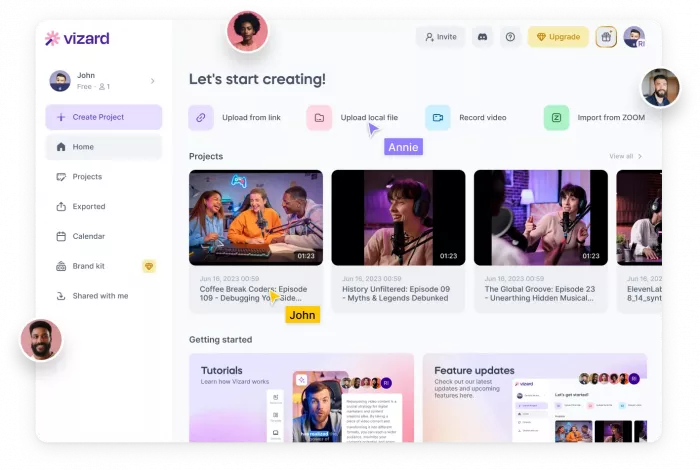
Vizard is useful when one long recording contains several possible content angles. It transcribes the video, identifies candidate sections and places the results inside a browser editor where the transcript, captions, timing and layout can be adjusted.
This approach works particularly well for webinars, panels and educational videos. A single recording may contain a short explanation, a mistake to avoid, a useful statistic and a customer example. Vizard exposes those separate possibilities instead of selecting only one dominant theme.
Key Features
● AI clipping generates multiple candidates and allows users to create new versions from the same source.
● Text-based editing removes or shortens footage when the corresponding transcript is changed.
● Automatic captions, keyword highlighting and subtitle translation support multi-platform publishing.
● Paid plans add 4K exports, AI B-roll, custom templates, scheduling and multiple connected social accounts.
Advantages and Limitations
| Advantages | Limitations |
| A broad first batch can uncover valuable sections spread throughout a webinar or interview. | Similar moments may appear several times, increasing the time needed to reject duplicates. |
| The browser editor gives enough control to repair a promising selection without starting again. | Every uploaded minute consumes a credit, regardless of how much of the source becomes usable content. |
| Paid plans combine clip creation, branding and social publishing. | The free plan restricts exports to 720p and retains projects for only three days. |
Vizard Pricing
Vizard counts one uploaded minute as one credit. Creator and Business plans begin with 600 monthly credits, with larger allowances available at higher prices.
| Plan | Monthly Price | Annual Equivalent | Main Allowance |
| Free | $0 | $0 | 60 credits, 720p exports, one social account and three-day storage |
| Creator | From $29 | From $14.50 per month | 600 monthly credits, 4K export, six social accounts and 100GB storage |
| Business | From $49 | From $24.50 per month | Shared workspace, brand kit, 20 social accounts and unlimited storage |
Best For
Vizard fits agencies, consultants, webinar marketers and educators who want several distinct posts from each source rather than one or two automatic highlights.
Practical Judgement
Creator offers enough processing capacity for an individual handling several long videos each month. Business mainly earns its higher price through collaboration, brand management and additional publishing connections.
3. Descript : Built for Editorial Control
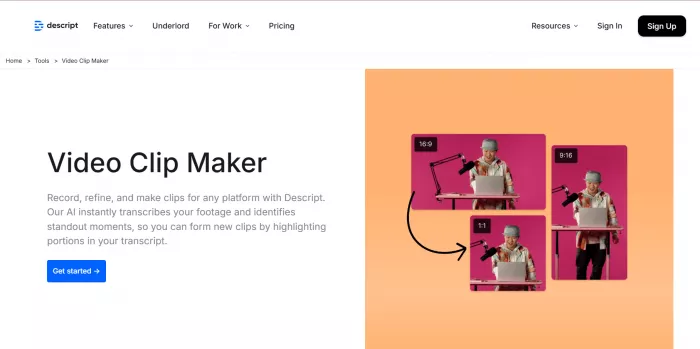
Descript treats the transcript as the main editing surface. Deleting words removes the matching audio and video, which makes it easier to refine a clip without repeatedly moving through a traditional timeline.
Its Create Clips feature can identify potential social extracts, while Underlord helps with cleanup and editing tasks. The main advantage is not the number of suggestions it produces. It is the ease with which an editor can restore a missing setup, remove a repeated sentence or extend an answer to its natural conclusion.
Key Features
● Text-based editing allows spoken footage to be changed by editing its transcript.
● Create Clips finds short sections and can work within requested duration ranges.
● Studio Sound, filler-word removal and speaker detection improve podcast and interview footage.
● Creator adds 4K exporting, full Underlord access, more AI credits and a royalty-free media library.
Advantages and Limitations
| Advantages | Limitations |
| Transcript control helps preserve context, qualifications and complete endings. | It expects more editorial involvement than tools designed around instant batch generation. |
| Audio repair, captions and clip refinement remain inside one project. | Media hours and AI credits are measured separately, so frequent use must be monitored across two limits. |
| Near-usable clips can be repaired quickly rather than regenerated repeatedly. | Social scheduling and high-volume distribution are not its main strengths. |
Descript Pricing
Descript prices each paid plan per editor and provides separate monthly allocations for media hours and AI credits. The lower amount shown is the annual-billing rate.
| Plan | Annual Rate | Monthly Rate | Main Allowance |
| Free | $0 | $0 | 1 media hour, 100 AI credits and 720p exports |
| Hobbyist | $16 per person/month | $24 | 10 media hours, 400 AI credits and 1080p exports |
| Creator | $24 per person/month | $35 | 30 media hours, 800 AI credits and 4K exports |
| Business | $50 per person/month | $65 | 40 media hours, 1,500 AI credits and Brand Studio |
| Enterprise | Custom | Custom | Tailored usage, security and organisational controls |
Best For
Descript is best for podcast editors, educators and interview producers who care about the structure and accuracy of each clip more than maximum output volume.
Practical Judgement
Hobbyist is suitable for occasional projects. Creator is the stronger working plan for weekly production because the higher media allowance, 4K exporting and broader Underlord access leave room for regular revisions.
4. Riverside : Built Into Podcast Production
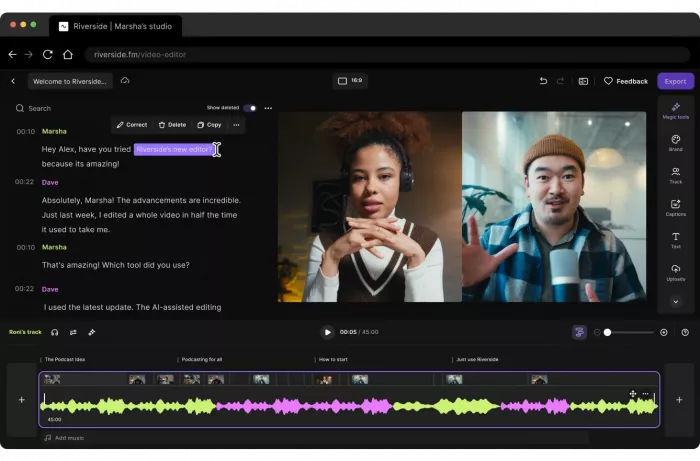
Riverside approaches clipping as one stage of a larger recording workflow. Magic Clips identifies highlights from Riverside sessions or uploaded footage, while the editor can shape clips through the transcript and apply vertical layouts, captions and brand presets.
Its most important advantage appears before editing begins. Riverside records separate local tracks for participants, giving the platform cleaner source material and more flexibility when changing speakers or constructing split-screen layouts.
Key Features
● Magic Clips finds potential highlights automatically and supports more focused selections by topic or speaker.
● Separate participant tracks allow cleaner audio and more flexible multi-person layouts.
● Text-based editing, silence removal, filler-word removal and audio enhancement simplify conversational edits.
● Pro provides 4K output, unlimited transcription, Magic Clips, show notes and podcast publishing tools.
Advantages and Limitations
| Advantages | Limitations |
| Recording, separate tracks, transcription and repurposing remain connected in one project. | Much of the subscription’s value is lost when recordings are produced elsewhere. |
| Speaker information improves the handling of remote interviews and multi-person podcasts. | The free plan exports at up to 720p and includes a Riverside watermark. |
| Pro includes podcast hosting and distribution alongside editing. | Some generative functions use separate AI credits beyond the core plan features. |
Riverside Pricing
Riverside offers monthly subscriptions and discounted annual billing. Pro falls from $29 to $24 per month on an annual commitment, while Grow falls from $39 to $34.
| Plan | Monthly Price | Annual Rate | Main Allowance |
| Free | $0 | $0 | Two one-off hours of multitrack downloads, 720p exports, watermark and Magic Clips |
| Pro | $29 | $24 per month | 15 monthly download hours, 4K, unlimited transcription and one studio |
| Grow | $39 | $34 per month | 20 download hours, two studios, scheduling, hosting and audience tools |
| Webinar | $99 | $79 per month | 25 download hours, three studios and webinar tools |
| Business | Custom | Custom | Unlimited studios, storage, production controls and integrations |
Best For
Riverside is the natural choice for video podcasts, remote interviews and recurring shows already recorded on the platform.
Practical Judgement
Pro provides the clearest value for a regular podcast. Grow is only necessary when social scheduling, newsletters, livestreaming and audience-growth tools also belong in the same production system.
5. Klap : Built for Fast Vertical Output
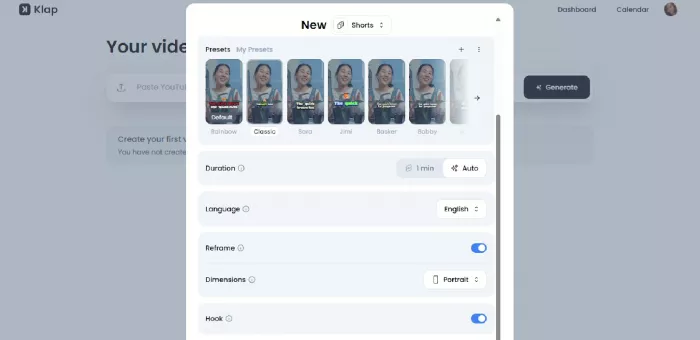
Klap focuses on turning speech-led videos into TikToks, Reels and YouTube Shorts without requiring a full editing setup. It identifies possible highlights, adds captions and uses AI Reframe 2 to follow the active speaker or another important subject.
Its newer reframing model also supports layouts such as screencasts, split screens and gaming footage. Even so, Klap remains most dependable with podcasts, interviews, lessons and product reviews where spoken content provides a clear structure.
Key Features
● AI clipping extracts several scored sections from each uploaded source.
● AI Reframe 2 adapts videos for vertical or square output and can recognise different scene layouts.
● Editable captions and transcription are available across 52 supported languages.
● Higher plans add 4K downloads, AI dubbing and larger monthly video and clip allowances.
Advantages and Limitations
| Advantages | Limitations |
| The focused interface is easier to learn than a complete desktop editor. | Its $29 entry plan is expensive for creators processing only one or two videos per month. |
| Plan limits are expressed through source videos and finished clips rather than an abstract credit pool. | The Basic tier limits source videos to 45 minutes and exports to HD. |
| Reframing covers more layouts than a basic face-tracking crop. | Dense software tutorials may still require manual composition changes. |
Klap Pricing
Klap offers monthly plans and discounted annual rates. The official annual prices currently equal $23, $63 and $151 per month for its three paid tiers.
| Plan | Monthly Price | Annual Equivalent | Main Allowance |
| Free Trial | $0 | $0 | One source video |
| Basic | $29 | $23 per month | 10 videos up to 45 minutes, 100 clips and HD downloads |
| Pro | $79 | $63 per month | 30 videos up to two hours, 300 clips, 4K and AI dubbing |
| Pro+ | $189 | $151 per month | 100 videos up to three hours, 1,000 clips, 4K and AI dubbing |
Best For
Klap suits solo creators, coaches, educational channels and interview producers who want a direct workflow with predictable monthly output limits.
Practical Judgement
Basic works for shorter videos and modest publishing schedules. Pro becomes necessary for weekly podcasts longer than 45 minutes, 4K delivery or multilingual versions.
6. Captions : Built for Mobile-First Production
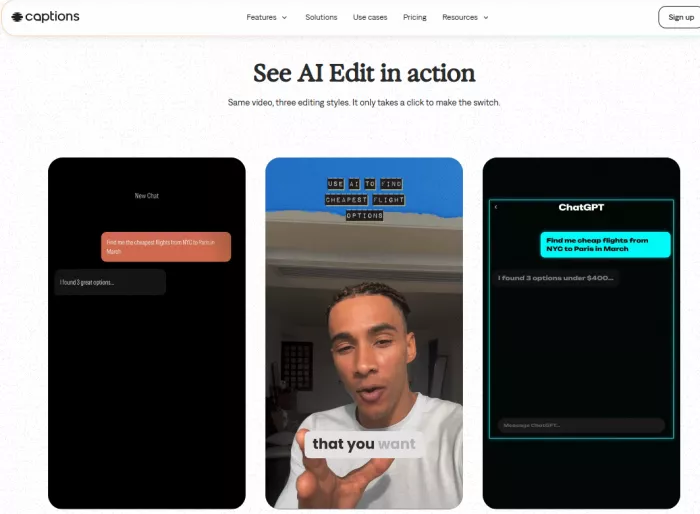
Captions treats long-to-short clipping as part of a wider vertical-video workflow. AI Shorts accepts an uploaded video or a public or unlisted YouTube URL, then generates several clips that can be reviewed and edited inside the platform.
Source videos must be between four minutes and two hours. AI Shorts supports more languages on desktop than on iOS, and generation can take up to an hour for longer files.
Key Features
● AI Shorts identifies potential social clips from podcasts, interviews, webinars and streams.
● The editor provides trimming, resizing, captions, transitions and other vertical-video controls.
● Max adds AI Edit styles, a chat-based editor, AI actors and generated supporting media.
● Scale tiers provide larger monthly credit pools and access to higher-level generative models.
Advantages and Limitations
| Advantages | Limitations |
| The vertical-first workspace makes it easier to assess text placement and framing on a phone. | Long recordings may take considerably longer to process than simpler desktop clippers. |
| Clipping, caption styling and generative finishing remain in one application. | The same credits are used by multiple AI features, making monthly consumption harder to predict. |
| Desktop support expands the number of languages available for AI Shorts. | Many Max features are unrelated to clipping and may be unnecessary for straightforward repurposing. |
Captions Pricing
Captions’ current public pricing page lists Free, Max, three Scale levels and Enterprise. Displayed prices and features reflect its iOS plans.
| Plan | Price | Main Allowance |
| Free | $0 | Traditional editing, limited caption styles and no recurring AI-credit allocation |
| Max | $24.99 per month | 500 credits, AI Edit styles, chat editing and generated media |
| Scale | $69.99 per month | 1,400 credits and higher-level generative models |
| Scale 2x | $139.99 per month | 2,800 credits |
| Scale 4x | $279.99 per month | 5,600 credits |
| Enterprise | Custom | Bulk credits, custom seats, onboarding and account management |
Best For
Captions fits creators who produce and approve most short-form content on a phone and also use generative tools for B-roll, sound or social-video finishing.
Practical Judgement
Max is the relevant entry tier for serious AI use. The Scale plans make sense only when clipping is part of a much larger generative-video workload.
7. Adobe Express Clip Maker : Built for Branded Campaign Clips
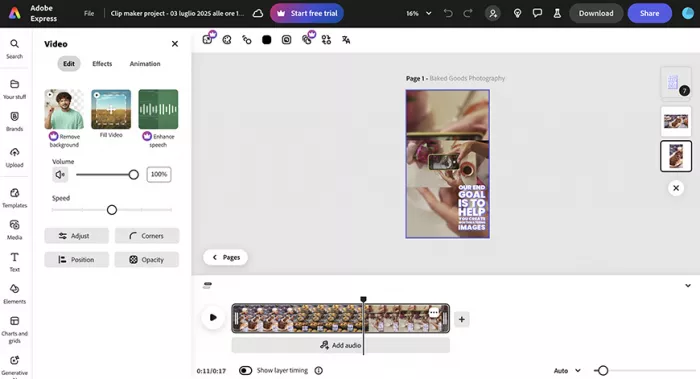
Adobe Express Clip Maker automatically extracts short sections from uploaded videos and opens them inside the broader Express editing environment. It adds captions and provides tools for changing length, layout and visual treatment.
Its main strength appears after the moment has been chosen. Marketing teams can add logos, campaign colours, title cards, stock footage, music and a closing call to action without moving the clip into another design platform.
Key Features
● Clip Maker identifies key moments in podcasts, lessons, product reviews and other long-form videos.
● Automatic captions and resizing prepare clips for different social channels.
● The Express editor provides templates, animation, stock media, music and collaborative editing.
● Premium adds brand kits, one-click resizing, 4K export, broader scheduling and 100GB of storage.
Advantages and Limitations
| Advantages | Limitations |
| Clip Maker is available through the free Adobe Express plan. | Its moment selection is less specialised than tools centred on transcript analysis. |
| Design and brand tools can turn a plain excerpt into a complete campaign asset. | Teams needing precise conversational edits may still require Descript or a conventional editor. |
| Adobe Stock assets and scheduling reduce the number of separate tools needed for finishing. | Many Premium benefits relate to general design rather than clip discovery. |
Adobe Express Pricing
Adobe’s current India pricing lists a free individual plan and Premium at ₹398.84 per month including GST.
| Plan | Price | Main Allowance |
| Free | $0 | Clip Maker, basic editing, limited assets, one scheduled account per network and 5GB storage |
| Premium | $4.17 per month | Brand kits, one-click Resize, premium assets, 250 AI credits and 100GB storage |
| Teams | $4.38 per licence/month for the introductory first year, excluding GST | Premium features, admin controls, shared assets and 1TB storage per user |
| Enterprise | Custom | Advanced security, administration and organisation-wide controls |
Best For
Adobe Express suits educators, small businesses and marketing teams repurposing webinars, interviews and product videos that must follow an established visual identity.
Practical Judgement
The free plan is enough to test the clipping workflow. Premium is worth paying for when brand kits, premium assets, resizing and scheduling are part of regular campaign production.
Match the Tool to the Video
The source recording should guide the final choice.
For podcasts and interviews, OpusClip provides the strongest balance of automation and publishing. Descript is better when wording and context need careful protection. Riverside becomes the most efficient option when the episode is already recorded there.
For webinars and educational sessions, Vizard’s broader candidate batch helps identify separate lessons across a long recording. Adobe Express is more useful when each lesson needs branded graphics and campaign finishing.
For talking-head YouTube videos, Klap provides a straightforward route to vertical clips with predictable output limits. Captions suits creators who prefer to review and finish the results in a mobile-oriented environment.
For software demonstrations and screen recordings, automatic framing should never be accepted without review. A tool may correctly identify the active speaker while removing the interface, slide or product that gives the explanation meaning.
Review the First Cut
An AI-generated clip should be treated as an assembly edit rather than a completed post.
Watch it without referring to the original video. The opening should identify the subject quickly, particularly when the first sentence contains words such as “this,” “that” or “it.” Those openings often indicate that an earlier explanation has been removed.
Check the ending with the same care. Some tools stop after the strongest sentence even when the next line contains the example, qualification or practical takeaway.
Captions require manual checks for names, figures and technical terms. The crop should also be viewed at phone size, where subtitle blocks and face tracking may cover material that looked acceptable on a desktop monitor.
Reject duplicates before polishing. Five clips covering different questions will extend the useful life of a long video more effectively than five variations of the same opinion.
The Bottom Line
OpusClip is the strongest all-round option for creators who need clipping, social formatting and publishing inside one repeatable system. Vizard is better for extracting a broad content batch from webinars and long educational sessions.
Descript offers the most useful editorial control, while Riverside provides the smoothest route from remote podcast recording to social clips. Klap keeps talking-head repurposing simple, and Captions suits mobile-first creators who also use generative editing tools.
Adobe Express is the best fit when clip selection is only the first stage and the result still needs branding, campaign graphics and several platform versions.
The right tool is not the one that generates the greatest number of files. It is the one that consistently finds complete ideas and leaves the smallest amount of repair work before publication.
Comments