If you only read one thing Cursor wins on raw speed of the inner loop: Tab completion, the Composer model, and running several agents in parallel without leaving the editor. Windsurf wins the moment the codebase is bigger than your head: Codemaps, Fast Context, and the SWE-1.6 model make old, sprawling repos feel navigable. Both cost $20 a month for Pro now, so the price argument that decided this matchup in 2025 is dead. What follows is what actually separates them. |
Why I ran this test again
I picked Cursor in early 2025 for a boring reason: it felt like VS Code with a better brain, and Windsurf was the cheaper alternative I recommended to friends on a budget. That framing collapsed this year. On March 19, 2026, Windsurf raised its Pro plan from $15 to $20 a month and swapped its credit system for daily and weekly quotas, matching Cursor's price exactly. If you subscribed before that date you keep the $15 rate, but for anyone choosing fresh, the discount is gone.
So I did what the situation demanded. I put both editors on the same machine and split my actual work between them for several weeks: a mid-sized Next.js product with a messy API layer, a Python data pipeline, and one genuinely unpleasant legacy repo I inherited and did not write. Same tasks, same prompts where possible, both on paid plans, notes kept in a plain text file as I went. No affiliate links, no sponsorship, just the two invoices on my card statement.
The short version: these are no longer the same product at two price points. They have split into two philosophies, and which one deserves your day depends on what your day looks like.
What changed between 2025 and now
You cannot compare these tools fairly without the backstory, because both went through their biggest year yet.
July 2025. Windsurf's planned sale to OpenAI, reported around a $3 billion valuation, falls apart. Google hires CEO Varun Mohan and co-founder Douglas Chen in a licensing deal reported at $2.4 billion. Cognition, the company behind the Devin agent, acquires the remaining team, brand, and IP for a reported figure of roughly $250 million.
October 29, 2025. Both companies ship on the same day. Cursor 2.0 launches with Composer, its first in-house coding model, plus a multi-agent interface built on git worktrees. Cognition releases SWE-1.5 for Windsurf, served on Cerebras hardware at up to 950 tokens per second.
November 2025. Windsurf ships Codemaps, AI-annotated visual maps of a codebase, generated by SWE-1.5 in fast mode or Claude Sonnet in smart mode.
Early 2026. Cursor 3 lands with Background Agents, Plan Mode, subagents, and support for up to eight parallel agents.
March 19, 2026. Windsurf moves Pro to $20 a month with daily and weekly quotas. Existing subscribers are grandfathered at $15. The change draws loud complaints, much like Cursor's own pricing controversy in July 2025.
April 15, 2026. Windsurf 2.0 ships with the Agent Command Center, one panel supervising local Cascade agents and cloud Devin agents together.
Two things matter here. First, both companies now bet their identity on in-house models rather than pure resale of frontier APIs. Second, Windsurf is no longer a scrappy startup. It is the desktop arm of Cognition, which means Devin, its cloud coding agent, is now wired directly into the editor.
Pricing in 2026: same sticker, different meter
The headline numbers are nearly identical. The billing mechanics are not, and the mechanics are what you feel on a Thursday afternoon.
| Plan level | Cursor | Windsurf |
| Free | Hobby tier, limited Tab and a small chat allowance | Free tier with unlimited Tab completions and weekly premium credits |
| Entry paid | Pro, $20/month, monthly usage pool | Pro, $20/month, daily and weekly quotas ($15 grandfathered) |
| Middle | Pro+, $60/month | No equivalent tier |
| Heavy use | Ultra, $200/month | Max, $200/month |
| Teams | $40 per seat/month | $40 per seat/month |
Prices as of September 2026; always confirm on the official pricing pages before subscribing.
Cursor gives you a monthly pool and lets you drain it however you like. Burn most of it in one heroic weekend refactor if you want. Windsurf's quotas refresh daily and weekly, which protects you from blowing the month in a week but also means a hard stop can arrive mid-task, and you wait for the reset. I hit that wall once during a long Cascade session and it stung. On the other hand, Windsurf's Tab completions never touch the quota on any plan, including Free, which makes its free tier the most generous serious option on the market.
One structural gap worth naming: Cursor's Pro+ at $60 gives heavy individual users a rung between $20 and $200. Windsurf has nothing there. If your usage sits in that awkward middle band, Cursor's ladder fits better.
The feature scoreboard
| What I compared | Cursor | Windsurf | Edge |
| Inline autocomplete | Tab is fast, low-noise, and right more often than not | Good and unlimited on every plan, slightly behind on acceptance | Cursor |
| In-house model | Composer, tuned for sub-30-second agent turns | SWE-1.6, with SWE-1.5 serving at up to 950 tok/s on Cerebras | Tie, different goals |
| Agent workflow | Up to 8 parallel agents, Plan Mode, Background Agents in cloud VMs | Cascade plus Devin cloud agents in one Command Center | Cursor for parallelism |
| Codebase understanding | Solid indexing and repo-aware chat | Codemaps and Fast Context, built for huge repos | Windsurf |
| Third-party models | Claude, GPT, Gemini families, deepest selection | Claude, GPT, Gemini, plus open-weight options | Cursor, slightly |
| Code review | Bugbot reviews GitHub pull requests | Devin can review and iterate on branches | Tie |
| Enterprise posture | SSO, analytics, admin controls on Business | SSO, RBAC, hybrid deployment, FedRAMP and HIPAA options | Windsurf |
| Free tier | Enough to evaluate, limits show fast | Unlimited Tab plus weekly premium credits | Windsurf |
Living in Cursor: speed as a feature
Cursor's whole personality is latency. Composer, the in-house model that arrived with 2.0, is not the smartest model you can pick, and Cursor does not pretend otherwise. It exists so that most agent turns finish in under 30 seconds, and in practice that changes behavior. When a response
Cursor's whole personality is latency. Composer, the in-house model that arrived with 2.0, is not the smartest model you can pick, and Cursor does not pretend otherwise. It exists so that most agent turns finish in under 30 seconds, and in practice that changes behavior. When a response arrives before your attention drifts, you stay in the problem. When it takes a minute, you check Slack, and the afternoon leaks away.
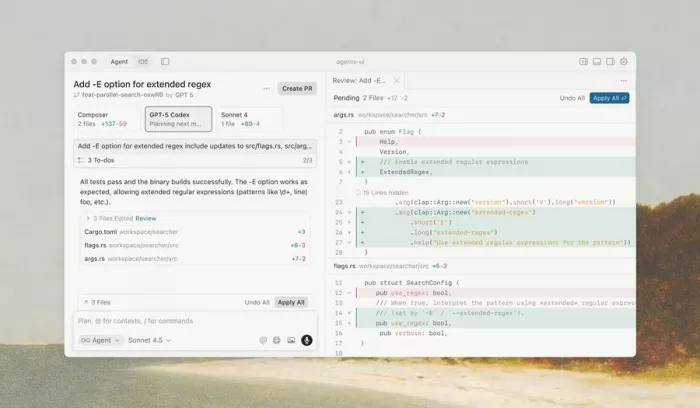
The 2026 releases pushed this into orchestration territory. Plan Mode makes the agent write out a numbered list of files it intends to touch and waits for approval, which is the single feature that made me trust it with larger changes. Background Agents clone your repo into a cloud VM, work on a branch, and hand back a pull request while you keep coding locally. Fanning out subagents on a wide refactor genuinely works, though reviewing eight streams of diffs is its own skill you have to build.
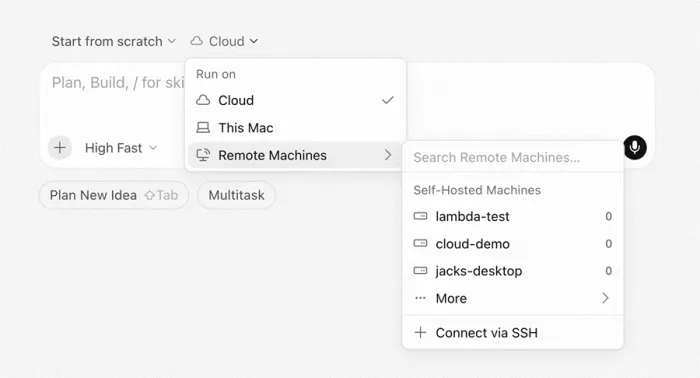
Launching an agent in Cursor: run it in the cloud, on your own machine, or on a remote box over SSH. Image: Cursor changelog, cursor.com.
Where Cursor earned my time
• Tab completion that reads like it pair-programmed with me for a month
• Composer for quick agent turns, Claude or GPT for the hard reasoning
• Plan Mode approval gates before multi-file edits land
• Background Agents turning dependency upgrades into review-only work
Where it cost me
• The monthly pool invites binge usage, then a lean end of month
• Parallel agents multiply review load faster than they multiply output
• On the inherited legacy repo, it edited confidently in places it understood shallowly
• Team seats include less usage than individual Pro, which surprises new teams
Living in Windsurf: understanding as a feature
Windsurf after the Cognition acquisition is a different product than the one I dismissed as the budget pick. SWE-1.5 running on Cerebras hardware was the first agent I have used where the response felt immediate rather than merely fast, and SWE-1.6 is now the default in-house option. Small edits that used to carry a 20-second wait in other tools land in a few seconds. Cognition's own framing, roughly 13 times faster than a comparable frontier model, matched what I felt, even if I never timed it with a stopwatch.
But the feature that justified the second invoice was Codemaps. You press Cmd+Shift+C, describe a task, and Windsurf draws an annotated map of the relevant code: which files matter, how calls flow, where the real entry points hide. On my legacy repo, the one nobody at my old team fully understood, a smart-mode Codemap gave me in half an hour the mental model I had budgeted two days for.
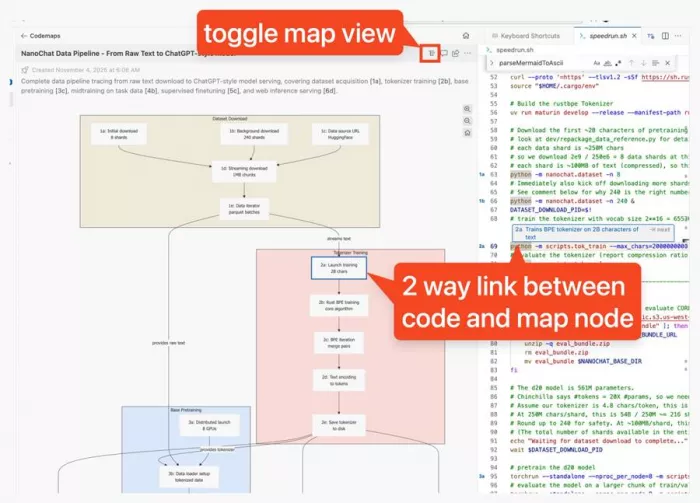
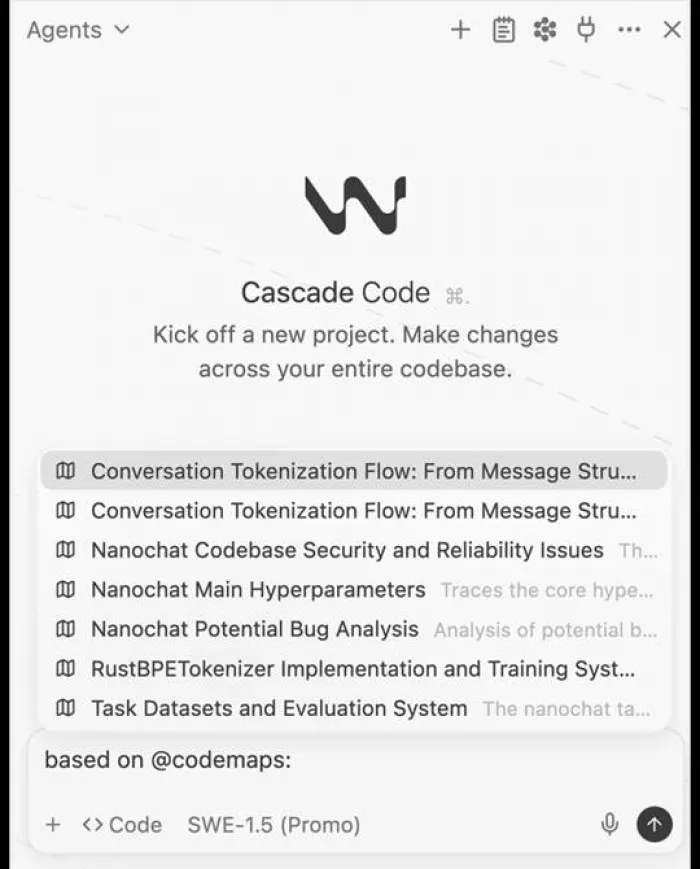
Fast Context, powered by the SWE-grep retrieval models, then feeds that understanding to Cascade so the agent starts editing the right files instead of searching for them. You can reference a Codemap directly inside a Cascade prompt with an @-mention, which is a small touch that quietly changes how you delegate: you hand the agent your mental model along with the task.
Where Windsurf earned my time
• Codemaps for orientation in code I did not write
• Fast Context making large-repo retrieval near instant
• SWE-1.6 speed that keeps you inside the task
• Agent Command Center watching local and Devin cloud agents in one place
Where it cost me
• Daily quota resets can pause you mid-flow on heavy days
• The March 2026 pricing change eroded goodwill, and the community is smaller
• Codemaps adds little on a fifty-file side project
• No middle plan between $20 and $200 for heavy solo users
So who should pick which?
Pick Cursor if this sounds like you
• You write greenfield or mid-sized code daily and feel autocomplete quality in your fingers
• You want to delegate chores to parallel or background agents and review pull requests
• You value the biggest community, plugin ecosystem, and fastest release cadence
• Your usage varies month to month and a flexible pool suits you
Pick Windsurf if this sounds like you
• You spend your days inside a large monorepo or inherited legacy code
• You onboard engineers often, or you are the one being onboarded
• Your company needs RBAC, hybrid deployment, or FedRAMP and HIPAA compliance
• You want the strongest free tier, or you are grandfathered at $15
My verdict after the dust settled
I went into this expecting to write “Cursor, obviously” and cancel the other subscription. I am keeping both, and that is not fence-sitting, it is a reflection of how differently my weeks are shaped. On the days I am building, Cursor is the one open on my main monitor. The Tab completion still spoils me for everything else, Plan Mode keeps agent edits from surprising me, and shipping a feature while a Background Agent quietly rewrites my test suite on a branch feels like having a second hire I never interviewed. If someone told me they code fresh features forty hours a week and could only pay for one tool, I would say Cursor without hesitating. But the day the client handed me that decade-old repo, Windsurf paid for its entire year in one afternoon. Codemaps turned dread into a diagram, and Cascade with Fast Context edited the right files on the first pass while I was still sipping the same coffee. No amount of autocomplete polish replaces actually understanding code you did not write, and right now Windsurf is the only editor that treats understanding as the product. So here is the answer the headline promised. Cursor is worth your day if your day is mostly writing new code fast. Windsurf is worth your day if your day is mostly wrestling with code that already exists. At the same $20, the wrong choice is not picking the loser, because there is not one. The wrong choice is picking the tool built for someone else's day instead of yours. |
Comments