Meeting notes used to be the tax you paid for collaboration. Somebody half-listened, scribbled a few bullets, and the real decisions evaporated by Friday. By 2026 that tax is mostly optional, because a good AI note taker now sits in (or quietly beside) the call, captures every word, and hands back a clean summary with action items before the next meeting even starts.
The catch is that the category has quietly split into very different products wearing the same label. Some send a visible bot into your Zoom room. Some record silently from your laptop so nobody in the call knows. Some are built for a single founder running back-to-back calls, and others for a 200-rep sales floor that needs every conversation logged into Salesforce. Picking by headline price alone is how teams end up paying for minutes they never use, or hitting a wall of AI credits two weeks in.
To cut through the marketing, this guide lines up the four most-used tools on the things that actually matter once you are past the demo: what they capture, how good the AI output is, how they handle multiple speakers, how they fit the rest of your stack, and what they really cost. What follows is a clear-eyed picture of where each one earns its subscription and where it quietly costs you time instead.
| What to weigh. Five things that actually matter once the novelty wears off: transcription accuracy on real audio, how usable the summary and action items are without heavy editing, speaker identification, how it fits the rest of your stack (calendar, CRM, docs), and the true cost after the free tier runs out. Pricing in this space moves fast, so treat every number here as a starting point and confirm on the vendor page before you buy. |
The four, at a glance
| Tool | Best for | Paid from | Free tier | Capture |
|---|---|---|---|---|
| Fathom | Best free plan, easiest start | $16 / user / mo | Unlimited recording | Bot, going bot-free |
| Otter.ai | Live transcription, Zoom teams | $8.33 / user / mo | 300 min / month | Bot |
| Fireflies.ai | Sales and ops rollouts | $10 / user / mo | Unlimited transcripts | Bot |
| Granola | Bot-free notes for solo pros | $14 / user / mo | 30-day history | Bot-free |
The tools, ranked by fit
Fathom ★ Top pick for most peopleBest free plan |
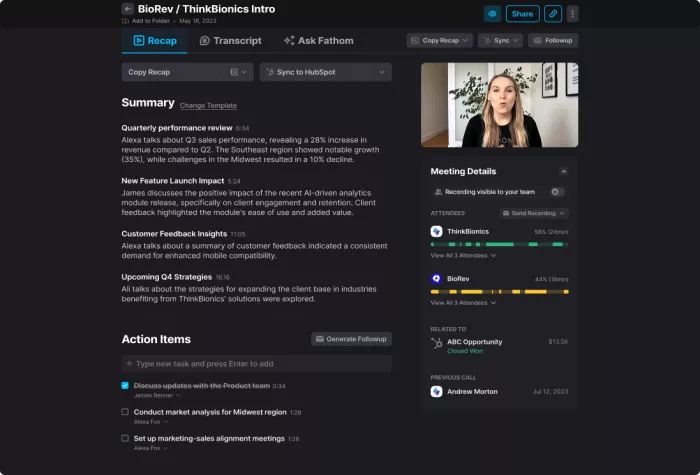
Free tier Unlimited | Paid from $16 / user / mo | Capture Bot, going bot-free | Works on Zoom, Meet, Teams |
Fathom built its reputation on the most generous free plan in the category, and that is still the headline. The free tier records, transcribes, and stores an unlimited number of meetings across Zoom, Google Meet, and Microsoft Teams, which is more than most paid plans offered two years ago. The interface stays fast and uncluttered, summaries land within seconds of hanging up, and Ask Fathom lets you interrogate a call afterward instead of scrubbing the transcript.
There is one catch that tightened in 2026. The advanced AI summaries and action items are now limited to the first five calls each month on the free plan, after which you drop to a basic template. For anyone in more than a meeting a week, that nudge toward Premium is deliberate. Bot-free capture has also started appearing, beginning with Zoom on Mac, and transcription now covers 38 languages.
| Feature | Detail | |
|---|---|---|
| Free recording | Unlimited meetings, transcripts, and storage | |
| AI summaries | Advanced summaries and action items capped at 5 calls / month on free | |
| Ask Fathom | Conversational Q and A across your own calls | |
| Languages | 38 supported | |
| Team pricing | Team and Business tiers, 2-user minimum | |
| ✓ Pros | ✗ Cons | |
|
| |
Bottom line: the easiest place for an individual to start, and the free plan runs further than any rival before it asks for money.
Otter.aiBest for live transcription |
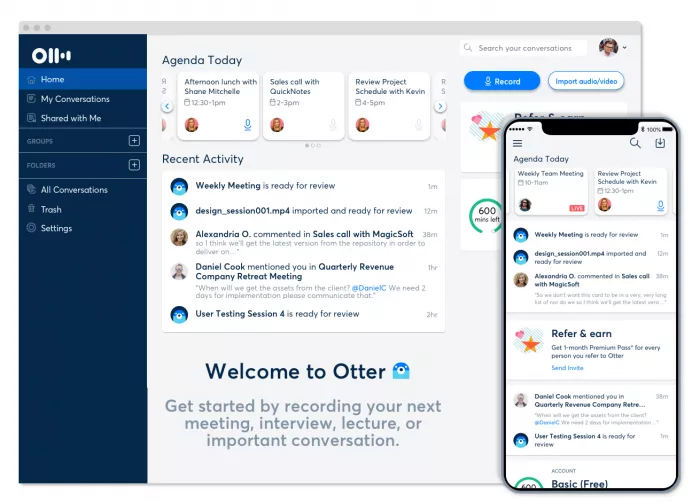
Free tier 300 min / mo | Paid from $8.33 / user / mo | Capture Bot | Works on Zoom, Meet, Teams |
Otter.ai is the veteran of the group and still the name most people reach for first. In 2026 it positions itself less as a transcription app and more as a meeting intelligence platform, with live captions you can read as the conversation happens, an Otter AI Chat that answers questions across your entire meeting history, and CRM syncing into Salesforce and HubSpot on paid tiers.
Where it shines is real time. The transcript scrolls live, so you can skim back mid-call without waiting for processing, which genuinely helps in long meetings. On clean audio with clear speakers it holds up well and reviewers score it 4.4 out of 5 on Capterra. In noisier or crowded calls accuracy slips, and its speaker labels need correcting more often than the marketing suggests. Independent reviews have put accuracy near 85 percent in tougher conditions, with one catching it render a rival name as Fireplace AI.
| Feature | Detail | |
|---|---|---|
| Live transcription | Readable in real time during the call | |
| Otter AI Chat | Search and ask questions across past meetings | |
| CRM sync | Salesforce and HubSpot on Pro and above | |
| Free limits | 300 min / mo, 30-min cap per conversation, 3 lifetime imports | |
| API | Otter Connect API v2 for enterprise integrations | |
| ✓ Pros | ✗ Cons | |
|
| |
Bottom line: best for people who live in Zoom and want to read the transcript as it happens, as long as the audio is clean.
Fireflies.aiBest for sales and ops teams |
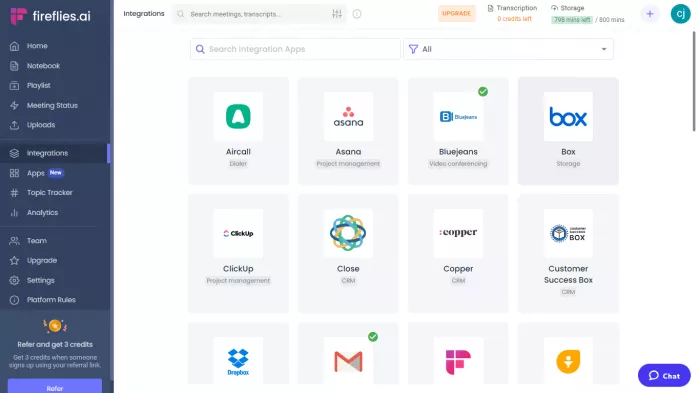
Free tier Unlimited transcripts | Paid from $10 / user / mo | Capture Bot | Works on Zoom, Teams, Meet, Webex |
Fireflies.ai is the one built for teams that need every call captured, searchable, and pushed into the CRM without anyone lifting a finger. It joins meetings across Zoom, Teams, Meet, and Webex, transcribes them, and files everything into a searchable archive an admin can govern. Its AskFred assistant answers questions about past calls, and a 2026 sales suite added deal intelligence, CRM autofill, and call scorecards aimed squarely at revenue teams.
The free plan is generous on raw transcription but stingy where it counts. AI features run on a pool of credits that do not refill on their own, so the moment a team leans on summaries and analytics, those credits disappear and the real cost shows up as add-on purchases. It is the single thing to understand before rolling Fireflies out widely: budget for the credits, not just the seats.
| Feature | Detail | |
|---|---|---|
| Coverage | Zoom, Teams, Meet, and Webex | |
| AskFred | AI assistant for searching and summarizing calls | |
| Sales suite | Deal intelligence, CRM autofill, call scorecards (2026) | |
| AI credits | Separate pool, does not auto-replenish | |
| Enterprise | SSO, SCIM, and HIPAA on the top tier | |
| ✓ Pros | ✗ Cons | |
|
| |
Bottom line: best when a team needs every conversation logged and searchable, provided someone watches the AI credit meter.
GranolaBest bot-free notepad |
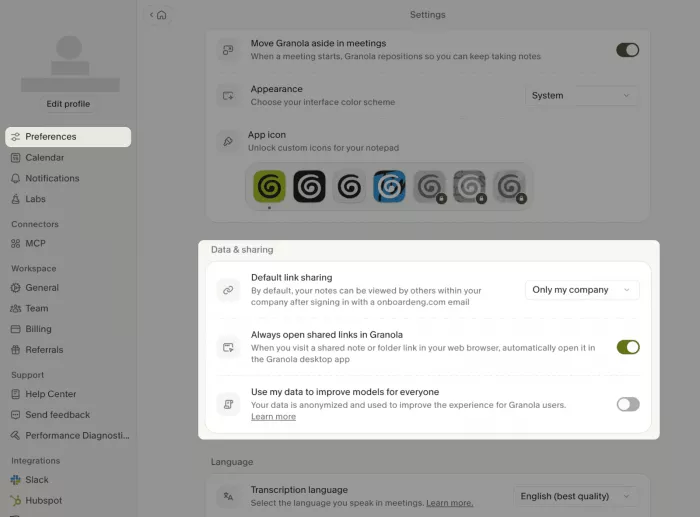
Free tier 30-day history | Paid from $14 / user / mo | Capture Bot-free | Works on Mac, Windows, iOS, Android |
Granola took a different route and won a loyal following, especially among founders and investors, by refusing to send a bot into the room at all. It records straight from your device audio, so nothing announces itself to the other participants, then merges your own rough notes with the transcript into a clean summary that reads like you wrote it. Its Chat can now search across months of notes and cite where answers came from, and a Model Context Protocol connection lets you pull meeting context into tools like Claude or ChatGPT.
The trade-offs are real. The free plan is effectively a trial: unlimited meetings, but history is locked to a rolling 30 days with no integrations. There is no audio or video upload, and team features stay thin next to Fireflies or Otter. Privacy-minded buyers should also note that Granola default model-training settings drew a proposed class action in mid-2026, so the opt-out is worth reviewing before you commit.
| Feature | Detail | |
|---|---|---|
| Bot-free capture | Records device audio, nothing visible joins the call | |
| Notes-first | Blends your rough notes with the transcript | |
| Agentic Chat | Searches months of notes with citations | |
| MCP and API | Available on the Business tier | |
| Platforms | Mac, Windows, iOS, and Android; 32 languages | |
| ✓ Pros | ✗ Cons | |
|
| |
Bottom line: the standout for solo professionals who take their own notes and never want a bot on screen.
Feature comparison
The four cover the basics in similar ways. Where they split is the detail: which AI extras are included, how they connect to the rest of your tools, and what you actually get for free. Green marks a capability that is included, amber marks one that is partial or limited, and gray marks one that is not offered.
AI capabilities
| AI capability | Fathom | Otter.ai | Fireflies.ai | Granola |
|---|---|---|---|---|
| Automatic AI summary | Yes | Yes | Yes | Yes |
| AI action items | Yes | Yes | Yes | Yes |
| Conversational assistant | Ask Fathom | Otter AI Chat | AskFred | Granola Chat |
| Follow-up email draft | Yes | Limited | Yes | Yes |
| Call coaching / scorecards | Yes | No | Yes | No |
| Search across all meetings | Yes | Yes | Yes | Yes |
Integrations and platforms
| Integration | Fathom | Otter.ai | Fireflies.ai | Granola |
|---|---|---|---|---|
| CRM sync (Salesforce, HubSpot) | Yes | Yes | Yes | Limited |
| MCP to Claude or ChatGPT | No | No | No | Yes |
| Bot-free capture | Limited | No | No | Yes |
| Meeting platforms | Zoom, Meet, Teams | Zoom, Meet, Teams | Zoom, Teams, Meet, Webex | All (bot-free) |
| Apps | Web, desktop, mobile | Web, mobile | Web, mobile | Mac, Win, iOS, Android |
| Enterprise SSO | Business tier | Enterprise | Enterprise | Enterprise |
What the free plans actually give you
| Free plan | Fathom | Otter.ai | Fireflies.ai | Granola |
|---|---|---|---|---|
| Recording / transcription | Unlimited | 300 min / mo | Unlimited | Unlimited |
| Per-meeting cap | None | 30 min | None | None |
| Advanced AI on free | First 5 calls / mo | ~20 Chat queries | ~20 one-time credits | Included |
| Video capture | Yes | No | No | No |
| History kept | Unlimited | Limited | 800 min storage | 30 days |
Pricing, side by side
| Tool | Free | Entry paid | Top published tier |
|---|---|---|---|
| Fathom | Unlimited recording | $16 / user / mo (Premium, annual) | $25 / user / mo (Business, annual) |
| Otter.ai | 300 min / month | $8.33 / user / mo (Pro, annual) | $19.99 / user / mo (Business, annual) |
| Fireflies.ai | $0, unlimited transcripts | $10 / user / mo (Pro, annual) | $39 / user / mo (Enterprise, annual) |
| Granola | 30-day history | $14 / user / mo (Business) | $35+ / user / mo (Enterprise) |
Which one should you pick?
| If you... | Pick |
|---|---|
| You want the best free tool | Fathom |
| You live in Zoom and want a live transcript | Otter.ai |
| You are rolling out to a sales or ops team | Fireflies.ai |
| You take your own notes and value privacy | Granola |
The verdict
Line all four up against the same needs and no single winner emerges, and that is the honest answer: the right AI note taker depends on how you actually work.
For most people starting out, Fathom is the easiest recommendation. Nothing else gives you unlimited free recording and transcription with summaries this clean, and it runs for weeks before the five-call AI limit ever pushes you toward paying. If your day is a wall of Zoom calls and reading the transcript live matters, Otter stays the most comfortable, as long as the audio is clean and you do not mind correcting a speaker label now and then.
Teams with a revenue motion will get the most from Fireflies, provided someone keeps an eye on the AI credit meter so the bill does not surprise finance. And for the founder or investor who takes sharp personal notes and would rather no bot ever appear on screen, Granola sits in a class of its own, with the privacy settings being the one thing worth reviewing first. Pick the tool that matches your calendar, not the one with the longest feature list. Any of these four will hand back the hour a day you currently lose to writing things down.
Comments