Landing on MeiGen for the first time, there is no welcome tour and no paywall waiting to pounce. There is a scrolling wall of finished AI images with the prompt that made each one printed right underneath. After a couple of weeks of pulling prompts, switching engines, and pushing real product ideas through it, the shape of the tool becomes clear. It behaves less like a single generator and more like a place to borrow good ideas honestly and bend them into something of your own.
Hand it a small brief, a logo concept, a packshot, a ten second clip for social, and the novelty wears off fast while the usefulness stays. It also shows its edges quickly once the easy wins are spent. The sections below cover what the platform actually is, the features worth knowing, the honest trade-offs, the jobs it handles well, and the people who get the most out of it.
MEIGEN AI IN PLAIN TERMS A free, community driven prompt gallery with a multi model generator bolted on. It runs no AI model of its own. Instead it hands your request to leading image and video engines, and shows you the exact prompts that already worked. |
What is MeiGen AI?
MeiGen AI, found at meigen.ai, is really two products stitched into one workflow. The first is a searchable gallery of more than a thousand curated prompts for AI images and short videos, where every card shows the real output beside the text that produced it. The second is a generator that runs those prompts on outside engines such as GPT Image, Nano Banana, Seedream, Midjourney, Flux, Seedance, and Veo.
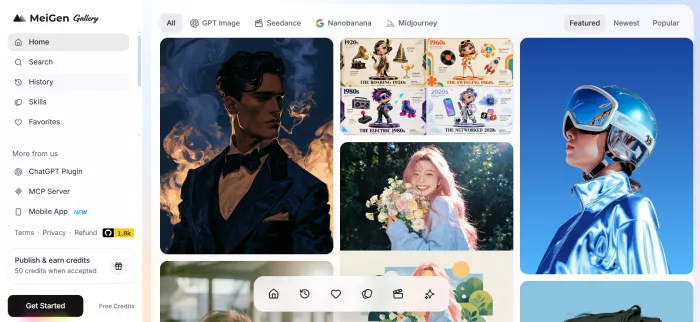
That second point is the one most newcomers miss, so it is worth saying plainly. MeiGen is a front end, not a model. The pictures and clips come from third party engines that also live elsewhere. What MeiGen adds is curation and convenience: a regularly refreshed feed of proven prompts, and one button that pushes any of them through many different models without a stack of separate accounts.
A fair way to picture it is the difference between watching a finished magic trick and being handed the instructions. Most generators show the trick. MeiGen hands over the method.
MeiGen AI at a glance
| Product | MeiGen AI (meigen.ai) |
| Type | Prompt gallery plus multi model generator |
| Category | AI image and video creation |
| Core idea | Browse proven prompts, then generate them on outside engines |
| Models used | GPT Image, Nano Banana, Seedream, Midjourney, Flux, Seedance, Veo |
| Platforms | Web, mobile app, Figma plugin, MCP server, CLI and ComfyUI |
| Pricing model | Free tier, pay as you go credit packs, and subscriptions |
| Best for | Fast inspiration and a modest volume of polished output |
How MeiGen AI works

| 1 | Browse or search the gallery Scroll categories like ads and product, brand and logo, portraits, posters, illustration and 3D, or the videos tab, and filter by text, by image, or even by color. |
| 2 | Grab a prompt Copy the full prompt from any card, or drag the card straight into the generator to seed your own text or act as a visual reference. |
| 3 | Pick an engine Choose the model that fits the job, then reshape the subject, style, and references to match the idea in your head. |
| 4 | Generate and refine Run it, compare the variations, swap engines if the look misses, and save the keepers to Favorites. |
For a closer, project by project view of how those steps behave once a real deadline is involved, there is a practical look at the everyday workflow from first prompt to finished clip.
Key features of MeiGen AI
The platform packs more into the interface than its clean landing page lets on. These are the pieces that get used most once the gallery stops being a curiosity.
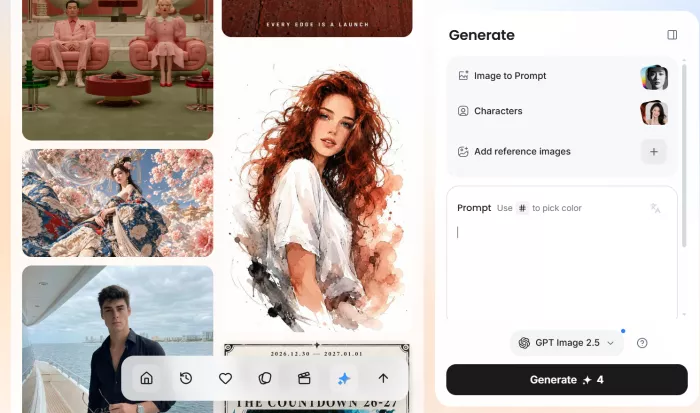
Curated prompt gallery Over a thousand prompts, refreshed often, sorted by use case, with a Recent view for the freshest additions rather than only the most popular. | Multi model generation Top image and video engines under one roof, switchable on a per generation basis so one idea can run several ways. |
Image to prompt Drop any image into the describe zone and MeiGen reverse engineers a full prompt from its style, composition, and mood. | Search by text, image, color Hunt prompts by keyword, by an uploaded reference, or by a specific color, which matters when chasing a brand palette. |
Built in translation Many of the strongest prompts start in Chinese, Japanese, or Korean, and MeiGen flips them into your language while keeping trigger words intact. | Drag and drop Pull any card into the prompt box or reference area instead of writing from a blank cursor. |
Reference control Attach up to seven reference images per generation, plus audio and short video references for the motion features. | Reusable characters Build an AI actor and carry its identity across scenes, handy for a recurring face, host, or mascot. |
Favorites and history Shortlist the prompts you like and retrace past generations without losing them to the scroll. | Beyond the browser A mobile app for browsing on the go, a Figma plugin inside the design canvas, and an MCP server with CLI and ComfyUI support for developers. |
The models behind MeiGen
Because MeiGen routes to outside engines, the model chosen changes the result more than any prompt tweak. Here is a plain read on the main options and where each tends to shine.
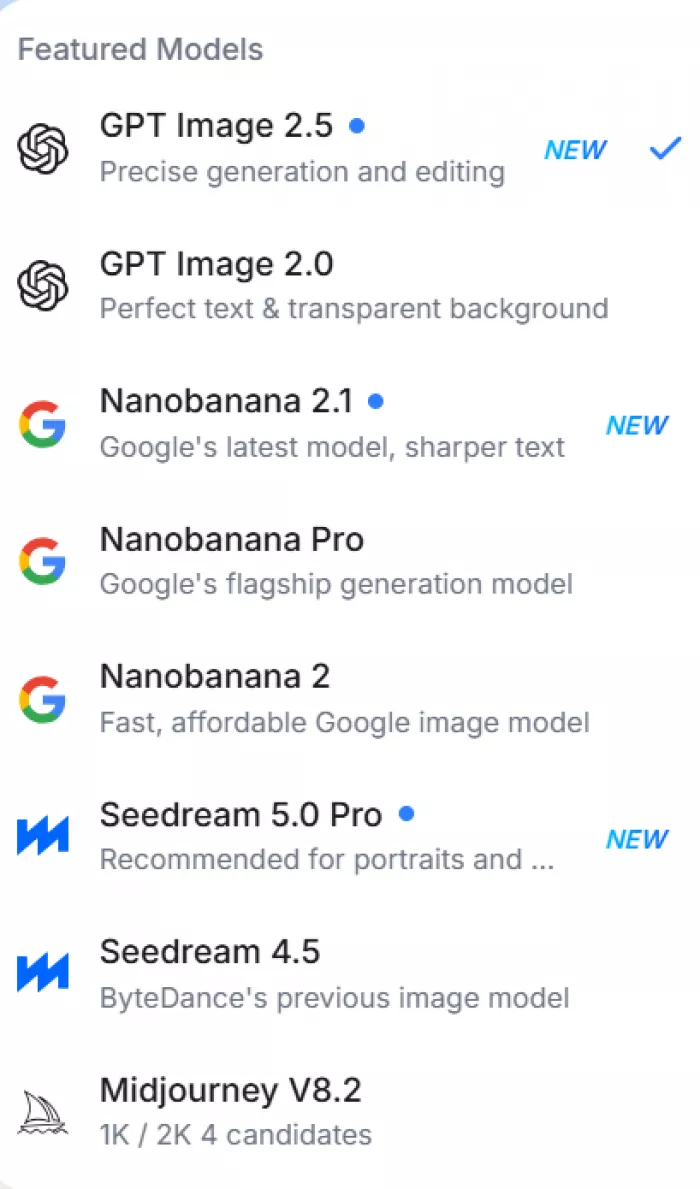
| Engine | Type | Best suited for |
|---|---|---|
| GPT Image 2 | Image | Balanced everyday results with sensible defaults |
| Nano Banana 2 / Pro | Image | Staying faithful to reference photos and edits |
| Seedream | Image | Punchy, stylized, high impact frames |
| Midjourney | Image | The most polished, designed look for posters and decorative work |
| Flux | Image | An alternative image character when the others miss the brief |
| Seedance 2.0 | Video | Stable, believable motion in short clips at low cost |
| Veo 3.1 | Video | Higher quality video with stronger motion and coherence |
The exact lineup shifts as engines are added, updated, or retired, so the roster on any given day may look slightly different. The real advantage is running a single idea across several of them in one sitting and keeping the winner.
What people use MeiGen AI for
Beyond the feature list, a few recurring jobs explain why people reach for it in the first place.
Product and packshot visuals Reshape a well lit product prompt, attach reference photos of the real item, and mock up store ready shots fast. | Logo and brand concepts Pull from the brand and logo category to explore marks, type treatments, and visual directions quickly. |
Social and ad content Spin up scroll stopping images and short clips sized for feeds, with no studio or shoot required. | Storyboards and characters Sketch scene sequences and keep a recurring character consistent across several frames. |
Posters and illustration Lean on the more designed engines for decorative, print leaning pieces and hero artwork. | Learning prompt craft Treat the gallery as reference material and study how high performing prompts are actually structured. |
Benefits of using MeiGen AI
Strip away the novelty and a handful of concrete reasons explain why creators keep the tab open.
● It beats the blank box. Starting from a prompt that already produced good work removes the hardest part of generative creation, the empty cursor.
● One place, many models. A single interface stands in for several separate subscriptions and logins.
● Honest side by side comparison. The same concept runs through several engines at once, so the pick is based on results rather than loyalty to one model.
● A quiet education in prompting. Reading hundreds of working prompts teaches how strong ones are built, a skill that carries to every other tool.
● Fast from idea to asset. Drag, tweak, generate. The path from inspiration to a usable first draft stays short.
● Zero friction to try. The whole gallery is browsable, copyable, and translatable without an account. Signing in only happens the moment you press run.
Limitations of MeiGen AI
No tool this convenient comes without compromises, and MeiGen's are worth knowing before any money changes hands.
● It is only as good as its engines. Owning no model means any price change, update, or outage at a third party engine flows straight through to the user.
● Not a full editor. There are no layers, masking, or detailed retouching, so finished images often need a cleanup pass in another tool.
● The free tier is thin. Signup credits cover roughly two standard images, enough to confirm the tool runs and little more.
● Video drains credits. Standard clips are reasonable, but premium video is costly enough that free experimentation is not realistic. The per generation cost swings by model and resolution, mapped out in MeiGen's full plans and credit pricing.
● Consistency is not automatic. References and characters help, but a set of images still needs light art direction to feel like one cohesive shoot.
● Look alike domains exist. Several near identical sites quote different offers and support details, so confirm everything on one trusted address before entering card details.
● Public uploads grant broad rights. Posting to the public gallery hands the platform wide display and marketing rights over that work, so sensitive or client owned material is safer generated privately.
● Occasional moderation blocks. Some prompts get rejected mid flow, a small interruption even when the credits are refunded.
Who should use MeiGen AI?
The audience that gets real mileage here is specific, and so is the group that will find the tool thinner than hoped.
| Best fit | Verdict | Why |
|---|---|---|
| Solo marketers and small shop owners | Strong fit | Good visuals quickly, with no design team or stack of subscriptions |
| Social and content creators | Strong fit | On trend prompts and fast turnaround for posts and short clips |
| Designers who live in Figma | Strong fit | The plugin keeps generation inside the layout canvas |
| Newcomers to prompting | Strong fit | The gallery doubles as a working classroom for prompt craft |
| Developers automating assets | Worth a look | The MCP server and CLI open programmatic generation for small teams |
| Prompt pros wanting raw model access | Probably not | Going direct to a single engine may be simpler and cheaper |
| Anyone needing a full editing suite | Not ideal | No layers or retouching, so it complements an editor rather than replacing one |
| High volume video on a fixed budget | Not ideal | Premium video costs climb too quickly to run at scale |
Final verdict
Two weeks of real use settle the question. MeiGen earns its place as the spot to go when the blank page wins, when a look needs reverse engineering, or when one idea deserves three versions across three engines before anything is committed. The gallery, not the generate button, is the genuine product, and the convenience of reaching so many models from one screen is real.
What it is not is a whole pipeline. The output tends to land near the mark rather than fully finished, premium video is too costly to treat as a sandbox, and the swirl of copycat domains means sticking to one address that can be trusted. Used as a springboard for ideas and quick first drafts, it is quietly one of the more useful tools a creator can keep within reach. Treated as a one button factory running the same handful of prompts on repeat, the value thins fast and the engines it borrows become the cheaper direct route.
The sensible way in stays the same. Start free, spend those first credits comparing engines rather than burning them on two quick ideas, and let the actual work decide whether MeiGen deserves a permanent seat in the toolkit.
Comments