Table of Contents
- What I looked for
- Quick comparison
- 1. AdCreative.ai: Best for rapid paid-ad variation
- 2. Pencil: Best for performance-led creative
- 3. Canva Business: Best for team consistency
- 4. Adobe Express: Best for controlled editing
- 5. Predis.ai: Best for social ads
- 6. The Brief: Best for multi-format scale
- A Brand Kit Is Not Enough
- Which tool should you choose?
- Final verdict
AI has made producing more ads remarkably easy. Keeping those ads recognisably yours is harder.
The difference becomes obvious once a campaign expands beyond a few creatives. A logo shifts position, the AI chooses a slightly different visual style, headlines stop sounding like the brand, and resized versions slowly drift away from the original design. The best AI ad tools in 2026 are therefore not simply the ones that generate fastest. They are the ones that can scale creative production without making every new variation feel like it came from a different company.
What I looked for
For this comparison, I looked beyond prompt-to-image quality. A useful advertising platform has to work after the first generation, when creatives need to be edited, resized, tested and handed between people.
The main criteria were:
● Creative generation: The tool should produce usable static, video or social advertising rather than simply adding AI copy to existing templates.
● Brand consistency: I looked at how logos, colours, fonts, tone, imagery and brand rules actually influence the output.
● Creative scalability: A good system should make multiple concepts, sizes and audience variations without requiring every version to be rebuilt.
● Editing control: AI rarely produces a final ad on the first attempt, so the ability to repair individual elements matters.
● Production workflow: Ad integrations, approvals, collaboration and publishing can save more time than generation itself.
● Pricing at realistic volume: Credit limits, brand limits and team seats matter more than an attractive entry price if creative production is frequent.
Quick comparison
| Tool | Best for | Brand control | Scaling strength | Starting paid price |
| AdCreative.ai | Rapid paid-ad variations | Very good | Excellent | $39/month |
| Pencil | Performance-led creative teams | Excellent | Excellent | $14/month |
| Canva Business | Brand-controlled team production | Excellent | Very good | $20/person/month |
| Adobe Express | Controlled creative workflows | Excellent | Very good | $7.99/person/month |
| Predis.ai | Social and UGC ad production | Good | Very good | $19/month annually |
| The Brief | Multi-format campaigns at scale | Excellent | Excellent | $29/month annually |
Note : Pricing checked in August 2026. Annual discounts, promotions and enterprise pricing can change.
1. AdCreative.ai: Best for rapid paid-ad variation
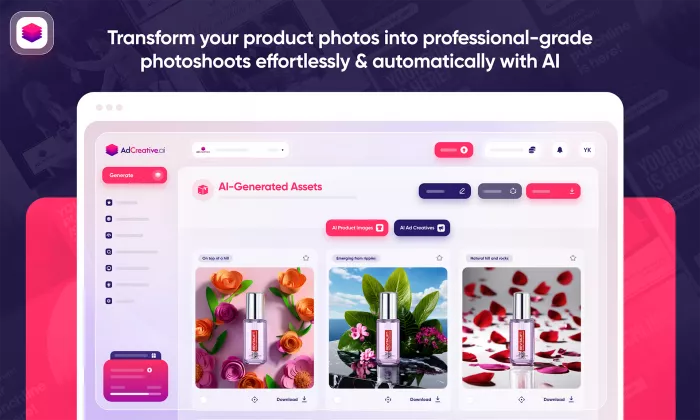
AdCreative.ai is built specifically for producing paid-ad creatives at scale. You create a brand with elements such as your logo, colours and description, select an ad type and generate several variations around that identity. The platform also combines generation with creative scoring, competitor research and ad-account integrations, which makes it more advertising-focused than a general design platform.
Key features
● Brand profiles reduce repetitive campaign setup: Logos, colours, descriptions and connected ad accounts remain attached to the brand rather than being entered again for every generation.
● Unlimited generations encourage broader experimentation: Paid plans currently allow unlimited creative generation, with credits primarily consumed when an asset is downloaded.
● Creative Scoring AI helps narrow a large batch: It produces performance and awareness scores and can analyse components such as logos, CTAs and products before a team decides which concepts deserve actual media spend.
● Competitor and creative-insight tools add campaign context: This gives performance marketers more information than they would get from an isolated AI image generator.
Workflow advantage
The main benefit is that one campaign idea can become several plausible executions without manually duplicating and rebuilding layouts. That is particularly useful for paid-social teams dealing with creative fatigue, where the problem is often not producing the first ad but producing the next ten quickly enough.
Because generation itself is unlimited, weak directions can be rejected before consuming a download credit.
Where it wins and struggles
AdCreative.ai is strongest where volume and testing speed matter more than precise art direction. The trade-off is editing freedom and governance. Teams requiring highly controlled layouts, locked brand elements or complex approval structures will find deeper controls elsewhere.
Pricing
| Plan | Price | Included |
| Starter | $39/month | 10 credits, 1 brand |
| Professional | $249/month | 50 credits, higher brand/team limits |
| Ultimate | $999/month | 100 credits, agency-scale usage |
| Enterprise | Custom | Tailored credits, governance and support |
Annual and quarterly billing reduce the effective monthly rate.
Ratings
| Area | Rating |
| Brand consistency | 4.3/5 |
| Creative scalability | 4.8/5 |
| Editing freedom | 3.9/5 |
| Performance workflow | 4.6/5 |
| Overall rating | 4.5/5 |
Verdict: AdCreative.ai makes sense when you already know what you are advertising and need more credible ways to advertise it. Its strength is not pixel-perfect art direction. It is turning one paid-media brief into enough variations to test properly.
2. Pencil: Best for performance-led creative
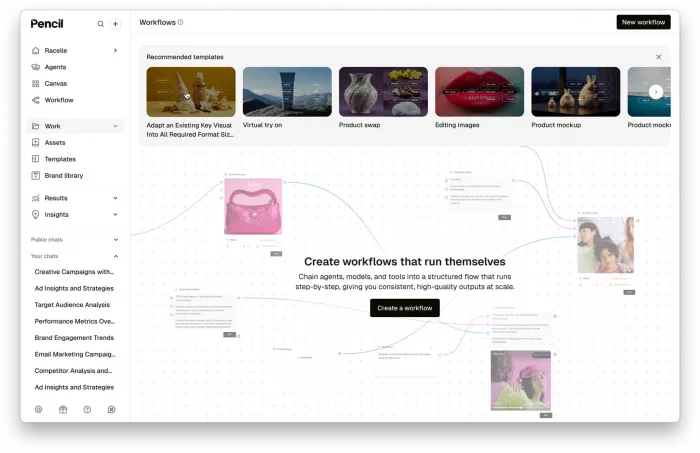
Pencil takes a more structured approach to brand context. Its Brand Library can contain far more than basic colours and logos, including typography rules, tone guidelines, imagery direction, approved claims, product naming, compliance requirements and style references.
That depth makes Pencil particularly interesting for teams that want AI generation without explaining the brand from scratch every time.
Key features
● The Brand Library can hold detailed creative rules: Teams can define logos, colours, typography, voice, imagery, layouts, messaging and even regulatory requirements rather than relying on a three-field Brand Kit.
● Brand knowledge influences generated copy: Pencil sends relevant Knowledge and Tone information alongside text-generation requests, so the model has persistent context around how the brand communicates.
● Static and video creatives can be produced in the same environment: Current plans include AI agents for text, images, video and advertising concepts.
● Ads can be launched and tracked across major channels: Current integrations include Facebook, Instagram, TikTok, YouTube, Google Display, DV360 and LinkedIn.
Workflow advantage
Pencil rewards proper setup. A team can define the brand once, add its approved assets and product knowledge, then use that information across briefs and creative generation.
There is an important nuance here. Brand Library information does not simply feed every visual model directly. Knowledge and Tone directly influence Pencil's language models, while brand assets such as logos, fonts and colours affect specific creative workflows, including the static-ad agent and editor. Multimodal agents can also use brand context while constructing image or video prompts.
That is more sophisticated than saying “upload your logo and the AI stays on-brand,” but it also means output quality still depends on how the workflow is used.
Where it wins and struggles
Pencil works best for companies prepared to treat brand setup as infrastructure rather than a five-minute onboarding task. The richer the Brand Library, the less interpretation the AI has to do.
Its weakness is the same thing: teams wanting instant results from a one-line prompt may find simpler generators quicker to start with.
Pricing
| Plan | Monthly | Annual billing |
| Core | $14/month | $11/month |
| Growth | $55/month | $44/month |
| Pro | Custom | Custom |
Core currently includes 50 generations per month, while Growth includes 250. Pro introduces unlimited generations, bulk workflows and enterprise controls.
Ratings
| Area | Rating |
| Brand consistency | 4.7/5 |
| Creative scalability | 4.8/5 |
| Editing freedom | 4.3/5 |
| Performance workflow | 4.8/5 |
| Overall rating | 4.7/5 |
Verdict: Pencil is the most balanced option here for teams that want brand context, creative generation and campaign performance living in the same workflow. Its advantage grows as your Brand Library becomes more detailed.
3. Canva Business: Best for team consistency
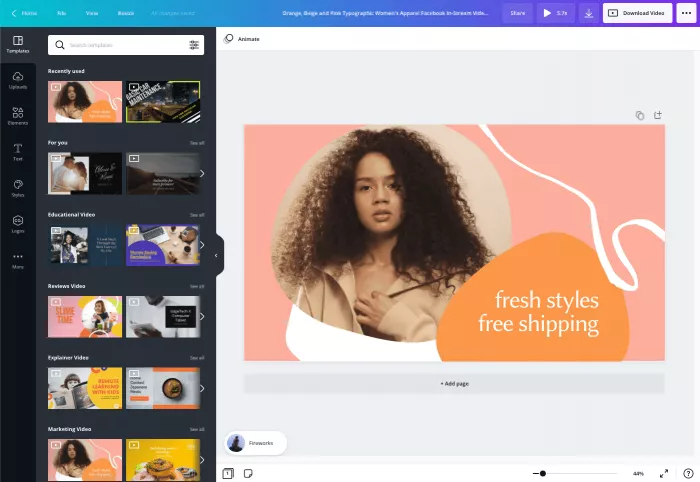
Canva Business is less specialised than Pencil or AdCreative.ai, but it solves a problem pure generators often overlook: what happens after other people start editing the ad.
Brand inconsistency is frequently introduced during production rather than generation. Someone changes the font, replaces an approved image, moves the logo or builds a regional version from an old template. Canva's brand-management system is designed around preventing that drift.
Key features
● Brand Kits can contain much more than logos and colours: Fonts, imagery, icons, graphics and written Brand Guidelines can be stored centrally, with support for up to 100 separate brands.
● Brand Templates protect important creative decisions: Logos and other design elements can be locked so marketers can customise a layout without rebuilding its visual hierarchy.
● Brand Controls can restrict fonts, colours, content and template usage: This moves Canva beyond guidance and closer to actual enforcement.
● Design Approvals introduce a review layer: Teams can designate approvers before work is published rather than relying on informal checks.
Workflow advantage
Canva works particularly well when a design team creates the original campaign and other people need to adapt it.
The central team can establish an approved template, lock important elements and make approved imagery, typography and colours available through the Brand Kit. A marketer can then create a new offer or regional version without receiving an unrestricted master file.
Magic Switch can also reformat designs for different platforms, while Canva's newer advertising workflow can connect ad accounts and surface campaign insights.
Where it wins and struggles
Canva's brand control is excellent, but its broad scope means the creative-testing workflow is not as focused as Pencil or AdCreative.ai. You can make many variants, but Canva remains a general creative workspace rather than a dedicated performance-ad system.
Ad production rarely ends with a single visual. Copy, video and platform-specific versions often need to move together, which is why thinking in terms of an AI tools for writing, design, and video stack can be more useful than judging each creative platform in isolation.
Pricing
| Plan | Price | Best fit |
| Canva Business | $20/person/month | Individuals and growing teams |
| Canva Enterprise | Custom pricing | Larger organisations |
Canva Business has no seat minimum and includes the broader business-focused AI and brand-management feature set.
Ratings
| Area | Rating |
| Brand consistency | 4.9/5 |
| Creative scalability | 4.5/5 |
| Editing freedom | 4.8/5 |
| Performance workflow | 4.1/5 |
| Overall rating | 4.6/5 |
Verdict: Canva Business is the strongest choice here when your biggest concern is not producing enough ads but preventing a growing team from slowly changing the brand. Its Brand Controls and locked templates are more meaningful for consistency than another AI generation button.
4. Adobe Express: Best for controlled editing
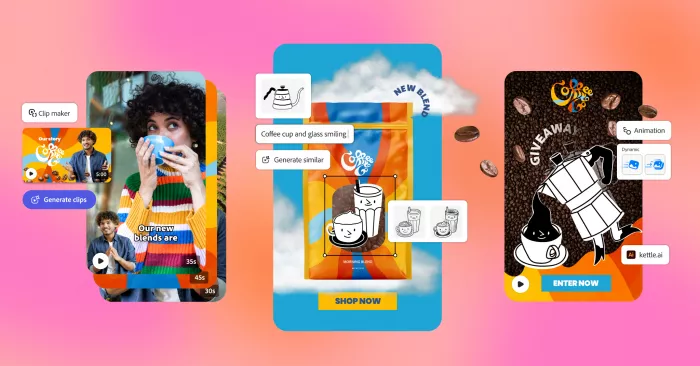
Adobe Express takes a similar brand-governance approach but fits particularly well where professional designers are creating templates that less technical marketers will later adapt.
Its strongest feature in this comparison is not Firefly generation by itself. It is the ability to place AI-assisted creation inside a more tightly controlled template system.
Key features
● Brand Kits centralise approved visual assets: Fonts, colours and other brand elements can be made available across team production.
● Template restrictions can limit creative choices: Teams can restrict users to approved brand fonts and colours rather than merely recommending them.
● Layers can be locked at different levels: Creators can allow unlocking, require a passkey or prevent users from unlocking protected layers entirely.
● Teams receive commercially focused AI tools: Adobe Express Teams currently includes 250 generative credits per user per month plus access to Adobe Stock assets and premium editing tools.
Workflow advantage
Consider a campaign where legal copy, product placement, logo position and CTA hierarchy have already been approved. A designer can turn that into a restricted template rather than sending marketers an unrestricted file.
Other users can update the permitted copy or imagery while protected elements remain intact. That is a far more reliable consistency mechanism than hoping every person remembers a PDF style guide.
Express also retains familiar editing tools such as Resize, background removal, video editing and scheduling, so AI generation remains only one part of the production process.
Where it wins and struggles
Adobe Express is strongest once a creative system already exists. If the main objective is generating dozens of new performance concepts from scratch, AdCreative.ai or Pencil will usually feel more direct.
Its team features also make more sense for organisations that genuinely need controlled collaboration rather than solo users making occasional ads.
Pricing
| Plan | Price | Notes |
| Adobe Express Teams | $7.99/user/month | Annual subscription, 2-seat minimum |
| Enterprise | Custom | Advanced organisational controls |
Adobe has also advertised a discounted first-year Teams rate in some markets, so the regular price is the safer figure for comparison.
Ratings
| Area | Rating |
| Brand consistency | 4.8/5 |
| Creative scalability | 4.4/5 |
| Editing freedom | 4.8/5 |
| Performance workflow | 4.0/5 |
| Overall rating | 4.6/5 |
Verdict: Adobe Express is a strong fit when designers need to give marketers enough freedom to produce variations without giving them enough freedom to break the campaign. Template restrictions are the feature that really separates it from simpler AI generators.
5. Predis.ai: Best for social ads
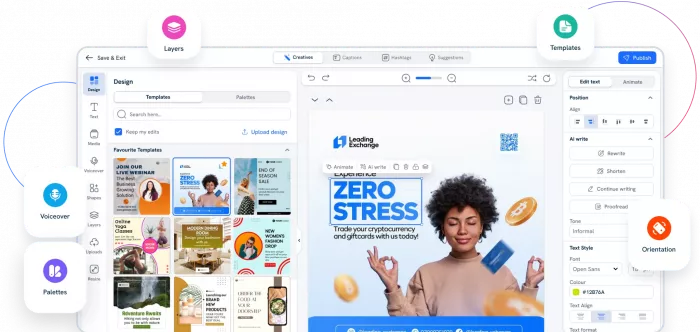
Predis.ai approaches advertising from the social-content side. Instead of treating static ads, reels, UGC videos, carousels and organic posts as separate workflows, it can generate several of these formats from the same brand setup.
That makes it especially practical for smaller teams where paid social and everyday content are managed by the same people.
Key features
● Brand profiles combine visual and verbal identity: A brand can store its logo, colours, tone of voice and key messaging, which Predis then uses across generated content.
● The platform produces complete social assets: It can generate images, videos, carousels, captions and other content rather than stopping at copy or a single visual.
● Brand voice can learn from existing material: Predis says it can draw from a website or previous posts to better understand how the brand communicates.
● Publishing is built into higher plans: Rise includes automated posting and support for up to 20 publishing channels, reducing the need for another handoff after creation.
Workflow advantage
Predis works well when the starting point is a product, social idea or campaign rather than a detailed design file. Create the brand once, generate the required media, adjust it in the editor and move suitable pieces into publishing.
Its credit system is worth understanding before choosing a plan. A standard ad creative or image currently consumes 15 credits, while an eight-second standard or UGC video uses 200 credits. Video-heavy workflows therefore consume allowances much faster than static advertising.
That is exactly the sort of pricing detail hidden by simply saying a plan includes “1,300 credits.”
Where it wins and struggles
Predis is good at applying a brand identity, but it offers less rigid governance over what collaborators may change than Canva or Adobe. It therefore works better for a small trusted team than a large distributed organisation with strict design controls.
Pricing
| Plan | Price when billed annually | Main allowance |
| Core | $19/month | 1,300 credits, 1 brand |
| Rise | $40/month | 3,200 credits, up to 4 brands |
| Enterprise+ | $212/month | 10,000 credits, unlimited brands |
Ratings
| Area | Rating |
| Brand consistency | 4.1/5 |
| Creative scalability | 4.6/5 |
| Editing freedom | 4.2/5 |
| Social workflow | 4.8/5 |
| Overall rating | 4.4/5 |
Verdict: Predis.ai is the most practical option here for a social-first team that needs ads, reels, carousels and regular posts from one workflow. Its brand system is useful, but its real advantage is reducing the number of separate tools required to keep social production moving.
6. The Brief: Best for multi-format scale
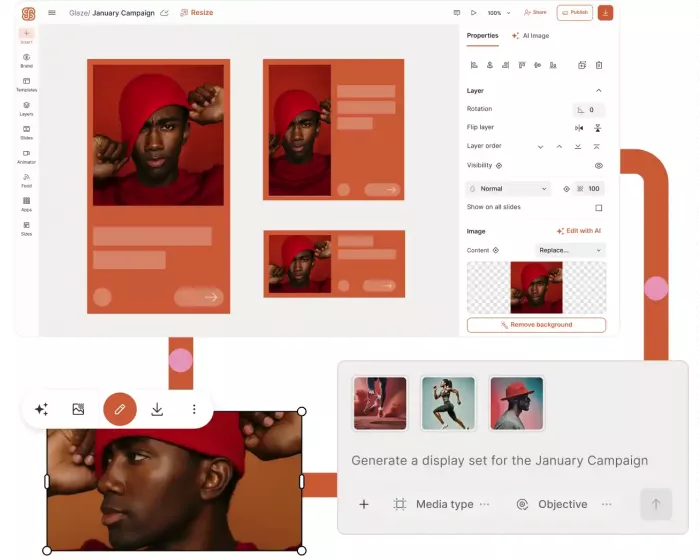
The Brief, formerly Creatopy, is less about producing one clever AI image and more about turning a campaign into a production system.
Its Ad Studio supports image, video and copy generation, AI resizing across more than 50 formats, editable campaign assets and batch production. That makes it particularly relevant to agencies and brands where one campaign needs to become dozens of display, social and regional variations.
Key features
● AI Resize turns one design into many platform formats: This removes a large amount of repetitive production work once the core campaign is approved.
● Imported designs remain editable: Figma or Photoshop work can be brought into the Ad Studio and adjusted at layer level rather than flattened into an uneditable AI result.
● Brand systems become stronger on team plans: Shared templates, team fonts and locked elements allow larger groups to reuse approved campaign structures.
● Higher tiers add distribution and localisation: Ultra includes AI Translate, ad serving across more than 25 networks, Meta and Google publishing, automated A/B testing and reporting.
Workflow advantage
The Brief becomes more valuable after the hero creative has been approved.
Instead of giving designers a spreadsheet containing 30 required sizes, five products and several regional messages, a team can work from a master campaign and systematically generate the required variants.
That distinction is important. Generating 100 random ideas is not the same as generating 100 controlled permutations of an approved campaign. The Brief is considerably better suited to the second problem.
Where it wins and struggles
Its production depth can be unnecessary for small advertisers running a handful of Meta creatives each month. The more products, sizes, regions and contributors involved, however, the stronger its case becomes.
Pricing
| Plan | Annual-billing rate | Best fit |
| Pro | $29/month | Solo professional production |
| Ultra | $79/month | High-volume and multi-market work |
| Team | $49/seat/month | 2 to 10-person teams |
| Enterprise | Custom | Feed-driven mass production |
Notably, The Brief says its current plans include AI generation without a conventional credit counter, with capacity scaling by plan.
Ratings
| Area | Rating |
| Brand consistency | 4.7/5 |
| Creative scalability | 4.9/5 |
| Editing freedom | 4.7/5 |
| Production workflow | 4.9/5 |
| Overall rating | 4.7/5 |
Verdict: The Brief is the strongest choice here when “more creatives” really means dozens of sizes, products, markets and campaign versions. It is closer to creative-production infrastructure than a simple AI ad generator.
A Brand Kit Is Not Enough
Almost every tool on this list can now claim that it supports brand consistency. The problem is that “supports your brand” can mean anything from remembering three colours to preventing hundreds of employees from editing protected assets.
Visual consistency gets even harder when ads use a recurring AI-generated person, spokesperson or mascot. In that situation, the same principles behind keeping an AI character consistent across every image become useful: stable reference images and fixed identity traits usually hold a campaign together better than repeatedly describing the character from scratch.
A more useful way to judge these systems is to think in four levels.
| Level | What actually happens |
| Asset storage | Logos, colours and fonts are saved for reuse. |
| Generation guidance | AI uses brand information while producing copy or creative. |
| Brand enforcement | Users can be restricted to approved fonts, colours, layouts or assets. |
| Workflow governance | Permissions, templates, approvals and distribution rules control the complete process. |
This changes how the six tools compare.
Predis.ai and AdCreative.ai are particularly good at feeding stored brand information into creation. Pencil goes further by letting teams build a much richer source of brand knowledge, including voice rules, imagery direction, product terminology and compliance information. Canva Business and Adobe Express are strongest when the problem shifts from generation to controlling what human collaborators do afterward. The Brief combines brand controls with large-scale campaign adaptation.
A company should therefore ask something more precise than, “Does it have a Brand Kit?”
Ask: What happens when 15 people use that Brand Kit to create 300 ads?
That is where the differences become obvious.
Which tool should you choose?
If the main problem is creative fatigue in paid campaigns, AdCreative.ai is the simplest fit. It is deliberately optimised around producing and evaluating more ad concepts without turning every variation into a manual design task.
For brand intelligence and performance creative in one system, Pencil is stronger. Its detailed Brand Library gives AI substantially more context than a basic logo-and-colour setup, especially when copy, products and brand rules are complicated.
Canva Business is difficult to beat, if your biggest challenge is keeping a team on-brand. Brand Controls, locked templates and approvals directly address the places where consistency normally breaks.
If professional designers create campaign systems that non-designers need to adapt safely, Adobe Express is particularly compelling. Template restrictions provide real guardrails without forcing every simple copy change back through the design department.
If advertising is just one part of a larger social-media production workload, Predis.ai makes more sense. Its value comes from combining posts, carousels, videos, UGC-style content, ads and publishing rather than specialising exclusively in paid creative.
And the Brief has the strongest scaling workflow. Resizing, batch production, localisation and editable imports solve a much bigger production problem than generating another standalone image, if one campaign routinely becomes dozens or hundreds of formats
Final verdict
There is no single winner because the six tools solve different parts of the creative bottleneck.
For pure paid-ad experimentation, AdCreative.ai is the easiest recommendation. For teams wanting deeper brand context tied to performance creative, Pencil is the more complete system. Canva Business gets my pick for everyday brand consistency because it can control what people are allowed to change, while Adobe Express is particularly strong when designers need stricter template governance.
Predis.ai is the better fit for social-first teams, and The Brief stands out once campaign production reaches enough formats and markets that resizing and version management become problems of their own.
The bigger lesson is that AI has made creative quantity cheap. That makes consistency more valuable, not less. A system that generates 100 ads quickly is useful. A system that can generate 100 ads while preserving the same typography, visual hierarchy, product treatment, messaging rules and recognisable brand character is considerably more useful. In 2026, that is the difference worth paying attention to.
Comments