Table of Contents
- Quick answer: the best AI presentation maker by deck type
- How we evaluated these AI presentation tools
- The main AI presentation makers, and who each one is really for
- Best AI presentation maker
- for sales decks
- for teaching
- for startup and investor pitches
- for business and internal presentations
- What AI presentation makers still get wrong in 2026
- AI presentation maker comparison table
- How to choose the right AI presentation maker
- The bottom line: match the tool to the deck, not the hype
You have a presentation due, you've heard an AI presentation maker can build it in minutes, and you've probably already tried one. The slides came out looking decent, but the deck it produced isn't the deck you needed. The sales pitch reads like a Wikipedia summary. The lesson slides are too dense for a classroom. The investor deck buries your traction on slide nine.
Generating slides is no longer the hard part; nearly every tool in this category can turn a prompt into a presentable draft. The hard part is choosing software whose strengths match the type of deck you're making. A tool that's excellent for marketers can be actively frustrating for a teacher, and one built for solo founders can fall apart inside a sales org with brand guidelines.
So instead of ranking ten products in the abstract, this guide works backwards from your situation: sales, teaching, startup pitches, internal business decks, branded corporate work, and workflows that must stay inside PowerPoint or Google Slides.
Quick answer: the best AI presentation maker by deck type
There is no single winner — the honest answer depends on what you're building:
- Sales decks: Pitch for collaboration and brand control, with engagement tracking on top; Beautiful.ai if consistency across many presenters matters most
- Teaching: Canva for visual flexibility and a usable free plan; Gamma for turning lesson notes into slides fast
- Startup and investor pitches: Gamma for a fast first draft; Beautiful.ai or Pitch when the design bar rises
- Internal business presentations: Copilot on Microsoft 365; Plus AI for stronger generation in the same apps
- Branded corporate decks: Beautiful.ai's team plans, or Plus AI with custom templates
- Visual and marketing presentations: Canva, without much competition
- PowerPoint or Google Slides workflows: Plus AI first, Copilot second
The rest of the article explains why, including where each tool falls short.
How we evaluated these AI presentation tools
A note on method: this comparison is built from each product's documented capabilities and current plans, plus consistent patterns across user reviews, not a claim to have stress-tested every feature. Details were checked against official sources as of mid-2026; these products change often, so treat specific numbers as a snapshot.
The criteria that shaped the recommendations:
Usefulness after generation, not just first-draft beauty. Every AI presentation generator can produce something that looks finished. The real question is how much work remains - does the structure hold up, and do you spend twenty minutes or two hours fixing it?
Structure and storytelling. Can the AI build an argument, or does it produce seven interchangeable bullet slides?
Design flexibility versus design control. Some tools let you change anything (and break everything); others lock layouts so you can't ruin them. Neither is better in the abstract.
Brand consistency, data handling, collaboration, export options, ease of use, and value for money round out the list, weighted differently per use case. A teacher doesn't care about Salesforce integration; a sales team absolutely does.
The main AI presentation makers, and who each one is really for
Gamma: the fastest route from idea to presentable draft
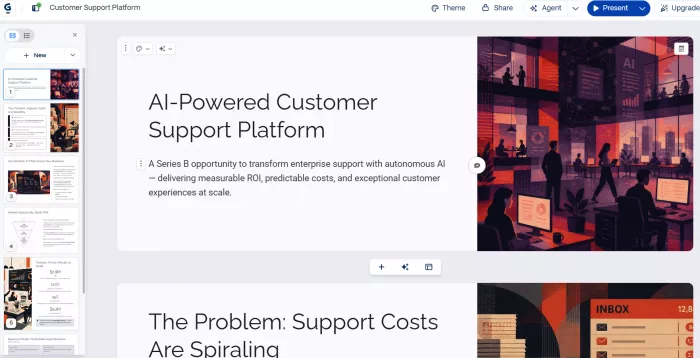
Gamma is what most people mean by "I typed a sentence and got a whole presentation." It generates card-based decks (closer to scrollable web pages than rigid 16:9 slides), and its first drafts are consistently among the most attractive in the category.
For a founder sketching a pitch, or a consultant mocking up a proposal, Gamma is hard to beat; anyone who just needs a credible draft in ten minutes will feel the same way. The free plan includes one-time AI credits (enough to build a handful of real decks and judge the output), though free decks carry "Made with Gamma" branding, which rules them out for client-facing work. Paid plans start low (around $8–12 monthly depending on billing) and lift the watermark.
Where it falls short: everything runs on credits, which frustrates heavy users, and the card format doesn't always export cleanly to PowerPoint. Its structure also tends toward the generic: pleasant sections and safe ordering, not much argumentative spine. Solo professionals will be happy; teams with strict templates will not.
The catch: Gamma gets you to “good-looking” unusually fast, but the deck still needs a point of view. Expect to rewrite the argument, trim generic copy, and check the PowerPoint export before treating the draft as finished.
Beautiful.ai: design guardrails for people who shouldn't design slides
Beautiful.ai's core idea is "Smart Slides": templates that automatically rebalance as you add content. Drop in a fourth chart and the layout reshuffles itself; you physically can't misalign things. Where decks are made by many hands of varying skill, that's the closest thing to a guarantee that everything leaving the building looks professional.
The trade-offs are real. There's no free plan, only a 14-day trial that requires a credit card and converts to a paid subscription unless you cancel. Individual Pro runs about $12 per month billed annually; team plans cost several times that. The same guardrails will fight you the moment your content doesn't fit the available structures; if you want pixel-level control, it feels like driving with the parking brake on.
It suits sales and marketing teams that value consistency over creativity, and managers tired of reformatting other people's slides. Team tiers add shared libraries and brand controls, plus a Salesforce integration that tells you who the intended buyer is.
The catch: Beautiful.ai will happily solve the formatting problems you don't want to think about. The harder part is fitting your content into its system when your story doesn't behave like the template expects.
Canva: the visual powerhouse that happens to make presentations
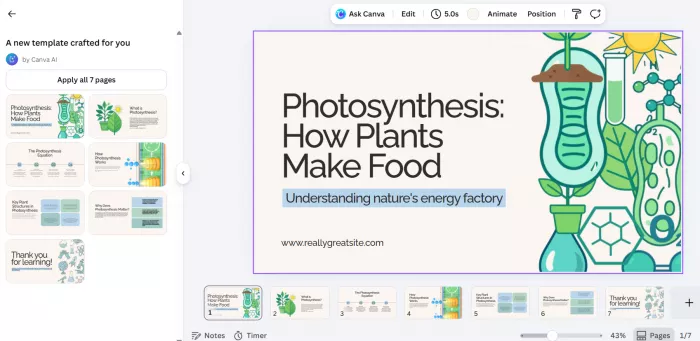
Canva is the opposite approach: a full design platform with an enormous library of templates, photos, icons, and graphics, where Magic Design generates presentations as one capability among many. The AI output is a scaffold rather than a finished argument: well-designed slides with placeholder-quality thinking, which you then shape with the best visual toolkit in this roundup.
That makes Canva the default for marketing decks and any presentation where imagery does the persuading. It's also quietly one of the best options for teachers, via a workable free plan (with capped AI usage) and a separate free education offering. Full AI access and the Brand Kit come with Canva Pro, roughly $13–15 per month.
The weaknesses: AI generation draws from a shared credit pool that free users exhaust quickly, and Magic Design builds from a short prompt rather than ingesting your documents. PowerPoint export is also notorious for shifting layouts, so Canva works best when the deck lives and is presented in Canva. Infinite freedom also means you can lose an hour nudging elements Beautiful.ai would have locked down.
The catch: Canva gives you enough freedom to make the deck genuinely yours - and enough freedom to spend an afternoon doing exactly that. The AI gets you started; the finished presentation is largely a design job you take back over.
Pitch: presentation software built around the sales motion
Pitch treats the deck as one step in a larger process: create collaboratively, stay on brand, share with a prospect, track what happens next. Real-time multi-user editing is core rather than bolted on. Brand libraries keep distributed teams consistent, and engagement analytics show whether a prospect opened the deck and how far they got. Higher tiers add personalized "pitch rooms" and CRM integrations, extending it from making presentations into managing follow-up.
Its AI generation is competent but not the headline; Gamma and Plus AI do text-to-deck magic better. What Pitch offers instead is a home for the lifecycle of a sales deck: versioning, commenting, duplicating a master deck per prospect, seeing which slides prospects linger on. There's a free tier; paid team plans run ~$20-plus per user per month.
Skip it if you present live and never share links, or if final delivery must be PowerPoint.
The catch: Pitch becomes more valuable once the deck is in circulation. If you're only looking for an AI tool to generate ten polished slides from a prompt, you're paying for a broader sales workflow you may never use.
Plus AI: the best AI presentation maker for PowerPoint and Google Slides
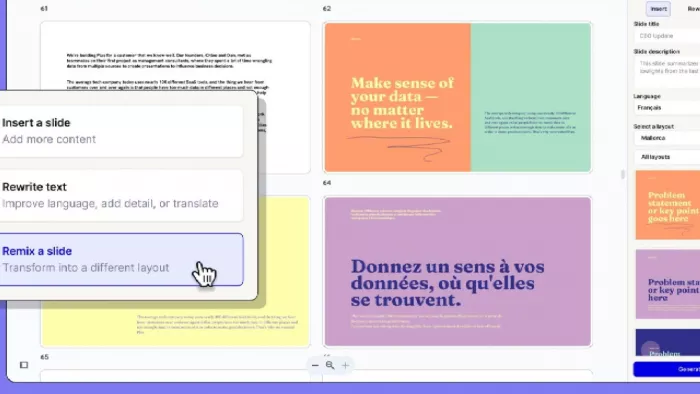
Plus AI makes a different bet: instead of asking you to adopt a new platform, it installs as an add-on inside Google Slides and PowerPoint and generates native, fully editable slides where you already work. It builds decks from prompts or uploaded documents and rewrites or "remixes" individual slides. On team plans, it also generates into your organization's actual templates and brand settings.
For anyone whose company standardized on Slides or PowerPoint, this removes the biggest problem with AI presentation tools, the export step, entirely. The AI creates a normal deck colleagues can edit and comment on, then present without ever knowing AI was involved.
The compromises: no permanent free plan, just a 7-day trial with a credit allowance, and the visual "wow" of a first draft trails Gamma's. By most accounts, the Google Slides experience is more polished than the PowerPoint one. Paid plans start around $10–15 per month. Vague prompts also produce vague slides; it rewards real source material.
The catch: The payoff isn't the first draft's visual wow factor. It's what happens afterward: you can rewrite, rearrange, and hand the deck to a colleague without fighting an export or rebuilding it in PowerPoint or Google Slides.
Decktopus: quick, guided decks for solo presenters
Decktopus aims at people who want the tool to make decisions for them. It offers a deck from a short prompt and a constrained set of layouts with sensible variants, plus features aimed at freelancers and small operators: embedded lead-capture forms, audio narration, custom domains for web-shared decks. There's a free version; paid pricing has shifted enough that I'd check its pricing page rather than quote a number.
The honest assessment: pleasant within its lane, frustrating outside it. Layouts are limited by design, and customization is shallow next to Canva or even Gamma. Users have long reported formatting problems when exporting to PowerPoint. For a web-shared proposal from a one-person business, that's fine, arguably ideal. For anything that must survive a corporate template review, look elsewhere.
The catch: Its simplicity is also its ceiling. If your presentation fits the layouts it provides, you'll barely need to touch it; once you want something unconventional, the lack of control becomes noticeable.
PowerPoint with Copilot: AI where your organization already lives
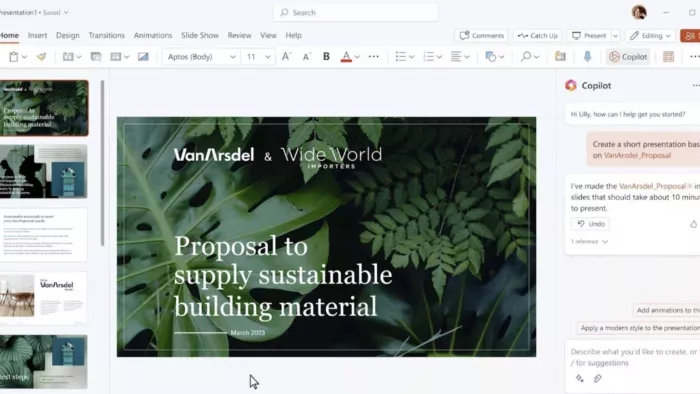
Copilot is less a presentation product than an AI layer across Microsoft 365. Inside PowerPoint it drafts decks from prompts, builds them from Word documents, pulls source material from SharePoint and OneDrive, generates speaker notes, and, as of 2026, can start from an admin-approved brand kit so output lands in your company's colors and fonts. It requires a Microsoft 365 subscription with a Copilot license: the priciest option here if you're not already paying for it, roughly free-feeling if you are.
Its strength is converting existing material into slides under enterprise governance: your permissions and templates, kept inside your compliance rules. Its weakness is the quality ceiling: reviewers consistently find its from-scratch drafts conservative, with bland design and storytelling that needs a human rebuild. Dedicated tools generate better-looking first drafts; Copilot generates acceptable drafts in the only environment many large companies will permit.
The catch: Copilot's biggest advantage is also its limitation: it works inside the machinery your organization already uses. That makes it easy to deploy and govern, but don't expect the first draft to have the editorial sharpness of a presentation tool built specifically around storytelling.
Best AI presentation maker
for sales decks
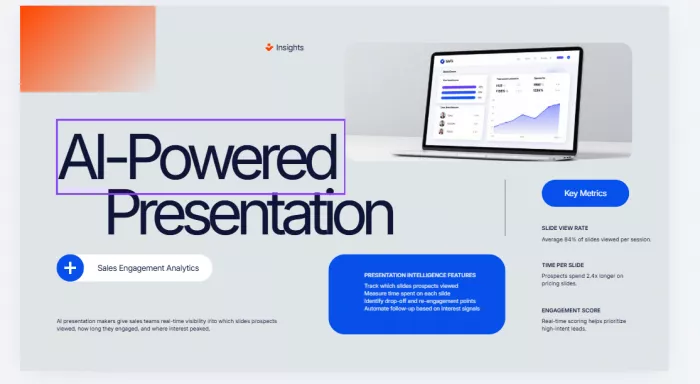
Sales decks get misdiagnosed by generic roundups because the deck is only half the job. What actually matters: a customer-specific story; proof points in the order this prospect cares about; airtight branding; collaboration, since decks get cloned and customized constantly; and what happens after you hit send.
By those measures, Pitch fits sales teams best: engagement analytics tell reps which prospects are warm and which slides did the work, and shared brand libraries stop the eleventh SDR from inventing their own color scheme. Beautiful.ai is the alternative when the priority is fifty people producing visually identical decks unsupervised: its team tier's Salesforce connection is a meaningful tiebreaker for CRM-driven orgs.
If your sales organization mandates PowerPoint, and many enterprise processes effectively do, Plus AI is the practical pick: customizing a master deck for the tenth prospect this week is exactly the repetitive work it accelerates, in a format your ops team accepts.
One warning for all of them: no AI tool knows your customer, and the generated draft will make generic claims in a confident voice. The reps who win use AI for structure and speed, then rewrite the value proposition slide themselves. Every time.
for teaching
Teachers work under constraints most reviews ignore: near-zero budget, bright-classroom projection, mixed reading levels, material reused every term. What matters is lesson structure (a beginning, activities, a recap, not a corporate arc), visual explanation, big readable text, and full control, because pedagogy lives in the details AI gets wrong.
Canva is the strongest overall choice. The free plan is genuinely usable rather than a demo, and Canva for Education extends free access to eligible K–12 teachers and students. The template and diagram library also handles visual explanation (labeled diagrams, timelines, cycles) better than any AI generation feature does. Magic Design gives you a structure; the design tools let you rebuild it around how you actually teach.
Gamma earns second place for a different job: converting lesson notes into slides quickly. Paste in an outline and you get a clean, readable draft in minutes, genuinely useful on a Sunday night. The flip side: generated content skews text-heavy for projection, and the free plan's one-time credits run out mid-semester.
Copilot rates a mention only because many school districts license Microsoft 365; where included, it's serviceable, though its conservative output needs the most reworking to become an actual lesson.
for startup and investor pitches
Investor decks follow rigid conventions: problem, solution, market, traction, team, ask. Investors see thousands of these, which cuts two ways: a competent AI-generated structure won't embarrass you, and it won't distinguish you either.
Gamma is the right starting point for most founders. It gives the most polished first draft from the least input, with an aesthetic that reads "startup" rather than "corporate," and it's fast enough to matter when iterating between investor conversations. Budget for a paid month so the watermark disappears before anything reaches an investor.
Upgrade paths: Beautiful.ai when you're past seed stage and the design bar rises (its structured layouts handle traction charts cleanly), and Pitch when fundraising becomes a team sport and you want to know which investors opened the deck and where they stopped scrolling. That last data point is more useful in a fundraise than most founders expect.
The limitation: AI tools reliably generate the skeleton of a pitch and reliably fail at the parts investors fund: why now, why you, and what the traction actually proves. Treat generated market-size numbers as decoration to be replaced, not research.
for business and internal presentations
Internal decks are the volume game: weekly updates, project reviews, planning docs turned into slides an hour before the meeting. Nobody needs these to be beautiful; everyone needs them fast and accurate enough to trust.
Here, document-to-deck conversion matters more than prompt-to-deck generation: internally, the content usually already exists in a doc or in meeting notes somewhere. Copilot is the sensible default for Microsoft 365 companies. It drafts from Word files and SharePoint content while respecting organizational templates via brand kits, all inside IT-approved boundaries. Plus AI is the pick for noticeably better generation in the same PowerPoint/Google Slides world, and the obvious winner for Google Workspace shops, where Copilot isn't an option.
Gamma deserves internal consideration precisely because export stops mattering: if your team happily reads a shared link, its card format is arguably better than slides for updates people skim rather than watch.
What AI presentation makers still get wrong in 2026
This is the section vendors would prefer to skip. Across the category, the same failure patterns recur:
Generic storytelling. AI structures decks the way an average deck is structured. If your argument is unusual, and persuasive arguments usually are, the generated flow flattens it into "Overview, Background, Three Points, Conclusion."
Too much text. Most generators produce slides meant to be read, not presented. You will delete words on almost every slide, whatever the tool.
Confident, unverified content. Generated decks state plausible-sounding claims and statistics with total assurance. Anything factual must be checked before the deck leaves your desk. AI-built charts from your own data are better, but still need a sanity pass; a mislabeled axis costs more than the tool saved.
Weak visual judgment. Tools pick imagery related to your topic rather than meaningful to your point. Decorative, not explanatory.
Brand and template ceilings. True brand enforcement (locked templates, approved assets, no going off-script) is generally an enterprise-tier feature, or missing entirely.
Export friction. The most common real-world complaint. Web-native tools (Gamma, Canva, Decktopus) all degrade somewhat when converted to PowerPoint: shifted layouts, substituted fonts, flattened elements. If .pptx is your delivery format, choose a tool native to it.
Underneath all of these sits the distinction this article keeps returning to: generating slides quickly is not creating a persuasive presentation. The gap is still closed by a human.
AI presentation maker comparison table
| Tool | Best for | Ease of use | Design control | Ideal workflow |
| Gamma | Fast drafts, startup pitches, web-shared decks | Very easy | Moderate | Prompt → polish → share as link |
| Beautiful.ai | Team consistency, sales/marketing decks | Easy | Deliberately limited | Smart templates enforce the design |
| Canva | Visual and marketing decks, teaching | Easy to start, deep to master | Maximum | AI scaffold → hands-on design |
| Pitch | Sales teams, collaborative deck workflows | Easy | Good | Master deck → clone, customize, track |
| Plus AI | PowerPoint / Google Slides users | Easy (familiar apps) | Full native editing | Docs or prompts → editable native slides |
| Decktopus | Solo presenters, web-shared proposals | Very easy | Limited | Guided generation → light tweaks |
| PowerPoint + Copilot | Microsoft 365 organizations, internal decks | Moderate | Full native editing | Word/SharePoint content → governed slides |
How to choose the right AI presentation maker
A short decision framework, in roughly the order to ask the questions:
Choose Plus AI if your decks must end up in PowerPoint or Google Slides - format-native beats format-converted every time.
Choose Copilot if your Microsoft 365 organization already licenses it, especially for internal decks built from existing documents. Don't buy it only for presentations.
Choose Gamma if speed to a good-looking draft is the whole game: early pitches, proposals, anything shared as a link rather than a file.
Choose Beautiful.ai if many people of varying skill produce decks under one brand and you'd trade creative freedom for consistency. Mind the trial-to-paid billing.
Choose Pitch if you run a sales team and care as much about what happens after the deck is sent as how it looks.
Choose Canva if the deck is fundamentally visual, you're a teacher, or you already live in Canva.
Choose Decktopus if you're a solo operator sharing simple web-based proposals and want the fewest decisions possible.
And a question worth asking first: is an AI presentation maker worth it for you at all? If you build two decks a year from a fixed corporate template, honestly, probably not. The tools pay off from roughly a deck a month upward, and compound from there.
The bottom line: match the tool to the deck, not the hype
There's no universal winner here, so I won't invent one. Here's the recommendation I'd actually make, depending on who's asking.
For raw speed, with decks that live on screens rather than in files: Gamma. For brand control across a team: Beautiful.ai, eyes open about its rigidity. For sales decks as a team sport: Pitch. For teachers: Canva, starting with the free education tier. And for anyone committed to PowerPoint or Google Slides, most working professionals, Plus AI, or Copilot if your company already pays for it.
If I were choosing today with no constraints, I'd start with Gamma: its free credits let you judge the output in an afternoon, and its drafts need the least design rescue of anything here. The trade-off is real: Gamma is at its best when decks stay in Gamma. The moment my work had to survive a corporate PowerPoint template, I'd move to Plus AI and accept a plainer first draft in exchange for slides that are native where I work.
Comments