I've spent the last several weeks putting Akool AI through its paces on real projects: a client explainer video, a product tutorial translated into three languages, and even a birthday reel for a friend using face swap. Akool is genuinely capable. The talking-avatar output is impressive, video translation with lip-sync works well most of the time, and the streaming avatar feature is a neat trick if you're building something interactive.
But Akool isn't the right fit for every workflow, and if you've landed here, you probably already know that. Maybe the credit pricing bit into your budget. Maybe the render queue during peak hours cost you a deadline. Maybe you needed more cinematic footage, tighter enterprise controls, or a cheaper way to make a single talking photo. Whatever pulled you here, I want to help you find the right replacement, not just the loudest one.
So I sat down and put four of the strongest Akool alternatives through the same battery of tests: a scripted 60-second explainer, a lip-synced translation from English to Spanish, a short cinematic shot from a text prompt, and a talking-photo test. I noted where each one shined, where it flopped, what it costs, and which projects I'd actually pick each one for. That last part is what most reviews skip.
I picked four tools deliberately, not seven or ten. A shortlist you can act on beats a bloated list that leaves you paralyzed. These four cover the four distinct reasons people move away from Akool: needing a better all-round alternative, a corporate-safe option, a creative-cinematic upgrade, or a cheaper talking-photo tool.
Quick Recap: What Akool AI Actually Does Well (and Where It Falls Short)
Before we get into alternatives, it helps to be honest about what Akool AI does well. That's the only way you'll know which alternative will genuinely replace it for your use case.
Where Akool AI genuinely shines
• Face swap on images and short video clips, one of the smoother mainstream implementations
• Video translation with matching lip-sync across 30+ languages
• Streaming avatar for real-time interactive use cases like customer support demos
• Talking photo for turning a still image into a speaking clip in a few clicks
Where I hit friction with Akool
• Credit-based pricing gets expensive fast on long-form video
• Render queues can stretch simple exports to 15–20 minutes during peak hours
• Avatar library is capable but smaller than dedicated competitors
• Fine-grained camera and motion control is limited compared to cinematic tools
• Face swap on longer clips can show artifacts around fast head movement
None of this makes Akool a bad tool. It just means the "best alternative" depends on which of those weaknesses is blocking your workflow. This guide is less of a ranked list and more of a matching exercise.
At-a-Glance: The 4 Akool AI Alternatives Compared
If you skim one section of this guide, make it this one. It's the shortest path from "which tool should I even try" to a shortlist of one or two candidates worth a free trial.
| Tool | Best For | Free Plan | Starting Price | My Verdict |
|---|---|---|---|---|
| HeyGen | AI avatars & video translation | Yes (limited) | ~$29/mo | ★★★★★ Best all-round replacement |
| Synthesia | Enterprise training videos | Free demo only | ~$29/mo | ★★★★½ Polished, strict on content |
| Runway | Cinematic AI video generation | Yes (limited credits) | ~$15/mo | ★★★★½ Creative studios love it |
| D-ID | Talking-photo on a budget | Yes (watermarked) | ~$5.9/mo | ★★★★ Cheapest talking-avatar pick |
HeyGen: The Most Direct Akool Alternative
If Akool's avatar and translation features are what pulled you in, HeyGen is the tool to try first.
HeyGen is the closest feature-for-feature competitor to Akool AI in this comparison. Both tools solve the same core problem: turning a script into a polished, human-looking video without a camera crew. But HeyGen has been iterating hard on avatar realism and translation quality, and it shows.
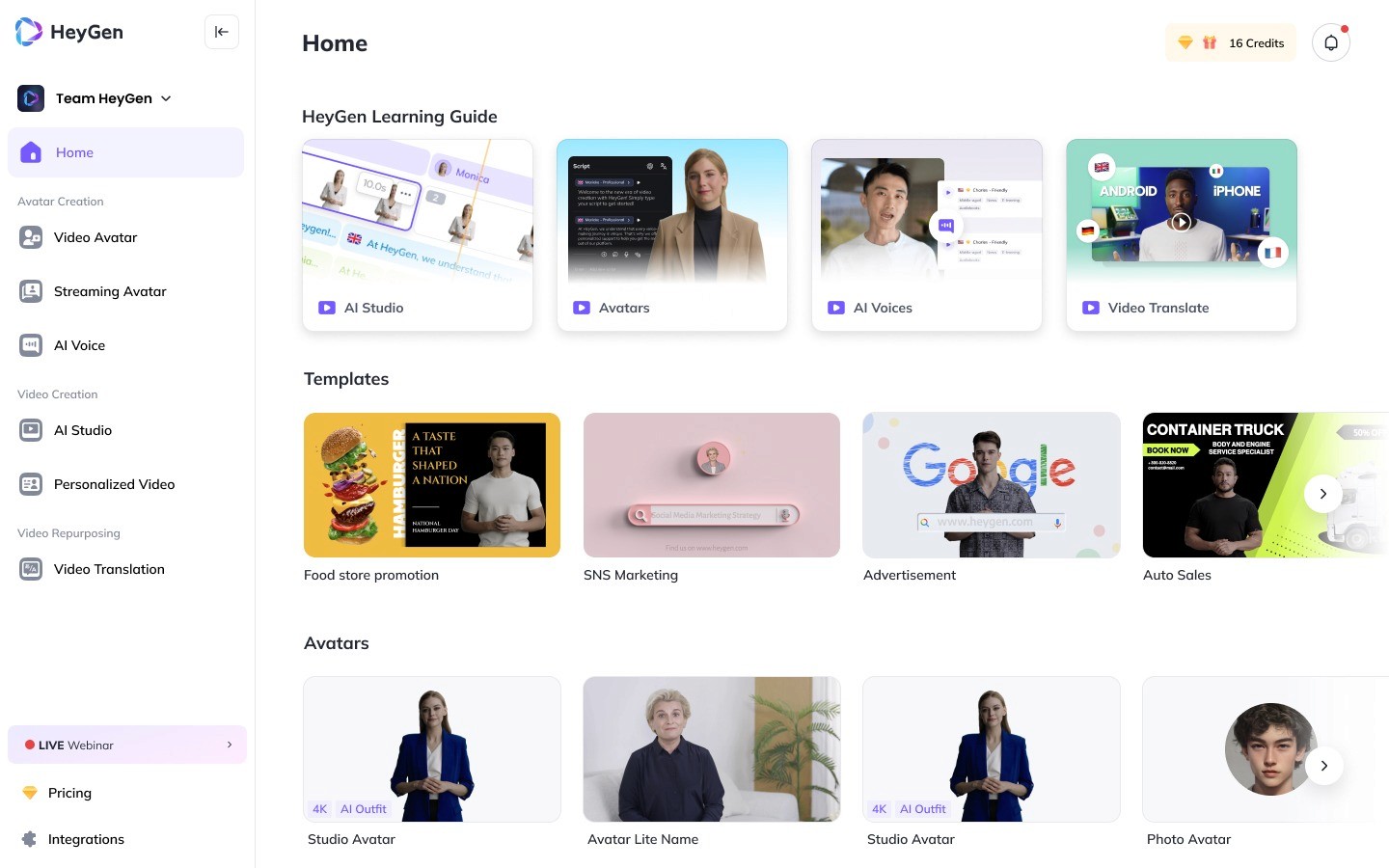
In my testing, HeyGen's lip-sync on the Spanish translation felt slightly more natural than Akool's on the same clip. Small mouth movements matched the language's rhythm better. The avatar library is larger, the interface is friendlier for first-timers, and the instant avatar feature (turning your own 2-minute selfie video into a reusable clone) is one of the smoother implementations I've used in this category.
| At a Glance | Details |
|---|---|
| Category | AI avatar video, video translation, talking avatar |
| Free plan | Yes, 3 credits/month, watermarked |
| Avatar library | 500+ stock avatars, custom cloning available |
| Languages | 175+ for translation and voice |
| Best-known feature | Instant avatar cloning + translation with lip-sync |
| API access | Yes (business plans and above) |
Best for: Marketers, course creators, and agencies producing avatar-led scripted videos at scale.
Key Features I Tested
• Custom avatar cloning from a 2-minute selfie video
• Video translation with lip-sync in 175+ languages, plus voice cloning
• 500+ stock avatars covering a wide range of ages, ethnicities, and looks
• AI script writer built in, helpful when you're stuck on copy
• Templates library for demos, training modules, and testimonial-style videos
• API access on higher plans for developers embedding avatar generation
Pros & Cons
| ✓ Pros | ✗ Cons |
|---|---|
| • Cleaner lip-sync than Akool in my Spanish translation test | • Free tier is very limited (3 credits per month) |
| • Larger avatar library out of the box | • Enterprise plan costs climb quickly |
| • Instant avatar cloning is genuinely usable, not gimmicky | • Strict content policy, so expect friction on edgy scripts |
| • Interface is less cluttered than most avatar tools | • No cinematic B-roll generation like Runway |
| • Solid developer API with clear pricing | • Custom avatar approval can take a day or two |
Pricing
| Plan | Price | Who it's for |
|---|---|---|
| Free | $0 | Testing the waters, 3 credits/mo with watermark |
| Creator | ~$29/mo | Solo creators making short videos |
| Team | ~$89/mo | Small teams needing custom avatars & brand kits |
| Enterprise | Custom | Agencies, large orgs, API access, SSO |
Note: Prices are approximate and vary by region and promotions. Always check the vendor's current pricing page.
Real-world scenario I used it for I used HeyGen to produce a 90-second onboarding video for a SaaS client in English and Spanish. Total time from script to final export: under 25 minutes for both languages. The Spanish lip-sync was clean enough that the client's Mexico City team didn't flag anything unnatural, which was the outcome I was hoping for. |
| My Test Rating: ★★★★★ The strongest all-round replacement for Akool. Start here. |
Synthesia: The Corporate & Training Video Powerhouse
The go-to choice for enterprises where consistency and brand safety matter more than creative flexibility.
Synthesia is the tool I'd hand to a corporate learning-and-development team without hesitation. It's built for scale, for compliance-heavy industries, and for teams whose primary job is producing training or compliance content at volume, not experimenting with viral formats.
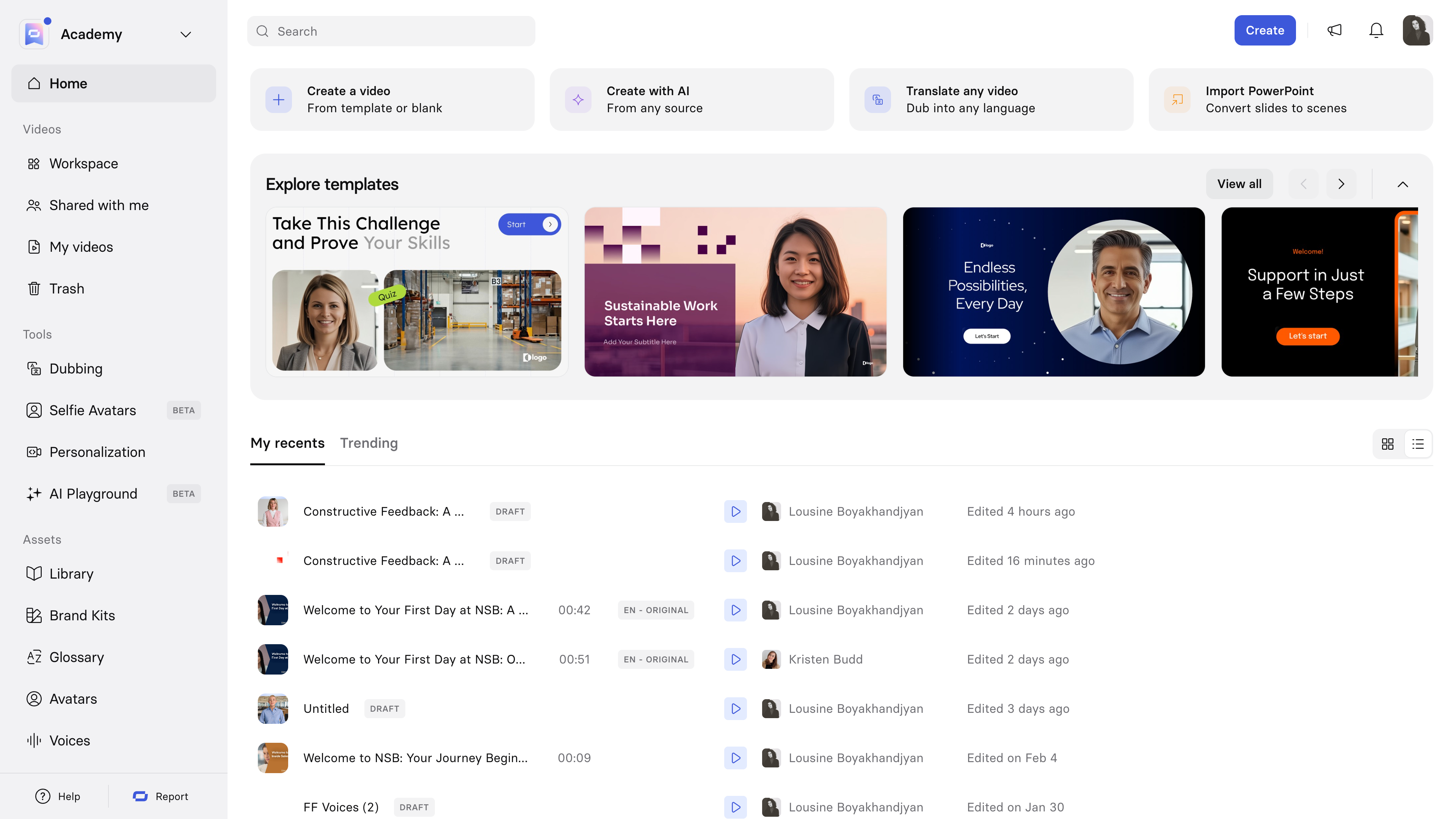
In my testing, Synthesia's avatar realism was on par with HeyGen, but the platform feels more like "work software" than a creator tool. That's not a criticism. It's exactly what large teams want: brand kits, avatar libraries locked down for consistency, review workflows, and predictable output every time.
| At a Glance | Details |
|---|---|
| Category | Enterprise AI avatar video, training content |
| Free plan | Free demo (very limited) |
| Avatar library | 230+ stock avatars, custom avatars on higher tiers |
| Languages | 140+ voices, strong on major European & Asian languages |
| Best-known feature | Reliable, brand-safe avatar videos at scale |
| Ideal team size | 5 people and up |
Best for: L&D teams, HR departments, and enterprises producing high-volume training and compliance content.
Key Features I Tested
• Enterprise brand kits to lock down fonts, colors, and avatar choices
• Reliable rendering, with no queue delays in a week of testing
• 230+ stock avatars with a strong range of professional looks
• Custom avatar creation on business and enterprise plans
• PPT-to-video: upload a slide deck, get a narrated video back
• Review workflow with in-platform comments for team sign-off
Pros & Cons
| ✓ Pros | ✗ Cons |
|---|---|
| • Extremely consistent output quality | • Pricier than most alternatives |
| • Best-in-class for L&D and training use cases | • Not for edgy, viral, or highly creative content |
| • Strong compliance and enterprise controls | • Strict content policy, enforced consistently |
| • Reliable render times, even during peak hours | • Interface feels more corporate than creative |
| • PPT-to-video is a genuine time-saver | • No cinematic B-roll or generative video |
Pricing
| Plan | Price | Who it's for |
|---|---|---|
| Starter | ~$29/mo | Individuals producing short training clips |
| Creator | ~$89/mo | Freelancers making longer client work |
| Enterprise | Custom | Teams needing SSO, custom avatars, high volume |
Note: Prices are approximate and vary by region and promotions. Always check the vendor's current pricing page.
Real-world scenario I used it for I helped a compliance team put together a 12-module onboarding course. Synthesia's PPT-to-video feature turned their existing slide deck into narrated videos in under an hour of active work. The alternative would have been a week of studio recording. The final videos passed their legal review on the first pass, which is the metric that actually mattered to them. |
| My Test Rating: ★★★★½ The safest, most polished choice for corporate work. |
Runway: For Cinematic, Story-Driven AI Video
If Akool felt limited when you wanted actual scene generation and film-style shots, this is the upgrade.
Runway is a different animal from the avatar-first tools above. Its Gen-3 and Gen-4 models focus on generative video: creating shots that don't exist, animating stills into short clips, running camera moves, style transfers, and inpainting. If you're a filmmaker, motion designer, or content creator whose taste runs cinematic, Runway is where you'll actually feel excited to work.
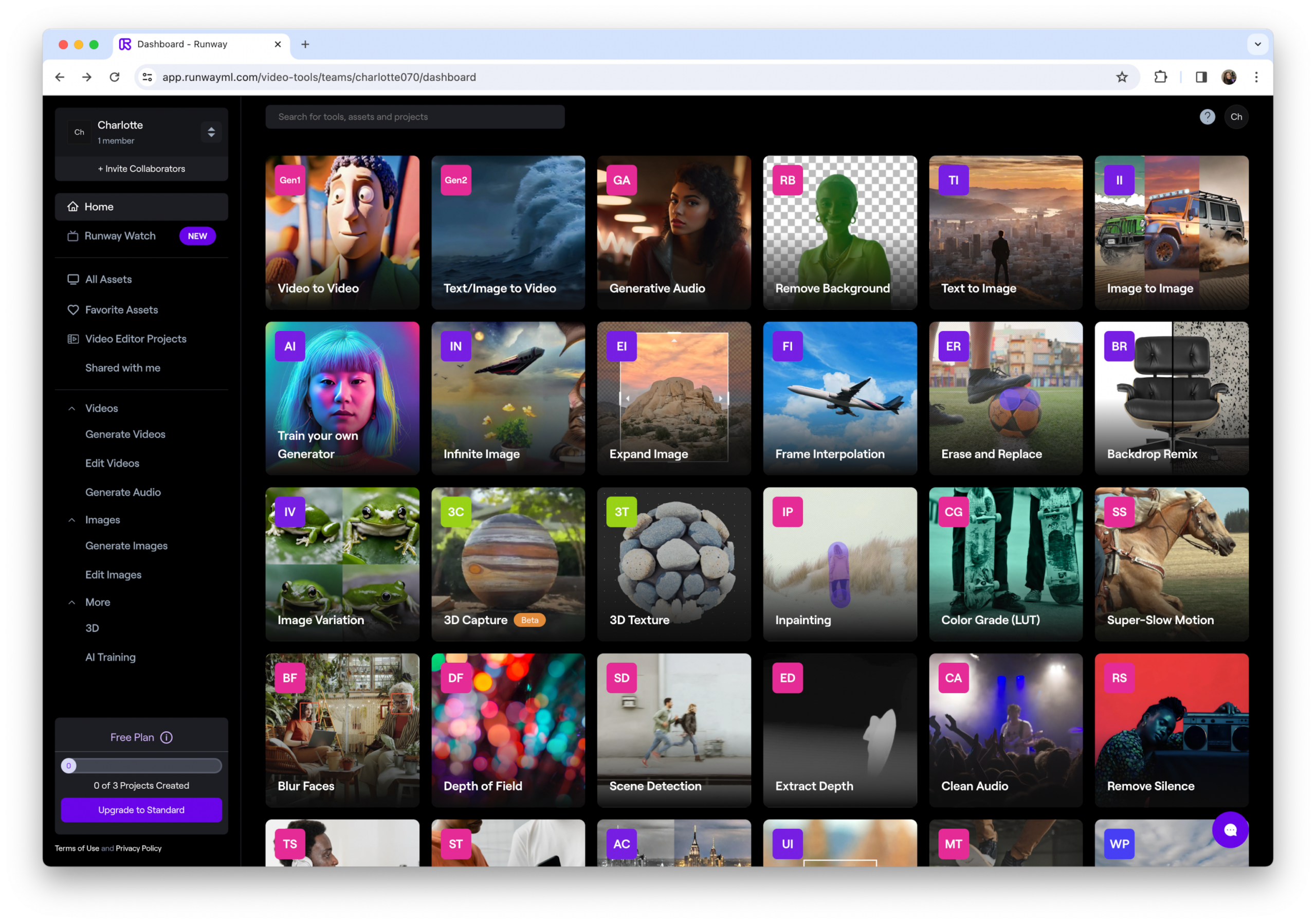
The trade-off is real. Runway isn't the tool for producing a 5-minute talking-head training video. It's the tool for producing a dreamy 4-second establishing shot to open that video. Understanding which of those you need is the whole game. If you're mainly leaving Akool because you wanted more visual variety, Runway is probably why.
| At a Glance | Details |
|---|---|
| Category | Generative AI video, image-to-video, editing suite |
| Free plan | Yes, limited credits, no long clips |
| Video length | Up to 20 seconds per clip on higher plans |
| Best model | Gen-4, noticeably sharper than Gen-3 |
| Best-known feature | Cinematic text-to-video and image-to-video |
| Team collaboration | Yes, shared workspaces on team plans |
Best for: Filmmakers, motion designers, creative agencies, and anyone whose output needs to feel cinematic rather than corporate.
Key Features I Tested
• Gen-4 video model, currently near the top for generative video quality
• Image-to-video to animate a still image into a short clip with camera motion
• Video-to-video to restyle existing footage into a new aesthetic
• Inpainting and object removal to clean up unwanted objects in footage
• Motion brush to direct specific parts of a scene to move in specific ways
• Full editing suite built in, so you can trim, layer, and export without switching tools
Pros & Cons
| ✓ Pros | ✗ Cons |
|---|---|
| • Best-in-class cinematic quality on this list | • Not built for talking-avatar or explainer content |
| • Motion brush gives creative control that most tools lack | • Credit consumption is heavy on Gen-4 |
| • Full editing suite reduces tool-hopping | • Clips are still capped at short lengths |
| • Regular model updates (Gen-3 to Gen-4 in months) | • Requires more experimentation to achieve consistent results |
| • Strong creative community and tutorials | • Some prompts take many attempts to nail |
Pricing
| Plan | Price | Who it's for |
|---|---|---|
| Free | $0 | Testing Gen-3 with limited credits |
| Standard | ~$15/mo | Creators making regular short clips |
| Pro | ~$35/mo | Higher credit quotas, longer clips |
| Unlimited | ~$95/mo | Heavy users, always-on generation |
| Enterprise | Custom | Studios, brand teams, API access |
Note: Prices are approximate and vary by region and promotions. Always check the vendor's current pricing page.
Real-world scenario I used it for I used Runway Gen-4 to generate three establishing shots for a short brand film: a slow push-in on an empty coffee shop, a top-down of hands typing, and a dreamy shot of steam rising from a mug. Total generation time was about 40 minutes including reroll attempts. Getting the same footage from a stock library would have taken longer and looked more generic. |
| My Test Rating: ★★★★½ The best pick if your work is creative, not corporate. |
D-ID: Best Budget Pick for Talking Photos & Avatars
If you mainly liked Akool's talking-photo feature, D-ID does the same thing at a fraction of the price.
D-ID has been in the talking-avatar space longer than most tools in this comparison, and it shows in the polish of its core feature: turning a still photo into a speaking clip. It's not trying to be a full video suite. It's trying to nail one specific job, and it does.
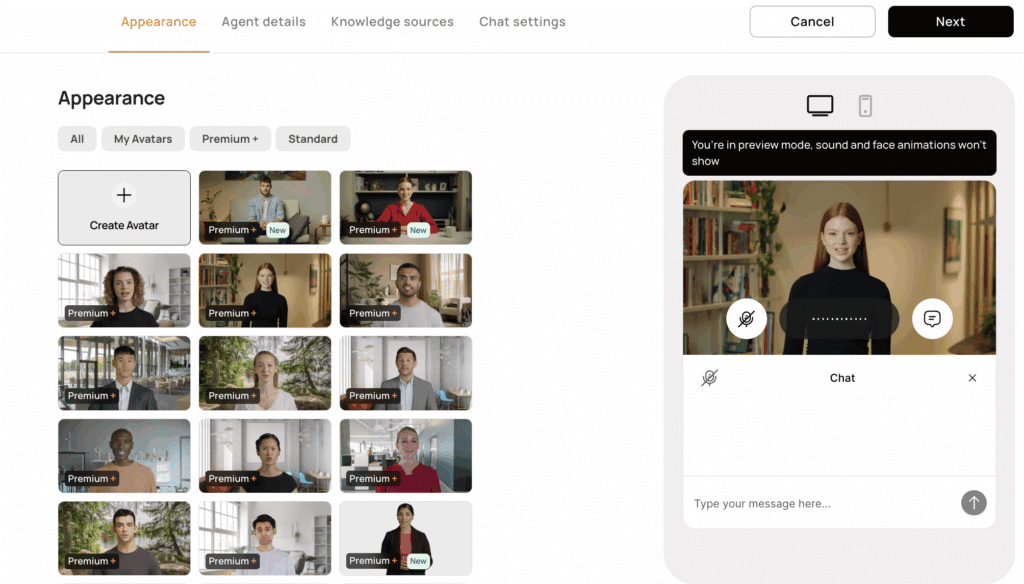
For my testing, I uploaded the same portrait photo to D-ID and Akool, gave both the same short script, and compared the results. D-ID's mouth movement felt slightly more grounded in the face's actual geometry, while Akool's had smoother animation but occasionally over-animated the eyebrows. Neither is objectively "better"; it depends on your taste. What is objectively better is the price.
| At a Glance | Details |
|---|---|
| Category | Talking photo, AI presenter, avatar API |
| Free plan | Yes, 14-day trial with watermarked exports |
| Avatar library | Bring-your-own photo + preset presenters |
| Languages | 100+ voices via ElevenLabs and Microsoft integrations |
| Best-known feature | Photo-to-speaking-clip in one upload |
| API access | Yes, pay-per-minute pricing for developers |
Best for: Solo creators, small businesses, and developers needing cheap, quick talking-avatar output.
Key Features I Tested
• Photo-to-video in one upload, the core use case, and it works well
• Real-time streaming avatar for interactive apps (comparable to Akool's live avatar)
• Integration with ElevenLabs for premium voice quality
• API access with pay-per-minute pricing, friendly for indie developers
• Presenter Studio for scripted videos with slides
• Chrome extension for making talking avatars from LinkedIn photos
Pros & Cons
| ✓ Pros | ✗ Cons |
|---|---|
| • Cheapest starting price on this list (~$5.9/mo) | • Not a full video suite, no B-roll or complex editing |
| • Genuinely strong talking-photo quality | • Avatar library isn't as deep as HeyGen or Synthesia |
| • Developer-friendly API with per-minute pricing | • Face swap is limited compared to Akool |
| • Real-time streaming avatar for live apps | • Free trial exports carry a visible watermark |
| • ElevenLabs integration lifts voice quality noticeably | • UI feels a bit dated next to newer tools |
Pricing
| Plan | Price | Who it's for |
|---|---|---|
| Trial | Free (14 days) | Testing the tool with watermarked exports |
| Lite | ~$5.9/mo | Casual creators, side projects |
| Pro | ~$29/mo | Regular content creators and small businesses |
| Advanced | ~$196/mo | Agencies, higher volumes, priority queue |
| Enterprise | Custom | Custom avatars, API, SSO |
Note: Prices are approximate and vary by region and promotions. Always check the vendor's current pricing page.
Real-world scenario I used it for A friend running a small e-commerce brand wanted to add "talking founder" clips to her product pages without hiring a videographer. We used D-ID's Lite plan and her existing headshot to produce 8 clips (one per product) in a single afternoon. The full month cost less than a single Fiverr voiceover gig. |
| My Test Rating: ★★★★ Best value if all you need is the talking-photo core feature. |
Head-to-Head Scorecard: All 4 Tools Rated Across 7 Criteria
After the deep dives, here's how the four tools actually compare when you strip everything back to scores. I've rated each on the criteria that matter most in day-to-day use, not marketing categories, but the things that actually shape whether you keep or cancel a subscription. Winners in each row are highlighted in green.
| Criteria | HeyGen | Synthesia | Runway | D-ID |
|---|---|---|---|---|
| Ease of Use | ★★★★½ | ★★★★ | ★★★½ | ★★★★½ |
| Output Quality | ★★★★½ | ★★★★½ | ★★★★★ | ★★★★ |
| Feature Breadth | ★★★★½ | ★★★★ | ★★★★ | ★★★ |
| Value for Money | ★★★★ | ★★★½ | ★★★½ | ★★★★★ |
| Render Speed | ★★★★½ | ★★★★★ | ★★★½ | ★★★★½ |
| Customization | ★★★★ | ★★★★ | ★★★★★ | ★★★½ |
| Developer / API | ★★★★½ | ★★★½ | ★★★½ | ★★★★½ |
| Overall Score | ★★★★★ | ★★★★½ | ★★★★½ | ★★★★ |
How to read this: no single tool wins every row, and that's the point. HeyGen is the strongest all-rounder, but Runway rules on quality and customization, Synthesia on reliability, and D-ID on price. If your workflow leans heavily on one criterion, follow the green highlight in that row rather than the overall score.
Which Akool AI Alternative Should You Actually Pick?
None of these four tools "beats" Akool at everything. Each beats it at something specific, and that's exactly how you should approach this decision. Here's the shortcut I'd give a friend over coffee.
| If your priority is… | Pick this tool |
|---|---|
| I need clean video translation with lip-sync | HeyGen offers the cleanest translation of the four. Synthesia is a close second for corporate use. |
| I make corporate training videos at scale | Synthesia is the safest, most consistent choice for compliance-heavy work. |
| My work needs to feel cinematic, not corporate | Runway offers the best generative video quality on this list. |
| I just want a cheap talking-photo tool | D-ID is the cheapest and most focused on this single feature. |
| I'm a developer needing an API | HeyGen or D-ID. Both offer solid APIs with clear pricing. |
| I mostly want face swap (Akool's strongest feature) | Stick with Akool. None of these four match its face-swap depth. |
Final Verdict After Testing
If I had to name a single winner, it would be **HeyGen**. It's the tool that overlaps most cleanly with Akool AI's feature set (avatars, translation, talking photos), and in my testing edged Akool on lip-sync accuracy and avatar variety. For most people arriving at this article, HeyGen is the answer, and I'd start a free trial there before anywhere else.
But that answer's incomplete without the caveats. **Runway** is the smarter pick if you're a creative professional and Akool felt visually flat. **Synthesia** is the responsible pick for enterprise buyers who need consistency more than creativity. **D-ID** is genuinely the best value for the talking-photo use case, and no one should pay more than they need to for that single feature.
Here's the honest truth most "best of" articles won't tell you: the best AI video tool is almost never the one with the highest score in a review. It's the one that fits the specific bottleneck in your specific workflow. Spend an hour thinking about what actually slowed you down on Akool. The right alternative will be obvious from that answer.
My personal shortlist First pick: HeyGen, the closest match to Akool with better lip-sync If you're creative: Runway, where cinematic generation is unmatched here If you're at a company: Synthesia, for enterprise safety and polish If you're on a budget: D-ID Lite, offering talking photos for under $10/mo |
Comments