Table of Contents
- Why the same description gives you a different person every time
- Build a Character DNA profile before you generate anything
- What makes a master reference image actually work
- Turning one reference into a full character sheet
- A prompt framework you can reuse for every scene
- Keeping the same character across six different scenes
- Does using the same seed keep a character consistent?
- How to hold the face, clothes, poses, and angles all at once
- Reference features, image-to-image, and when to train a model
- Fixing the seven ways a character drifts
- AI Character Consistency Checklist
- Where to start
You generate a character you love, place them in a new scene, and suddenly the face is slightly different, the hair has shifted, or the whole person feels like a convincing stranger. That small identity drift is one of the biggest challenges in creating recurring AI characters.
The fix is not to keep adding more adjectives to every prompt. Reliable consistency comes from giving the model a stable visual identity to follow, then controlling what is allowed to change from image to image. This guide shows how to build that foundation, create stronger references, structure prompts, handle different poses and environments, and troubleshoot the most common forms of character drift.
Why the same description gives you a different person every time
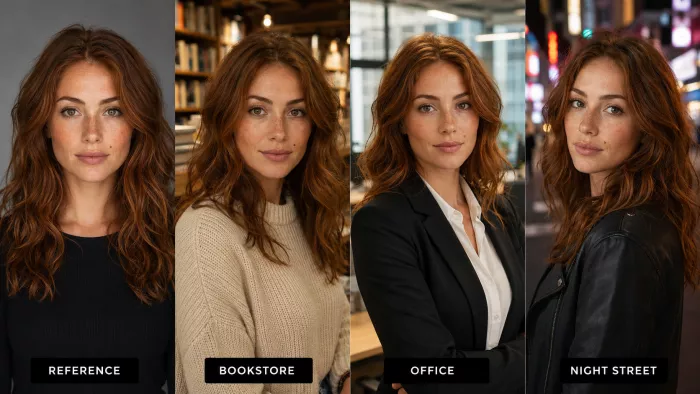
A text prompt is lossy. When you write "woman, late twenties, green eyes, wavy auburn hair, sharp jawline," you've described millions of possible faces, not one specific human. The model fills every gap you didn't specify a little differently on each run, and there are hundreds of gaps. That's why consistent character generation from words alone almost never holds up.
Two mechanical reasons make it worse. First, diffusion models start from random noise and denoise their way to an image; different starting noise means a different interpretation of the same words. Second, human perception is brutally sensitive to faces. We're wired to notice a two-millimeter shift in eye spacing or a slightly rounder chin, so changes the model considers trivial read to us as "that's a different person." A landscape can wander a lot before anyone notices. A face can't.
This is the core reason a consistent AI character depends less on clever wording than on two things you set up once and reuse: a reliable character reference image and a fixed list of identity traits. Prompts still matter, but they're the steering wheel, not the engine. Once you accept that reference images and locked traits carry the identity, AI character consistency stops feeling like luck.
Build a Character DNA profile before you generate anything
Before you make a single image, write down your character's Character DNA, the identity profile you'll paste into or attach to every prompt. The point is to separate what must never move from what you're free to change. Everything in the "fixed" column is what makes the character recognizable; everything in the "flexible" column is what makes each image feel new.
| Fixed identity traits (keep these constant) | Flexible elements (change these freely) |
| Face shape and bone structure (jaw, cheekbones, brow, nose) | Clothing and accessories |
| Eye shape and eye color | Pose and body language |
| Skin tone and undertone | Facial expression |
| Hairstyle, length, texture, and hair color | Background and environment |
| Approximate age | Camera angle and framing |
| Body proportions, height, and build | Activity or action |
| Distinctive features (freckles, moles, scars, dimples, glasses) | Lighting and mood |
The mistake most people make is treating hair, age, and build as decoration and describing them loosely. Those three are identity anchors. "Shoulder-length auburn hair, side part, slight wave" is a trait; "nice hair" is a coin flip. Write the fixed column as if you're briefing a portrait artist who will never see the person. Make it specific enough that two different readers would draw nearly the same face.
Keep the profile short and concrete, roughly like this:
CHARACTER DNA — "Mara"
Age: 29
Face: oval, soft jaw, high cheekbones, straight narrow nose
Eyes: almond-shaped, hazel-green
Skin: warm medium tan, freckles across the nose
Hair: shoulder-length copper-auburn, natural wave, center part
Build: 5'7", slim athletic, long neck
Distinctive: small mole above left lip, thin silver nose stud
That block becomes the identity spine of every prompt. You'll reuse it verbatim so the model hears the same traits every time.
What makes a master reference image actually work
Your AI character reference is only as good as the master image behind it. This is the anchor everything else is generated from, so it's worth getting right before you scale up.
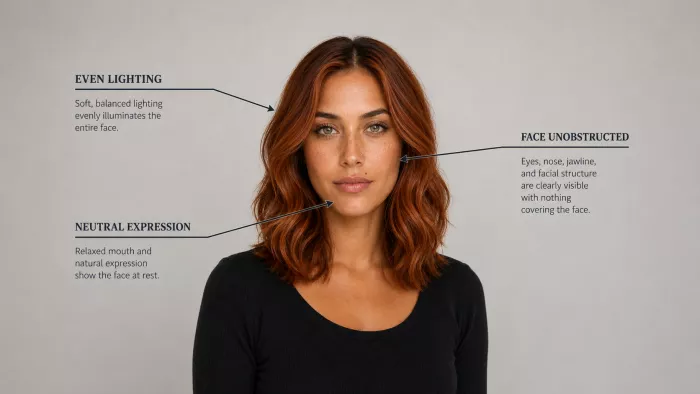
A strong anchor image has a clearly visible face shot from the front or a slight three-quarter angle, lit with soft, even light. Harsh side lighting looks dramatic but hides half the bone structure the model needs to read, and once structure is hidden the model invents it. Keep the expression neutral or lightly relaxed for the master shot. A big grin distorts the cheeks and eyes, which then bleed into every future generation. Make sure nothing obstructs the face: no hair falling across the eyes, no sunglasses, no hand on the chin, no dramatic hat. The features you want to preserve all need to be plainly visible.
Resolution matters more than people expect. A small or blurry reference gives the model mushy information, and mushy information drifts fast. Use the sharpest, highest-resolution version you have, and keep the background simple so the model isn't distracted trying to interpret a busy scene as part of the person.
If you ever plan to generate full-body shots, make a separate full-body reference too. A tight headshot tells the model nothing about height, limb length, or build, so when you later ask for a full-body image it guesses the proportions. That guess is where "why does the body look like someone else?" comes from. One clean face reference plus one clean full-body reference covers most needs.
Turning one reference into a full character sheet
Most tools that support character consistency get noticeably better when you give them more than one angle. That's what a character reference sheet is for. Instead of a single headshot, you build a small set of views that show the model the same person from every side, so it can generalize the identity instead of memorizing one pose.
A useful sheet covers five views: a straight front view, a three-quarter view at roughly 45 degrees, a side/profile view, a full-body view for proportions, and a couple of expression variations (a neutral face and a light smile). The front and three-quarter views carry most of the identity; the profile locks the nose and chin; the full-body view fixes proportions; the expression shots teach the model that the smile and the frown are still the same person.
You can build this sheet in a few ways. If your tool renders a reasonable second angle from your master image, generate the other views and keep only the ones that stay on-model. Use those as additional references. If it doesn't, generate candidates, hand-pick the ones that match, and treat that curated set as your reference pack. The reason multiple clear references improve consistent character generation is simple: one image is a single data point the model can misread, while five consistent images describe a person the model can't easily wander away from.
A prompt framework you can reuse for every scene
Once your Character DNA and references exist, the prompts themselves should follow a fixed skeleton so the identity block never gets diluted by scene description. This is the framework I reuse for everything:
[Character identity / reference] +
[what must remain unchanged] +
[pose / action] +
[clothing] +
[environment] +
[camera angle] +
[lighting] +
[visual style]
The order matters. Lead with identity so the model weighs it heavily, restates the non-negotiable traits, and only then describes the scene. When you keep the first two blocks identical across every generation and change only the last five, you're changing the situation without touching the person. These are the consistent character prompts that hold up across a whole set.
Sample prompt 1: same character, new outfit and setting
Mara [attach character reference], 29, oval face, hazel-green almond eyes,
warm tan freckled skin, shoulder-length copper-auburn wavy hair, small mole
above left lip — keep facial structure, eye color, hair, and age unchanged.
Standing, weight on one hip, looking over her shoulder. Wearing a cream
oversized knit sweater and dark jeans. Cozy independent bookstore, warm
wooden shelves behind her. Three-quarter camera angle, chest-up framing.
Soft window light from the left. Natural editorial photography style.
Sample prompt 2: same character, different pose and mood
Mara [attach character reference], 29, oval face, hazel-green almond eyes,
warm tan freckled skin, shoulder-length copper-auburn wavy hair, small mole
above left lip — keep facial structure, eye color, hair, and age unchanged.
Seated at a desk, leaning forward mid-conversation, focused expression.
Wearing a charcoal blazer over a white tee. Modern glass-walled office at
dusk. Slightly low camera angle, waist-up framing. Cool ambient light with
a warm desk lamp. Clean corporate lifestyle style.
Notice that the first two lines are byte-for-byte identical between the two prompts. Everything after "keep... unchanged" is what varies. That discipline is what separates a set that looks like one person from a set that looks like siblings.
Keeping the same character across six different scenes
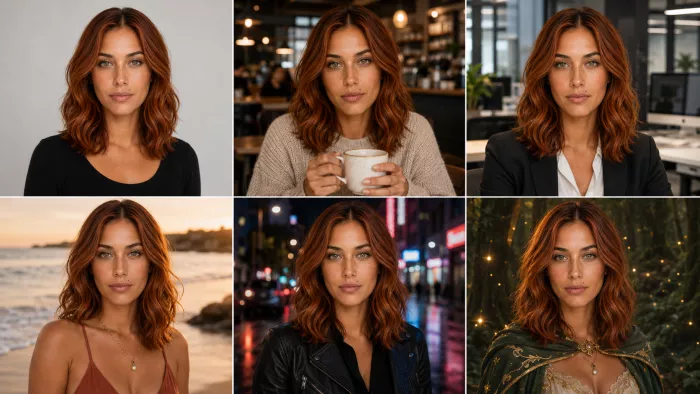
Here's the practical test: can the same person survive a studio portrait, a coffee shop, an office, a beach, a cinematic night street, and a fantasy world? They can, as long as you hold the identity block constant and change only scene variables. The table below shows exactly what stays locked and what you're free to move in each case.
| Scene | Keep fixed | Change freely |
| Studio portrait | Full Character DNA, neutral or soft expression | Backdrop color, key-light direction, framing |
| Coffee shop | Face, eyes, hair, skin, age, build | Casual outfit, holding a cup, warm ambient light, candid pose |
| Office | Same identity block | Blazer and shirt, standing or seated, cool daylight, waist-up angle |
| Beach | Same identity block | Summer clothing, wind in hair, squint-free relaxed expression, golden-hour light |
| Cinematic night street | Same identity block | Jacket, neon and rim lighting, low angle, moody film-still style |
| Fantasy environment | Same identity block | Costume or armor, dramatic pose, magical lighting, painterly style |
Two failure points show up in this exercise. The beach and fantasy scenes tempt you to change hair ("windswept," "battle-worn") and lighting so aggressively that the face reads differently. Resist rewriting the hair color or cut, and keep at least a soft key light on the face so structure stays visible. The cinematic street scene tempts heavy color grading that shifts skin tone; grade the scene, not the person. As long as your first two prompt blocks don't move, the same AI character walks convincingly from a bright studio into a neon alley and out into a fantasy forest.
Does using the same seed keep a character consistent?
Short answer: not on its own. A seed is the random starting point the model denoises from. If you hold the seed, the prompt, the model, and every setting exactly the same, you'll get the same image. That's useful, but it's the same image, not the same character in a new scene. The moment you change the prompt to move the character to a coffee shop or into a new outfit, the seed no longer guarantees the same face. You've changed the recipe, so the output changes too.
Where seeds actually help is controlled experiments. Fix the seed, then change one thing (swap "smiling" for "neutral," or nudge the lighting) and compare. Because only one variable moved, you can see its effect cleanly. That makes seeds a great tuning tool. But treating "same seed" as a consistency solution leads people astray, because as soon as the scene genuinely differs, the same seed can hand you a completely different-looking person. Seeds mainly control reproducibility, not identity. Reference images and locked traits are what do most of the work of holding a face steady.
How to hold the face, clothes, poses, and angles all at once
These are the four questions people search for most, and each has a specific answer.
Keeping the same AI face in every image comes down to feeding the model the same face reference every time and never rewriting the facial-structure words between prompts. If you described "oval face, straight nose, almond eyes" once, keep reusing those exact words. Changing the wording can increase identity drift.
Keeping the same character while changing clothes works precisely because clothing isn't part of identity. Hold the identity block fixed and describe a completely new outfit in the clothing slot. The classic bug is clothing "reverting" to the reference outfit, which happens when the reference image dominates too strongly. The fix is to state the new outfit explicitly and, in reference-based tools, lean the strength toward the character rather than the whole image (more on that below).
Creating the same AI character in different poses is easiest when you separate pose from identity. Describe the new pose or action in its own slot and, if your tool supports pose control, use it so the body moves without the face being renegotiated. This is how you get the same AI character in different poses without the identity resetting on each one.
Maintaining identity from different camera angles is the hardest of the four, because a profile or low angle exposes bone structure the model may not have seen. This is exactly why the three-quarter and profile views in your reference sheet matter: they give the model the side and angle information it needs so a new camera angle doesn't force it to invent a new nose.
Keeping multiple characters consistent in one image is a separate challenge. Models tend to blend two described people into one averaged face, or swap their traits. Give each character a distinct, unambiguous identity block, and keep their descriptions clearly separated in the prompt. When possible, generate them with tools that support multiple named references or regional prompting. If your tool struggles, generate each character in their own pass and composite, then use inpainting to blend the scene.
Reference features, image-to-image, and when to train a model
Beyond prompts, several features push consistency from "usually right" to "locked." Here's which to reach for.
Character-reference features are the first thing to try. Many current tools let you attach an image specifically as a character reference, and most major image generators now offer some version of this. This tells the model to carry the identity from that image while it invents a new scene. That's far stronger than describing the person in words.
Image-to-image (img2img) starts from an existing image of your character and generates a variation. Keep the denoising strength moderate so the model preserves the identity while changing the surroundings; push it too high and it stops respecting the source. It's excellent for putting an established character into a lightly different pose or setting.
Multiple reference images (feeding several angles of the same person at once) help the model generalize the identity instead of overfitting to one shot. This is where your reference sheet pays off.
Inpainting lets you fix one region while leaving the rest untouched. If a generation is perfect except the face drifted, mask just the face and regenerate it against your reference. It's the surgical tool for reclaiming an image you'd otherwise throw away.
Pose and composition controls (tools that read a pose skeleton, a depth map, or an edge map from a source image) let you dictate the exact pose or layout while leaving identity to the reference. Because the body is constrained separately, the face isn't renegotiated every time you change the pose.
LoRA and custom models are the step up when you need a character across dozens or hundreds of images. Train a small LoRA on roughly 15–30 varied, consistent images of your character, and the model learns the identity as a reusable concept you can invoke by name in any scene. This is the most reliable route for serial content like comics or a recurring brand mascot.
Full fine-tuning goes further, baking the character deep into a model. It's the most consistent option and the most effort, so it's overkill unless the character is central to a long project. For most people, a good reference sheet plus a character-reference feature or a lightweight LoRA is more than enough.
Fixing the seven ways a character drifts
When consistency breaks, it usually breaks in one of these specific ways. Here's the likely cause and the fix for each.
The face shape keeps changing. Usually the reference is weak: low resolution, obstructed, or shot in harsh light that hid the bone structure. Rebuild the anchor with an even-lit, unobstructed, high-res front shot, and restate the exact facial-structure words in every prompt.
The hairstyle or hair color drifts. Hair is an identity anchor being treated as a detail. Pin it precisely (length, part, texture, and an exact color), and never paraphrase it between prompts. "Copper-auburn, center part, shoulder-length, wavy" every time, not "reddish hair" one run and "auburn waves" the next.
The character looks older or younger between images. Age drifts when the prompt doesn't state it, or when lighting and expression imply a different age (soft light plus a big smile reads younger; hard shadows read older). State the explicit age every time, and keep a consistent baseline expression. Avoid lighting that dramatically ages or softens the face.
Full-body images look like a different person. The face occupies far fewer pixels in a wide shot, so the model has less to work with and fills in the rest. Use a dedicated full-body reference for proportions, and frame a little tighter when you can. After generating the body, inpaint the face against your headshot reference to restore identity.
Clothing reverts to the reference outfit unexpectedly. The reference image is overpowering the prompt. State the new outfit explicitly and, in reference-based tools, shift the strength toward preserving the character rather than the whole image, so the model keeps the face but accepts the new clothes.
Identity changes when the pose is far from the reference. A dramatic pose forces the model to re-derive the face from an unfamiliar angle. Use pose control so the body moves independently, and add the matching angle to your reference sheet. Change pose in smaller steps rather than jumping straight to an extreme.
Multiple characters get mixed together. The model averages two described people into one, or swaps their traits. Give each a distinct, unambiguous identity block, separate them clearly in the prompt, use per-character references or regional prompting if available, or generate them in separate passes and composite with inpainting.
AI Character Consistency Checklist
Before you hit generate, run down this quick list:
- I'm using the same reference image (or reference set) I used for previous shots.
- My Character DNA block (face, eyes, skin, hair, age, build, distinctive features) is pasted in verbatim.
- The facial-structure and hair wording is identical to my last prompt, not paraphrased.
- I've stated the explicit age and a consistent baseline expression.
- I'm only changing scene variables: pose, clothing, environment, angle, lighting, style.
- There are no conflicting instructions (e.g., "windswept hair" fighting a fixed hairstyle, or grading that shifts skin tone).
- For full-body shots, I've attached a full-body reference for proportions.
- For multiple characters, each has a separate, clearly labeled identity.
- I know which strength or denoise setting keeps the character while accepting the new scene.
Where to start
Pick your character and write the Character DNA block. Then generate one excellent anchor image under soft, even light, with the face fully visible. Build a small reference sheet from it (front, three-quarter, profile, full-body, and an expression or two), then reuse the same identity block and reference in every prompt, changing only pose, clothing, environment, angle, lighting, and style. Treat seeds as a tuning tool, not a consistency guarantee, and reach for character-reference features, pose control, inpainting, or a LoRA when a project outgrows plain prompts.
Comments