I did not plan to spend a week living inside flashcard apps, but here we are. It started with a friend halfway through nursing school who asked me a simple question: Knowt keeps throwing ads in her face mid-study, she is tired of it, and what should she actually switch to? I gave a lazy, half-remembered answer, felt bad about it, and then went and did the work properly.
So I made decks. I imported old sets. I sat through the paywalls, hit the free-tier walls at one in the morning the way a real student does, and paid for a couple of months I probably did not need to. This guide is what I wish I could have handed her on day one: the honest version, with the trade-offs left in.
First, credit where it is due. Knowt earned its popularity. It showed up right as Quizlet started locking Learn mode and practice tests behind a subscription, and it did the obvious, generous thing. It made those study modes free again, added AI that turns your notes, PDFs, and lecture videos into flashcards, and let you import your old Quizlet sets in a couple of clicks. Millions of students use it, and most of them like it.
But popular and free is not the same as right for you. Spend real time in Knowt and the same friction points keep surfacing, both in my own use and across its reviews:
• Ads. The free tier is ad-supported, and heavy users report the ads getting intrusive enough to slow the app down. On Trustpilot in particular, ad complaints dominate.
• Creeping limits. A few things that used to be free have drifted toward paid tiers, and AI generation carries monthly limits even on higher plans.
• AI accuracy. AI-made cards are fast but not flawless. They sometimes miss nuance, so you end up editing before they are exam-ready.
• Retention depth. If you want a rigorous, tunable spaced-repetition engine, Knowt's adaptive review is fine but not the strongest option out there.
None of that makes Knowt bad. It just means the best study app depends entirely on how you actually study, whether you live in pre-made decks, need bulletproof long-term recall for boards, want AI to do the grunt work, or simply want a clean app with no ads. Below are the six alternatives I would actually recommend, each suited to a different kind of learner.
A quick snapshot of what you are replacing Knowt: free (ad-supported), with a Premium tier around $5/month and a higher Ultra tier for unlimited AI. Strengths: free study modes, AI flashcards and notes from PDFs and videos, Quizlet import, the Kai study assistant, and a dedicated AP exam hub. Weak spots: ads, AI limits, and the occasional bug. |
The alternatives at a glance
A fast way to orient yourself before the deep dives. SRS means spaced repetition, the science-backed method of reviewing a card right before you would forget it.
| Tool | Best for | Free tier | Paid (approx.) | SRS engine |
|---|---|---|---|---|
| Quizlet | Huge library of ready-made sets and quick, social study | Flashcards and Match; Learn/Test capped | Plus ~$36/yr | Weak (no true SRS) |
| Anki | Serious long-term recall (med, law, languages) | Fully free on desktop and Android | iOS app ~$25 once | Best-in-class (FSRS) |
| Brainscape | Focused, ad-free study with curated expert decks | Unlimited own cards, key decks locked | Pro ~$60/yr | Confidence-based |
| Gizmo | Turning PDFs and videos into cards with zero manual work | Usable, but daily “lives” limit | ~$3 to $14/wk tiers | Solid, automated |
| RemNote | Note-takers who want notes and cards in one place | Genuinely functional | Pro subscription | Strong (FSRS) |
| Gauth | Step-by-step homework help across STEM subjects | Limited daily solves | ~$10 to $12/mo | N/A (solver) |
Note: Gauth is a homework solver rather than a flashcard app. It solves a different problem than Knowt, but it comes up so often in “what else should I use” conversations that it earns a spot here, clearly labelled.
How they compare on ease vs. retention power
Two things students care about most rarely live in the same app: how quickly you can just start studying, and how hard the underlying engine works to keep knowledge in your head months later. Here is roughly where the flashcard-style options fall.
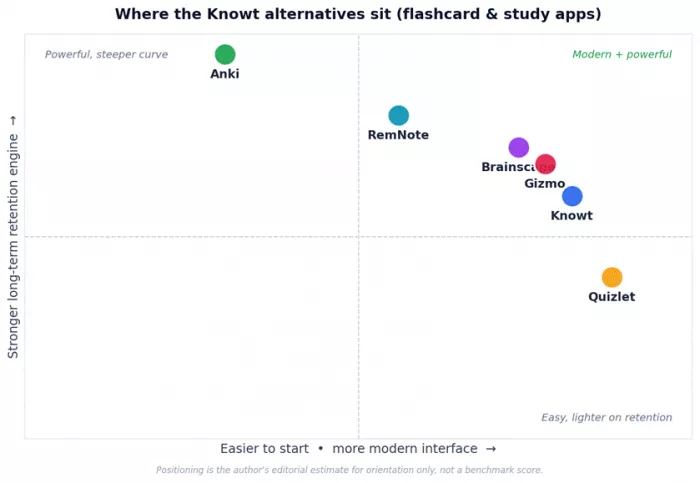
The sweet spot most students want is the top-right: modern and easy and strong on retention. No single app fully owns it, which is exactly why the right pick depends on your priorities.
What real users think, across platforms
Star ratings are easy to cherry-pick, so it helps to read the same app across several places at once. An app can look adored on iOS and battered on a review site, and that gap usually tells you exactly where its weakness lives. Below is how each tool lands across the App Store, Google Play, and independent review sites, based on figures observed in mid-2026.
| Tool | Apple App Store | Google Play | Review sites | What the pattern tells you |
|---|---|---|---|---|
| Knowt | Consistently high with its most engaged students | Positive; 7M+ users, but ad complaints recur | Trustpilot low on a small pool; ads dominate | Loved on iOS and the Chrome extension; Android and third-party scores get dragged down by ads |
| Quizlet | High, on an enormous rating base | About 4.3/5 from roughly 765k ratings | Trustpilot very low (near 1.4/5); Sitejabber ~2.6/5 | Strong store ratings on a massive base, while review sites capture years of paywall anger |
| Anki | AnkiMobile well rated by loyal users | AnkiDroid among the highest rated in the category | Beloved in study communities | A devoted user base; complaints are about the learning curve, not the app itself |
| Brainscape | Positive | Positive | G2 praises adaptive review and analytics | Well liked by committed users; the main gripe is how much sits behind Pro |
| Gizmo | Very positive; time saved is the headline | Web and iOS focused | Review writeups positive, with SRS-tuning caveats | Adored for automation; power users want finer control over recall scheduling |
| RemNote | Positive | Positive | Frequently recommended for notes plus cards | The favourite of note-heavy students; the structure has a mild learning curve |
| Gauth | About 4.9/5 from 1.67M+ ratings | About 4.8/5 from 1.7M+ ratings | Trustpilot low (near 2.1/5), almost all billing complaints | Genuinely useful in-app, but trial-to-paid billing frustration tanks its review-site score |
How to read this: a high score on a small base means less than a slightly lower score drawn from hundreds of thousands of users. Ratings shift constantly, so confirm the current numbers before you decide. The useful signal is not the exact decimal, it is the gap between where an app is loved and where it is criticised.
The six alternatives, in depth
Quizlet: the giant library, minus the free perks
Quizlet is the app Knowt was built to replace, which is a strange reason to recommend it, until you remember its one unbeatable asset: scale. With something like 800 million public study sets and tens of millions of monthly users, whatever you are studying, someone has probably already made a decent set for it. For common courses, AP subjects, and language vocab, that is a genuine time-saver.

The catch is the reason Knowt exists in the first place. Since 2022, Quizlet has moved its most effective tools, unlimited Learn mode, Test mode, and most AI features, behind Quizlet Plus. The free tier still does flashcards and Match, but the active-recall modes that actually build memory are capped. That shift is the single loudest complaint in its recent reviews.
Best for: students who value a massive ready-made library, polished mobile apps, and the cheapest annual price in the category, and do not mind paying to unlock the good study modes.
What works
| What to watch
|
| Free tier | Create and browse sets, Flashcards and Match; Learn and Test are limited |
| Paid (approx.) | Plus ~$2.99/mo billed annually ($35.99/yr); Plus Unlimited ~$44.99/yr; monthly ~$7.99 |
| Standout feature | The largest flashcard library on the internet, plus AI test and notes tools on paid tiers |
| Spaced repetition | Not a core feature since around 2020, so pair it with your own review schedule |
| Platforms | Web, iOS, Android |
| What reviewers say | Google Play sits around 4.3/5 from hundreds of thousands of ratings, but Trustpilot has dropped sharply as long-time users vent about paywalled features |
Anki: the retention machine (that you have to earn)
If your goal is remembering things a year from now, med-school boards, the bar, a language to fluency, Anki is still the tool serious learners swear by. It is free, open-source, and its scheduling engine (now the modern FSRS algorithm) is the most rigorous in the category. The benchmarks behind FSRS draw on hundreds of millions of real reviews, and it typically cuts the number of reviews needed for the same retention.

The trade-off is honest and well known: Anki asks something of you first. The interface looks like it wandered in from 2010, card creation is manual unless you download a shared deck, and getting comfortable with decks, note types, and add-ons feels more like configuring software than studying. People who want tap-and-go bounce off it fast. People who stick with it rarely leave.
Best for: disciplined learners with heavy, long-horizon memorization, especially medical, law, and language students, who want maximum retention and zero subscription.
What works
| What to watch
|
| Free tier | Fully free on Windows, Mac, Linux, and AnkiDroid (Android); AnkiWeb sync is free |
| Paid (approx.) | AnkiMobile for iOS is a one-time purchase near $24.99 that funds development, with no subscription |
| Standout feature | FSRS scheduling plus deep customization and a huge shared-deck ecosystem |
| Spaced repetition | Best-in-class, the reason clinicians and language learners stay loyal |
| Platforms | Windows, Mac, Linux, Android, iOS, Web |
| What reviewers say | AnkiDroid keeps very high app-store ratings; long-time users describe it as the tool that made memory feel like a choice rather than luck |
Brainscape: clean, ad-free, and quietly effective
Brainscape is the middle path between Quizlet's ease and Anki's intensity. Instead of know or don't know, it asks you to rate your recall on each card from 1 to 5. That small act of honest self-assessment (metacognition) drives a spaced-repetition sequence: low-confidence cards come back often, high-confidence cards fade into the distance. Many users find the 1 to 5 scale more intuitive than Anki's buttons, and the interface is genuinely pleasant and ad-free.
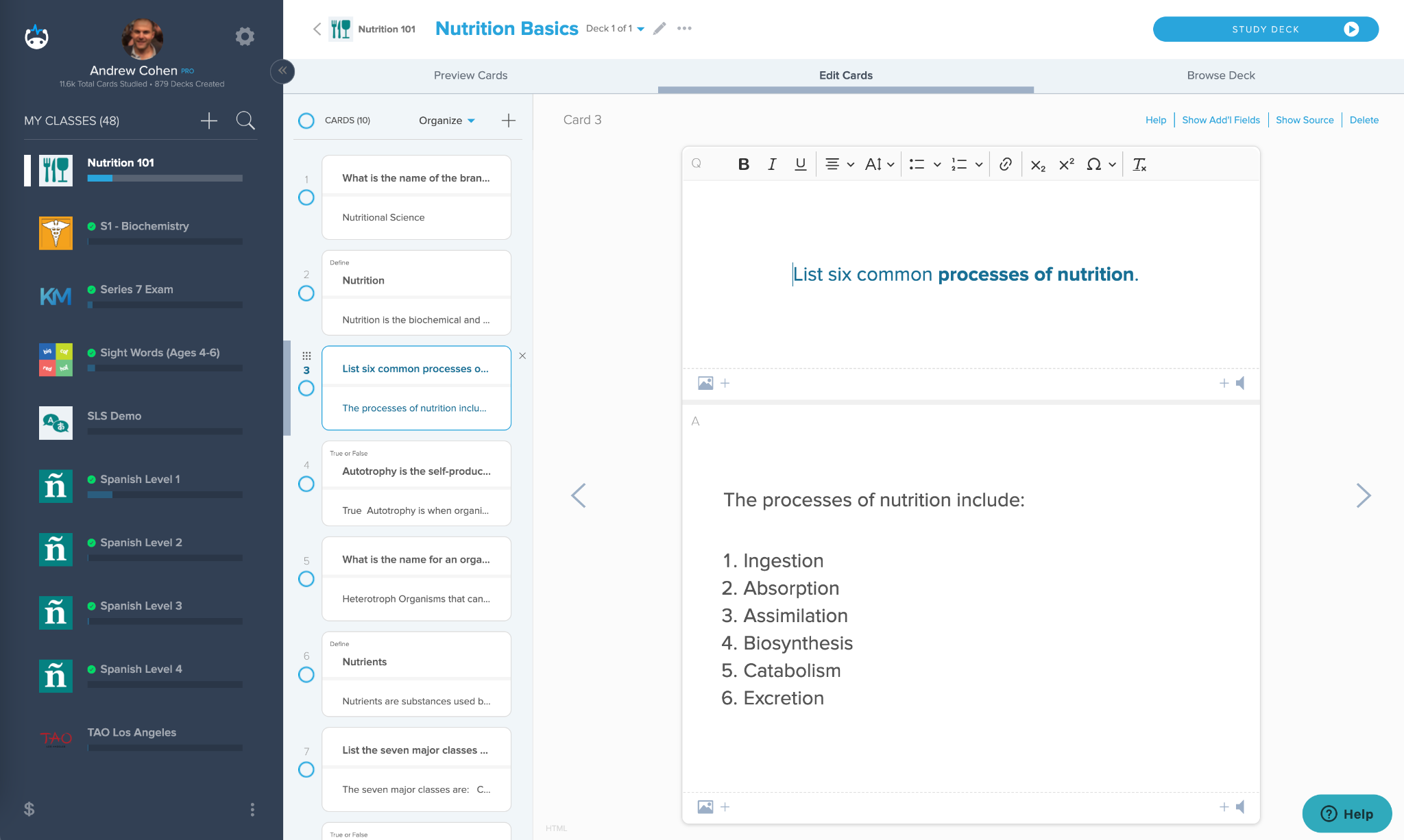
It also leans on quality over quantity. Alongside user decks, Brainscape publishes certified decks vetted by subject-matter experts, handy for MCAT, bar prep, and languages, where a random classmate's set might be riddled with errors. The honest caveat: the free tier works more like a capable demo, and the best decks plus the full engine sit behind Pro, which is pricier than Quizlet.
Best for: learners who want a focused, distraction-free, science-backed routine and will pay for a polished experience and curated content.
What works
| What to watch
|
| Free tier | Make and study unlimited cards of your own; many certified decks are locked |
| Paid (approx.) | Pro around $7.99/mo or roughly $59.99/yr |
| Standout feature | 1 to 5 confidence-based repetition plus expert-vetted certified decks |
| Spaced repetition | Yes, driven by your confidence ratings; lighter than Anki's math but far better than none |
| Platforms | Web, iOS, Android |
| What reviewers say | On G2, users praise the adaptive, personalized review and analytics; students often describe it as the more grown-up flashcard app |
Gizmo: AI does the card-making for you
Gizmo (from Cambridge alumni, originally called Save All) attacks the most tedious part of studying: making the cards. Drop in a PDF, a YouTube lecture, your notes, or even a photo of a slide, and it generates flashcards and quizzes automatically, then wraps them in a gamified, spaced-repetition loop. You can import existing Quizlet and Anki decks, and an AI tutor explains concepts when you are stuck. If Knowt appealed to you specifically for AI generation, Gizmo is its closest spiritual sibling.

Two honest drawbacks. First, the free plan runs on lives. Wrong answers cost hearts, and running out triggers a timed lockout, which is maddening the night before an exam. Second, like all AI generators, it occasionally produces shallow or slightly-off cards, so technical and medical users often edit before trusting them. Pricing also skews weekly, which adds up fast unless you commit to the yearly plan.
Best for: students drowning in PDFs and lecture recordings who want study material generated for them and enjoy a game-like, streak-driven routine.
What works
| What to watch
|
| Free tier | Real access to core tools, but capped by daily “lives” and a limited number of AI quizzes |
| Paid (approx.) | Premium sold weekly (up to around $13.99/wk) or far cheaper on the yearly plan (near $3/wk equivalent); student discounts exist |
| Standout feature | Magic Import: automatic flashcards and quizzes from almost any source file |
| Spaced repetition | Yes, automated behind a simple daily queue; some users want finer control of intervals |
| Platforms | Web, iOS |
| What reviewers say | App Store users love the time saved and the addictive quiz loop; a common critique is that its recall scheduling is not as finely tuned as Anki's on very large decks |
RemNote: where your notes become your flashcards
Most study workflows are fragmented: notes in one app, flashcards in another, PDFs in a third. RemNote collapses that. You take structured notes, and with a keystroke any line becomes a flashcard linked back to the context it came from. That linkage is the whole point. You review cards without losing the surrounding explanation, which helps understanding, not just recognition. Its spaced repetition uses the modern FSRS algorithm, and an Exam Scheduler ramps up your daily reviews as a test date approaches.
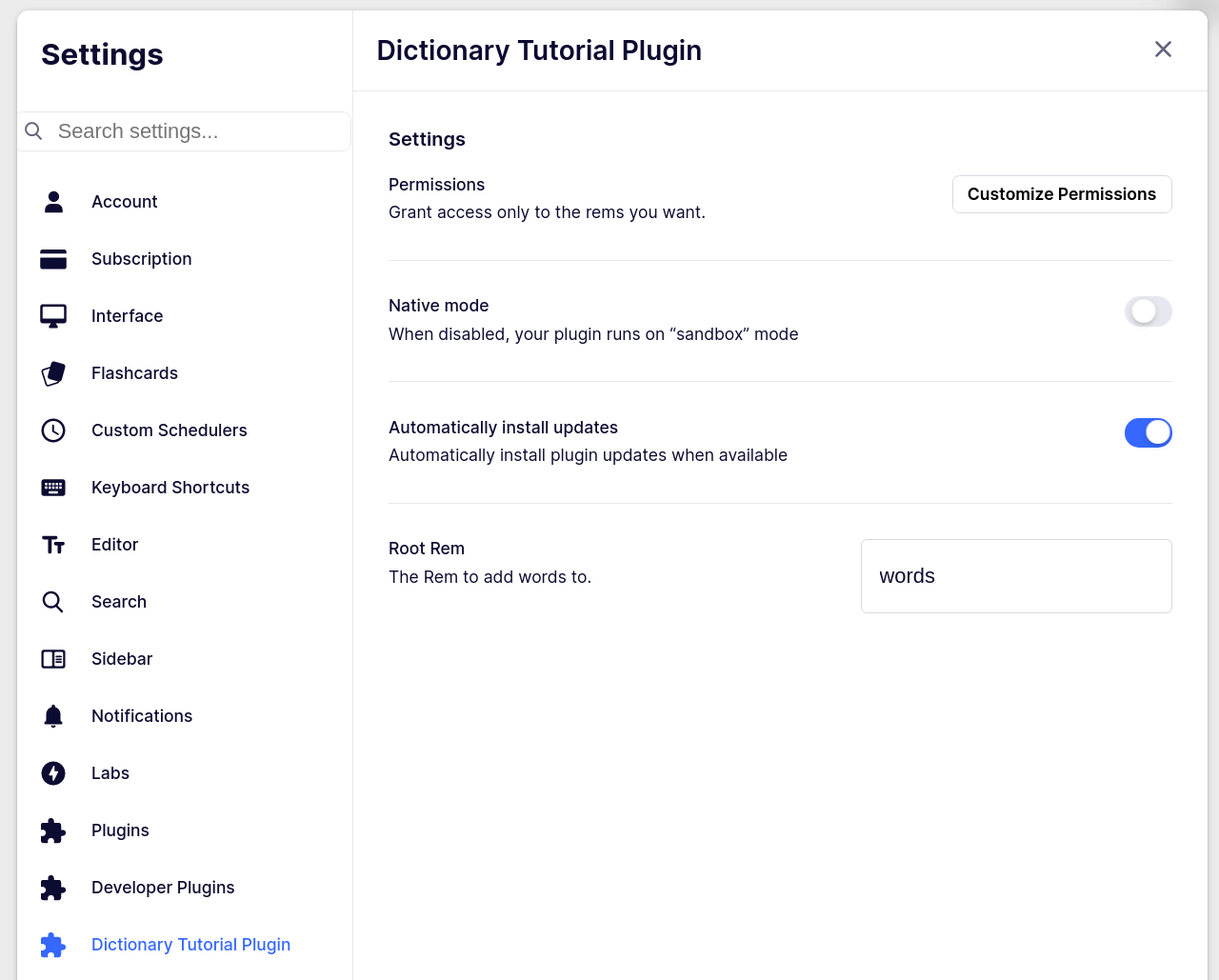
It is the natural pick if you already think in outlines and want one home for everything. The trade-off is that it is a note-taking tool first, so pure, quick flashcard use feels slightly less streamlined than a dedicated app, and there is a modest learning curve to its structure. The free plan is genuinely usable; heavier AI generation and larger uploads live in the paid Pro tier.
Best for: note-heavy learners, university and grad students especially, who want notes, PDFs, and flashcards to live and grow in a single connected workspace.
What works ✓ Notes and flashcards in one place, no app-switching ✓ Cards keep the context they came from ✓ Modern FSRS scheduling plus an exam-date planner ✓ Solid free plan; good for building a knowledge base over time | What to watch ✗ Note-taking first, so quick flashcard-only use is less direct ✗ The outline structure takes some getting used to ✗ Heavier AI and larger uploads require Pro ✗ Smaller pre-made deck ecosystem than Quizlet or Anki |
| Free tier | Functional note-taking plus flashcards and spaced repetition for everyday use |
| Paid (approx.) | Pro subscription unlocks unlimited AI features and larger PDF and file uploads |
| Standout feature | One-keystroke conversion of any note into a context-linked flashcard, plus the Exam Scheduler |
| Spaced repetition | Strong, built on FSRS, the same modern engine Anki adopted |
| Platforms | Web, desktop (Mac, Windows, Linux), iOS, Android |
| What reviewers say | Frequently recommended as the best fit for students who want their whole study routine, notes, PDFs, and cards, in a single tool rather than three |
Gauth: the homework solver in the room
Gauth (formerly Gauthmath, owned by ByteDance) is not a flashcard app at all. It is a photo-based homework helper. I am including it because Knowt's own Snap and Solve and Kai assistant nudge into this territory, and plenty of students want a dedicated tool for the moment they are actually stuck on a problem. Snap a photo of a math or science question and it returns a step-by-step solution in seconds, with follow-up chat to ask why a step works. Coverage stretches well beyond math into physics, chemistry, biology, coding, and writing.

Two things to weigh honestly. The product is well liked, holding around 4.9 stars from over a million App Store ratings, yet its Trustpilot score is low, and almost all of that gap is billing complaints about trials auto-converting. Cancel through Apple or Google, not the in-app flow, and set a reminder before any trial ends. The bigger issue is academic integrity. Used to understand a problem, it is a great tutor. Used to copy answers, it is a fast way to fail the actual exam. Check your school's policy.
Best for: students who mainly need step-by-step help getting unstuck on STEM homework, and who will use the explanations to learn rather than just copy.
What works
| What to watch
|
| Free tier | A limited number of daily solutions, fine for occasional use |
| Paid (approx.) | Plus roughly $9.99 to $11.99/mo, about $99.99/yr; usually a short free trial |
| Standout feature | Snap a photo, get a guided step-by-step solution, then ask follow-up questions |
| Spaced repetition | Not applicable; this is a solver and tutor, not a review tool |
| Platforms | iOS, Android, Web, Chrome extension |
| What reviewers say | Independent reviewers rate it the strongest multi-subject homework helper for STEM, while flagging the trial-to-paid billing traps as its real weakness |
Match your situation to a tool
Feature lists cause paralysis. Situations do not. Find the row that sounds most like your life right now and start there.
| If this is you | Start with | Because |
|---|---|---|
| You want a ready-made set for almost any class and the lowest annual price | Quizlet | Its library dwarfs everything else, and someone has likely already built what you need |
| You are grinding toward boards, the bar, or fluency and need it to stick for months | Anki | The strongest spaced-repetition engine there is, free, if you invest a weekend learning it |
| You want a calm, ad-free, science-backed routine and will pay for polish | Brainscape | Confidence-based repetition and expert-certified decks, with no distractions |
| You are buried in PDFs and lecture recordings and hate making cards by hand | Gizmo | It auto-generates cards and quizzes from your files and gamifies the daily habit |
| You take heavy notes and want notes, PDFs, and cards in one connected place | RemNote | Any note becomes a context-linked flashcard, scheduled around your exam date |
| You mostly need to get unstuck on a hard STEM problem, then learn from it | Gauth | Photo-to-solution with step-by-step reasoning; a tutor, not a flashcard app |
| You loved Knowt's AI but wanted fewer ads and cleaner limits | Gizmo or RemNote | Both keep the AI-generation appeal while feeling calmer to work in day to day |
The combo a lot of students actually land on There is no rule that says pick one. A common, effective stack: Gizmo or Knowt to generate cards quickly, Anki to lock in the highest-stakes material long term, and Gauth or a similar solver for the occasional wall you hit on homework. Use each tool for the one job it is best at. |
A few honorable mentions
Not everyone fits neatly into the six above. Worth a look depending on your needs:
• StudySmarter and Vaia: an all-in-one study workspace with flashcards, notes, and summaries together, though the flashcards are less focused than a dedicated app.
• Mochi: a minimalist, Markdown-and-LaTeX flashcard app with built-in image occlusion; small ecosystem, but lovely for a distraction-free setup (sync is paid).
• MintDeck: a newer, free iOS option built on FSRS with AI card generation, aimed squarely at students who lost Quizlet's free Learn mode.
Switching from Knowt without losing your work
• Export first. Get your Knowt sets out before you commit elsewhere; most apps accept a standard flashcard or CSV import.
• Use import tools. Gizmo imports Quizlet and Anki decks directly, Anki reads CSVs, and RemNote can rebuild sets from pasted text.
• Trial during a real study week. Run the free tier during actual revision, not a quiet weekend. That is the only way to see if you will hit the caps.
• Audit AI-generated cards. Whichever app you pick, skim auto-made cards for errors before you trust them at exam time.
• Cancel through the app store. For any subscription, manage and cancel through Apple or Google to dodge the auto-renewal complaints that plague this category.
My honest send-off
If you have read this far, you already know more than enough to choose well, so I will keep this short.
Here is the part nobody selling a study app wants to say out loud: the actual science under all of them is the same, and it is a little boring, and it works. Active recall plus spacing. That is it. The AI, the streaks, the confidence sliders, the leaderboards, all of that is packaging built to get you to come back tomorrow. Which matters, because coming back tomorrow is the whole game.
So do not overthink it. If you loved Knowt's AI but wanted less friction, try Gizmo. If you want free and permanent power, learn Anki. If you want calm and polish, Brainscape. If your life runs on notes, RemNote. If you mostly need to get unstuck, keep a solver like Gauth within reach. Pick the one that fits how you already study, give it one real week, and then let the habit do the heavy lifting.
As for my nursing-school friend: she moved her Quizlet-imported decks into a cleaner setup, dropped the ad-heavy free tier, and stopped studying at one in the morning quite so often. That is the only benchmark that ever really counts.
Comments