Sitting down to put Focal through its paces at the end of 2026 turned into an unexpected story. Focal built a reputation as one of the newer "agentic" AI video platforms, the kind of tool that promises to take a single sentence and hand back a finished scene complete with voiceover and sound. Creating an account took seconds. The dashboard loaded. And then a message pushed everything else off the screen: Focal is sunsetting.
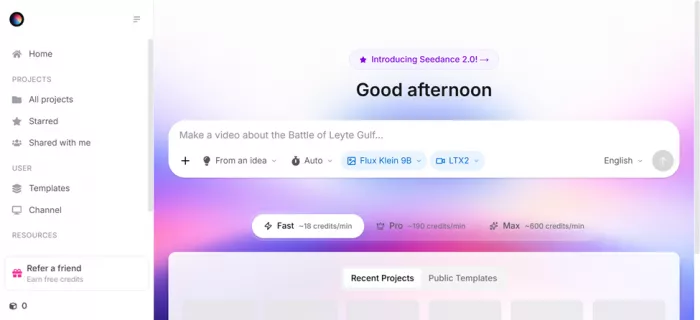
So this guide does two jobs at once. It walks through exactly how Focal is meant to work, step by step, so the idea-to-video process is clear for anyone curious about it. It also reports honestly on what the testing session could and could not reach, because the live product is now being wound down and the hands-on run hit a wall before the generation flow could be tested. Where a feature is described, the source is flagged: either it was seen directly in the interface, or it comes from Focal's own public claims and third-party product listings. Nothing here is dressed up as verified output when it was not.
Important: Focal is winding downAs of this review, Focal shows a site-wide banner and in-app message stating the platform is sunsetting. The announcement explains the team received and signed an acquisition offer and is retiring the existing product, with a dedicated tool for exporting projects. If you already have work inside Focal, exporting it should be the first thing on your list before access closes. The rest of this guide treats the tool as a case study rather than a live recommendation. |
Quick verdict
3.0/5 ★★★☆☆ | A smooth, genuinely promising concept caught at the worst possible moment to adopt it. Onboarding is painless and the pitch of several leading video models behind one prompt box is appealing. But with an acquisition signed and the product being retired, Focal is no longer a sensible place to start a new project. Existing users should export and move on. |
Focal review scorecard
These scores reflect what the session could actually assess. The generation engine could not be exercised during testing, so output quality is marked as unverified rather than guessed.
| Category | Rating | Notes |
|---|---|---|
| Signup and onboarding | ★★★★½ | Google sign-in only, done in under a minute. |
| Interface and layout | ★★★★☆ | Calm, uncluttered, a single prompt box as the front door. |
| Model variety (claimed) | ★★★★½ | Lists Veo, Seedance, Kling, Hailuo and ElevenLabs voices. |
| Pricing and value | ★★★★☆ | Free tier plus paid plans from a low entry point. |
| Export and data control | ★★★½☆ | Dedicated export tool, though urgency is forced by the wind-down. |
| Output quality | Not verified | The generation flow was blocked during the session. |
| Current reliability | ★½☆☆☆ | Product is being retired after acquisition. |
What is Focal AI?
Focal is a web-based, text-to-video platform from a San Francisco startup that came up through Y Combinator. Its founding pitch was ambitious: let anyone turn a book, a screenplay or a loose idea into watchable episodes and short films, with a longer-term plan to distribute AI-generated shows on its own platform. Over its run the company says it served well over a million users making everything from animated stories to educational clips.
The product itself is best described as a storytelling front end sitting on top of several third-party AI models. Instead of asking you to learn one specific generator, Focal routes the heavy lifting to engines like Veo, Seedance, Kling and Hailuo for visuals, and ElevenLabs for voice, then wraps the results in a timeline you can edit. The homepage captured during testing even highlighted a "Seedance 2.0" launch, a sign of how closely the platform tracked new model releases.
In one line
Focal is an idea-to-video tool: describe a concept or paste a script, let AI build the scenes, voiceover and sound, then refine the result with chat commands or a traditional timeline.
Key features at a glance
Idea to videoStarts from a short prompt and expands it into a structured story with scenes and characters. | Script adaptationBring your own script and the platform aims to follow it faithfully rather than rewrite it. |
Chat-command editingAdjust scenes using plain-text instructions instead of hunting through menus. | Timeline editorTraditional editing controls for trimming and reordering once the AI draft exists. |
Multi-model engineSeveral leading video, image and voice models accessible from one place. | Extend and interpolateVideo extension and frame interpolation to lengthen clips and smooth motion. |
How to use Focal AI, step by step
The workflow below reflects the intended path from a blank prompt to a finished export, drawn from the live interface and Focal's documentation. Each step notes what was observed firsthand and, where relevant, where the current wind-down interrupts the flow.
| 1 | Create an accountHead to the Focal site and choose Get Started. The signup screen offers a single route: Continue with Google. There is no email-and-password form, so a Google account is required to get in. During testing this step was fast and worked without friction. Tested: signup completed in under a minute 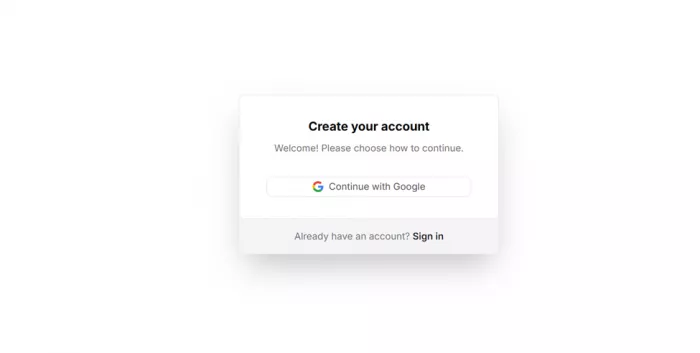 |
| 2 | Land on the prompt boxAfter signing in, the home view centres on one large text field with a placeholder inviting you to describe a video. Below it sit a few controls: an attachment button, a source selector, a mode selector, and a language picker. The design keeps everything on one line so the starting point is obvious rather than buried. 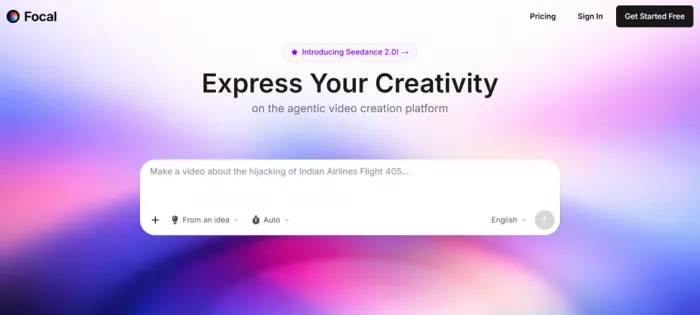 |
| 3 | Choose your starting point and modeThe source selector lets you begin From an idea for a loose concept, or switch to a script-based start if you already have writing to adapt. A second control sets how much the tool handles automatically, shown as an Auto mode in the interface. In practice this is where you decide whether Focal drives the creative choices or you do. Observed: idea and auto modes visible in the toolbar |
| 4 | Generate the story and scenesWith a prompt entered, submitting it is meant to kick off the agentic part: the platform drafts a plot, breaks it into scenes, and begins generating visuals, voiceover and sound using the connected models. This is the headline feature and the reason most people try Focal. It is also the step the testing session could not reach, as explained in the note below. Company claim, not verified this session. |
What actually happened during testing
Signing in with Google worked, and the dashboard opened. From there, a "Focal is sunsetting" panel took over the screen with no visible close control. Selecting Learn more did not clear it, and the option to open or export projects did not move the flow forward either. With no working proceed button and no close button, the overlay stayed put and the interface would not progress. The practical result was that the generation workflow could not be exercised at all during the session. For that reason, the output quality, render speed and editing experience are left unrated here rather than estimated. This behaviour is tied to the ongoing wind-down and may differ from how the product ran earlier in its life.
| 5 | Refine with chat commands or the timelineOnce a draft exists, Focal's design lets you revise it two ways: type plain-language commands to change a scene, or drop into a timeline editor for manual trimming, reordering and polishing. Features like video extension and frame interpolation live here, aimed at lengthening shots and smoothing motion. This refinement stage is a documented part of the workflow rather than something the session could confirm live. 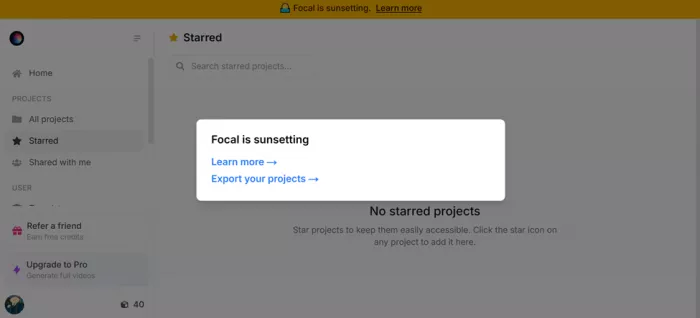 |
| 6 | Render, download and exportThe final stage is rendering the finished video and saving your work. With the platform sunsetting, Focal added a dedicated Export your projects tool. It saves each project as a JSON file plus your chosen media, and offers three choices: everything (rendered video and all source media), only the finished videos, or only the source assets. Already-exported files are skipped so the process can be re-run safely. For current users, this is the single most important screen on the platform right now. Observed: export tool with three download options 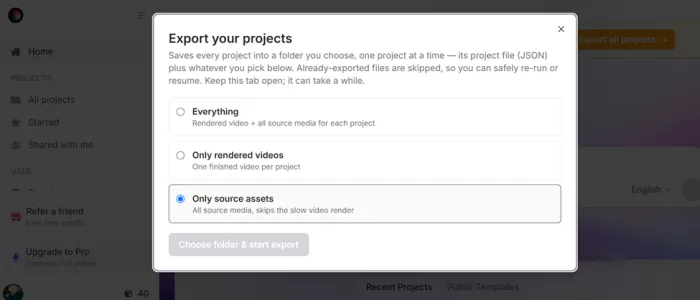 |
Focal AI pricing
Focal ran on a freemium model. A free tier existed for personal use, and paid plans unlocked more generation and commercial rights. Published pricing across product listings lined up on the tiers below. Treat these as the last widely listed figures rather than a live quote, since the platform is being retired.
| Plan | Price | Best for | Commercial use |
|---|---|---|---|
| Free | $0 / mo | Trying the tool and personal projects | No |
| Starter | $10 / mo | Light, regular creators | Yes |
| Standard | $30 / mo | Frequent short-form output | Yes |
| Pro | $100 / mo | Heavy use and longer videos | Yes |
About credits
Generation ran on a credit balance rather than unlimited output, with usage measured per minute of video. Higher tiers raised the monthly ceiling, with the top plan advertised at up to 15,000 seconds of video per month. Heavier or longer projects drew the balance down faster, so the right plan depended on how much you intended to render.
Pros and cons
Strengths
| Drawbacks
|
Who was Focal built for?
On paper, Focal aimed squarely at creators, educators, marketers and small teams who wanted finished video without learning editing software. The idea-to-video angle suited explainer clips, social posts and short narrative pieces where speed mattered more than frame-by-frame control. Its multi-model setup also appealed to people who liked trying different generators without juggling separate subscriptions.
That said, the honest recommendation today is different from the one that would have made sense a year ago. With the product sunsetting, new users are better served elsewhere.
Active alternatives worth a look
For AI video that is still being actively developed, Runway, Luma, Kling and LTX Studio cover similar ground, while InVideo AI leans toward prompt-to-video for marketing clips. Each has its own model lineup and pricing, so the best pick depends on whether you prioritise cinematic quality, speed, or editing depth.
Final verdict
The hard truth from this session is that Focal arrived as a genuinely interesting idea at exactly the wrong moment to recommend it. The onboarding is smooth, the interface is calm, and the promise of several leading video models behind one prompt box is the sort of thing that should save real hours. What the session could not reach was the part that matters most, the actual generation, because the wind-down notice took over the screen and the controls stopped responding.
With an acquisition signed and the product being retired, pouring new projects into Focal today does not add up. The sensible move for existing users is simple: open the export tool, pull every project and its source files, and store them somewhere safe before access closes. For anyone arriving fresh and hoping to make AI videos, the better use of time is a platform that is still being actively built, such as Runway, Luma, Kling or LTX Studio.
Focal's concept was sound and its ambition was real. Its timing, through no fault of the people who built it, is the reason this guide ends with a goodbye rather than a green light.
Comments