Spend an afternoon inside Nearpod and the question of cost tends to show up on its own. The free plan handles a single class without complaint, right up until a second section needs to join a live lesson or a couple of uploaded videos push the storage bar into the red. That is the moment most teachers click through to the pricing page and start weighing what the paid tiers really buy. On the surface the menu is short: one free plan, two paid plans for individual teachers, and a quote-based license for schools and districts. The detail that decides a real budget sits one layer down, in three numbers that repeat across every tier, how much storage you get, how many students can join a live session, and which tools stay locked until a card is on file.

This guide walks through every Nearpod plan, what each one costs per teacher, where the quiet extra costs hide, and which tier actually fits a single classroom versus a whole building. Treat it as the money-focused companion to the full Nearpod review and feature walkthrough, since the aim here is value rather than another tour of the toolset.
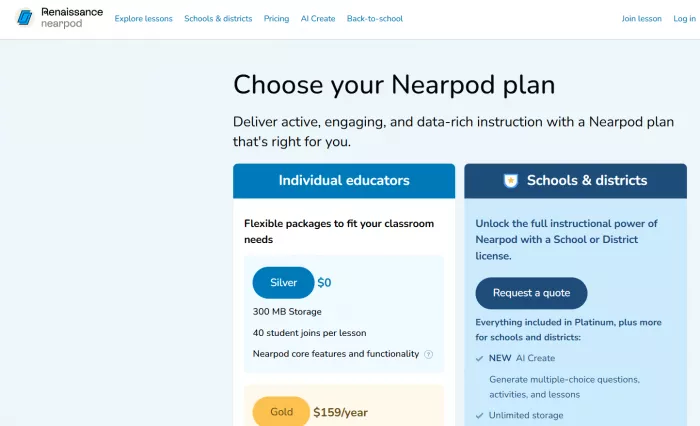
| Nearpod runs on four tiers. Silver is free with no time limit, Gold is $159 per teacher per year, Platinum is $397 per teacher per year, and the School or District license is custom-quoted. Paid plans are billed once a year, not monthly, and the free plan never asks for a credit card. |
Free plan $0 | Cheapest paid (Gold) $159/yr | Top individual (Platinum) $397/yr | School license Custom |
Every Nearpod plan, side by side
| Plan | Price (per year) | Storage | Live student joins | What stands out |
|---|---|---|---|---|
| Silver | $0 | 300 MB | 40 | Full builder, 22,000+ library, live and self-paced, reports |
| Gold | $159 | 1 GB | 75 | AI Create questions, Google Slides add-on, Drag and Drop, Sub Plans |
| Platinum | $397 | 5 GB | 90 | Everything in Gold, plus Student Notes |
| School / District | Custom quote | Unlimited | 250 | Curriculum programs, admin reporting, rostering, co-teaching |
Paid plans are charged as one annual payment. The per-month figures elsewhere in this article are the yearly price divided across twelve months, not a monthly plan.
Nearpod plan breakdown, tier by tier
Silver Free The free tier is a complete lesson tool, not a stripped trial. It opens the full builder, the library of more than 22,000 standards-aligned lessons (saved against your storage limit), live and self-paced delivery, and the real-time reports that make Nearpod worth using in the first place. The ceilings are 300 MB of storage and 40 students per live lesson. In practice the 300 MB is the first wall a media-heavy teacher hits, and the 40-join cap applies to a teacher-paced Live session, not to a self-paced assignment. Best for: a single teacher with one class around 40 or fewer, running lessons built on text, images, polls, and quizzes. |
Gold $159 / year The first paid step is mostly about clearing Silver's limits and adding a few workflow features. Storage moves to 1 GB, live joins rise to 75, and a set of tools becomes available: the AI Create Question Generator, the Google Slides add-on, Drag and Drop, Sub Plans for leaving a ready lesson with a substitute, and the option to run more than one live session at once. Priced across the year it works out to about $13.25 a month, charged as a single annual payment. Best for: the teacher running several sections a day who keeps bumping the 40-student ceiling or the storage bar. |
Platinum $397 / year Platinum is a capacity upgrade more than a feature one. Over Gold it adds another 4 GB for a 5 GB total, lifts live joins to 90, and includes Student Notes. There is no long new feature list here, so the plan earns its price for teachers with large stored libraries and the biggest live classes rather than anyone chasing a specific tool. Across the year that is roughly $33 a month, again billed annually. Best for: a power user with a heavy media library and large live classes. |
School / District Custom The top tier drops per-teacher limits entirely. It carries everything in Platinum plus unlimited storage, up to 250 students per live lesson, admin-level reporting, rostering and LMS integration, co-teaching, and access to Nearpod's curriculum programs for Math and Social Studies. Pricing is quoted after a conversation with sales and usually scales to the number of teachers or the size of the school. Best for: a grade team, school, or district where buying seats one by one stops making budget sense. |
What Nearpod pricing costs a team
The per-teacher structure is the single biggest driver of a Nearpod bill, so the total climbs fast once a department is involved. The table below multiplies the two individual plans out across common team sizes.
| Teachers | Gold total (per year) | Platinum total (per year) |
|---|---|---|
| 1 | $159 | $397 |
| 5 | $795 | $1,985 |
| 10 | $1,590 | $3,970 |
| 20 | $3,180 | $7,940 |
Somewhere around eight to ten paid seats, a quoted School or District license deserves a side-by-side look, because unlimited storage and a 250-join cap can come in under a stack of individual Platinum seats and bring admin reporting along with it.
The free plan in practice
Silver is where a lot of teachers start, and for many it is where they stay. A few things are worth knowing before deciding it is not enough.
● No expiry date and no credit card. Silver can run year after year. ● The 40-student limit is a Live cap, not a Student-Paced one. Self-paced assignments have no concurrent ceiling on any plan. ● 300 MB is the first pressure point. A handful of uploaded videos fill it quickly. ● Switching a lesson from Live to Student-Paced mid-session is a paid-plan feature. |
Hidden costs in Nearpod pricing
The sticker price is clear enough. The line items that catch people out are the ones that sit just outside it.
● Billing is annual, not monthly. The $13.25 and $33.08 figures are the yearly price split across twelve months, not a plan you cancel each cycle. ● Annual plans are generally not prorated or refunded partway through, so confirm the current terms before paying. ● Storage, not the headline price, is the real budget lever. Stored video and image-heavy decks eat the 300 MB and 1 GB tiers fast. ● Curriculum programs for Math and Social Studies are separate School and District add-ons, not part of the Gold or Platinum price. ● One device per student and a stable connection are infrastructure costs that sit outside the subscription but still shape the true total. |
How to pay less for Nearpod
● Match the tier to the limit you are hitting, not the top of the menu. Plenty of single-class teachers never outgrow Silver. ● Lean on Student-Paced mode to get past the Live join cap without upgrading, since self-paced assignments carry no concurrent limit. ● Watch for free Gold upgrade promotions. Nearpod periodically runs promo-code upgrades through its redeem page that hand over a year of Gold at no cost. ● Trim stored media, shorter clips and linked rather than uploaded video, to stay inside a cheaper storage tier. ● For a team of roughly eight or more, ask sales to quote a School license and compare it against stacked individual seats before committing. ● Buy near the start of a funding cycle so the single annual charge lines up with the budget. |
Which Nearpod plan is right for you
| Your situation | Best plan |
|---|---|
| One class, around 40 students or fewer, lessons built on text, images, and quizzes. | Silver (Free) |
| Several sections a day, some video, routinely bumping the 40-join cap. | Gold ($159/yr) |
| Large media library and the biggest live classes on campus. | Platinum ($397/yr) |
| A grade team, school, or district that needs rostering and admin reporting. | School / District |
To see how each tier's features translate into real classroom activities, the complete breakdown of Nearpod's features maps them out lesson by lesson.
How Nearpod pricing compares
Among live-engagement tools, Nearpod's free tier is more generous than most. The full lesson builder and the 22,000-plus library are available at no cost, where many rivals gate their better features behind a paywall. Gold sits in the middle of the market for an individual teacher license, and what moves a Nearpod budget is rarely the sticker price. It is the per-teacher model once a department multiplies it out, which is the whole reason the quote-based license exists. Teachers comparing tools usually weigh Nearpod's library, reporting, and media against lighter quiz-only apps, then decide whether the paid tier earns its keep for the way they teach.
Final verdict
Price the tiers against the way a class actually runs and Nearpod's cost starts to make sense in a specific, narrow way. On the free Silver plan, a single teacher with one reasonably sized class can run real interactive lessons for a full school year without paying a cent, and for a lot of classrooms that is where the story ends. The paid tiers earn their keep by removing one wall at a time. Gold clears the storage and student-join limits that a busy teacher runs into by about the third section of the day, and Platinum buys capacity for heavy media users rather than a fresh pile of features. The number that tends to catch schools off guard is not the $159 or the $397 on their own, it is what those figures become once a whole department is stacked up, which is the point where a quoted district license shifts from overkill to the cheaper line on the budget. Read the right way, Nearpod pricing is less about picking the fanciest plan and more about matching a single number, either storage or live joins, to the room in front of you. Stay on Silver until a real limit forces a move, step up to the tier that clears that exact limit, and let a school license carry the load once per-seat costs pile up. For the feature side of that decision, the full hands-on review walks through a live lesson start to finish. Handled this way, the spend stays in step with the teaching, which is close to the best thing you can say about any classroom tool's price tag. |
Comments