Most write-ups of AI study tools come from twenty minutes of clicking around and mostly repeat the feature list. Question AI deserved a slower look, partly because it is genuinely popular: Sensor Tower's report on the first half of 2024 placed it third among AI apps downloaded in the United States, behind only ChatGPT and Microsoft Copilot, and the top education app on that list. Its Google Play listing sits above ten million installs.
So I slowed down. I signed up fresh, asked a question from my own work as a software developer, pushed the free plan until it pushed back, tested the calculator, and reread the checkout renewal terms. Every screenshot below comes from that session, in the exact order things happened. A single tester is a sample size of one, so I also pulled the public numbers: store ratings, real user reviews, and a third-party accuracy study. The score at the end is built from all of it, not from a first impression.
What exactly is Question AI?
Question AI is an AI homework and study assistant from D3 Dimension Technology, the Singapore registered international arm of Zuoyebang, one of China's largest education technology firms. It launched in May 2023 and grew fast: EqualOcean reported close to two million weekly active users in North America within its first year, and its Google Play listing shows roughly a 4.5 star average from more than 200,000 ratings.
The pitch is simple. You bring a question, typed or snapped as a photo, and it answers across ten subjects: Math, Statistics, Calculus, Physics, Chemistry, Biology, Economics, Literature, Business, and Social Science. Around that core sit four modes: Solve all-subject homework, AI Writing, AI Search, and Translate. A PDF solver and a math calculator round out the toolkit. There is a free tier, and a Plus subscription that promises answer accuracy exceeding 90 percent. Whether it earns those numbers is what the rest of this review tests.
Ten screenshots, ten moments, in the order they happened
Nothing here is staged or cherry-picked: this is the raw session, good and bad.
STEP 01
The first screen sets a confident tone
The landing page is clean in a way most study tools are not. A bold headline calls it the best study companion, a tidy grid shows the ten subjects with the four modes alongside. The sidebar lists Ask AI, PDF Solver, and Calculator, and a single prompt box anchors everything. No pop-ups, no countdown timers, no fake urgency. As first impressions go, this one is good, and I arrived looking for cracks.
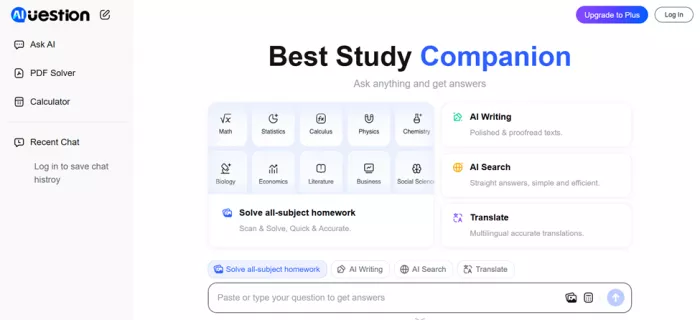 |
SCREENSHOT 1. The logged-out homepage: subject grid, four modes, and the full three-tool sidebar.
STEP 02
The login gate makes a strange promise
Try to do anything meaningful and a modal appears: log in for more accurate answers. Read that again. The product is telling you, in its own words, that the logged-out experience is a degraded one. Sign-in options are Google, Apple, or email plus a verification code, no password to invent, done in under a minute. Low friction is a real point in its favor; openly rationing accuracy is a stranger signal.
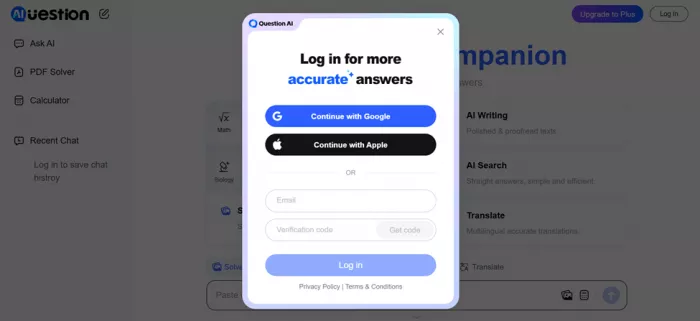 |
SCREENSHOT 2. The login modal promising “more accurate answers,” with Google, Apple, and email options.
STEP 03
A small disappearing act after login
Here is a detail other reviews miss. Before login, the sidebar shows Ask AI, PDF Solver, and Calculator. After I logged in, PDF Solver was gone, and PDF Homework Help resurfaces later as a Plus benefit on the pricing table. Nothing broke, but it was my first hint that the interface quietly rearranges itself around the subscription. It becomes a theme.
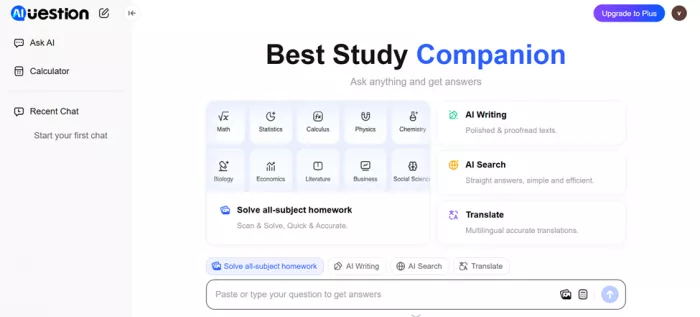 |
SCREENSHOT 3. The homepage after login. Same layout, but the PDF Solver entry has vanished from the sidebar.
STEP 04
I asked it a real question, not a textbook one
I skipped the algebra worksheets and typed the kind of question an actual adult learner would ask: I'm a software developer. Which AI courses should I prioritize? There is no single correct answer, which is the point. Open judgment questions reveal whether a tool can organize information usefully, and this one I can grade myself.
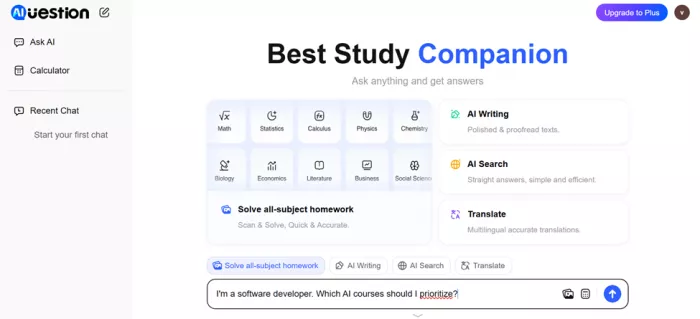 |
SCREENSHOT 4. My prompt in the input box: “I’m a software developer. Which AI courses should I prioritize?”
STEP 05
The first answer fell apart
What came back was, and I am being generous, a collision. Sentences ran into each other, stray asterisks sat orphaned in the text, and the numbering skipped straight to five. One line began: “As a software prioritize AI courses that align goals in.” Recognizable names surfaced through the wreckage, Andrew Ng, Coursera, TensorFlow, Hugging Face, so the model clearly retrieved sensible material, but the response was unusable as delivered. If this had been my only data point, the review would end here.
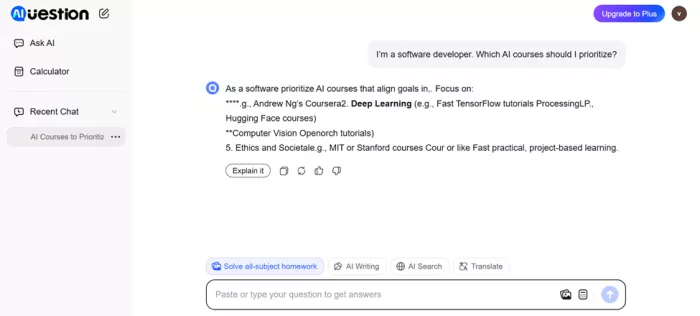 |
SCREENSHOT 5. The first response: broken formatting, orphaned symbols, and colliding sentence fragments.
STEP 06
One regenerate later, a different product
I pressed regenerate and received a clean, numbered list of ten courses with one-line rationales: the Deep Learning Specialization, the TensorFlow Developer Certificate, Hugging Face courses, Computer Vision, Python for Everybody, AI for Everyone, Google's Machine Learning Crash Course, NLP with Python, AI Ethics and Society from MIT OpenCourseWare, and Practical AI with Python. A defensible, if safe, syllabus. The gap between attempts is the real story: same question, same account, sixty seconds apart, wildly different quality. Then I asked a follow-up: how long would the full list take to complete?
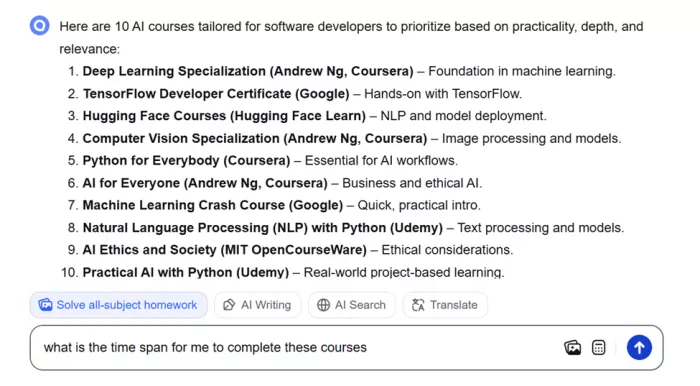 |
SCREENSHOT 6. The regenerated answer: ten clean course recommendations, follow-up question queued below.
STEP 07
The paywall arrives with a 59-cent handshake
Soon after, the Plus screen appeared. Two options: three days for $0.59, or $14.99 per month. Below them, a benefits table in which the free column contains exactly one check mark, the calculator. Everything else, snaps and chats, PDF homework help, step-by-step video, textbook solutions, and answer accuracy that exceeds 90 percent, lives on the Plus side. Then the fine print in small grey type: after the trial, you are automatically charged $99.99 for a full year. That sentence is the most important one on the entire website, and the least visible.
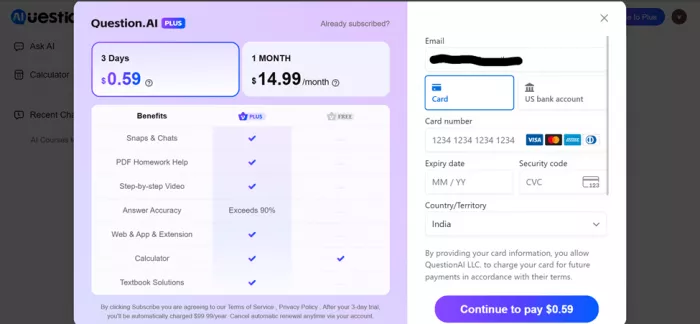 |
SCREENSHOT 7. The Plus paywall: $0.59 trial, $14.99 monthly, one-check free column, $99.99 yearly auto-renewal in the footnote.
STEP 08
The calculator is quietly the best free feature
Switching to the Calculator tab reveals a proper math input pad: Basic and Functions modes, an abc tab for variables, keys for pi, e, roots, fractions, and inequalities, and a large Solve button. Per the pricing table, this is the one tool that stays fully free, and it feels like the most mature corner of the product.
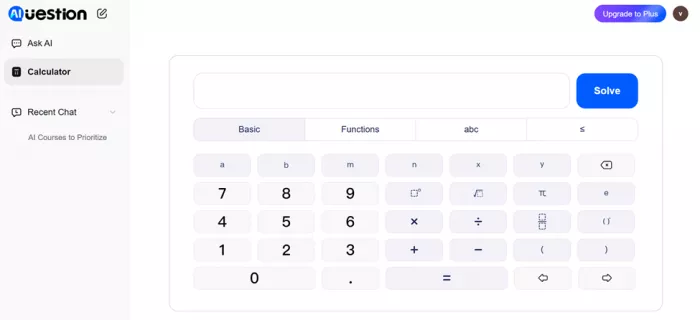 |
SCREENSHOT 8. The Calculator tool: Basic, Functions, and abc modes with a full symbolic keypad.
STEP 09
A deliberately easy stress test: 25 × 50
I typed 25×50. Trivial, and that was the point: I was testing the wiring, not the intelligence. The expression rendered cleanly, the Solve flow ran instantly, and the correct result came back with no upsell interrupting. For daily arithmetic and algebra checks, this tab alone justifies a bookmark.
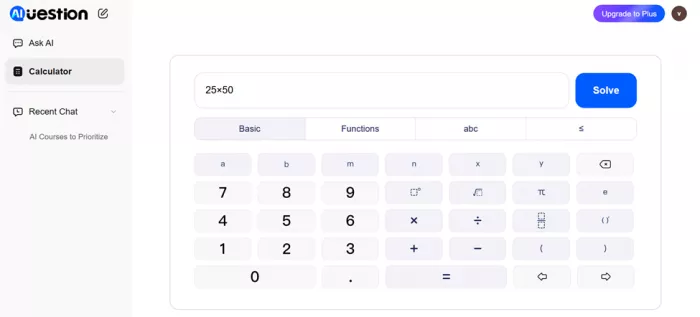 |
SCREENSHOT 9. My 25×50 input, ready to solve. Instant and free.
STEP 10
I went back to the checkout on purpose
Before writing this article, I reopened the payment screen to read everything slowly. Card and US bank account options. A country selector, which for me showed India while every price stayed in US dollars, so no regional pricing. And that renewal sentence again: $99.99 per year, automatic, unless you cancel. If you ever start the trial, screenshot this screen and set a phone reminder for day two.
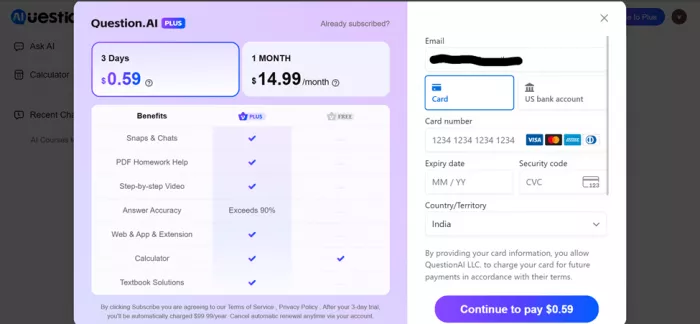 |
SCREENSHOT 10. The checkout revisited: payment options, India selected with USD pricing, and the auto-renewal terms.
The pricing math, spelled out
Every number from the checkout flow in one place, including the one hiding in the footnote.
PRICING AS TESTED, JULY 2026, IN USD
| Plan | Price | What you get | The catch |
|---|---|---|---|
| Free | $0 | Calculator and limited web chats; users report mobile ads | One check mark on the official benefits table |
| Plus trial | $0.59 / 3 days | Full Plus access: snaps, PDF help, video steps, textbook solutions | Auto-converts to annual billing |
| Plus monthly | $14.99 / month | Everything above, billed month to month | Costs 80% more per month than the annual rate |
| Plus annual (post-trial) | $99.99 / year | Everything above, about $8.33 per month effective | Charged automatically after day 3 unless cancelled |
Run those numbers and the design becomes clear. The trial is not really a 59-cent product; it is a hundred-dollar decision with a 72-hour fuse. To be fair, $99.99 a year beats $14.99 a month by roughly 44 percent, but only for someone who consciously chose a year. Nobody impulse-buying a 59-cent trial has.
USER-FIRST WARNING The auto-renewal is disclosed, so this is not a scam. It is printed in the smallest text on the page under a bright $0.59 headline. If you try the trial, set a reminder for 48 hours in, and confirm the cancellation went through. |
The 90 percent claim versus the tested numbers
The checkout page promises that Plus answer accuracy exceeds 90 percent, and the company's own marketing has cited figures as high as 98 percent. Independent testing tells a cooler story. A hands-on evaluation published by Techpoint Africa in 2025 scored the tool at 85 percent on math, 82 on language arts, 78 on science, and 75 on history, falling to 65 percent on complex, multi-step problem solving.
My own tiny sample, one broken answer and one good one from the same prompt, fits that inconsistency far better than anything in the nineties. The fair reading: strong on structured, formula-shaped questions, weaker when a task needs several reasoning steps or careful formatting, and worth double-checking whenever real stakes are attached.
How Question AI scores across review platforms
One tester is an anecdote; hundreds of thousands of raters are a dataset. Here is its score everywhere I found meaningful numbers.
RATINGS SNAPSHOT ACROSS FIVE PLATFORMS
| Platform | Rating | Sample size | My reading |
|---|---|---|---|
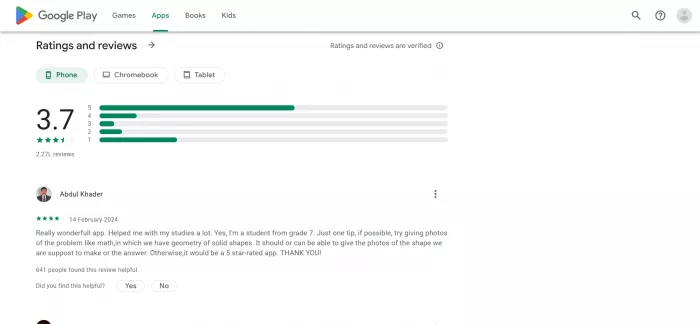
| Google Play | 4.7 / 5 | 200,000+ ratings, 10M+ installs | Strong satisfaction; the recurring complaint is free-tier ads |
| Apple App Store | ~4.7 / 5 | Varies by regional storefront | Positive overall, though counts differ between countries |
| Chrome Web Store | ~4.8 / 5 | Official featured extension | Well liked; beware lower-rated lookalike extensions |
| Trustpilot | No stable score | Around 14 reviews | Sample too small to trust; sharply split between praise and accuracy complaints |
| Independent test (Techpoint Africa) | 65-85% accuracy | Multi-subject 2025 study | Real performance lands below the marketed 90-plus claims |
Ratings shift daily; treat this table as a snapshot.
Two cautions before treating that table as gospel. App store ratings skew positive in general, and the Trustpilot sample is so small that one furious or delighted user moves the needle. Directionally, though, it matches my session: most people are satisfied, and the unhappy minority is unhappy about the same two things, answer accuracy and monetization.
What people are saying on review platforms
Paraphrased from published user reviews: the substance without the noise.
GOOGLE PLAY ★★★★★ SENTIMENT
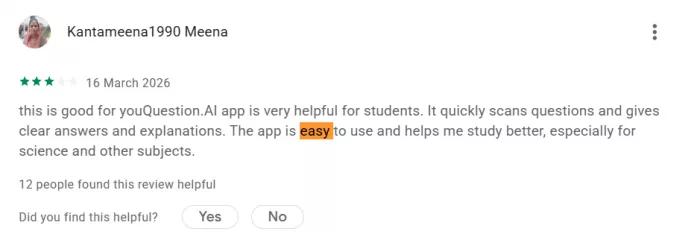
The top-rated reviews describe the app as easy to use and accurate for coursework, with several saying they would rate it above five stars if allowed.
GOOGLE PLAY ★★ SENTIMENT
The most common critical theme is advertising: free users report frequent unskippable ads that make quick homework checks on mobile frustrating.
TRUSTPILOT ★ SENTIMENT
One detailed reviewer ran over ten questions across subjects, kept receiving wrong or irrelevant answers, and concluded rival tools served them better.
TRUSTPILOT ★★★★★ SENTIMENT
Another highlights the multilingual support and credits the free tier with carrying them through history and literature homework at no cost.
Pros and cons after the full test
Where it earns its keep
• Clean, fast interface with almost no learning curve
• A genuinely free calculator that simply works
• Ten subjects and four modes under one roof
• Passwordless login takes under a minute
• A 59-cent way to test every premium feature
Where it loses points
• Inconsistent output; my first answer arrived broken
• Trial auto-converts to a $99.99 annual charge in 72 hours
• The free column of the benefits table holds one feature
• Independent accuracy results sit below the marketing claims
• Ad complaints dominate the negative mobile reviews
Who should actually use it
Use it if you are a student needing fast checks on structured problems, algebra, formulas, definitions, translations, and you will hit regenerate when an answer looks off; the free web experience plus the calculator covers a lot at zero cost. Skip it, or at least do not pay, if your work involves multi-step reasoning or professional stakes, or if you know you will forget to cancel a 72-hour trial. Parents should note that instant answers are wonderful for checking work and terrible for learning it, so usage matters as much as accuracy.
My score, and exactly how I got there
I came into this review expecting either a scam or a savior, because that is how the internet talks about these tools. Question AI is neither. After the session above and a pass through every public data source I found, here is where each category lands.
Ease of use earns an 8.5, one of the smoothest onboarding flows I have tested in this category. The free tier takes a 7.5 on the strength of the web experience and that calculator. Answer quality gets a 6.5, dragged down by the broken first response and the independent accuracy data, lifted by how good the regenerated answer was. Features land at 7, broad but partly gated. Pricing transparency gets a 4.5, because a $99.99 automatic annual charge deserves headline type, not footnote type. Value for money settles at 6.
| WEIGHTED SCORECARD · JULY 2026 | |
6.6 / 10 Useful, uneven, and worth watching your wallet around | |
| Ease of use | 8.5 |
| Free tier value | 7.5 |
| Answer quality ×2 WEIGHT | 6.5 |
| Features | 7.0 |
| Pricing transparency | 4.5 |
| Value for money | 6.0 |
Average those six numbers evenly and you get 6.7. But a study tool has exactly one job, being right, so I count answer quality twice, and the weighted result settles at 6.6 out of 10. I can defend every decimal: a genuinely useful free helper with real strengths, a consistency problem it has not solved, and a checkout flow that demands open eyes. My bottom line after all this analysis: I am keeping the free tab bookmarked, I will keep hitting regenerate when it stumbles, and I am not handing over my card without an alarm on my phone.
Comments