Cursor earned its reputation for a reason. It turned an AI code editor into something many developers now treat as a daily driver, and by early 2026 it had crossed a million paying users. Popularity, though, does not make it the right fit for everyone. Some people want to stay in the editor they already use. Others were unsettled by the pricing changes Cursor rolled out in 2025. A few simply need something a terminal can run, or a tool their security team will actually approve.
This guide walks through four strong alternatives, what each does well, where it falls short, and the kind of developer it fits. No hype, and no invented benchmark numbers, just a practical look at the current landscape.
How we evaluated these tools
⚙️ Our approach Each tool is assessed on five dimensions: code quality, agentic ability (how well it handles multi-step tasks on its own), ease of adoption, value for money, and privacy or enterprise readiness. Star ratings are our editorial judgment, informed by hands-on use and aggregated public feedback, not a single leaderboard score. Pricing reflects publicly listed rates as of July 2026 and changes often, so confirm the current numbers on each vendor's site before you commit. The sentiment cards paraphrase recurring themes from public reviews on G2, Reddit, and Trustpilot. They are representative summaries rather than individual endorsements. |
Why look beyond Cursor?
A quick reality check before the list. Cursor is excellent, and switching only makes sense if one of these reasons resonates with your situation.
● Pricing predictability. In June 2025 Cursor moved from a fixed request count to usage-based credits, and the change frustrated a chunk of its community. Heavy use of frontier models can push the real bill well past the sticker price.
● Editor lock-in. Cursor is its own editor, a fork of VS Code. If you live in JetBrains, Neovim, or Xcode, you cannot bring Cursor with you.
● Cost sensitivity. GitHub Copilot and Blackbox AI start at half the price of Cursor Pro, which matters for students, hobbyists, and small teams.
● Privacy and data control. Defaults differ: some tools may train on your code unless you opt out, and teams with strict requirements should check each policy before adopting a tool.
● Workflow fit. Some developers prefer a terminal agent, and others want an editor that prioritizes raw speed over the deepest AI features.
The alternatives at a glance
Here is the shortlist side by side, with Cursor included as the baseline for reference. Prices are the lowest paid individual tier; most tools also have a free option.
| Tool | Best for | From | Free tier | Standout feature |
|---|---|---|---|---|
| Cursor (baseline) | Deep codebase work in a polished AI editor | $20/mo | Yes | Composer agent and multi-model flexibility |
| Windsurf / Devin Desktop | Cursor-style editor with stronger agents; JetBrains | $20/mo | Yes | Codemaps and multi-agent command center |
| GitHub Copilot | Lowest-friction AI inside VS Code and GitHub | $10/mo | Yes | Best-in-class autocomplete and GitHub workflow |
| Claude Code | Autonomous, whole-codebase work from the terminal | $20/mo* | No | Agentic search and strong multi-file edits |
| Blackbox AI | Multi-model access on almost any platform, cheaply | $10/mo | Yes | 300+ models and image-to-code |
* Claude Code has no standalone price; it is included with a Claude subscription starting at $20 per month, or billed per token via the API.
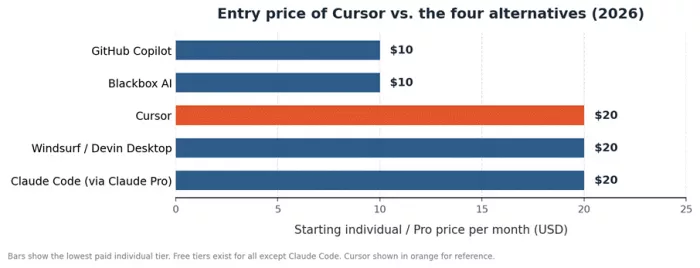
Entry-level pricing across the field. Remember that usage-based credits, quotas, or tokens can raise the real monthly cost above these starting figures.
Windsurf (now Devin Desktop): the closest like-for-like swap
If you want something that feels almost identical to Cursor, Windsurf is the obvious first stop. It is also a VS Code fork, so your extensions, keybindings, and settings carry over cleanly.

The twist is ownership. Windsurf began life as Codeium, survived a dramatic 2025 (an OpenAI acquisition fell through, Google hired its founders, and Cognition, the team behind the Devin agent, bought what remained), and in June 2026 it was rebranded as Devin Desktop. Same product lineage, new name, and a heavier focus on autonomous agents.
Key facts
| Maker | Cognition (formerly Codeium) |
| Best for | A Cursor-style editor with stronger autonomous agents, plus JetBrains and Vim teams |
| Pricing | Free ($0), Pro $20/mo, Max $200/mo, Teams and Enterprise (seat-based). Annual billing saves about 17%. |
| Free tier | Yes, with unlimited Tab autocomplete and a daily agent allowance |
| Platforms | Its own editor plus 40+ IDE plugins (JetBrains, Vim, Neovim, Xcode) |
| Models | In-house SWE-1.6 (fast, near-frontier) plus Claude, GPT, and Gemini |
| Standout | Codemaps (visual, AI-annotated code maps) and an Agent Command Center for running several agents at once |
Pros and cons
| What we like | Watch-outs |
● Agents plan multi-step work, run terminal commands, and edit across many files with little hand-holding ● SWE-1.6 is genuinely fast, which keeps you in flow while iterating ● Broad IDE coverage, unlike Cursor, so JetBrains and Vim users are not left out ● Codemaps make large or unfamiliar codebases easier to navigate ● Strong enterprise credentials, including HIPAA, FedRAMP, and ITAR on the enterprise side | ● The March 2026 switch from credits to daily and weekly quotas annoyed existing users, and long sessions can hit a cap ● The old $15 price advantage over Cursor is gone; Pro now matches at $20 ● Rapid rebranding and product churn under new ownership create some uncertainty ● Agents are less reliable on large, messy legacy files than on clean, well-scoped tasks ● Documentation for advanced features is thin, and Pro support is email-only |
| Our editorial rating | |
| Code quality | ★★★★½ 4.5/5 |
| Agentic ability | ★★★★½ 4.5/5 |
| Ease of use | ★★★★☆ 4.0/5 |
| Value | ★★★★☆ 4.0/5 |
| Privacy / enterprise | ★★★★☆ 4.0/5 |
| Overall | ★★★★☆ 4.2/5 |
💬 What developers are saying ▲ The handling of multi-file tasks and the speed of SWE-1.6 draw consistent praise. ▲ JetBrains users are relieved to get real AI coding without leaving their IDE. ▼ The quota change and the constant rebranding are the most common complaints. Community sentiment: genuinely split, enthusiastic on Reddit and Discord, harsher on Trustpilot, landing near 3.5 out of 5 overall. |
GitHub Copilot: the mainstream default that meets you where you are
Copilot is the most widely adopted AI coding assistant, and for many teams it is the safe, sensible pick. It lives inside the editor you already use, whether that is VS Code, JetBrains, Neovim, or Visual Studio, rather than asking you to switch.
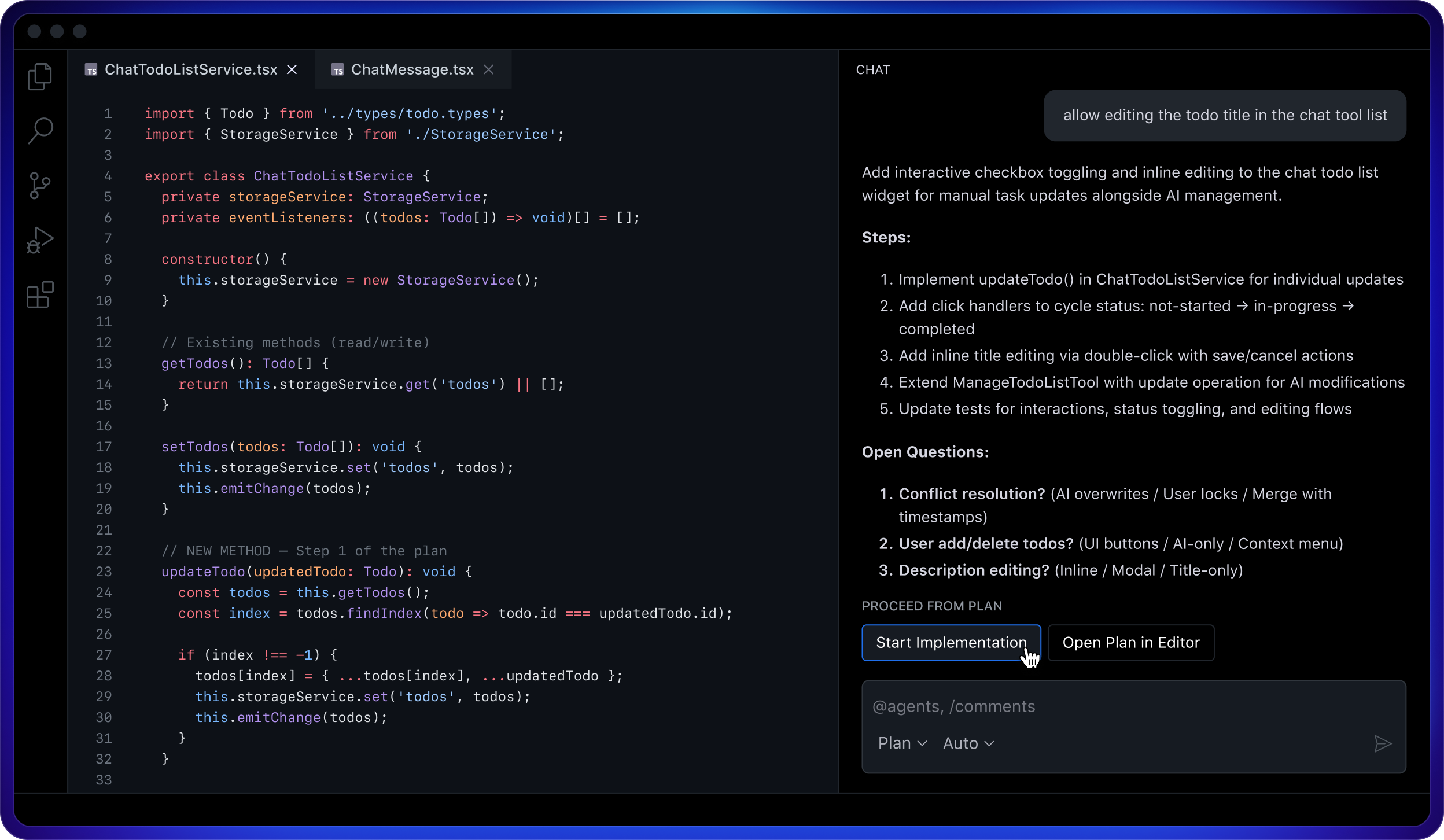
Over the last year it grew from an autocomplete tool into a full agentic platform with an agent mode, automated code review, and a command line interface. On June 1, 2026 it moved to usage-based billing: code completions stay unmetered, but chat, agent mode, code review, and the CLI now draw from a monthly pool of AI Credits, where one credit equals one cent.
Key facts
| Maker | GitHub (Microsoft), using OpenAI and Anthropic models |
| Best for | Developers who want the tightest VS Code and GitHub integration with minimal friction |
| Pricing | Free ($0), Pro $10/mo (about $100/yr), Pro+ $39/mo, Max $100/mo, Business $19/seat, Enterprise $39/seat |
| Free tier | Yes, 2,000 completions and 50 chat or premium requests per month |
| Platforms | VS Code, JetBrains, Neovim, Visual Studio, and GitHub |
| Models | GPT-5.2, Claude Sonnet 4.6, and Gemini 3, with Claude Opus on Pro+ and above |
| Standout | Best-in-class autocomplete and a deep, native GitHub workflow (pull requests, code review, Actions) |
Pros and cons
| What we like | Watch-outs |
● The lowest friction of any tool here if you already use VS Code or GitHub ● Autocomplete quality remains a benchmark that others measure against ● Unmetered completions on paid plans, so everyday typing never eats your credits ● Strong governance: SSO, audit logs, IP indemnity, and training opt-out by default on Business and Enterprise ● The cheapest serious paid tier on this list at $10 a month | ● The move to usage-based credits means heavy agent users can pay noticeably more, and token billing is harder to forecast ● Agentic features are capable but still trail Cursor and Windsurf on large, autonomous refactors ● Opus-family models are restricted to Pro+ and above, and they burn credits quickly ● Some new sign-ups were temporarily paused during the 2026 billing transition, so availability can vary ● Enterprise carries a hidden requirement of GitHub Enterprise Cloud, raising the real per-user cost |
| Our editorial rating | |
| Code quality | ★★★★½ 4.5/5 |
| Agentic ability | ★★★★☆ 4.0/5 |
| Ease of use | ★★★★★ 5.0/5 |
| Value | ★★★★½ 4.5/5 |
| Privacy / enterprise | ★★★★½ 4.5/5 |
| Overall | ★★★★☆ 4.4/5 |
💬 What developers are saying ▲ Praised for how invisible it is; it just works inside the editor teams already know. ▲ Business and Enterprise buyers value the compliance story and IP indemnity. ▼ The June 2026 credit change drew real frustration from heavy agent users worried about unpredictable bills. Community sentiment: around 4 out of 5, still the default recommendation for most teams. |
Claude Code: the terminal agent for deep, autonomous work
Claude Code takes a different shape from the editors above. It lives in your terminal, with extensions for VS Code and JetBrains, and behaves like an autonomous engineer.
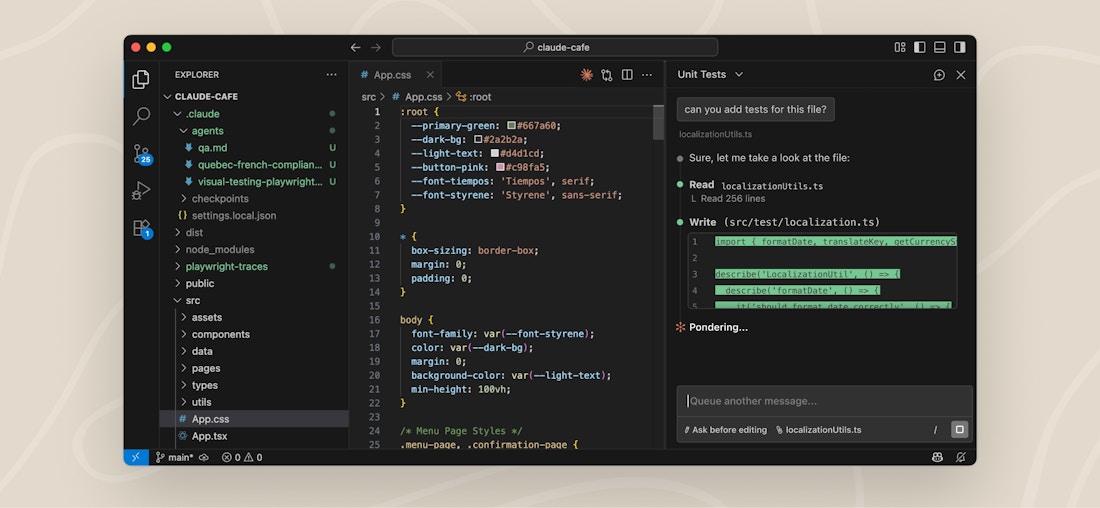
Point it at a repository and it maps the codebase, reads the relevant files on its own, makes multi-file edits, runs tests, and can open a pull request, all from the command line. Built by Anthropic, it has become a favorite for complex debugging and large refactors.
Key facts
| Maker | Anthropic |
| Best for | Experienced developers who want deep codebase understanding and hands-off, multi-file changes |
| Pricing | No standalone price. Included with Claude Pro $20/mo (about $17 annual), Max 5x $100/mo, Max 20x $200/mo, Team Premium $100/seat, and Enterprise. Or pay per token via the API. |
| Free tier | No. The free Claude plan does not include Claude Code. |
| Platforms | Terminal, plus native extensions for VS Code and JetBrains (it also runs inside Cursor and Devin Desktop) |
| Models | Claude Sonnet 4.6, Opus 4.8, and Haiku 4.5, with newer models on higher tiers |
| Standout | Agentic search that understands an entire codebase in seconds, paired with strong multi-file editing |
Pros and cons
| What we like | Watch-outs |
● Among the strongest tools for accurate debugging, refactoring, and reasoning across a whole project ● Terminal-first design plugs neatly into Git, CI, and existing command line tools ● Prompt caching keeps real costs lower than raw token math suggests ● Works alongside your editor of choice rather than replacing it ● Your code is used only for the session, not for training | ● Token-based billing can spike hard; heavy automation can reach hundreds or thousands of dollars a month ● The terminal workflow has a steeper learning curve than a polished editor ● No free tier, so you need at least a Claude subscription or API credits to start ● Costs are the hardest to predict of any tool here without active monitoring ● Less suited to beginners or to quick inline autocomplete |
| Our editorial rating | |
| Code quality | ★★★★★ 5.0/5 |
| Agentic ability | ★★★★★ 5.0/5 |
| Ease of use | ★★★½☆ 3.5/5 |
| Value | ★★★½☆ 3.5/5 |
| Privacy / enterprise | ★★★★☆ 4.0/5 |
| Overall | ★★★★☆ 4.2/5 |
💬 What developers are saying ▲ Developers repeatedly call out the quality of its codebase understanding and multi-file edits. ▲ The terminal plus Git workflow feels natural to experienced engineers. ▼ Unpredictable token costs are the number-one worry, especially for automated runs. Community sentiment: very high among power users who can manage the cost, comfortably above 4 out of 5. |
Blackbox AI: multi-model coverage on almost any surface
Blackbox AI takes a breadth-first approach. Instead of betting on one model, it routes your request to many at once through a system it calls Chairman LLM, then picks the strongest result.
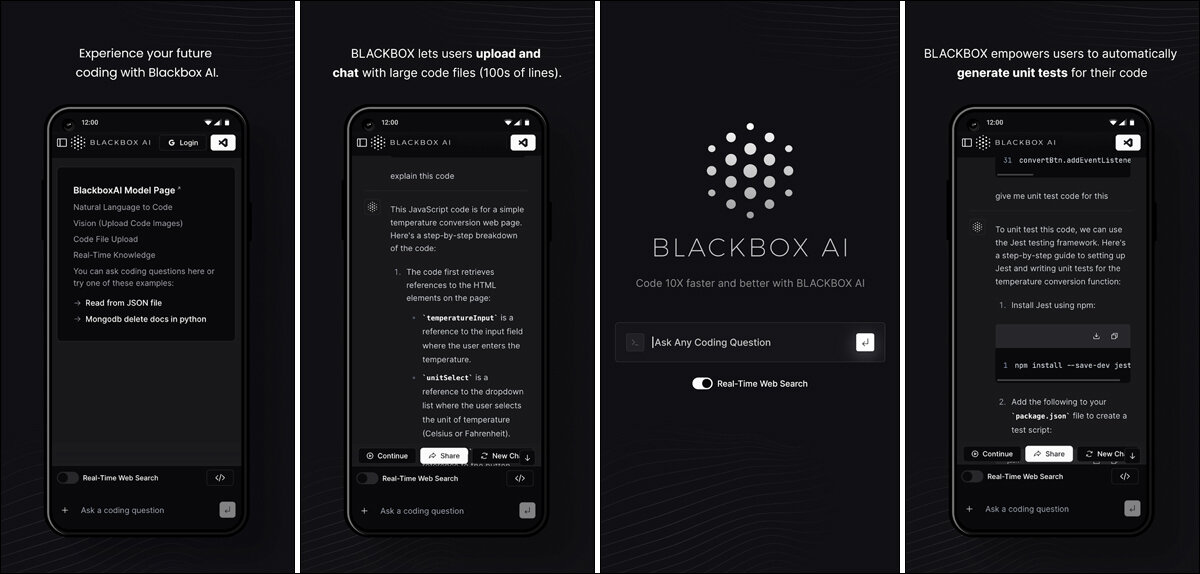
It runs almost everywhere: a VS Code extension with millions of installs, JetBrains, its own IDE, a CLI, a browser extension, mobile apps, and the web. For developers who value flexibility and a low price, it is a compelling option, especially for front-end work.
Key facts
| Maker | Blackbox AI Inc. (founded 2019, San Francisco) |
| Best for | Multi-model access and cross-platform coverage on a budget, plus turning designs into code |
| Pricing | Free tier, Pro $10/mo (often $2 for the first month), Pro Plus $20/mo, Pro Max $40/mo, Enterprise (custom) |
| Free tier | Yes, with unlimited chat and basic autocomplete |
| Platforms | VS Code, JetBrains, its own IDE, CLI, Chrome extension, iOS, Android, web, and desktop |
| Models | 300+ including Claude, GPT, Gemini, and its own Blackbox models |
| Standout | Image-to-code (turn Figma files or screenshots into working components) and very wide platform reach |
Pros and cons
| What we like | Watch-outs |
● Access to a huge range of models under one subscription, unmatched for experimentation ● One of the widest platform footprints of any coding assistant ● Aggressively priced, with a genuinely useful free tier ● Image-to-code and voice coding are handy extras few rivals match ● Multi-agent execution can run several agents on the same repository | ● Code quality and codebase awareness trail Cursor, Copilot, and Claude Code on complex tasks ● Historically inconsistent pricing transparency, so check the current terms carefully ● Cloud-only, with no offline mode ● Training opt-out and full data controls are reserved for the Enterprise plan ● Autonomous agents can miss on multi-file changes and need close review |
| Our editorial rating | |
| Code quality | ★★★★☆ 4.0/5 |
| Agentic ability | ★★★½☆ 3.5/5 |
| Ease of use | ★★★★☆ 4.0/5 |
| Value | ★★★★½ 4.5/5 |
| Privacy / enterprise | ★★★☆☆ 3.0/5 |
| Overall | ★★★½☆ 3.9/5 |
💬 What developers are saying ▲ The multi-model access and low price are the features developers mention most. ▲ Front-end developers like the screenshot and Figma-to-code conversion. ▼ Reliability on complex, multi-file work and past pricing opacity are the recurring criticisms. Community sentiment: around 4 out of 5, a strong-value pick with clear caveats. |
Head-to-head: the four alternatives compared
Before the verdict, here are the four alternatives side by side across four angles: what they can do, what they cost, how we rate them, and who each one fits best. Scan for the row that matches your situation.
Capability comparison
| Capability | Windsurf | GitHub Copilot | Claude Code | Blackbox AI |
|---|---|---|---|---|
| Starting paid price | $20/mo | $10/mo | $20/mo* | $10/mo |
| Free tier | ✓ | ✓ | ✗ | ✓ |
| Autonomous multi-file agent | Strong | Good | Excellent | Basic |
| Inline autocomplete | Good | Benchmark | Minimal | Good |
| Model choice | SWE-1.6, Claude, GPT | GPT, Claude, Gemini | Claude family | 300+ models |
| IDE coverage | 40+ IDEs | Major IDEs | VS Code, JetBrains | 35+ IDEs |
| Image-to-code | ✗ | ✗ | ✗ | ✓ |
| Billing model | Quotas | Usage credits | Tokens or plan | Credits or flat |
* Claude Code has no standalone price; it is included with a Claude subscription from $20 per month, or billed per token via the API.
Pricing by plan
| Plan (per month) | Windsurf | GitHub Copilot | Claude Code | Blackbox AI |
|---|---|---|---|---|
| Free | $0 | $0 | Not included | $0 |
| Individual entry | Pro $20 | Pro $10 | Claude Pro $20 | Pro $10 |
| Individual power | Max $200 | Max $100 | Max 20x $200 | Pro Max $40 |
| Team (per seat) | $40 | Business $19 | Team Premium $100 | Custom |
| Enterprise | Custom | $39 | Custom | Custom |
Mid tiers also exist: Copilot Pro+ $39, Blackbox Pro Plus $20, and Claude Code Max 5x $100. Claude Code can also be billed per token via the API. Annual billing usually saves 17 to 20 percent.
Ratings at a glance
| Rating (out of 5) | Windsurf | GitHub Copilot | Claude Code | Blackbox AI |
|---|---|---|---|---|
| Code quality | ★★★★½ 4.5 | ★★★★½ 4.5 | ★★★★★ 5.0 | ★★★★☆ 4.0 |
| Agentic ability | ★★★★½ 4.5 | ★★★★☆ 4.0 | ★★★★★ 5.0 | ★★★½☆ 3.5 |
| Ease of use | ★★★★☆ 4.0 | ★★★★★ 5.0 | ★★★½☆ 3.5 | ★★★★☆ 4.0 |
| Value | ★★★★☆ 4.0 | ★★★★½ 4.5 | ★★★½☆ 3.5 | ★★★★½ 4.5 |
| Privacy / enterprise | ★★★★☆ 4.0 | ★★★★½ 4.5 | ★★★★☆ 4.0 | ★★★☆☆ 3.0 |
| Overall | ★★★★☆ 4.2 | ★★★★☆ 4.4 | ★★★★☆ 4.2 | ★★★½☆ 3.9 |
Ratings are our editorial judgment, informed by hands-on use and aggregated public feedback, not a single benchmark score.
Best fit by use case
| Use case | Windsurf | GitHub Copilot | Claude Code | Blackbox AI |
|---|---|---|---|---|
| Solo dev and side projects | Good | Great | Fair | Best |
| Fast-moving startup team | Great | Best | Good | Good |
| Large enterprise (SSO, audit) | Great | Best | Good | Fair |
| Front-end and design-to-code | Good | Good | Good | Best |
| JetBrains, Vim, or Xcode | Best | Great | Good | Great |
| Large legacy refactors | Great | Good | Best | Fair |
| Tightest budget | Good | Great | Fair | Best |
| Beginners learning to code | Good | Best | Fair | Fair |
Fit scale: Best is the top choice for that scenario, followed by Great, Good, and Fair. This reflects our editorial read, so weigh it against your own priorities.
How to choose the right one for you
Still deciding? Match your top priority to the tool that serves it best.
● You want the closest thing to Cursor, or you use JetBrains or Vim: Windsurf (Devin Desktop).
● You want the least friction and already live in VS Code or GitHub: GitHub Copilot.
● You want the cheapest serious paid tier: GitHub Copilot or Blackbox AI at $10 a month.
● You want deep, autonomous work across a whole codebase: Claude Code.
● You want the widest model choice and platform reach on a budget: Blackbox AI.
The bottom line
There is no single best Cursor alternative, only the best fit for your workflow, budget, and constraints. GitHub Copilot is the safe mainstream choice and the cheapest serious paid tier. Windsurf is the closest swap with stronger agents and the widest editor support. Claude Code is the power tool for deep, autonomous work. Blackbox AI is the flexible, low-cost pick with the broadest platform reach.
The good news is that three of the four offer a free tier, and Claude Code comes with a Claude subscription you may already have. The lowest-risk move is simple: try two of them against a real task, and let your own workflow decide.
Comments