I found Flashka the way most students do, at 1 a.m. with a 46-page pharmacology PDF and a test in four days. Credit where it is due, the app turned that PDF into a usable deck before my coffee went cold. But after living inside it for a full semester, I kept bumping into the same walls. The free plan's daily AI credits ran dry right when my study sessions got serious, and because Flashka is built around cards you make from your own material, the moments I needed a huge shared deck library, a homework solver, or desktop-grade control sent me looking elsewhere.
So I spent the last few weeks doing what I probably should have done earlier: running the most talked about Flashka AI alternatives through real study sessions with the same three files. Same psychology PDF. Same photo of handwritten chemistry notes. Same messy lecture recording. Here is what actually held up.
Why look beyond Flashka AI at all?
To be clear, Flashka is a good app. This section exists because knowing exactly what it does well tells you which alternative fills your specific gap.
| Where Flashka shines | Where it runs out of road |
• The PDF and photo to deck pipeline is genuinely fast • Professor Ka explains cards in context, like a pocket tutor • Spaced repetition is baked into every study session • Image occlusion and oral exam mode suit visual and spoken recall | • Daily AI credits on the free plan run out fast during exam week • Heavy use means a subscription • It is card-first, so it will not solve a problem set for you • No large community library of ready-made decks |
If a row on the right side of that table made you nod, one of the seven tools below fixes it.
Quick comparison: all 7 alternatives at a glance
| Tool | Best for | Free plan | Paid from | My rating |
|---|---|---|---|---|
| Knowt | The closest all-round Flashka replacement | Very strong, most modes free | About $9.99/mo (Ultra, yearly) | 4.6 / 5 |
| Anki | Months-long memorization and full control | Free on desktop, Android, web | $24.99 one time (iOS app) | 4.7 / 5 |
| Quizlet | Ready-made decks and classroom study | Basic, with ads and caps | About $7.99/mo (Plus) | 4.3 / 5 |
| StudyFetch | An all-in-one platform with an AI tutor | Tiny (2 uploads, 10 chats) | $7.99 to $11.99/mo | 4.4 / 5 |
| Doctrina AI | Quizzes and mock exams without a subscription | Basic quiz and essay tools | Around $10 one time, lifetime | 4.0 / 5 |
| Gauth | Step-by-step STEM homework help | Limited daily solutions, no ads | About $11.99/mo or $99.99/yr | 4.2 / 5 |
| Question AI | Fast scan-and-answer in 100+ languages | Core features, with ads | Subscription, varies by store | 3.9 / 5 |
Prices checked on official pages in July 2026 and rounded to US app store figures. Plans and regional pricing change, so confirm before you subscribe.
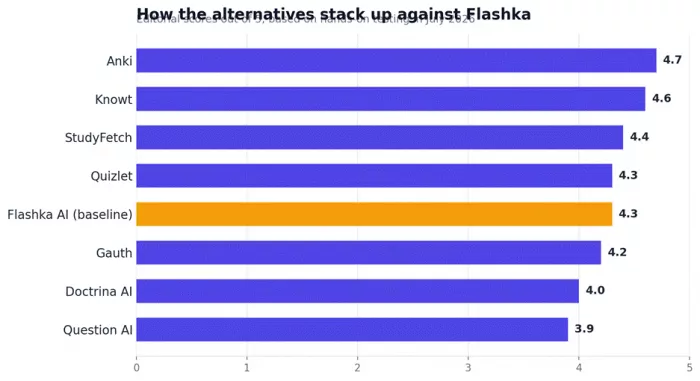
Scores reflect my own weighted testing of card quality, study features, pricing honesty, and reliability. They are editorial opinions, not lab benchmarks.
Knowt: the closest one-to-one Flashka replacement
Knowt is the app I kept opening after the testing was officially over. It feels like someone listed every feature students actually use in Flashka and Quizlet, then made the important ones free.

| Best for | A free, all-round Flashka replacement |
| Platforms | Web, iOS, Android, Chrome extension |
| Free plan | Learn mode, practice tests, matching, spaced repetition, AI generation with monthly caps |
| Paid plan | Ultra, about $9.99 a month billed yearly, raises AI limits and adds Snap and Solve |
| My rating | 4.6 / 5 |
What stood out in testing
• It built a clean, accurate deck from my 46-page psychology PDF, and the Chrome extension pulled key points straight out of a YouTube lecture.
• Learn mode and unlimited practice tests cost nothing, which is rare in 2026.
• The AP and IB hubs come preloaded with exam-specific decks and realistic practice questions.
| What I liked | What to watch |
• The strongest free plan in this roundup • One-click import of existing Quizlet sets • AI handles PDFs, slides, videos, and typed notes • Solid, usable mobile apps | • AI generation is capped monthly, even on Ultra • The interface pushes upgrades and can feel busy • Newer features sometimes ship with rough edges |
My take: If you only try one app on this list, make it this one. The free tier alone covers most of what Flashka charges for.
Anki: best for long-haul memorization and total control
Anki looks like it was designed in 2006 because parts of it were. I almost skipped it for that reason, and that would have been a mistake. Once my chemistry deck crossed 400 cards, nothing else here came close for long-term retention.

| Best for | Serious, months-long memorization: medicine, law, languages, certifications |
| Platforms | Windows, Mac, Linux, Android, iOS, web |
| Free plan | Fully free on desktop, Android, and the web |
| Paid plan | $24.99 one-time purchase for the iPhone app, which funds the whole project |
| My rating | 4.7 / 5 |
What stood out in testing
• The FSRS scheduler adapts review intervals to how your memory actually behaves, and you can tune every parameter.
• The add-on library covers everything from image occlusion to review heatmaps.
• Shared decks, like the famous AnKing deck for med students, can save you hundreds of hours of card writing.
| What I liked | What to watch |
• Completely free on desktop and Android • The most trusted spaced repetition engine available • Huge community and shared deck library • Works fully offline, and your data stays exportable | • No built-in AI card generation, you bring cards or add-ons • The interface feels dated next to Flashka • Expect to spend a weekend learning the settings • Desktop and mobile apps feel like different products |
My take: If Flashka is a microwave, Anki is a cast iron pan. Slower to get comfortable with, better results over months and years.
Quizlet: best for ready-made decks and classrooms
Quizlet is the tool your classmates already use, and that network is its real feature. Search almost any textbook chapter and there is a good chance a deck already exists.

| Best for | Studying from existing decks and teacher-led classes |
| Platforms | Web, iOS, Android |
| Free plan | Flashcards and limited Learn rounds, with ads |
| Paid plan | Plus from about $7.99 a month, cheaper on the yearly plan |
| My rating | 4.3 / 5 |
What stood out in testing
• Magic Notes turned my typed outline into flashcards, practice questions, and a summary in one pass.
• Q-Chat quizzes you in a back-and-forth conversation instead of just flipping cards.
• The giant library of user-made sets meant I rarely had to build a deck from scratch.
| What I liked | What to watch |
• Enormous library of existing decks for nearly any subject • Polished, familiar interface on every device • Useful classroom modes for teachers • Magic Notes is a genuinely good notes-to-cards pipeline | • The best features sit behind the Plus paywall • Free tier caps Learn rounds and shows ads • Less generous than Knowt at a similar price • Community decks vary in accuracy, so verify before an exam |
My take: Pick Quizlet when someone has already made your deck. Pick Knowt when you are building your own.
StudyFetch: best all-in-one platform with an AI tutor
StudyFetch wants to be your entire study system, not just a card maker. Spark.E, its AI tutor, answers from your actual uploads instead of generic knowledge, and that difference shows the moment you ask an exam-specific question.
| Best for | Students who want cards, quizzes, notes, and a tutor in one place |
| Platforms | Web, iOS, Android |
| Free plan | 2 uploads and 10 tutor chats, enough for a taste but not a real trial |
| Paid plan | Base at $7.99 and Premium at $11.99 a month, with yearly discounts |
| My rating | 4.4 / 5 |
What stood out in testing
• It turned my 20-minute lecture recording into structured notes plus a quiz without any extra prompting.
• The Live Lecture assistant takes notes in real time while you sit in class.
• Flashcards, practice tests, essay feedback, and audio recaps all live under one login.
| What I liked | What to watch |
• Widest range of study formats on this list • Tutor answers are grounded in your own materials • Imports from Canvas, Quizlet, and Google Docs • Handwriting and photo uploads work on Premium | • The free tier is too small to properly judge the product • Billing and cancellation complaints appear repeatedly in user reviews • Complex diagrams sometimes get misread • The Android app trails the iOS version |
My take: The most complete platform here. Just treat the trial like a parking meter and set an alarm before it converts.
Doctrina AI: best one-time payment for quizzes and mock exams
Doctrina AI was the surprise of this roundup, mostly because of the receipt. One payment of around ten dollars and every feature is yours for good, which felt almost suspicious after a month of subscription screens.

| Best for | Students and teachers who refuse another monthly subscription |
| Platforms | Web browser |
| Free plan | Quiz and essay tools with basic limits |
| Paid plan | Around $10, paid once, for lifetime access to everything |
| My rating | 4.0 / 5 |
What stood out in testing
• The exam generator built a structured mock test on my topic with beginner, intermediate, and advanced difficulty settings.
• Class notes enrichment tidied my rough notes into an organized study guide.
• There is a voice chat mode for talking through a concept out loud.
| What I liked | What to watch |
• Lifetime access for the price of two coffees • Exams export as clean PDFs, handy for teachers • Simple enough to learn in one sitting • Quizzes, exams, notes, essays, and chat in one suite | • No spaced repetition deck system, so it complements card apps rather than replacing them • Outputs often need a round of human editing • The interface is plain next to Flashka • Question depth varies by subject |
My take: Not a Flashka clone. Think of it as the mock-exam half of your routine, bought outright instead of rented.
Gauth: best for step-by-step STEM homework help
Gauth solves a different problem than Flashka. When I hit a physics problem set that no flashcard could rescue me from, Gauth's photo scan walked me through the working line by line.

| Best for | Getting unstuck on math, physics, chemistry, and other STEM problem sets |
| Platforms | iOS, Android, web |
| Free plan | A limited number of daily solutions, with no ads |
| Paid plan | Plus around $11.99 a month or $99.99 a year, tutor tier around $19.99 a month |
| My rating | 4.2 / 5 |
What stood out in testing
• It scanned handwritten calculus problems and returned readable step-by-step working within seconds.
• Coverage stretches past math into physics, chemistry, biology, economics, and writing.
• On the top tier, human tutors pick up the questions the AI gets wrong.
| What I liked | What to watch |
• Fast, clear step-by-step explanations • Strong photo recognition, even on messy handwriting • Multi-subject coverage beyond math • Ad-free even on the free plan | • Accuracy dips on unusual or multi-part problems, so verify anything that counts • Subscriptions auto-renew and users report cancellation friction, cancel through your app store • It solves problems but builds no review system • ByteDance ownership will matter to some readers |
My take: Keep a flashcard app for memorization and Gauth for the nights the problem set fights back.
Question AI: best for quick answers across subjects and languages
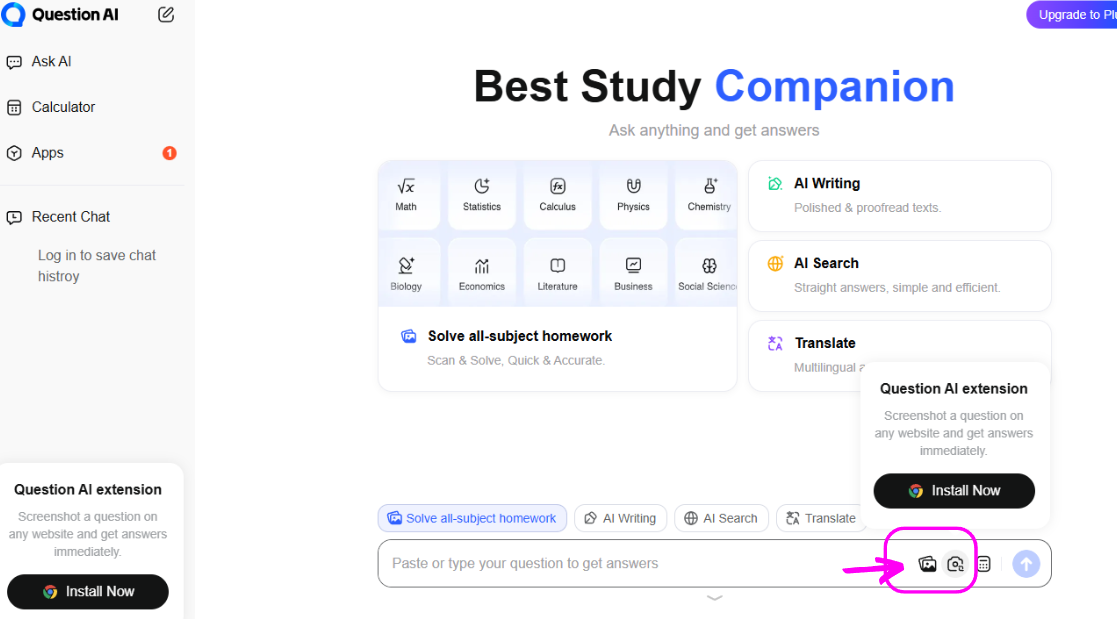
Question AI is the fastest route I tested from a photographed question to an explained answer. It is less of a study system and more of an always-open answer desk.
| Best for | Instant explanations across STEM, humanities, and business topics |
| Platforms | iOS, Android, web, Chrome extension |
| Free plan | Core scanning and answers, with ads |
| Paid plan | A subscription removes ads and lifts limits, pricing varies by app store |
| My rating | 3.9 / 5 |
What stood out in testing
• The scan tool handled everything from algebra to a literature passage without complaint.
• Explanations arrive in plain language with steps, not just a final answer.
• The Chrome extension answers questions straight from a webpage screenshot, which is handy for online coursework.
| What I liked | What to watch |
• Very fast capture-to-answer flow • Wide subject spread, including business and economics • Supports more than 100 languages • The browser extension is genuinely convenient | • Ads interrupt the free experience • Answers occasionally miss the context of the question • No spaced repetition or deck system • Depth thins out once you leave math and science |
My take: Great as a pocket explainer, especially for multilingual students. Not a Flashka replacement on its own.
Which one should you pick?
Short answers, based on the gap you are trying to fill:
• You want everything Flashka does, free: Knowt.
• Your exam is months away and memorization-heavy: Anki.
• Your classmates already share decks: Quizlet.
• You want a tutor that has read your slides: StudyFetch.
• You never want another subscription: Doctrina AI.
• Problem sets, not flashcards, are the real enemy: Gauth.
• You need answers explained fast, in any language: Question AI.
Final verdict
After a month of rotating these apps through real revision, my phone told the story better than any spreadsheet could. Knowt survived on the home screen because it does most of what Flashka does without asking for my card. Anki lives on my laptop for the decks I need to remember past next semester. And honestly, Flashka never got deleted either. Its photo-to-deck speed is still the best I have used, and if the daily credits fit your workload, staying put is a perfectly fair choice.
If a student asked me for a single Flashka AI alternative, I would send them to Knowt and tell them to import their old sets before doing anything else. If they mentioned a licensing exam a year out, I would swap that answer to Anki and warn them the first weekend is awkward and worth it. Everything else on this list earns its spot for one specific job: StudyFetch when you want a tutor that has done the reading, Doctrina AI when subscriptions make you itch, and Gauth or Question AI on the nights the homework, not the memorizing, stands between you and sleep.
Comments