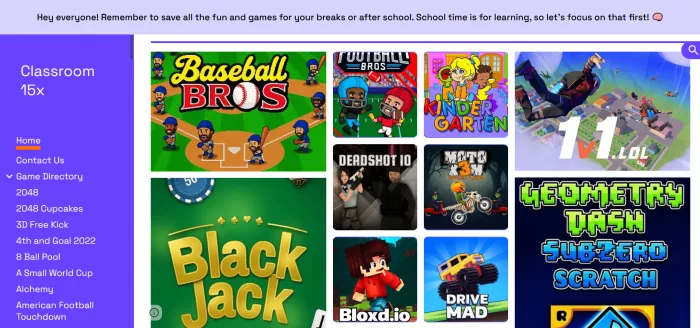
Open Classroom 15x on a locked-down school Chromebook and the experience is quieter than the name suggests. There is no splashy launcher, no account wall, and no wait for a client to install. The page loads, a grid of games sits in front of you sorted by category, and a puzzle or arcade title starts within a few seconds because it runs as plain browser code.
That restraint is the whole point. This guide covers what the platform actually is, which games and categories it carries, the features that let it work on school networks, and how to browse it without walking into the common traps.
| At a glance | |
| What it is | A free browser-based unblocked games hub |
| Built on | Google Sites, HTML5 games |
| Cost | Free, no paid tiers |
| Account | None required |
| Works on | Chromebooks, laptops, tablets, phones |
| Game types | Puzzle, arcade, shooter, board, educational |
| Downloads | None, games run in the tab |
What Classroom 15x actually is
Classroom 15x is a free website that gathers browser games and arranges them so they load on school devices. It is built on Google Sites, and every title runs on HTML5, which means each game is a web page rather than software you download. The project sits inside a wider family of similarly named hubs, including Classroom 6x and Classroom 30x, all built on the same idea.
The name causes some confusion, so it helps to clear it up. A handful of education blogs use the phrase Classroom 15x to describe a high-tech teaching model with small student ratios and cloud tools. In everyday use, and in the way most students search for it, the term points to the unblocked games hub described here. This guide stays with the games hub.
In practice, sessions tend to be short. The platform fits the few minutes between assignments or a brief reset at the end of a task rather than a long gaming session, and the curated, lightweight titles match that rhythm.
Why it exists and why it caught on
Most schools route traffic through a content filter that blocks known gaming domains. Because Classroom 15x serves lightweight HTML5 pages, the games behave like ordinary site content, so they tend to slip past filters built to catch heavier, obvious game traffic.
A few practical things pushed it into wide use. Chromebooks dominate classrooms across the United States, so a Chromebook-first hub matches the hardware students already hold. HTML5 replaced Flash years ago, so browser games now run everywhere without a plugin. The naming pattern of 6x, 15x, and 30x spreads through word of mouth and search. And the category layout makes it quick to find something playable in the short gap between tasks. Teachers have also leaned on short, supervised game breaks to reset attention between lessons, which gave the format a foothold beyond students playing on their own.
How Classroom 15x works
Every game on the platform is an HTML5 file that runs inside the browser tab. Nothing is copied onto the Chromebook, no plugin is needed, and there is no separate program to launch. For a school network that is a lighter footprint than a downloaded game, and for the device it means titles start quickly even on hardware that struggles with heavier software.
The same design keeps the technical risk low. HTML5 games cannot drop an executable on the machine, so there is no .exe to run and no obvious path for a virus the way a downloaded installer or crack would carry one. The trade-off is that each game depends on the browser and on whichever host holds the original file, which is why a title occasionally shows up as a dead embed.
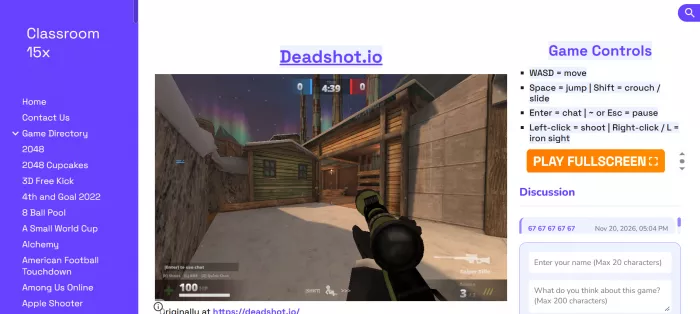
The word unblocked does some heavy lifting here, and it is worth being precise about it. Nothing is being hacked or forced open. The games are simply not on the filter's block list, because they load as standard web content instead of from a flagged gaming domain. When a school does add the address to its list, the games stop loading, which is the honest ceiling on any site like this. For a device-level walkthrough of how these titles load and perform on real hardware, this hands-on look at the Chromebook games hub covers the loading behaviour in more depth.
Games and categories
The library is organised into a short list of categories rather than one endless wall. The table below reflects the sections the hub publishes. The exact lineup shifts as games are added or retired, and not every title loads on every network. Because the titles are lightweight, they tend to run smoothly even when the connection is busy, which is part of why the format suits shared school networks.

| Category | What you will find | Typical titles in this style |
| Puzzle | Logic and tile games that reward thinking over speed | 2048, sliding puzzles, match games |
| Arcade | Quick-reflex games for short breaks | Runners, platform jumpers, reaction games |
| Shooter | Browser .io shooters and target games | First-person .io shooters, target ranges |
| Board | Classic strategy games | Chess, checkers, mahjong |
| Kids and educational | Lighter games for younger players and basic skills | Spelling, counting, memory games |
The list is curated for school-friendly content, which is why heavier or mature titles common on open gaming portals are left out.
Key features
Instant play Games open in the tab, usually within a few seconds, with no client to load. | No account Nothing to sign up for, no email, and no personal details requested. |
Firewall-friendly HTML5 pages that commonly pass filters built to catch heavier game traffic. | Runs anywhere Chromebooks, laptops, tablets, and phones on any modern browser. |
Sorted by category A directory layout instead of an unsorted pile of links. | Nothing to install No downloads, no extensions, and no plugins on the device. |
Pros and cons
What works well ✓ Opens fast on low-powered school Chromebooks ✓ No login, no email, and no personal data collected ✓ HTML5 means no executable downloads and no install step ✓ Games grouped into clear categories you can scan ✓ The same page works across Chromebook, tablet, and phone | Where it falls short ✗ Access is never guaranteed, and one filter update can switch it off overnight ✗ Copycat and mirror domains exist, and some carry heavy ads or trackers ✗ It is still a games site, so playing in class can breach an acceptable use policy ✗ The library is smaller than big portals, and embeds break when the host goes offline ✗ No progress saving, parental controls, or accounts to hold your place |
Is Classroom 15x safe?
Safety here splits into two separate parts, and mixing them up is where the wrong impression starts. The games themselves carry low technical risk because they are static HTML5 pages with nothing to download. The risk that actually matters is about behaviour and about which version of the site you land on.
Most of the genuine complaints about hubs like this trace back to copycats. A search can surface a dozen near-identical names, and the weaker clones lean on aggressive ad networks, fake play buttons, or pop-ups that push a download. Sticking to one known address and ignoring anything that asks to install software removes the bulk of that risk. None of this makes the site a security tool. It is entertainment, and the sensible posture is caution about where you click rather than fear of the games themselves.
Safe browsing checklist ✓ Check the exact web address before playing, since mirror sites copy the look but not always the safety ✓ Never enter a school login, email, or personal detail into a game or a pop-up ✓ Ignore any prompt that asks you to download, install, or update something to keep playing ✓ Treat the session as monitored, because school networks log activity ✓ Keep play to breaks and free periods rather than during lessons ✓ Follow the school's acceptable use policy, since access is a privilege and not a workaround |
For parents and teachers, the file-level risk is modest. The real conversation is about time on screen, which domain is being used, and whether entertainment belongs on a managed device during school hours.
How to access Classroom 15x
- Open a browser. Chrome on a Chromebook runs these games natively.
- Go to the Classroom 15x site.
- Pick a category from the directory.
- Click a game thumbnail and let it load in the tab.
- Play. Closing the tab ends the session, with nothing left behind on the device.
If the site is blocked Rather than reaching for a proxy or a VPN that breaks school rules, ask a teacher or an IT admin whether a specific game or site can be added to the approved list. That keeps access above board and avoids a disciplinary problem. |
Who Classroom 15x is for
- Students who want a quick break on a restricted device
- Teachers looking for short, low-friction brain breaks between tasks
- Casual players stuck on hardware that cannot run installed games
Final verdict
Spend a few sessions clicking through Classroom 15x and the verdict settles quickly. It is a narrow tool that does its narrow job well. Games open fast, nothing asks for a login, and the HTML5 setup keeps the device clean of downloads. That is more than a lot of flashier game portals can claim. What stands out across a few visits is how little it asks of you: no account, no install, no clutter, just a category and a game.
The honest limits are worth repeating. Access is a moving target that can vanish with the next filter update, mirror domains muddy the water, and none of it changes the fact that this is a games site on a school-managed device. Used on breaks, on the correct domain, and within the school's rules, it is a reliable way to pass ten minutes. Treated as a way around those rules, it stops being worth the risk. Judged on what it sets out to be, a fast, no-login, firewall-friendly games hub, it holds up.
Comments