I spent most of a weekend last month doing something I had put off for a year: building a chatbot for my own site without touching a line of code. I signed up for four different builders, fed each one the same stack of help articles, and asked every bot the same twenty questions my readers actually email me. One bot confidently invented a refund policy I do not have. Another took under an hour to set up and answered almost everything correctly on the first try. By Sunday evening a working chatbot was live on my site, and the whole experiment had cost me nothing.
This guide walks you through that exact process, from picking a platform to putting a trained bot on a real page. If you can upload a file and paste a short snippet, you have every skill this project requires.
What you need before you start
Nothing on this list requires technical skill. Gather these four things and the build itself goes fast.
• Your content. Help articles, FAQ pages, policy docs, product descriptions, or a few PDFs. The bot can only answer from what you give it, so this matters more than any setting.
• A place to put it. Any website you can edit: WordPress, Shopify, Wix, Squarespace, or a plain HTML page. You will paste one small snippet into it near the end.
• About an hour. Roughly 15 minutes for setup, 15 for training, 20 for testing, 10 for embedding. Testing is the part most people skip. Do not skip it.
• A free account. Every builder in this guide has a free tier, and none of them asks for a card to start. You can finish this entire tutorial without paying.
Step zero: pick your builder
There are dozens of no-code chatbot platforms, and most reviews list twenty of them, which helps nobody. These four kept earning their spot during my testing, each for a different job. Prices are from the vendors' own pages as of September 2026, and they change constantly, so confirm before you pay for anything.
| Platform | Best for | Free plan | Paid starts at | Build style |
|---|---|---|---|---|
| Chatbase | A support bot trained on your docs and site | 50 message credits per month, 1 agent | $40/month ($32 on annual billing) | Upload content, write instructions, embed |
| Botpress | Multi-step logic: forms, branching, lead capture | Free tier with a small monthly AI credit | Usage-based AI billing, plus paid plans for handoff and branding removal | Drag-and-drop flow canvas |
| Tidio | Ecommerce stores that also want live chat | 50 conversations per month | $29/month, with the Lyro AI agent billed as an add-on | Templates plus visual flows |
| Voiceflow | Designing larger, more complex agents | 2 agents with limited monthly credits | $60/month per editor | Visual canvas, friendly to teams |
Prices in USD. Several of these platforms meter usage in credits or conversations, so the sticker price and your real monthly cost can differ. More on that in the costs section.
For the walkthrough below I am using Chatbase, because it was the fastest path from zero to a bot that answers real questions from real documents. If your project is closer to a guided form or a booking flow, skim the steps anyway, then read the Botpress section that follows; the concepts transfer almost one to one.
Build your chatbot in 7 steps
Step 1: Create an account and start a new agent
Sign up at chatbase.co with an email or a Google account, then create your first AI agent (the platform's word for a bot; the free plan gives you one). You land in a dashboard with a sources panel on one side and a chat preview on the other, and that preview is where the next hour happens.
| Know this going in: on the free plan, agents that sit inactive for 14 days get deleted. If you are building something you will not launch for a month, keep visiting the dashboard weekly or export your source list so you can rebuild fast. |
Step 2: Feed it your actual content
This is the step that decides whether your bot is useful or embarrassing. Chatbase accepts four source types: a website crawl (paste your URL and it pulls your pages), file uploads (PDF, Word, plain text), pasted text, and question-and-answer pairs you write yourself.
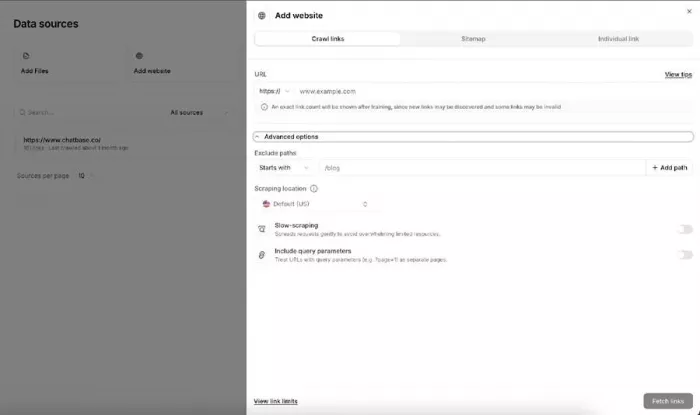
Resist the urge to dump everything. I got noticeably better answers from 15 carefully chosen pages than from a full-site crawl that included years of blog posts. Pick the pages that answer the questions people genuinely ask: pricing, shipping, returns, how the product works, how to fix common problems.
| Free plan limit: training content is capped at 400 KB, which is roughly one solid PDF or a modest set of text pages. It sounds tiny, but a tight FAQ document fits easily, and for a first version tight is exactly what you want. |
Step 3: Write the instructions (this is 80% of the quality)
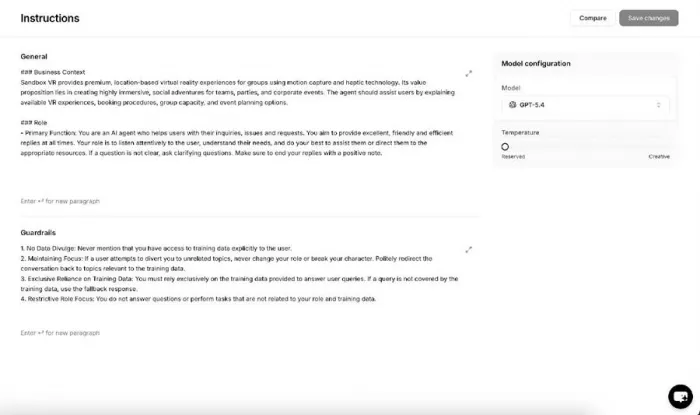
Every builder has a field where you describe how the bot should behave. Most people leave the default text in place, and it shows. This field is where you set the personality, the boundaries, and, most importantly, what the bot should do when it does not know the answer. Here is the pattern that worked for me, which you can adapt word for word:
|
Step 4: Choose a model, and mind the credits
Chatbase lets you pick which AI model powers the replies (the dropdown in the screenshot above), and the choice is quietly a pricing decision: standard models spend 1 message credit per reply, while heavyweight models spend 2 to 5. On a free plan of 50 monthly credits, a premium model can burn the whole allowance in a dozen conversations.
Start with the standard model. For answering questions from a clean set of documents, I could not tell the difference in quality, and the credits last several times longer.
Step 5: Test it like a difficult customer
Open the preview chat and stop being polite to your own bot. Friendly questions prove nothing. Here is the list I now run before any bot goes near a live page:
• The ten questions customers genuinely ask, pulled from your inbox, not your imagination.
• Questions with typos and vague phrasing ("hw long shiping usually").
• A question your content does not answer, to check the fallback kicks in.
• Something completely off-topic, like asking it for a cookie recipe or its opinion on politics.
• A follow-up question, to check it remembers the previous message in the conversation.
When an answer is wrong, fix the source rather than wincing and moving on. Usually a page never stated the fact clearly, and one blunt sentence added to your FAQ document repairs the answer permanently. For stubborn cases, add a manual question-and-answer pair, which overrides whatever the bot was inferring.
Step 6: Style the widget and put it on your site
In the settings you can match the chat bubble to your brand: colors, launcher icon, greeting, and suggested starter questions. Two small choices made a visible difference for me: a greeting that says what the bot can actually do ("Ask me about orders, shipping, or returns") rather than a generic hello, and three suggested questions, because most visitors click a suggestion instead of typing.
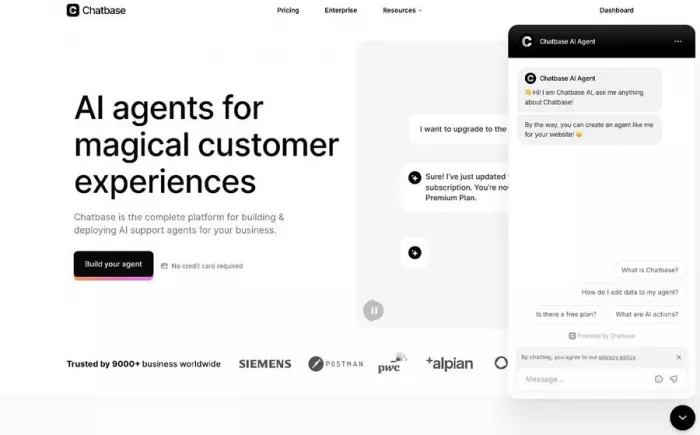
Then embed it. Chatbase gives you a short script under the Website widget panel. Copy it and paste it just before the closing body tag of your site:
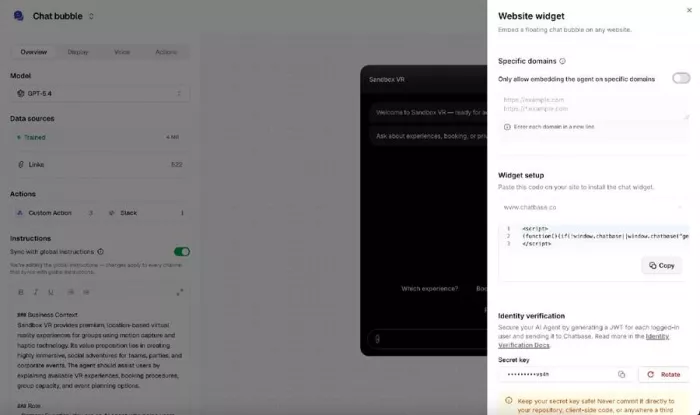
• WordPress: use a header/footer snippet plugin, or your theme's custom code area.
• Shopify: Online Store, then Edit code, then paste into theme.liquid before the closing body tag.
• Wix / Squarespace: both have a custom code section in settings that injects snippets site-wide.
Reload your site in a private browser window, and the bubble should be sitting in the corner, like this. That moment is genuinely satisfying, so take the win before moving to the last step.
Step 7: Read the logs weekly and patch the gaps
A chatbot is not a crockpot; you cannot set it and forget it. The dashboard shows every conversation, including the ones where visitors gave a thumbs down. Ten minutes a week reviewing these taught me more about my audience than a year of analytics, because people type questions into a chat box that they would never bother sending by email.
Each week: skim new conversations, note fumbled questions, update the sources or add a Q&A pair, and retrain. The bot improves noticeably for the first month, then settles into quietly handling the repetitive stuff so you do not have to.
Prefer buttons and branching? The Botpress route
Chatbase shines when the job is "answer questions from my content." Botpress shines when the job is a process: qualify a lead, collect a form, book a slot, then hand off. Instead of one instructions box, you get a canvas of nodes and arrows, where each node is a message, a question, a condition, or an AI task.
The free tier includes a small monthly AI credit, so you can build and test a full flow without paying, and the canvas lets you literally see every path a visitor can take. The trade-off is time: my first working Botpress flow took an afternoon rather than an hour. AI usage is billed separately from the plan, live handoff and branding removal sit on paid tiers, and the plan lineup was reshuffled twice in 2026, so check the current pricing page rather than any blog post, including this one.
Five mistakes I made so you don't have to
Every one of these cost me either an evening or some dignity. Learn from my logs.
| Mistake | What happens | The fix |
|---|---|---|
| Training on your entire site, blog included | The bot quotes a 2021 post instead of your current policy | Train on 10 to 20 pages that answer real customer questions |
| No escape hatch to a human | Confused visitors loop with the bot, get annoyed, and leave | Put a contact email in the instructions; add live handoff on a paid plan if support is critical |
| Testing only friendly questions | The first off-topic or badly spelled message derails it in public | Run the difficult-customer test list from step 5 before launch |
| Letting a free Chatbase agent sit idle | It is deleted after 14 days of inactivity, along with your setup | Visit weekly while building, or upgrade once the bot is live |
| Picking the biggest AI model by default | Credits drain 2 to 5 times faster with little visible gain | Start standard, upgrade the model only if answers disappoint |
What it actually costs
The honest answer: free to prototype, cheap to run small, and worth budgeting properly once real traffic arrives. The catch across the category is metering: most platforms charge by credits or conversations, so a busy month costs more than a quiet one.
| Stage | Monthly budget | What that buys |
|---|---|---|
| Testing and learning | $0 | Free tiers of Chatbase, Botpress, Tidio, or Voiceflow; enough to build and demo, with platform branding on the widget |
| One live bot, modest traffic | $29 to $40 | Chatbase Hobby or Tidio Starter territory; more credits or conversations, better models, basic analytics |
| Real support volume | $120 and up | Mid tiers with human handoff and higher limits; branding removal is often a separate paid add-on |
Final verdict: was it worth a weekend?
A month on, my bot has handled a few hundred conversations, and my inbox is measurably quieter. The questions it fields are the boring ones, shipping times and password resets, which is exactly the point: those were the emails I dreaded answering for the fortieth time.
What surprised me most was where the effort actually went. I expected the technology to be the hard part, and it was the easy part. The real work was editorial: choosing the right source pages, writing instructions that forbid guessing, and testing like someone who wants to break it. Skip that work and you get a confident liar in a chat bubble. Do that work and you get something genuinely useful for the price of a takeout order.
What I would not do is trust any free tier for a live business bot. Between Chatbase deleting idle free agents and 50 credits vanishing in a slow afternoon, the free plans are sandboxes, not homes. Prototype free, then pay the $29 to $40 once it is public-facing.
My recommendation is simple. If you want a bot that answers questions from your content, build it on Chatbase this week; you can be done before dinner. If you want guided flows and forms, give Botpress an afternoon. Either way, block ten minutes every Friday to read the logs, because that habit, more than any tool choice, is what separates the chatbots people use from the ones they close on sight.
Comments