Table of Contents
- What losing control looks like
- Set up the repo before you type a prompt
- Pick a run mode on purpose
- Work in a loop you can review
- Put risky work in a worktree
- With cloud agents, the pull request is your only gate
- Cap the bill while you're at it
- What Cursor gets right, and where you still have to watch it
- Final verdict
| ||||||
Last spring I gave Cursor's agent a one-line bug report on a client codebase and went to make coffee. When I got back it had changed 27 files. The bug lived in one of them. Every edit looked reasonable, the tests passed, and I still lost the afternoon working out which changes to keep.
That was the day I stopped treating Cursor as autocomplete with ambition and started treating it as a very fast junior developer who needs a brief, a fence and a code review.
I've used it on production work every day since, through the Cursor 3 release, Auto-review and this month's Projects beta. It has become far more autonomous in that time. Agents now run in the cloud for hours and open pull requests while your laptop is shut. Handy. It also means that if you set nothing up, you end up with a repo full of code nobody on your team has read.
Below is the setup and working loop I use to avoid that. I checked every setting against Cursor's documentation as it stands this month, because a lot of older advice describes options that have since been renamed or retired.
New to the tool? Start with our test of Cursor AI from the sign-up screen inward, which covers onboarding, the free tier and what it costs. This guide picks up once Cursor is installed and pointed at code you care about.
The short version • Write your rules and ignore files before the first prompt, and commit them. • Keep the run mode on Auto-review or a tight Allowlist. Run Everything has no place on a repo that holds credentials. • Plan first, keep each diff small enough to read in one sitting, commit after every accepted step. • Cloud agent output gets the same pull request review a person would get. |
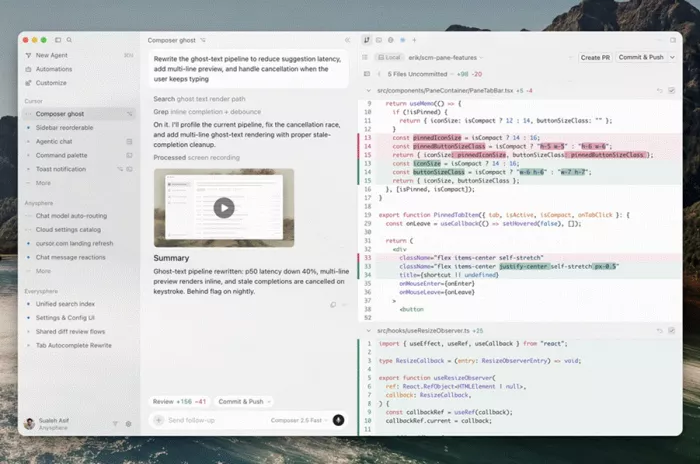
What losing control looks like
Nobody decides to stop understanding their own codebase. It happens in four ordinary ways.
|
| Worth knowing. A randomized trial published by METR in July 2025 had 16 experienced open-source developers complete 246 tasks in repos they knew well, mostly with Cursor Pro. With AI allowed they took 19% longer, and afterwards still believed they had been 20% faster. Models have improved since. The gap between feeling fast and being fast is the part I keep in mind. |
Set up the repo before you type a prompt
Cursor reads a handful of config files straight from the repo. Commit them and every teammate, and every cloud agent, starts inside the same fence.
Cursor config files worth committing
| File | What it controls | The catch |
|---|---|---|
| .cursor/rules/*.mdc | Project rules, scoped with frontmatter | A plain .md file in this folder is ignored |
| AGENTS.md | Plain markdown instructions, root or per folder | Nested files combine, and the more specific one wins. CLAUDE.md is read the same way |
| .cursorignore | Files hidden from Agent, Tab, Inline Edit and @ mentions | Terminal and MCP tools can still reach ignored files |
| .cursor/permissions.json | Terminal and MCP allowlists, plus guidance for Auto-review | An allowlist set here makes the in-app editor read-only |
| .cursor/sandbox.json | Network domains and paths a sandboxed command can reach | Team admin policy always sits on top of it |
| .cursor/hooks.json | Scripts that allow or block agent actions | Hooks fail open unless you say otherwise |
| .cursor/worktrees.json | Setup commands for worktrees, such as npm ci | Cursor advises against symlinking dependencies |
| .cursor/BUGBOT.md | Review rules for Bugbot and Agent Review | Your .mdc rules do not apply to Bugbot runs |
Rules that earn their place
Project rules come in four types: Always Apply, Apply Intelligently (the agent reads the description and decides), Apply to Specific Files (matched by glob) and Apply Manually (only when you @-mention it). Typing /create-rule in chat gets the agent to write one for you.
Cursor's own guidance is blunt, and I agree with it. Keep rules under 500 lines. Point to a canonical file instead of pasting code. Skip the style guide, because that is a linter's job. Add a rule when the agent makes the same mistake twice, not before. When rules conflict, Team Rules beat Project Rules, which beat User Rules. None of them affect Tab completions.

.cursor/rules/payments.mdc --- globs: src/payments/**/*.ts alwaysApply: false --- - Money is integer cents everywhere. No floats. - Never edit files under src/payments/ledger/ without asking first. - Match the error shape in @src/payments/errors.ts - Every new endpoint ships with a test in src/payments/__tests__/ |
.cursorignore is a privacy screen, not a vault
Everything in .gitignore is already hidden from the agent, along with .env* files and lockfiles. Add keys, certificates and data exports. Then read the fine print. Cursor's docs state that terminal and MCP tools can't enforce .cursorignore, so an agent that runs cat on an ignored file can still see it. Real secrets belong outside the workspace.
Working solo? Switch on Privacy Mode under Settings, then General, so your code is never used for training. Don't assume it's on. When we tested Cursor's onboarding on a fresh account, the data sharing switch arrived already flipped on. Team plans get Privacy Mode by default.
Pick a run mode on purpose
Open Settings, then Agents, then Approvals & Execution. This one dropdown decides how much the agent does without asking you.
Cursor run modes for local agents
| Mode | What runs without asking | Sandbox | Where I'd use it |
|---|---|---|---|
| Auto-review | Allowlisted calls run at once. Other shell commands run sandboxed where possible. The rest go to a classifier that can allow, redirect the agent, or ask you | Yes | Most repositories. Recommended default since Cursor 3.6 |
| Allowlist | Only what you list. Leave the list empty and every command asks first | Optional | Anything close to production |
| Run Everything | Every tool call | No | Throwaway prototypes in a disposable environment |
"Ask Every Time" was deprecated in Cursor 3.5 in May. An empty allowlist gives you the same behaviour. Auto-review arrived a week later, and Cursor's run modes documentation is upfront that it "is not a security boundary". The classifier can wave through a call you'd have blocked. So steer it. A permissions.json in the repo takes plain-English instructions:
.cursor/permissions.json { "terminalAllowlist": [ "git status", "git diff", "npm:test*", "npm:run lint*" ], "autoRun": { "block_instructions": [ "Database migrations need my approval first.", "Any git push, rebase or reset needs my approval first." ] } } |
Leave File-Deletion, External-File and Browser Protection switched on too. They force an approval even when the mode would otherwise run the call.
| Gotcha. Agent edits save to disk the moment they're made. If a dev server with hot reload is running, the new code can execute before you've read it. I stop the server, or move to a worktree, for anything that touches startup code or migrations. |
Work in a loop you can review
This is the part that matters most, and it costs nothing.
| 1 | Plan before any code Shift+Tab switches the chat to Plan Mode. The agent asks questions, reads the codebase and writes a plan you can edit. I read the file list first. If it names files I didn't expect, my prompt was too vague. "Save to workspace" keeps the plan in the repo next to the code it produced. |
| 2 | Hand over narrow context @-mention the files that matter, or use @Branch to attach your whole branch diff. The ring beside the input shows how full the context window is. Once Cursor starts summarising older turns, I open a fresh chat. |
| 3 | Watch, and interrupt early The diff view updates live. Hit Stop (Cmd+Shift+Backspace) the moment it heads somewhere odd. Enter queues your next message, and Cmd+Enter sends it straight away. |
| 4 | Checkpoints for undo, Git for history Cursor snapshots the files it modifies, and you restore from the chat timeline. Checkpoints are local and separate from Git. They revert files only, so they won't un-run a migration. |
| 5 | Review before you commit Run /agent-review, or use the Source Control tab to check all local changes against main. Quick depth suits small diffs. Deep is for auth, money and concurrency. Then read the diff yourself anyway. |
| 6 | Commit small One accepted step, one commit. If the history got messy, ask the agent to rework it into logical commits, which Cursor's review guide also recommends. |
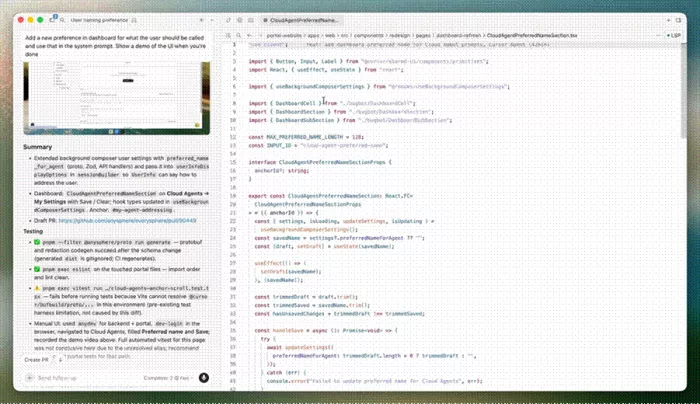
| When to start over. Cursor's docs say reverting and sharpening the plan is often faster than fixing a wrong build with follow-ups. My rule is two corrective prompts, then revert. |
Put risky work in a worktree
Start a prompt with /worktree and the rest of that chat runs in a separate Git checkout. Your main checkout stays untouched. /apply-worktree brings the result back, /delete-worktree clears it, and /best-of-n runs the same task across several models so you can compare.
| Gotcha. Cursor cleans up old worktrees automatically, with a default cap of 25 per machine, and worktrees you made yourself with git worktree add are fair game too. Push or apply anything you care about. |
Use hooks for the rules that must never bend
Rules and classifiers are advice to a model. Hooks are code. A hook is a script that receives JSON on stdin at a set point in the agent loop and answers allow, deny or ask. Exit code 2 blocks the action outright. When several hooks respond, deny beats ask, and ask beats allow.
.cursor/hooks.json { "version": 1, "hooks": { "beforeShellExecution": [ { "command": ".cursor/hooks/guard-db.sh", "matcher": "migrate|psql|prisma", "failClosed": true } ], "afterFileEdit": [{ "command": ".cursor/hooks/format.sh" }] } } |
The catch is that a hook which crashes or times out fails open by default, and the action goes ahead. Set failClosed: true on anything security-critical. Cloud agents run project hooks from the repo but never see your personal ~/.cursor/hooks.json.
With cloud agents, the pull request is your only gate
Cloud agents run in isolated VMs, work on their own branch and push for handoff. Run modes don't apply to them, and the agent never stops to ask for approval. All of your control moves to the pull request.
Where your control sits, local versus cloud
| Local agent | Cloud agent | |
|---|---|---|
| Approval prompts | Set by your run mode and sandbox | None |
| Undo | Checkpoints, then Git | Close the PR or revert the branch |
| Your gate | Live diff view and Agent Review | PR review, Bugbot, CI and branch protection |
So protect main and require a human approval. Add Bugbot, which reviews every PR update. One detail catches teams out. Bugbot findings report a neutral check status by default, so requiring the check won't block a merge unless fail-on-unresolved-issues is enabled for your organization.
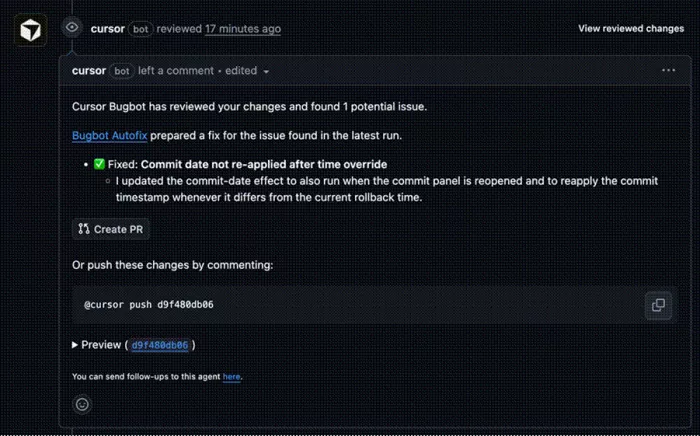
This matters more than it did a few months ago. Since August, cloud agents subscribe to the PRs they open and keep pushing until CI is green. Projects, in beta since September 10, adds a coordinator agent that plans, delegates to other agents, and can watch a Slack channel and act unprompted. I use all of it with tight scope, and nothing reaches main unread.
Cap the bill while you're at it
Cursor pricing, September 2026
| Plan | Price | What you get |
|---|---|---|
| Pro | $20 a month | Both usage pools, unlimited Tab, Bugbot, Cloud Agents |
| Pro Plus | $60 a month | Same features, more included usage |
| Ultra | $200 a month | Same features, the most included usage |
| Teams | $40 per user (Standard), $120 (Premium) | Central billing, Team Rules, enforced Privacy Mode, SSO |
Paid plans have two usage pools. Cursor Models (Grok 4.6, Grok 4.5 and Composer 2.5) come with far more included usage. Other Models bill at the provider's API price. Cursor's docs estimate that daily Agent users land between $60 and $100 a month in total usage.
On individual plans, on-demand billing stays off until you enable it. If you do, set a spend limit, and know that enforcement isn't instant. I run routine edits on Composer and keep the expensive models for planning and hard debugging.
What Cursor gets right, and where you still have to watch it
| ||||||||||||||||||||
My pre-merge checklist
I run through this before any agent-written branch goes up for review.
☐ I can explain every changed file without opening the chat.
☐ The diff matches the saved plan, and nothing outside it moved.
☐ Tests, types and lint pass locally, and I ran them myself.
☐ Agent Review or Bugbot findings are resolved, not dismissed.
☐ No new dependency, env var or migration slipped in unmentioned.
☐ Each commit is small enough that a teammate could revert it alone.
Final verdict
I still open Cursor every working day, and I no longer get the 27-file surprise. A smarter model didn't fix that. An afternoon of setup did: four rule files, a .cursorignore, a short permissions.json, and one hook that keeps everything away from the database unless I say so. Since then the agent has worked inside a fence the whole team can read, and my job has shifted from typing to planning and reviewing, which is where a senior developer's time should go anyway.
I trust it with well-scoped features, test coverage, refactors behind good tests, and the dull migrations nobody wants. I don't hand it auth, billing logic, or anything where I couldn't explain the diff line by line. Cloud agents and the Projects beta I treat like a contractor I've never met. Glad of the help, and every line goes through a pull request.
If you keep one thing from this page, keep the loop: plan, small diff, review, commit. Cursor is quick enough that the discipline barely slows you down. Skipping it is how you end up maintaining code you've never read.
Comments