The verdict, in short
1. Knowt (best for most students). Genuinely free, modern, and it handles notes, flashcards, and AI summaries in one place. The one I would hand a friend without a second thought.
2. Anki (best for long-term retention). Plain-looking, free forever on desktop, and no other app schedules your memory as precisely. Worth the effort if you are in this for the long haul.
3. Gizmo AI (best for motivation and speed). The app I actually opened every day. Card generation is the fastest of the three, but the free tier is really a demo and the real cost is a subscription.
For three weeks this term I did something a little ridiculous. I studied the same material three separate times, once in each app: the same messy biology lecture PDFs, the same Spanish vocabulary lists, the same run of history dates. I was not interested in which one had the nicest landing page. I wanted to know which one I would still be paying attention to at 11pm, when the novelty had worn off and I was tired and the streak was on the line.
That gap only shows up once you live inside an app for a while. All three make almost identical promises: turn your notes into flashcards, remember more with less effort, study smarter. What separates them is how they behave on day twelve, not day one. Here is what I found, what each one is genuinely good at, and the order I would rank them in if you asked me tomorrow.
The scorecard at a glance
I rated each app across seven things that actually decide whether you keep using a study tool. Scores are out of 5, weighted into an overall figure at the bottom.
| What I tested | Gizmo AI | Knowt | Anki |
|---|---|---|---|
| Getting started | 5.0 | 4.5 | 2.5 |
| Free tier value | 2.5 | 5.0 | 4.5 |
| Card creation speed | 5.0 | 4.5 | 3.0 |
| Retention algorithm | 3.5 | 3.0 | 5.0 |
| Cross-platform | 4.5 | 4.5 | 4.0 |
| Staying motivated | 5.0 | 3.5 | 3.0 |
| Value for money | 3.5 | 4.5 | 5.0 |
| Overall | 4.0 | 4.5 | 4.3 |
Read this before the scores fool you. These three apps are not really competing for the same job. Knowt wins on breadth and price, Anki wins on the science of remembering, and Gizmo wins on the very human problem of actually showing up. Your winner is whichever of those problems is loudest for you right now.
#1: Knowt
Overall 4.5 · about 4.4 on the stores
The free Quizlet replacement that quietly grew into a full study workspace.
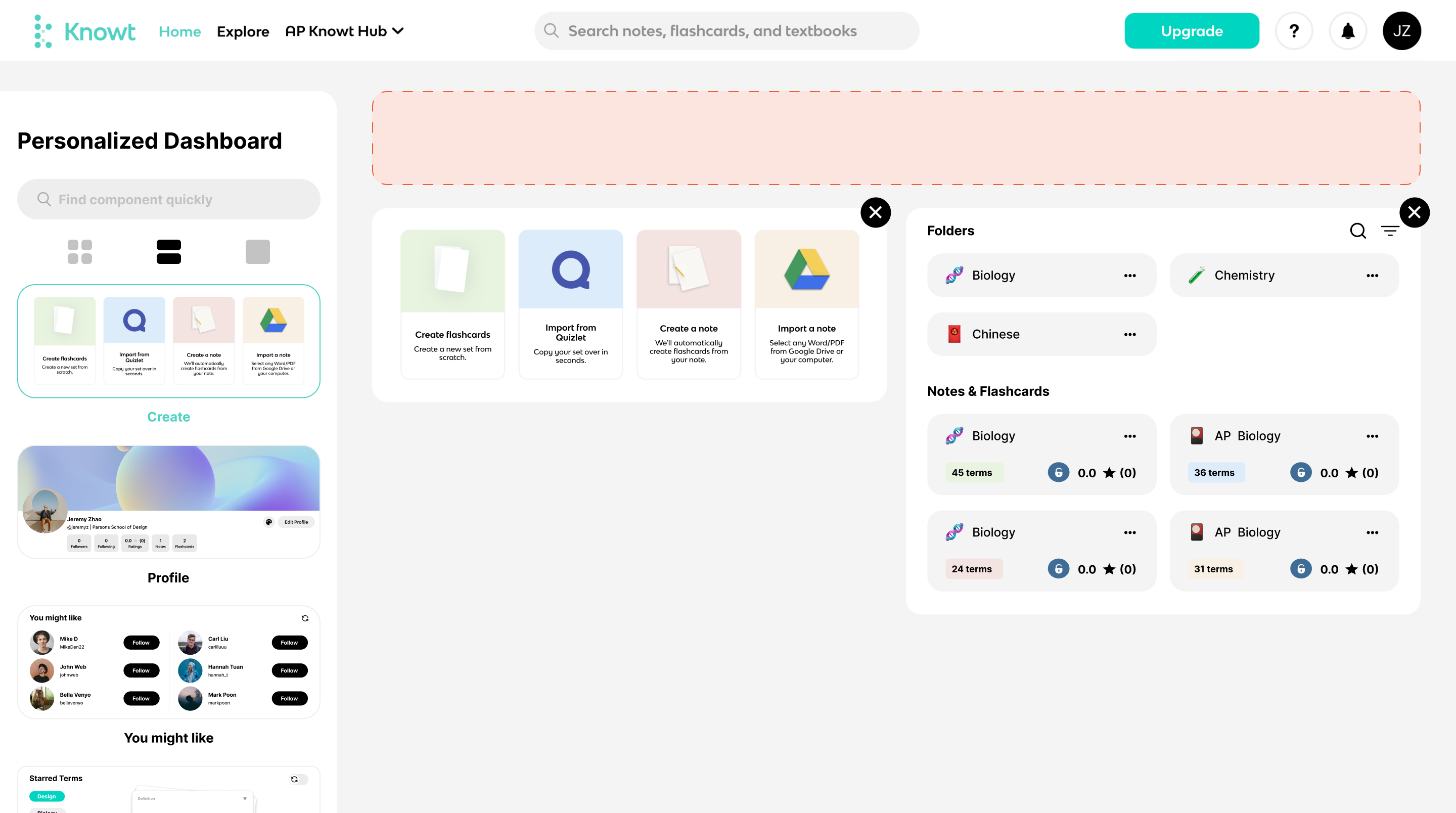
Knowt was the app I stopped resenting fastest. You paste in notes, upload a PDF, or drop a YouTube link, and it builds flashcards and a study set in seconds. When I ran a dense biology chapter through it, the generated cards caught the large majority of the key ideas without me touching a thing. From there you can drill them with Learn mode, a matching game, practice tests, or spaced review, and Kai, its built-in AI chat, will answer questions about your own material.
The part that genuinely surprised me is how much of that is free. Unlimited flashcards, note creation, study modes, and a library of roughly five million public resources sit on the free Basic plan with no card required. Knowt reports more than six and a half million users, and over seven hundred thousand students leaned on it for a single AP season, so this is a mainstream tool, not a weekend project.
Quick facts. Platforms: Web, iOS, Android. Free plan: generous, ad-supported. Ultra: $12.99/mo billed annually ($149.99), or $24.99/mo. AI extras: summaries, voice tutor, podcasts. Best for: note-heavy classes.
| What I liked | What frustrated me |
|---|---|
| + A free tier that covers real studying, not a locked demo of it | – Ads on the free plan occasionally sit right over study buttons |
| + One-click import brings existing Quizlet sets across in seconds | – Its spaced-repetition scheduling is not published, so you cannot inspect it |
| + Notes, cards, summaries, and practice tests live in one place | – Cards sometimes failed to save or synced late between devices |
| + Full feature parity and clean syncing across web, iOS, and Android | – Ultra is priced for power users and classrooms more than casual students |
What people are saying
Threads across r/APStudents and r/college keep pointing to it as the free tool that replaced a paywalled Quizlet.
Reddit study communities
Reviewers repeatedly call it easier to use than Quizlet, with AI generation landing close to ninety percent of the key points.
MobileAppDaily review
The common gripe is ads crowding the study screen, plus occasional cards vanishing mid-set on the free plan.
#2: Anki
Overall 4.3 · the veteran
Ugly, open-source, and still the memory tool everything else is measured against.

Anki is the app I trusted most and enjoyed least, at least for the first evening. It is open-source, roughly two decades old, and it looks it. Getting my first deck configured took the better part of a night of learning what note types, sub-decks, and cloze deletions were. Nobody holds your hand. Card creation is manual by default, though a wave of AI add-ons (AnkiBrain, Smart Notes, and the built-in OpenAI plugin among them) can now turn a long PDF into review-ready cards if you set them up.
Then the payoff arrives. Anki's scheduling engine, especially the newer FSRS algorithm introduced in version 23.10, studies your own review history with machine learning and shows each card right before you are likely to forget it. Users regularly report twenty to thirty percent fewer reviews for the same retention once FSRS is running. Crucially, the interval logic is documented, so you can actually check how it decides, which is more than most rivals allow. It also swallows hundred-thousand-card decks without slowing down.
Quick facts. Desktop and Android: free, open-source. iOS app: $24.99 one-time. Syncing: free via AnkiWeb. Algorithm: FSRS, fully documented. Shared decks: thousands, community-made. Best for: medicine, law and languages.
| What I liked | What frustrated me |
|---|---|
| + The most effective, most transparent scheduling of the three by a clear margin | – The interface looks and feels dated next to modern study apps |
| + Free forever on Windows, Mac, Linux, and Android with free syncing | – Initial setup is fiddly and assumes you enjoy tinkering |
| + Enormous shared-deck library covering USMLE, languages, law, and more | – Building good cards by hand is genuinely time-consuming |
| + Handles text, images, audio, video, LaTeX, image occlusion, and cloze cards | – The official iOS app is a paid one-time purchase, unlike the rest |
What people are saying
Medical students on r/medicalschool describe it as the backbone of their USMLE prep, banking tens of thousands of cards.
Reddit r/medicalschool
Reviewers agree that once configured, nothing else matches its flexibility or long-term recall results.
Spaced-repetition roundups 2026
The recurring complaint is the same one I hit: it feels like an engineering project before it feels like studying.
#3: Gizmo AI
Overall 4.0 · about 4.7 on the App Store
The gamified card factory that solves the problem of actually opening a study app.
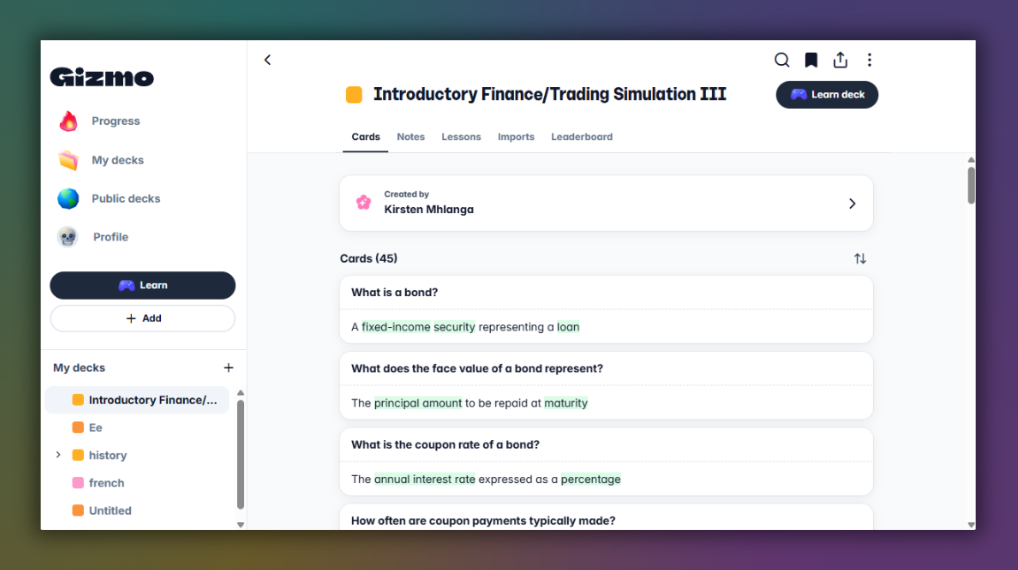
Gizmo was, without contest, the app I opened most often, and I think that is the whole point of it. Built by Cambridge alumni and backed by a $3.5 million seed round in 2023, it runs on web, iOS, and Android and holds a rating near 4.7 on the App Store across millions of users. You feed it a PDF, a set of notes, a YouTube video, or even an audio recording of a lecture, and it produces flashcards and quizzes fast. Its import from Quizlet and Anki, plus a built-in AI tutor that explains concepts step by step, made it the quickest of the three to get moving.
What keeps you coming back is the game layer: streaks, XP, levels, leaderboards, and a system of daily lives. For someone who keeps abandoning study apps, that machinery genuinely works, and it is the reason App Store reviewers keep calling it the only study app they have stuck with. The catch is that the free tier is effectively a trial. It throttles you with limited lives and a small number of AI quizzes per day, so the realistic price of daily use is the subscription, which works out to roughly three dollars a week on the annual plan, with student discounts cutting that down.
Quick facts. Platforms: Web, iOS, Android. Free tier: capped, demo-like. Realistic cost: about $3/week on the annual plan. Student discount: roughly half price. Standout: streaks and the AI tutor. Best for: habit and consistency.
| What I liked | What frustrated me |
|---|---|
| + The fastest path from a raw PDF to a usable deck of any app here | – No offline flashcard practice, which hurts on trains and blocked school Wi-Fi |
| + Gamification that genuinely rebuilt my daily study habit | – The free plan caps you fast, so daily use effectively means paying |
| + An AI tutor that breaks concepts down when a card is not enough | – AI cards sometimes need editing before they hold up for applied questions |
| + Imports from both Quizlet and Anki, plus a browsable public deck library | – The streak can quietly become the goal instead of the learning |
What people are saying
App Store reviewers keep repeating a version of the same line: it is the first study app they have actually stuck with.
Apple App Store reviews
A medical-student review praised how quickly recorded lectures and PDFs turned into a working deck.
Head to head, feature by feature
Here is how the three line up on the things people ask about most.
| Feature | Gizmo AI | Knowt | Anki |
|---|---|---|---|
| AI card generation | Yes, very fast | Yes, free | Via add-ons |
| Manual card control | Limited | Good | Total |
| Offline studying | No | Limited | Yes |
| Scheduling transparency | Hidden | Hidden | Documented (FSRS) |
| Gamification | Heavy | Light (game mode) | Minimal |
| Import from Quizlet | Yes | Yes | Via conversion |
| AI tutor or chat | Yes | Yes (Kai) | No native |
| Free on all platforms | Capped | Yes (with ads) | Yes, except iOS |
| Cheapest real cost | About $3/week annual | Free, or $149.99/yr | Free ($24.99 iOS) |
How the AI and content tools stack up
All three lean on AI now, but they use it for different jobs. This is where the daily experience actually diverges.
| Capability | Gizmo AI | Knowt | Anki |
|---|---|---|---|
| PDFs and notes to cards | Yes | Yes | Add-on |
| YouTube video to cards | Yes | Yes | No |
| Lecture audio to cards | Yes | Ultra | No |
| Built-in AI tutor or chat | Yes | Kai | Add-on |
| Summaries and podcasts | Basic | Ultra | No |
| Out-of-box card quality | Fast, edit for depth | Around 90% of key points | You write them yourself |
Platforms, access and imports
If you switch between a phone and a laptop, or study somewhere with patchy signal, this table matters more than any feature list.
| Access | Gizmo AI | Knowt | Anki |
|---|---|---|---|
| Web app | Yes | Yes | Via AnkiWeb |
| iOS | Free app | Free app | $24.99 once |
| Android | Free app | Free app | Free |
| Study offline | No | Limited | Yes |
| Sync across devices | Yes | Yes | Free (AnkiWeb) |
| Import from Quizlet | Yes | Yes | Via conversion |
| Import from Anki | Yes | Limited | Native |
What each one actually costs
Pricing is where a lot of free study app claims quietly fall apart, so I checked the current numbers directly rather than trusting older roundups.
| App | Free tier | Paid tier | The honest read |
|---|---|---|---|
| Knowt | Real and generous, ad-supported | Ultra: $12.99/mo annual ($149.99), or $24.99/mo | Free covers most students. Ultra is for AI summaries and exam prep. |
| Anki | Free on desktop and Android | $24.99 once on iOS only | The cheapest over time, and the payment funds development. |
| Gizmo AI | Capped trial of the real thing | About $3/week on the annual plan, student discount applies | Budget for the subscription if you plan to use it daily. |
What it really costs across a four-year degree
Sticker prices hide the long game. Here is roughly what each app costs a student who uses it seriously from first year to graduation.
| App | Realistic year-one cost | Four-year estimate | What the money buys |
|---|---|---|---|
| Anki | $0 to $25 | About $25 total | The whole app forever, plus the paid iOS version once if you want it |
| Knowt | $0 | $0, or up to about $600 with Ultra | Free for cards and notes. You only pay for AI summaries and exam prep |
| Gizmo AI | Roughly $80 to $155 | Around $300 to $600 | Unlimited daily generation, the AI tutor, and the full gamified system |
So which one should you pick?
The clean answer is that the right app depends on which problem you are trying to solve. Here is how I would send three different friends off.
If you want one free app that does it all
You take a lot of notes, you switch between phone and laptop, and you do not want to pay just to make flashcards.
Pick Knowt.
If you are in it for the long game
You are prepping for something big like a medical, law, or language exam and you care about remembering material in a year, not a week.
Pick Anki.
If you cannot get yourself to study
You keep downloading study apps and abandoning them, and you need something that makes opening the app feel like a game.
Pick Gizmo AI.
My final verdict
After three weeks of running the same material through all three, the app still on my home screen is Knowt, and it is not especially close for my situation. It asked the least of me, cost me nothing, and covered notes, cards, summaries, and quizzes without ever pushing me toward a paywall to do the basics. For a general student who wants a single dependable tool, that is the one I would recommend first, which is why it takes the top spot here.
Anki earns a very real second place, and if my goal had been a big cumulative exam instead of weekly quizzes, it might have come first. I did not enjoy the setup, and I will not pretend the interface is anything but plain. But when I looked at what I could still recall two weeks after studying, Anki's cards stuck the hardest, and it is the only one of the three that lets you see exactly how it decides what to show you.
Gizmo AI is the one I have the most complicated feelings about. It is the app I opened most, the one that got me studying on days I would otherwise have skipped, and the fastest at turning a chaotic PDF into something usable. Yet the moment I studied on a train with no signal, or hit the free-tier cap, its limits showed. If the streaks and the speed are what keep you consistent, it is worth paying for. For me, the value simply landed a step behind the other two.
Put plainly: Knowt for value and breadth, Anki for serious memory, Gizmo for momentum. Pick the one that fixes your loudest problem, and ignore the marketing that says any of them is best for everyone. None of them is.
Comments