Table of Contents
- Understanding LensGo AI
- Core Creative Capabilities
- Creation Workflow: Studio and Flow
- User Experience and Interface
- Positive Experiences Highlighted by Users
- Criticism and Limitations Mentioned by Users
- Trust and Safety Perception
- Strengths of the Platform & Limitations and Considerations
- Overall Evaluation
AI tools are allowing creators to produce visually compelling content without traditional cameras, editing software, or professional design expertise. One such platform that has gained attention in the AI creativity ecosystem is LensGo AI.
LensGo AI positions itself as a creative platform designed to help users generate travel-style images and videos using simple text prompts or reference media. Instead of relying on traditional photography, the platform leverages generative AI models to produce professional-looking visuals in seconds. According to the official website, the platform aims to “democratize travel photography” by allowing anyone to create high-quality imagery regardless of their technical skills or equipment.
This article provides a detailed and user-friendly exploration of the platform, examining its features, user experience, creative capabilities, and overall usefulness for creators, marketers, and digital professionals.
Understanding LensGo AI
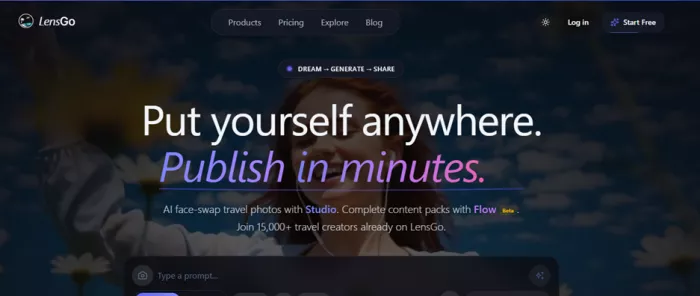
LensGo AI is essentially an AI-driven media generation platform that converts simple descriptions into visually rich travel imagery and short videos. Users can type prompts such as “sunset beach in Bali with golden light” or upload a reference image, and the system generates a photorealistic output within seconds.
The concept behind the platform is rooted in accessibility. Traditional travel photography often requires expensive cameras, drones, editing software, and technical knowledge. LensGo attempts to remove those barriers by enabling users to generate content through AI models that understand lighting, scenery, and composition typical of travel photography.
The result is a creative environment where bloggers, influencers, marketers, and even small businesses can quickly generate professional visuals without leaving their browser.
Core Creative Capabilities
One of the reasons LensGo AI has attracted attention is its wide range of AI-driven media generation tools. Rather than focusing solely on image generation, the platform combines multiple technologies to create a more complete content creation workflow.
Text-to-Image Generation
At its core, LensGo allows users to generate images from text prompts. By describing a scene in natural language, users can create photorealistic visuals in under thirty seconds. The AI interprets elements such as lighting, perspective, and location details to generate images that resemble professional travel photography.
These images can then be exported in formats such as PNG or JPG and used for websites, social media posts, or marketing campaigns.
Image-to-Video Animation
Another notable feature is the platform’s ability to animate static images. LensGo can convert a single photo into a short animated video with camera motion, depth effects, and environmental animation. This functionality is particularly useful for social media creators who want to transform static visuals into engaging video content for platforms like TikTok, Instagram Reels, or YouTube Shorts.
This capability significantly reduces the time and technical expertise required for creating motion graphics or cinematic sequences.
AI Style Transfer
Style transfer is another prominent feature offered by the platform. With this technology, users can apply artistic styles to images or videos, transforming them into visuals that resemble animation, paintings, or other artistic aesthetics.
For example, a regular photograph can be converted into an anime-style image, a Pixar-like 3D render, or a painting inspired by classical art. The AI preserves the structure of the original media while adapting its visual appearance to the chosen artistic style.
This feature is especially popular among content creators seeking visually distinctive content.
Custom Model Training
For users who require consistent branding or stylistic control, LensGo offers custom model training. This allows creators to upload their own images or datasets so that the AI learns a specific visual style or character design. Once trained, the system can generate new content that maintains the same aesthetic or identity.
Such functionality is particularly valuable for designers, animation creators, and brands that want consistent visual identity across multiple pieces of content.
Creation Workflow: Studio and Flow
The platform organizes its tools into two main workflows designed for different types of users.
Studio Mode
Studio mode provides full creative control. Users can write prompts, select style presets, and generate images manually. The process typically involves describing a scene, allowing the AI to generate the visual, and then refining the result through variations or adjustments.
The generated images can reach resolutions of up to 2048×2048 pixels and can be exported for professional use, including social media, websites, and printed materials.
Flow Mode
Flow mode is designed for automated content generation. Instead of writing prompts, users choose a destination or theme and receive a ready-to-publish content pack.
These packs can include several images along with captions, hashtags, and SEO metadata, making them particularly useful for bloggers, agencies, and social media managers who need content quickly.
This automated workflow reflects the platform’s focus on efficiency and scalability in content production.
Pricing Structure and Plans
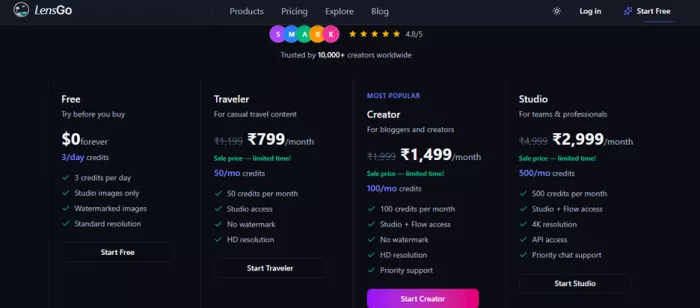
The pricing model of LensGo AI is built around a credit-based subscription system, where users receive a fixed number of credits each month. These credits can be used across different creative tools available on the platform, including image generation, video animation, and automated content creation workflows. The credit system allows users to mix different types of generation tasks while maintaining control over usage and cost.
In general, the platform offers a combination of free access for experimentation and several paid subscription tiers designed for creators, bloggers, and professional teams.
Free Plan
LensGo AI provides a free plan that allows new users to explore the platform before committing to a subscription. This plan typically includes a small number of daily credits that can be used for basic image generation tasks within the Studio environment. Generated outputs in the free tier usually include watermarks and standard resolution limits.
The free plan is mainly designed for testing the platform’s capabilities, helping users understand how the prompt-based system works and how different AI styles affect the generated visuals.
Traveler Plan
The Traveler plan is one of the entry-level paid tiers aimed at casual creators or individuals producing small volumes of AI-generated visuals. This subscription generally costs around €7 per month and provides approximately 50 credits per month, enabling users to generate higher-quality visuals without watermarks.
Users on this plan gain access to the main Studio generation environment and can produce HD-resolution images suitable for blog posts, social media graphics, or basic marketing content.
Creator Plan
The Creator plan is typically positioned as the most popular option for bloggers and content creators who need regular access to AI-generated visuals. This tier costs around €15 per month and includes roughly 100 credits per month, along with access to both Studio and Flow workflows.
A significant advantage of this plan is the inclusion of the Flow automation feature, which can generate ready-to-publish content packs containing images, captions, hashtags, and SEO metadata. This makes it particularly attractive for social media managers and digital marketers who want to streamline content production.
Studio Plan
For professional users and teams, LensGo AI offers a higher-tier subscription often referred to as the Studio plan, which costs around €30 per month and provides about 500 credits per month.
This tier unlocks more advanced capabilities such as higher-resolution outputs (including 4K), API access for automation workflows, and priority support. These features make it suitable for agencies, businesses, and creators who need large volumes of AI-generated content.
Additional Credit Packs
In addition to monthly subscriptions, the platform allows users to purchase extra credit packs when their monthly credits run out. These packs can typically be purchased in bundles for example, 50 credits, 120 credits, or 200 credits and can be used at any time without waiting for the next billing cycle.
This flexible purchasing option allows creators to scale their usage during high-production periods without upgrading to a higher subscription tier.
Enterprise and Custom Solutions
For large organizations and agencies, LensGo AI also offers enterprise-level solutions. These customized plans may include features such as unlimited generation capacity, dedicated account management, white-label solutions, custom API limits, and advanced model training capabilities.
Enterprise pricing is typically customized based on the scale of usage and the specific needs of the organization.
User Experience and Interface
A major factor that shapes the reception of any AI creative platform is its usability. For tools that rely on advanced machine learning models, the interface must balance technical power with accessibility so that users without a technical background can still generate high-quality content. In this regard, the interface of LensGo AI attempts to simplify complex AI workflows into a streamlined and intuitive environment.
Unlike many AI tools that require installing software or configuring local models, LensGo AI operates entirely through a web-based interface. This browser-based structure removes technical barriers for beginners and allows users to access the platform from almost any device with an internet connection. The login process is straightforward, typically requiring only a quick registration through email or a connected account before users can start experimenting with the platform’s creative tools.
Initial Onboarding and Navigation
When users first enter the platform, they are presented with a clean dashboard that focuses on content creation rather than technical configuration. The layout usually highlights the primary creation tools and guides users toward starting their first generation. Instead of overwhelming new users with advanced settings, the interface introduces a simplified workflow that focuses on prompts, style selection, and generation options.
The onboarding experience typically revolves around two core areas of the platform: Studio Mode and Flow Mode. These sections serve different purposes but share a consistent design language that prioritizes clarity and ease of navigation. The interface includes clearly labeled buttons, organized panels, and minimal visual clutter, which helps users quickly understand where to begin their creative process.
This design philosophy reflects a broader trend among modern AI creative tools that emphasize usability over complexity. Platforms such as Midjourney and Runway ML have similarly focused on simplifying user interaction with powerful generative models.
Prompt-Based Creation Workflow
The heart of the LensGo user experience lies in its prompt-driven workflow. Instead of navigating complicated menus or editing timelines, users interact with the AI primarily through natural language descriptions.
A typical workflow involves typing a description of the desired visual scene such as a beach at sunset, a futuristic cityscape, or a mountain landscape into a prompt field. The system then interprets the text and generates visual results based on the provided description. This approach allows users to focus on their creative ideas rather than technical execution.
The interface generally includes helpful prompt suggestions and examples that guide users toward writing more effective descriptions. These examples help beginners understand how to structure prompts for better results, including details about lighting, camera perspective, environment, and artistic style.
Such prompt-based systems have become a defining feature of generative AI platforms, particularly those powered by technologies similar to Stable Diffusion, which also rely heavily on descriptive input to guide visual generation.
Visual Generation Controls
While the platform emphasizes simplicity, it still provides several customization controls that allow users to refine their results. These controls may include options to adjust style presets, animation intensity, resolution settings, and generation variations.
For example, users can experiment with different visual aesthetics by applying cinematic lighting styles, artistic filters, or animation effects. These presets make it possible to transform the same prompt into multiple visual interpretations, allowing creators to experiment and refine their results without needing advanced design skills.
The interface typically presents these controls in a side panel next to the preview area, making it easy for users to modify parameters and regenerate visuals until they achieve the desired outcome. The preview area itself is designed to display results clearly, allowing users to compare variations and download the best version.
Studio Mode: A Creative Workspace
Studio Mode serves as the primary workspace for users who want to actively control their AI generation process. In this environment, the interface focuses on flexibility and experimentation.
Users can generate multiple visual variations from a single prompt and review them in a grid-style layout. This makes it easier to compare outputs and identify the most visually appealing result. Once an image is selected, users can download it or continue refining the prompt to produce improved versions.
Another advantage of this interface design is the ability to iterate quickly. Because the AI generation process typically takes only a few seconds, creators can experiment with numerous ideas in a short amount of time. This rapid iteration process encourages exploration and creativity, which is a key reason many creators find AI tools engaging.
Flow Mode: Automated Content Generation
While Studio Mode focuses on manual creativity, Flow Mode introduces a more automated experience designed for efficiency. In this workflow, the interface simplifies the content generation process by guiding users through a series of pre-defined selections.
Instead of writing detailed prompts, users can choose a location, theme, or category. The system then generates a package of visual content tailored to that selection. These content packs may include images, captions, and other assets that can be used directly on social media or marketing platforms.
From a user experience perspective, Flow Mode is designed for speed and convenience. It removes the need for prompt engineering and provides ready-to-use assets, which can be particularly beneficial for marketers and content managers working under tight deadlines.
Performance and Responsiveness
Another important element of user experience is system performance. LensGo AI generally emphasizes fast generation speeds, with most images produced within seconds depending on server demand and generation complexity. This rapid response time plays a significant role in maintaining user engagement.
Because the platform is cloud-based, processing occurs on remote servers rather than on the user’s device. This allows even users with modest hardware to generate complex visuals without performance limitations. However, it also means that generation speed may occasionally fluctuate depending on server load.
Despite this potential variability, the interface is designed to keep users informed during the generation process through progress indicators and loading animations. These visual cues help maintain transparency and prevent confusion while the AI processes requests.
Accessibility and Learning Curve
One of the defining strengths of LensGo AI’s interface is its relatively gentle learning curve. Beginners who have never used generative AI tools can usually start creating visuals within minutes of signing up.
The interface avoids technical jargon and focuses instead on creative terminology such as styles, prompts, and scenes. This approach allows non-technical users such as bloggers, marketers, and social media creators to interact with the platform comfortably.
At the same time, experienced users can still explore deeper customization options through prompt refinement and style experimentation. This balance between simplicity and creative control contributes to the platform’s accessibility across different user skill levels.
Overall Interface Evaluation
From a usability perspective, the interface of LensGo AI reflects a broader evolution in AI creative platforms. The design prioritizes clarity, speed, and accessibility, allowing users to interact with powerful generative models without needing advanced technical knowledge.
By combining prompt-based workflows, visual preview systems, and automated generation options, the platform offers a flexible environment that supports both experimentation and efficiency. While the quality of results ultimately depends on the prompts provided and the underlying AI models, the interface itself successfully lowers the barrier to entry for AI-driven content creation.
As generative AI technology continues to evolve, user-friendly interfaces like the one offered by LensGo AI will likely play a crucial role in making these powerful tools accessible to a wider audience of creators and digital professionals.
Typical Use Cases
LensGo AI serves a wide range of digital content workflows. Travel bloggers can generate destination imagery even if they have never visited a location, while marketers can create advertising visuals without organizing expensive photoshoots.
Social media managers frequently use the platform to produce visually consistent content across multiple platforms. Real estate professionals and hospitality businesses can also generate property visuals or promotional images for listings and marketing campaigns.
Because the generated images include commercial usage rights, they can be used in professional marketing materials and publications.
Community Feedback and Early User Experiences
Understanding how a platform performs in real-world scenarios often requires examining feedback from early adopters and online communities. Discussions about LensGo AI appear across multiple forums, review blogs, and creator communities where users test new AI tools and share their experiences. These discussions reveal both enthusiasm about the platform’s creative potential and some concerns regarding limitations and long-term stability.
Initial Reception Among Creators and Experimenters
When LensGo AI first appeared in the generative media ecosystem, it quickly attracted attention from creators experimenting with AI-generated visuals and video transformation. Early users often described the platform as an accessible way to experiment with AI style transfer, animated video creation, and image generation without requiring advanced technical knowledge.
Several independent reviews highlight that users appreciated how quickly the platform could produce creative assets compared to traditional editing workflows. Instead of spending hours editing or rendering videos, creators could generate stylized visuals in seconds or minutes, making the platform particularly attractive for rapid content production.
Another common observation among early users was the platform’s beginner-friendly design. Many reviewers noted that even individuals without prior experience in video editing or generative AI could begin producing results after only a few minutes of experimentation. This accessibility played a major role in attracting bloggers, social media creators, and independent designers to the platform.
Feedback from Online Communities
One of the most interesting places to observe early reactions to AI tools is developer and creator communities. On Reddit, users frequently discuss their experiences with experimental AI tools and share results, workflows, and questions about how the technology works.
For example, a Reddit user experimenting with LensGo’s animation capabilities wrote:
“I’m getting very good results from the lensgo.ai website… I couldn’t even match the quality remotely.” (Reddit)
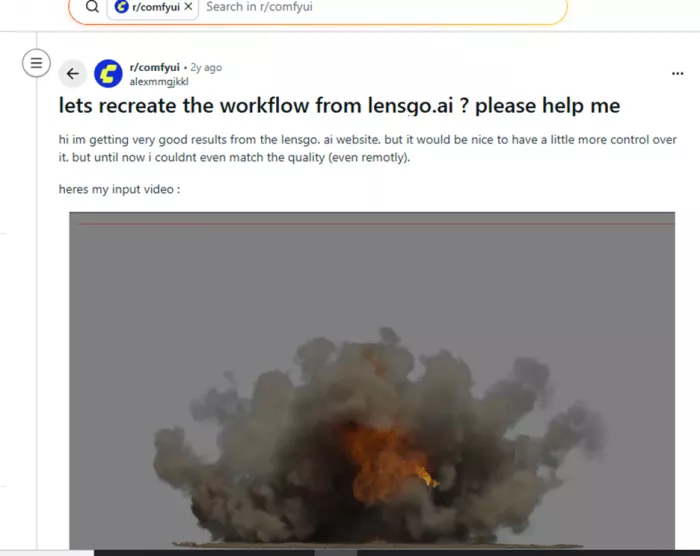
This comment reflects a common early reaction: many users were surprised by the visual quality that could be achieved through the platform’s automated workflow. However, the same discussion also revealed curiosity about how the system worked behind the scenes, particularly for users who wanted more control over the generation process.
Other Reddit threads show creators experimenting with LensGo in combination with other AI tools such as generative image models and visual editing pipelines. In one example, a creator described using LensGo’s style-transfer functionality to produce a short experimental film by combining AI visual effects with traditional video editing tools.
These discussions illustrate how early adopters often integrate emerging AI platforms into broader creative workflows rather than relying on a single tool.
Positive Experiences Highlighted by Users
Several themes appear consistently in community discussions and independent reviews. One of the most frequently mentioned advantages is the speed of content creation. Users report that LensGo significantly reduces the time required to produce visual assets, transforming workflows that traditionally required hours of editing into processes that take only seconds or minutes.
Another commonly praised aspect is the platform’s ability to support multiple visual styles. Users can experiment with different artistic aesthetics from photorealistic visuals to animation-style outputs without needing specialized design skills.
Additionally, some marketing professionals have noted that the platform can help reduce production costs. Testimonials published by the platform describe organizations that replaced expensive photography or agency work with AI-generated visuals, dramatically lowering their content budgets.
Such feedback highlights how AI-driven creative tools are beginning to reshape content production workflows across industries.
Questions and Curiosity from the Community
Despite the positive reception, many early users also expressed curiosity about the technology behind LensGo AI. In technical communities, discussions often revolve around understanding the models, workflows, and algorithms used to produce the platform’s outputs.
Some developers attempt to recreate similar results using open-source frameworks like generative diffusion models, but they sometimes report difficulty achieving the same visual quality. This has led to speculation about the underlying models or processing pipelines used by the platform.
These types of discussions are common in AI communities where creators are eager not only to use new tools but also to understand how they function internally.
Criticism and Limitations Mentioned by Users
Like most generative AI platforms, LensGo AI has also received some criticism from early users. One commonly mentioned limitation is the credit-based system, which restricts the number of images or videos that can be generated in free or lower-tier plans.
Another issue reported by users is occasional inconsistency in output quality. Complex prompts or detailed instructions may sometimes lead to unexpected results or visual artifacts. This is a common challenge across many generative AI tools, where the final output depends heavily on how prompts are structured.
Some discussions also raise concerns about long-term platform reliability. Independent reviews have pointed out that the platform’s domain activity and operational status have changed over time, leading some users to question the platform’s stability in the fast-moving AI market.
Trust and Safety Perception
From a security standpoint, website analysis platforms generally consider the domain associated with LensGo AI to have a moderate to good trust score, indicating that the platform has not been widely flagged for malicious behavior.
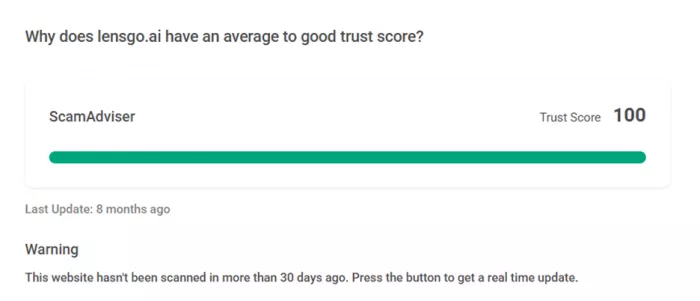
However, some reviewers still recommend caution, particularly when using emerging AI tools that process uploaded images or personal data. As with many AI services, users are advised to review privacy policies and avoid uploading sensitive content unless the platform clearly outlines how data is stored and processed.
Overall Community Sentiment
Overall, community sentiment around LensGo AI can be described as curious and experimental rather than purely evaluative. Early adopters often treat the platform as an opportunity to explore the creative potential of AI-generated media rather than relying on it as a fully established production tool.
Many creators appreciate the platform’s ability to generate visually compelling assets quickly and affordably, especially for social media or experimental projects. At the same time, discussions within developer and creator communities highlight the importance of understanding the tool’s limitations and evolving nature.
As generative AI continues to develop, community feedback will likely play an important role in shaping how platforms like LensGo evolve, improve their models, and refine their creative workflows.
Strengths of the Platform & Limitations and Considerations
| Strengths of LensGo AI | Limitations and Considerations |
| Beginner-Friendly Interface – One of the most widely appreciated strengths of LensGo AI is its simple and intuitive interface. Users can start generating visuals with minimal technical knowledge by simply writing prompts or uploading images. The interface design prioritizes accessibility, making it suitable for bloggers, marketers, and beginners experimenting with AI creativity. | Dependence on Prompt Quality – Like many generative AI platforms, the quality of the output depends heavily on how well the prompt is written. Beginners may initially struggle to achieve precise results until they learn how to craft detailed and descriptive prompts. |
| Fast Content Generation – The platform is designed to generate images and animations quickly, often within seconds. This speed significantly reduces production time compared with traditional design or video editing workflows. | Occasional Output Inconsistency – Some users report that results can vary depending on the complexity of the prompt. In certain cases, the AI may produce artifacts, unrealistic details, or visuals that do not perfectly match the prompt description. |
| Multiple AI Creative Tools in One Platform – LensGo combines several AI capabilities, including text-to-image generation, image animation, and style transfer. This allows creators to generate static visuals and short videos without switching between multiple tools. | Limited Free Credits – The free version usually provides a restricted number of daily generations. Users who need to generate large volumes of images or videos may eventually need to upgrade to paid plans. |
| Style Transfer and Artistic Flexibility – The platform allows users to convert images or videos into different artistic styles such as animation, cinematic visuals, or stylized art. This flexibility makes it appealing to content creators who want visually distinctive outputs. | Creative Control Limitations – While the interface is simple, professional designers may find that the platform offers fewer detailed controls compared with advanced editing software or more specialized AI tools. |
| Cloud-Based Accessibility – Because the platform operates entirely in the browser, users do not need powerful hardware or local AI installations. Even users with modest computers can generate complex visuals since the processing happens on remote servers. | Internet Dependency – Since the system is cloud-based, users must maintain a stable internet connection to generate content. Server congestion or network issues may occasionally slow down generation times. |
| Automation Through Workflow Tools – Features such as automated content packs and visual workflow pipelines make it easier to generate multiple pieces of content quickly, which is particularly useful for marketers and social media managers. | Relatively New Platform – Compared with established AI tools, LensGo AI is still relatively new in the market. This means its ecosystem, community resources, and long-term reliability are still evolving. |
| Cost Efficiency for Content Creation – For many creators, AI generation can reduce the need for expensive photography sessions, video production teams, or graphic design services. This makes the platform appealing for startups and small businesses with limited budgets. | Competition from Established AI Tools – The generative AI space is highly competitive, with platforms such as Midjourney, Runway ML, and Stable Diffusion offering similar capabilities with larger communities and more mature ecosystems. |
| Creative Experimentation Opportunities – Many creators use the platform to experiment with AI-driven storytelling, animation, and visual content. The rapid generation speed encourages exploration and iterative creativity. | Ethical and Authenticity Concerns – As with many generative AI tools, users must be mindful of ethical considerations, such as the potential misuse of AI-generated visuals or confusion between real photography and synthetic content. |
Overall Evaluation
LensGo AI represents a fascinating example of how artificial intelligence is reshaping the creative industry. By combining image generation, video animation, and style transfer within a simple browser-based interface, the platform lowers the barrier to producing high-quality digital visuals.
For travel bloggers, content creators, and digital marketers, it offers an efficient way to produce visually appealing content without traditional photography equipment or editing expertise. At the same time, like many AI creative tools, it is best viewed as a supportive tool rather than a complete replacement for professional design workflows.
As AI continues to evolve, platforms like LensGo AI demonstrate how creativity and automation are increasingly intersecting, enabling individuals and businesses to transform ideas into compelling visual stories with just a few words.
Comments