Table of Contents
- The short version, if you're in a hurry
- What you're actually paying for
- Getting started: the first ten minutes
- The gallery is the real product
- The images: close to great, rarely magic
- How the models actually differ in practice
- Keeping a product consistent: references and characters
- The video: good, right up until the meter catches you
- What it costs, in real numbers
- Beyond the browser: the app, a Figma plugin, and an MCP server
- Rights, moderation and the look-alike domains
- Three things that stuck with me
- How I'd approach it if I started over
- How it compares to the alternatives
- Who'll love it, who'll bounce off it
- Final Perspective
A friend once told me the fastest way to understand a creative tool is to give yourself a real deadline and no room to cheat. So I did. I had eight handmade ceramic mugs, a shop page that looked like a hostage note, and a week to make it presentable plus one promo clip for Instagram if I could manage it.
MeiGen came up in a chat with the pitch that it "just hands you the prompt that already worked." That was enough to pull me in. Two weeks later, here's what I found once the novelty wore off and the actual work started.
The short version, if you're in a hurry
MeiGen is a curated prompt gallery with a generator attached, and the generator borrows other companies' models to do the real work. Its value lives in the wall of prompts that already produced good results, not in the generation button itself.
It's excellent for breaking creative block and testing an idea across several models in minutes. It gets expensive fast for video, the free tier is barely a sample, and there's a confusing cloud of look-alike domains you'll want to avoid. Great for inspiration and modest output; the wrong tool for a high-volume pipeline or a full editor.
Everything below is the reasoning behind those lines, because the interesting parts are in the details.
What you're actually paying for
The homepage doesn't spell this out, so I will: MeiGen isn't an AI model. It's a front end. When you press generate, your request is quietly handed off to GPT Image 2, Nano Banana 2, Seedream, Midjourney, or one of the video engines like Seedance and Veo.
That single fact reframes the entire product. You're not buying a proprietary engine those same models exist elsewhere. What MeiGen sells is curation: a daily-refreshed gallery of prompts that already worked on real engines, each one showing the exact text that produced the picture.
Picture the difference between a food blog that shows you a beautiful dish and one that also prints the ingredient list underneath. MeiGen is the second kind, and once you've worked that way for a while, plain image generators start to feel like they're hiding the useful half.
Getting started: the first ten minutes
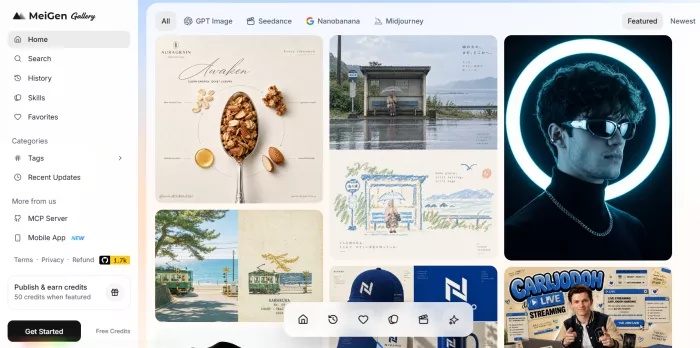
There's almost no onboarding, and I mean that as a compliment. The gallery is the landing page, so within seconds of arriving you're scrolling real work instead of reading a feature tour or dodging a paywall.
You can browse everything, open any card, copy its full prompt, and translate it into your language without an account. The sign-in only appears the moment you press Run, which is reasonable, that's when actual compute gets spent on your behalf. A Google login took me a few seconds and dropped ten free credits into the account.
Those ten credits are worth naming honestly: they're a taster, not a trial. They cover roughly two standard images before you hit the wall, which is enough to confirm the tool works and not much more. I'd treat that first session as reconnaissance rather than production.
The gallery is the real product
If MeiGen has a soul, it's the gallery. It's a masonry wall of AI images and short clips, sorted into categories ads and product, brand and logo, portraits, posters, illustration and 3D, storyboard and characters, wallpaper, and a videos tab with a Recent view when you want the freshest additions rather than the most popular.
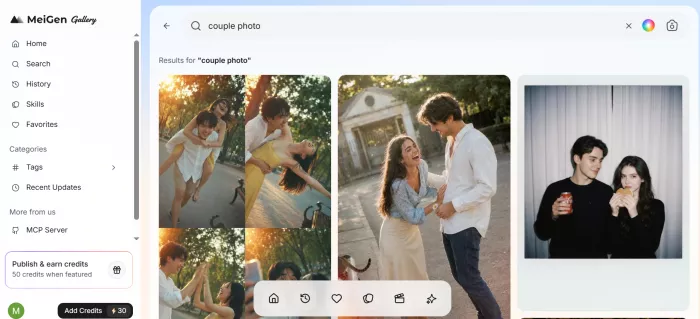
Search is more capable than I expected. You can search by text, but also by image and even by color, which is a small thing that turns out to matter when you're chasing a specific palette for a brand. Favorites and History are both there, so the prompts you liked don't disappear into the scroll, and I leaned on Favorites constantly to build a personal shortlist.
Translation deserves a mention of its own. A large share of the strongest trending prompts originate in Chinese, Japanese, or Korean, and the built-in translation flips them into your language while keeping the parameters and trigger words intact. Without it, a third of the best material would have been noise to me.
The interaction that changed my habits, though, is drag-and-drop. Grab any card and pull it into the generator: drop it on the prompt box to seed your text, or into the reference area to use it as a visual anchor. I stopped writing prompts from a blank cursor within the first day.
The images: close to great, rarely magic
My process settled fast. I'd scan the ads-and-product category, find a card whose lighting matched what I wanted, drag it in, and rewrite the subject to describe my own mug.
For my first serious attempt I reshaped a moody coffee-cup prompt into mine: a matte sage-green mug on rumpled linen, soft window light from the left, shallow focus, editorial and quiet. I attached two phone photos of the real mug as references and left it on the default engine, GPT Image 2.
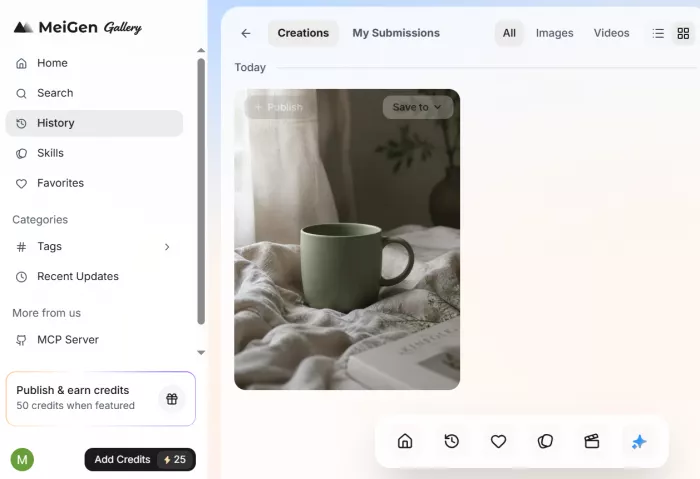
The result landed at about 80% of what I needed, which is the honest sweet spot for a tool like this. The composition was genuinely good. The glaze drifted a shade too blue, the handle was subtly off, and one variation grew a faint second mug in the background that I had to regenerate away.
What sold me was running the same idea through several engines and picking a winner in one sitting. That comparison, side by side, is the single strongest practical reason to use MeiGen rather than committing to one model and hoping.
One tool earned constant use: image-to-prompt. Drop one of your own photos into the "describe image" zone and it reverse-engineers a full prompt from it style, composition, mood which you can then bend toward your own subject. I used it to decode a competitor's product shot I admired and adapt its bones without copying it outright.
How the models actually differ in practice
Because MeiGen puts several engines behind one button, the choice of model changes your result more than any prompt tweak. Here's how they behaved for my product work, in plain terms rather than benchmark scores.
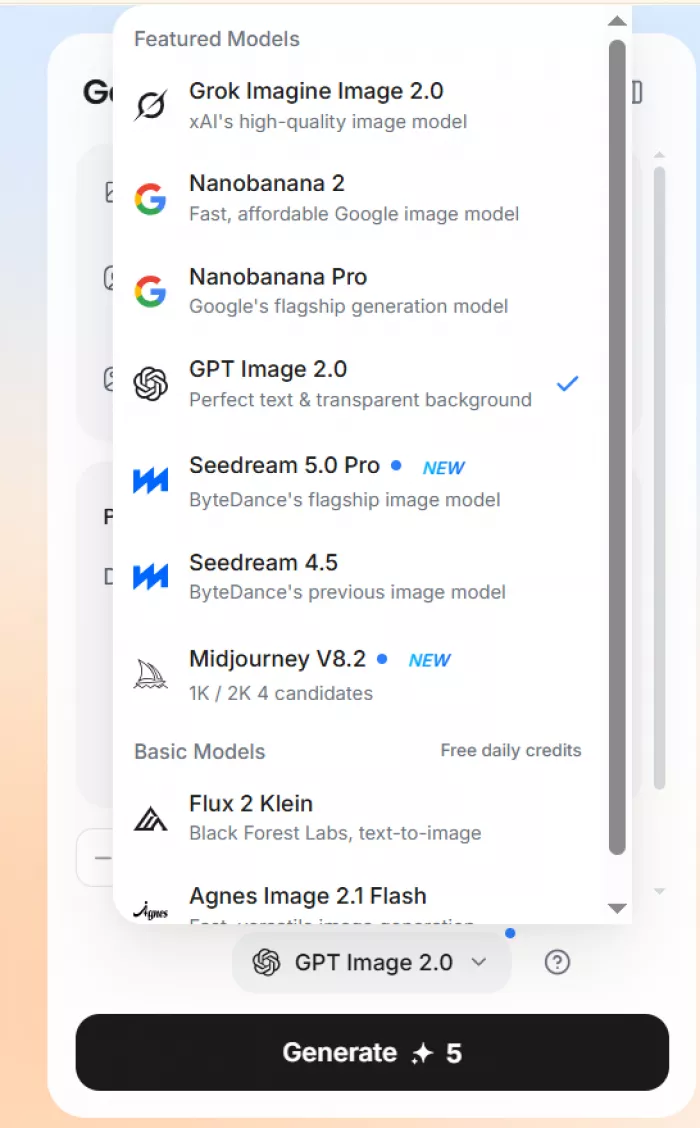
| Model | What it did well for me | When I reached for it |
| GPT Image 2 | Balanced, reliable, sensible defaults | My everyday first pass |
| Nano Banana 2 | Best fidelity to my reference photos and edits | When the output had to match the real mug |
| Seedream | Punchy, stylized, high-impact frames | Hero images where mood beat accuracy |
| Midjourney | The most polished, "designed" aesthetic | Posters and anything decorative |
| Seedance | Stable, believable motion in short clips | The promo video concept |
The lesson I took away is that you shouldn't pick a favorite and stop. The value is in matching the engine to the job reference-faithful when accuracy matters, stylized when impact matters and MeiGen makes switching cheap enough (in effort, if not always in credits) to actually do it.
Keeping a product consistent: references and characters
Product work lives and dies on consistency, and this is where I pushed the tool hardest. You can attach up to seven reference images per generation, plus up to three audio references and a short video reference for the motion features, which is a generous amount of steering.
More references genuinely helped. Feeding three angles of the same mug pulled the output closer to my real object than a single photo ever did, and it cut down the guesswork the model would otherwise fill in wrongly.
There's also a Characters feature reusable AI "actors" you can carry across generations which is aimed more at people building a recurring face or mascot than at product shooters like me. I tested it with a stylized brand character and it held identity reasonably well across a few scenes, though it's clearly happier with faces than with a specific hand-thrown ceramic.
The honest limit is that none of this makes a set automatically cohesive. My finished images were individually strong but needed a light editing pass later to feel like one shoot. MeiGen accelerates creation; it doesn't replace art direction.
The video: good, right up until the meter catches you
Video is where the mood shifts, mostly because of what it does to your credit balance. I wanted something modest, a slow push-in on a mug with steam curling off the top, eight to ten seconds.
Seedance handled it well. I fed it a finished product image as the opening frame and described the camera move, and the clip held the mug's shape instead of melting it into abstract soup halfway through, which is where most of these tools embarrass themselves.
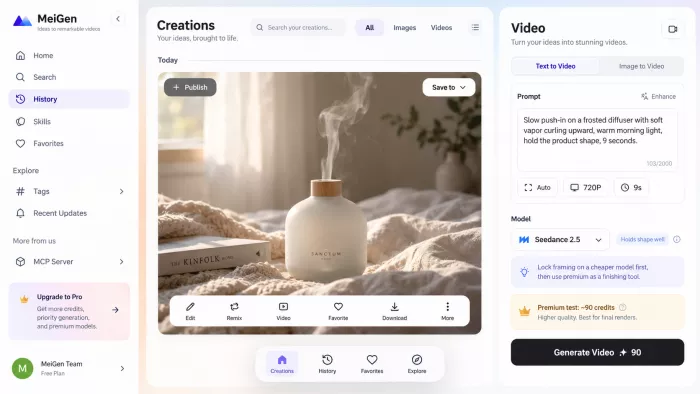
Then I tried a premium engine and watched days of careful budgeting vanish in two clicks. A single premium generation ran around 90 credits more than I'd spent on a full week of images.
That's the whole video story in one line: the quality is real, but the cost turns experimentation into a luxury you have to ration. My fix was to lock the concept on a cheaper model first, get the framing exactly right, and only spend premium credits once I was certain. Treat the expensive engine as a finishing tool, never a sandbox.
What it costs, in real numbers
MeiGen runs on credits rather than a locked subscription, and it earns genuine credit for one thing: its terms specify no auto-renewal. In a category riddled with quiet monthly billing, that alone made me comfortable topping up.
The catch is that the cost of a single generation swings hard by model and resolution, which makes spending difficult to predict. Rather than reprint a marketing table, here's roughly how my own credits actually moved:
| What I did | Rough cost | What I got |
| Signed in with Google | +10 free credits | About two standard 1K images a taster |
| Standard image, 1K (GPT Image 2) | ~4–5 credits each | My everyday workhorse |
| Higher resolution (2K/4K) | Meaningfully more per image | The two hero shots up top |
| Short clip, standard video model | Moderate | The promo concept, cheaply |
| One premium video clip | ~90 credits | A single video, and an empty balance |
I bought a small starter pack to keep going and, for a project this size, felt the spend was fair. The rule I'd pass on is simple: MeiGen is priced sensibly for someone making a handful of polished things, and gets costly fast for anyone running a production line video most of all.
Beyond the browser: the app, a Figma plugin, and an MCP server
MeiGen isn't only a website, and the extensions surprised me. There's a mobile app, which is the obvious one handy for browsing the gallery and saving ideas on a phone, less so for serious generation.
More interesting is the Figma plugin, which pulls the gallery and generator straight into a design canvas. For anyone already living in Figma, that removes the copy-paste-download shuffle entirely and keeps generated assets where the layout work happens.
The one I didn't expect was an MCP server, aimed squarely at developers. It lets an AI assistant generate images through MeiGen (or a local ComfyUI setup, or an OpenAI-compatible API), enhance rough prompts into detailed ones, and semantically search the curated prompt library programmatically. I didn't need it for mugs, but it signals that MeiGen wants to be plumbing as much as a destination and for a small team automating asset creation, that's a real angle worth exploring.
Rights, moderation and the look-alike domains
Three things here are easy to miss and worth knowing before you invest time or money.
First, rights. Uploading to the public gallery grants the platform broad display and marketing rights over that work, so I kept anything client-owned or sensitive out of public view and generated it privately. It's not unusual for this kind of service, but it's the sort of clause that matters if you're producing under someone else's brand.
Second, moderation. The system will block certain prompts, and while a rejected generation may refund the credits, an unexpected block mid-flow is still a small interruption. I hit it rarely, but it's there.
Third and this is the one I'd underline, there's a genuine sprawl of near-identical sites on different domains, each quoting different free-credit offers and listing different support emails. I couldn't confirm which are official and which are copies trading on the name, and neither could the reviews I checked. Pick one address, verify the pricing on that exact site, and never enter card details anywhere the URL quietly changes.
Three things that stuck with me
You're paying for the library, not the button. The generator is a convenience layer around models you can reach directly elsewhere. So the real question is how much the curated prompt wall is worth to you specifically. Bring your own polished prompts and you're paying a small wrapper premium; freeze at a blank box and that curation is the entire point.
Discovery user or vending-machine user pick one, knowingly. Used as a discovery engine, MeiGen teaches you how strong prompts are actually built, and the value compounds; I write better prompts everywhere now. Used as a vending machine five bookmarks run on repeat it stops paying off almost immediately. I caught myself sliding toward the second pattern in week two and had to consciously push back.
The gallery-first design is a trade, not a free lunch. Putting a flawless example beside your own attempt is brilliant for inspiration and slightly deflating for output. Whether that reads as refreshing honesty or a persistent small letdown depends on your temperament, but it's worth knowing which one you are before you start.
How I'd approach it if I started over
Knowing what I know now, my first session would look different, and a few habits would have saved me credits and frustration.
● Spend the free credits on comparison, not production. Run one idea across two or three engines to learn which model suits your work before you commit real money to any of them.
● Build a Favorites shelf before you generate anything. Ten minutes of curating strong prompts into Favorites gives you a reusable starting library and stops you doom-scrolling the gallery mid-project.
● Validate video on a cheap model first. Get camera move, framing, and length exactly right on an inexpensive engine, then spend premium credits once never to experiment.
● Feed more reference images than feels necessary. Three angles of the same object beat one every time, especially when accuracy to a real product matters.
● Keep sensitive or client work private. Generate it without posting to the public gallery so the display-rights clause never becomes your problem.
How it compares to the alternatives
MeiGen is not necessarily the deepest tool in any single category. Its strength is combining prompt discovery, multi-model generation, references, image creation and video in one workflow. If you only need one specialist capability, another platform may fit better.
| Platform | Better choice when | Where MeiGen stands out |
| Krea | You want real-time generation, advanced upscaling and deeper creative control | MeiGen offers a simpler inspiration-to-generation workflow |
| OpenArt | You want a broader AI studio with characters, stories and extensive editing | MeiGen feels more focused and easier to move through |
| Freepik AI | You need AI tools alongside stock images, templates and design assets | MeiGen is more centered on multi-model AI creation |
| Leonardo AI | You want a mature image-production environment with stronger dedicated controls | MeiGen is better for switching between different model families |
| Midjourney | You mainly use Midjourney and want its native controls and subscription model | MeiGen lets you use Midjourney alongside other image and video models |
The main reason to choose MeiGen is workflow flexibility. You can browse for an idea, reuse a prompt, attach references, switch models and move a finished image into video without rebuilding the project somewhere else.
If you already know exactly which specialist platform you want, going directly to it may be simpler. If your work regularly moves between different models and media types, MeiGen becomes much more useful.
Who'll love it, who'll bounce off it
The audience here is real, and so is the group that won't get it.
● You'll get real value if you want fast inspiration over a blank prompt box, you'd rather have one interface across several top models than juggle subscriptions, and you produce a modest volume of polished images with the occasional clip.
● You'll probably bounce if you already know your prompts cold and just want raw model access, you need a full editor with layers and retouching, you're planning high-volume video on a fixed budget, or predictable monthly cost matters more to you than pay-as-you-go flexibility.
In plain terms: a solo marketer, a small-shop owner, or a content creator who needs good visuals quickly will get real mileage. A seasoned pro with an existing prompt workflow, or anyone expecting a Photoshop-grade suite, will find it thinner than they hoped.
Final Perspective
I'm keeping MeiGen, and I know precisely why. It's earned a permanent role as the place I go to break a creative logjam to see what's landing right now, to reverse-engineer a look I admire, and to fire three versions of an idea across three models before I commit to any of them.
What I won't do is make it my whole pipeline. Premium video is too costly to iterate on freely, the finished set still gets a final pass elsewhere for consistency, and the domain confusion means I'll only ever use the one address I trust.
So here's my honest advice. Sign in, spend the free credits deliberately instead of burning them on your first two ideas, and use that window to decide whether you're a discovery user or a vending-machine user. If you're the former, MeiGen is one of the quietly more useful things I've added to my workflow this year. If you're the latter, save the money and go straight to the models it's borrowing from.
Comments