Table of Contents
- Why AI Headshots Look Uncanny
- Professional Does Not Mean Perfect
- Start With Better Source Photos
- Decide What the Headshot Is For
- Build the Prompt Like a Photographer
- Tell the AI What to Preserve
- Keep Skin Realistic
- Preserve Natural Facial Asymmetry
- Give the Light a Real Source
- Use Camera Language Carefully
- Keep Expressions Natural
- Watch Clothing and Accessories
- Keep the Background Simple
- Generate Controlled Variations
- Inspect the Final Image Properly
- Fix One Problem at a Time
- Three Useful Headshot Styles
- Common Mistakes That Create the AI Look
- AI Headshot or Photographer?
- A Better AI Headshot Workflow
- Conclusion
A convincing AI headshot should look like a strong photograph of you, not a polished approximation of someone who vaguely resembles you. The biggest mistake is assuming that more perfection means more professionalism, because overly smooth skin, exaggerated symmetry, artificial smiles and inconsistent lighting often create the exact “AI look” people are trying to avoid.
The better approach is to improve the photograph while preserving the person. That means protecting identity, using stronger source images, describing realistic photographic conditions and checking the final result for the small inconsistencies that make synthetic portraits feel uncanny.
Why AI Headshots Look Uncanny
Most bad AI headshots are not ruined by one dramatic error. They usually contain several small inconsistencies that accumulate until the face starts feeling artificial.
Skin may be uniformly smooth while individual hairs look extremely sharp. Both eyes may contain reflections that suggest different light sources. Teeth may blend together slightly, or a shirt collar may fold in a way that would not make sense physically. None of these problems is necessarily obvious on its own, but faces are familiar enough that people notice when several details do not agree.
This is why realism is better understood as consistency rather than perfection. The lighting, facial structure, hair, clothing, background and texture need to look as though they were captured by the same camera at the same moment.
Professional Does Not Mean Perfect
AI image generators often interpret words such as “perfect,” “flawless” and “beautiful” as permission to redesign the subject. The model may sharpen the jaw, narrow the nose, enlarge the eyes, erase fine lines and increase facial symmetry until the result looks polished but no longer completely recognizable.
A professional headshot does not need to remove every irregularity. Real photographers usually improve lighting, framing, posture and presentation while keeping the person recognizably themselves.
A more useful goal is to improve the conditions around the face. Better lighting, a cleaner background, suitable clothing and more flattering portrait perspective can make an ordinary source photograph look professional without changing identity.
Start With Better Source Photos
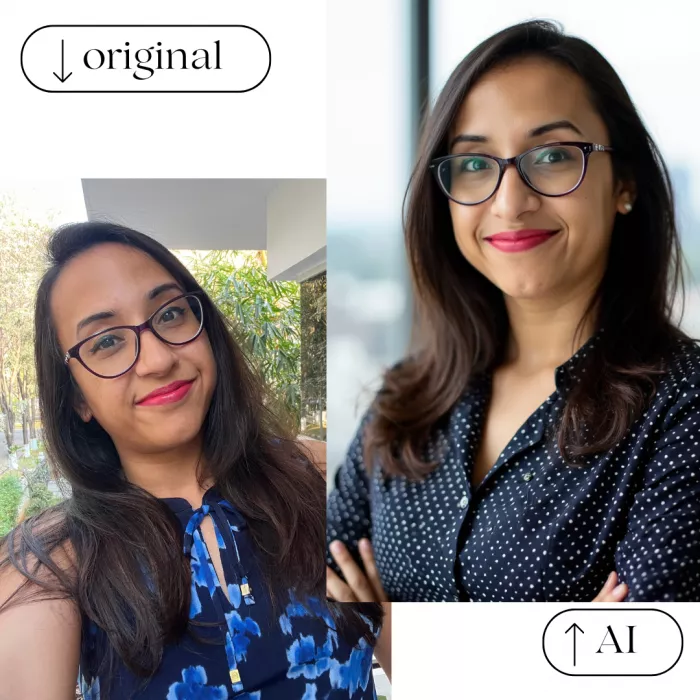
For headshot generators that use uploaded images, the prompt is only part of the process. The reference photographs determine how much reliable information the model has about the person's actual appearance.
Use current, reasonably sharp images taken under natural or neutral lighting. A useful reference set might include a straight-on portrait, a mild angle from each side, one natural smile and one neutral expression. Those views give the model different information about facial structure without asking it to combine completely different versions of the person.
Weak input images create predictable problems. Heavily filtered selfies can alter facial proportions before the generator even starts, while very close wide-angle selfies can exaggerate the nose and change the relationship between facial features. Images with sunglasses, deep shadows or hair covering much of the face also force the model to invent details that should have been visible in the source.
It is also better to use photographs from roughly the same period. Mixing images taken years apart can lead the AI to average different hairstyles, weights, facial hair or age characteristics into an identity that does not quite match any real version of the person.
Decide What the Headshot Is For
“Professional” means different things depending on where the photograph will appear. A conservative corporate headshot and a startup founder portrait can both look professional while using very different clothing, backgrounds and lighting.
| Use case | Useful visual direction |
| Clean background, approachable expression and restrained lighting | |
| Corporate bio | Consistent framing, formal or semi-formal wardrobe and controlled background |
| Startup founder | Smart-casual clothing with a softer office or environmental setting |
| Resume | Simple composition with minimal distractions and neutral presentation |
| Speaker or author | Warm editorial portrait with a slightly more personal feel |
| Creative portfolio | Stronger visual personality while keeping the face recognizable |
Making this decision before writing the prompt prevents the common mistake of generating the same dark-suit, grey-background portrait for every profession.
Build the Prompt Like a Photographer
A weak prompt usually relies on adjectives such as “professional,” “ultra realistic” and “high quality.” Those words communicate very little about how the photograph should actually look.
A better prompt describes the image in a logical sequence: identity, framing, expression, wardrobe, lighting, background and photographic treatment.
Breaking a vague idea into specific visual instructions is also one of the most reliable ways to write better AI image prompts, especially when several details need to work together realistically.
For example:
Create a photorealistic professional headshot based closely on the uploaded person. Preserve their real face shape, eye spacing, nose, jawline, skin tone, age and natural facial asymmetry. Use a shoulders-up composition with an eye-level camera, relaxed expression and slight natural smile. Dress them in a simple dark crew-neck shirt. Use soft directional window light from camera left, a neutral-grey background, realistic 85mm portrait perspective, natural skin texture and restrained retouching.
The useful part of that prompt is not the word “photorealistic.” It is the specific description of what should change and what should remain untouched.
Tell the AI What to Preserve
Headshot prompts should contain identity constraints as well as visual instructions. If the generator is allowed to decide what “better” means, it may improve the face according to generic beauty patterns rather than preserve the person accurately.
Useful instructions include preserving real facial proportions, current age, natural asymmetry, skin-tone variation and recognizable features. You can also specify that the model should avoid reshaping the jaw, nose, lips or eyes unless that change is genuinely required.
These phrases are not guaranteed commands, because different models interpret them differently. Their purpose is to establish priority: the model should improve the image before it tries to improve the person.
Keep Skin Realistic
Skin is one of the easiest places to spot artificial portraits because real faces do not have uniform texture. The forehead, nose, cheeks, lips and under-eye areas all behave differently. Natural skin can include mild redness, pores, faint lines, freckles, pigmentation and small imperfections, even when the person has clear skin.
Many AI headshots remove too much of this variation. The result may look expensive at thumbnail size but becomes plastic when enlarged.
Ask for natural skin texture, realistic tonal variation and restrained retouching instead of flawless skin. At the same time, avoid prompts that demand exaggerated pores or extreme imperfections because realism does not require making normal skin look deliberately rough.
Professional photography can still be flattering. The goal is to keep enough natural variation that the face feels alive rather than rendered.
Preserve Natural Facial Asymmetry
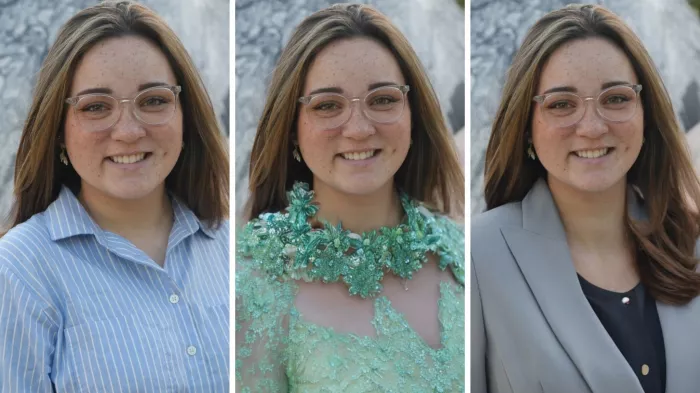
Human faces are not perfectly mirrored. One eyebrow may sit slightly higher, one eye may open a little differently and a smile may pull more strongly toward one side. Those differences are part of identity, yet AI generators can gradually smooth them away because symmetrical faces often match idealized portrait patterns.
Avoid asking for a “perfectly symmetrical face” when likeness matters. Instead, ask the model to preserve natural facial asymmetry and real proportions.
This becomes especially important when generating many variations. If each new output becomes more symmetrical and conventionally attractive, the model may also be moving farther away from the actual person.
Give the Light a Real Source
Believable lighting should make physical sense. The viewer should be able to imagine where the main light was positioned.
For a straightforward professional headshot, a large diffused window or soft studio light slightly to one side is usually enough. A prompt such as “soft window light from camera left with gentle shadow falloff across the opposite cheek” gives the generator a clear photographic setup.
Problems appear when prompts combine incompatible lighting instructions. Asking for dramatic cinematic light, bright studio illumination, sunset rim light and evenly lit skin all at once can produce a face where different regions appear to belong to separate photographs.
Look at the eye reflections as well. Catchlights should be consistent with the direction and shape of the light illuminating the rest of the face.
Use Camera Language Carefully
Camera terminology can help when it describes a recognizable visual result, but long lists of camera brands and lens specifications do not automatically improve realism.
For headshots, an 85mm-style portrait is useful shorthand because it suggests conventional portrait perspective with natural-looking facial proportions. A 50mm-style image may work better when you want more of the environment visible.
A practical description might be “eye-level camera, shoulders-up composition, 85mm portrait perspective and moderate shallow depth of field.” That communicates more than stacking unrelated terms such as medium format, IMAX, smartphone photography and several different focal lengths.
Depth of field should also remain believable. Extremely blurred backgrounds can make one eye sharp while nearby facial features become inexplicably soft, which creates another subtle synthetic cue.
Keep Expressions Natural
Very large smiles make AI portrait generation more difficult because they change several facial areas at once. The cheeks rise, eyes narrow, lips stretch, teeth become visible and the jaw shifts.
A restrained smile is usually safer for professional portraits, particularly if the source photographs do not contain a strong natural smile.
Instead of asking for “big confident smile,” try a relaxed expression with a slight natural smile and gentle engagement in the eyes.
The right expression should still match the person. If someone naturally has a broad smile, preserving that characteristic may matter more for likeness than simplifying the pose.
Watch Clothing and Accessories
AI artifacts are not limited to the face. Jacket lapels, collars, buttons, earrings, necklaces and patterns can quickly reveal that an image was generated.
Simple clothing usually produces cleaner results because there are fewer structures for the model to misinterpret. Plain shirts, uncomplicated jackets and restrained fabrics work well for most professional headshots.
If distinctive clothing or jewelry is important, inspect it separately. Look for uneven collars, disappearing chains, malformed earrings, inconsistent buttons and seams that do not connect logically.
The same applies to glasses. Frames should match on both sides, sit correctly on the face and connect naturally around the ears.
Keep the Background Simple
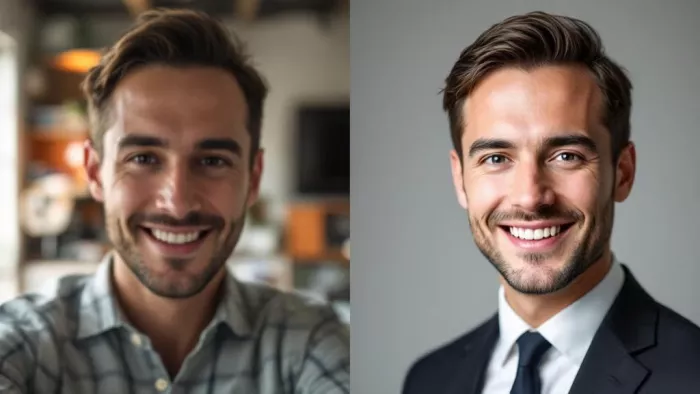
A headshot background should support the person rather than compete with them. Complicated AI-generated offices can introduce warped furniture, impossible architecture, floating lights and inconsistent blur. Those errors may be minor, but they can undermine an otherwise convincing portrait.
Neutral studio walls, softly blurred offices, warm interior backgrounds and understated environmental settings are usually safer.
Hair edges deserve particular attention because fine strands are difficult to separate cleanly from generated backgrounds. Check around the temples, ears and shoulders for halos, melted strands or abrupt cutouts.
Generate Controlled Variations
Once the AI produces a recognizable face, avoid changing everything at once. Instead, create variations that preserve identity and composition while changing only a limited number of photographic decisions. You might try a different shirt, softer background, slightly warmer light or more neutral expression while keeping the face stable.
This makes it easier to compare results without accidentally selecting the version that looks most attractive but least like the real person. The same controlled approach is useful when keeping an AI character consistent, since changing too many details at once can cause facial features and identity to drift between generations.
A useful standard is simple: someone who knows you should recognize you immediately without needing context.
Inspect the Final Image Properly
Do not judge the headshot only at the size shown in the generator. Check it both as a small profile image and at full resolution because different problems appear at different scales.
| Area | What to inspect |
| Eyes | Pupil alignment, iris consistency and believable reflections |
| Skin | Natural texture without waxy smoothing or strange patches |
| Hair | Hairline, flyaways and clean transitions into the background |
| Teeth | Individual shapes and realistic boundaries around lips and gums |
| Glasses | Matching frames, temples and physically believable reflections |
| Clothing | Collars, buttons, seams, lapels and repeating patterns |
| Jewelry | Matching earrings, clean chains and sensible attachment points |
| Background | Warping, halos, impossible objects and unnatural blur |
| Identity | Whether the person still looks unmistakably like themselves |
This inspection is more useful than simply asking whether the image “looks realistic.” Realism often breaks in small details rather than in the overall composition.
Fix One Problem at a Time
If the face already looks accurate, do not regenerate the entire image just because the jacket is wrong. Change the jacket. If the background looks synthetic, edit the background. If the skin has become too smooth, correct the skin texture rather than asking for a completely new portrait.
The closer the image gets to completion, the smaller your corrections should become. This reduces identity drift and prevents the common cycle where each new generation fixes one problem while introducing two more.
Three Useful Headshot Styles
You do not need dozens of complicated prompts. Three adaptable directions cover most professional situations.
1. Classic professional
A classic headshot works well for LinkedIn, corporate profiles and formal industries. Ask for realistic identity preservation, shoulders-up framing, a restrained expression, simple jacket or shirt, soft directional studio lighting, neutral background and moderate portrait depth of field.
2. Modern professional
A modern headshot suits startup founders, marketers, consultants and technology professionals. Keep the face unchanged, use smart-casual clothing, soft daylight, relaxed posture and a gently blurred contemporary workplace rather than a formal studio setup.
3. Editorial professional
An editorial portrait works better for speakers, authors and creative professionals. It can use slightly stronger directional lighting and more personality in the background while still preserving real facial proportions, age, skin characteristics and natural expression.
The difference between these three approaches is mainly context and presentation, not how much the AI changes the person.
Common Mistakes That Create the AI Look
Several mistakes repeatedly push otherwise convincing headshots into uncanny territory:
● Asking for flawless beauty often removes natural asymmetry, age and skin variation until the face becomes polished but less recognizable.
● Using filtered, blurry or inconsistent reference photographs forces the model to invent identity details that should have come from clear source images.
● Combining several lighting styles creates inconsistent shadows, catchlights and background illumination that make the portrait physically difficult to believe.
● Choosing the most attractive generation instead of the most recognizable one can produce a strong-looking profile image that no longer represents the actual person accurately.
● Ignoring ears, glasses, hair edges, teeth and clothing lets small structural mistakes survive because attention naturally remains fixed on the eyes and center of the face.
Most of these problems are better solved through a controlled workflow than through increasingly long prompts.
AI Headshot or Photographer?
AI headshots are fast, affordable and convenient when someone needs a polished digital profile without organizing a photography session. They also make it easy to explore different backgrounds, clothing styles and visual directions.
Professional photographers still provide advantages AI cannot fully reproduce. They work with the real subject, direct posture and expression in real time, control physical lighting and create an authentic photographic record rather than reconstructing one from references.
For routine social profiles, resumes and personal websites, AI may be enough when the result is carefully generated and reviewed. For executive campaigns, team photography, major personal branding or situations where exact physical representation matters, traditional photography remains the stronger option.
The useful question is not whether AI is better than photography. It is whether the resulting portrait is appropriate, recognizable and trustworthy for its intended use.
A Better AI Headshot Workflow
A reliable process starts with clear, current reference photographs that accurately represent the person. Decide where the portrait will be used, then define the required level of formality before writing the prompt.
Tell the model what identity characteristics must remain unchanged, then describe one coherent photographic setup with realistic lighting, framing, wardrobe and background. Generate controlled variations rather than completely different portraits, and choose the result based on likeness before attractiveness.
Inspect the selected image closely for facial, clothing and background inconsistencies. Make small local corrections instead of repeatedly regenerating the whole portrait, then finish with restrained editing and crop the image for the platform where it will actually appear.
Conclusion
The most convincing AI headshots are rarely the most perfect ones. Smooth skin, exact symmetry, flawless teeth and idealized facial proportions can make an image technically impressive while also making the person feel less real.
A professional AI headshot works when identity remains stable and the improvements happen around it. Better lighting, stronger framing, cleaner backgrounds and more appropriate clothing can improve presentation without altering the face into someone else.
The best rule is therefore simple: use AI to create a better photograph of the person, not a better-looking replacement for them. When likeness, photographic consistency and restraint remain the priorities, AI headshots can look polished without falling into the uncanny style that makes viewers immediately suspect something is artificial.
Comments