I have shipped a handful of small Chrome extensions over the past year, and every one of them started the same way: a half-formed idea typed into a chat box while I was annoyed at something in my browser. The first was a tab de-clutterer, built because I kept losing the one tab that mattered under the forty that did not. I did not write most of the code by hand. I described what I wanted, an AI wrote a first draft, I loaded it into Chrome, watched it break, pasted the error back, and we went around again. About ninety minutes later it worked.
That loop is the whole story, and it is a real break from how extensions got built even two years ago. But the gap between “it works on my machine” and “it is live on the store with real users” is wider than most tutorials let on, and it is exactly where the AI stops being able to help. So this guide covers both halves: the part where a model writes your extension in an evening, and the part where a reviewer at Google decides its fate.
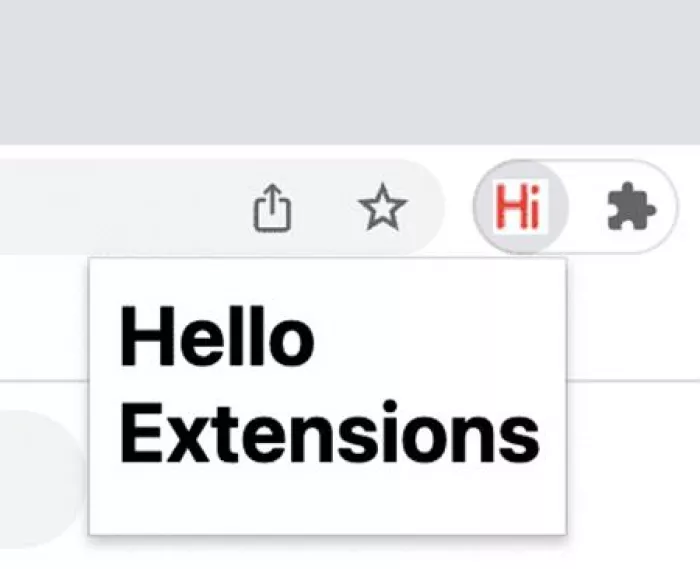
What you are actually building
A Chrome extension is a small bundle of web files that Chrome runs with extra powers. Before AI writes a line, it helps to know the shape of the thing.
Every new extension in 2026 has to use Manifest V3, with no way around it. Manifest V2 stopped running in stable Chrome back in July 2025, the last flags that could revive it were stripped out in mid-2026, and on 31 August 2026 Google began deleting the remaining V2 listings from the store. If an AI hands you code that talks about a “background page” or a blocking chrome.webRequest listener, it is writing for a platform that no longer exists. Models trained on years of old V2 tutorials do this more often than you would like.
Four things about V3 shape how you build, and they happen to be the four spots where AI trips most:
1. Service workers, not background pages Background logic runs in a worker Chrome can shut down at any moment. State does not survive between runs, so anything you need to remember goes in chrome.storage, never a global variable. |
2. Rules, not live interception You cannot rewrite network requests with running code anymore. You register static declarativeNetRequest rules and Chrome applies them. This is why the old-style ad blockers broke. |
3. No remote code, at all Every line of JavaScript must ship inside the package. You cannot pull a script off a CDN at runtime. AI loves to suggest a quick hosted library, and the store will reject it. |
4. Permissions are read out loud Each permission becomes an install-time warning to the user and a justification you owe the reviewer. Narrow permissions clear faster. Broad ones invite a human to read your code line by line. |
Most extensions are built from the same few files:
| File | What it is | When you need it |
|---|---|---|
| manifest.json | The blueprint. Name, version, permissions, and which scripts run where. | Always |
| background.js | The service worker. Event-driven logic that runs behind the scenes. | Anything beyond a static popup |
| content.js | A content script injected into web pages to read or change them. | If you touch page content |
| popup.html | The toolbar window, plus its CSS and JS. | If you have a UI |
| icons | Square PNGs, usually 16, 48, and 128 pixels. | Always, for the store |
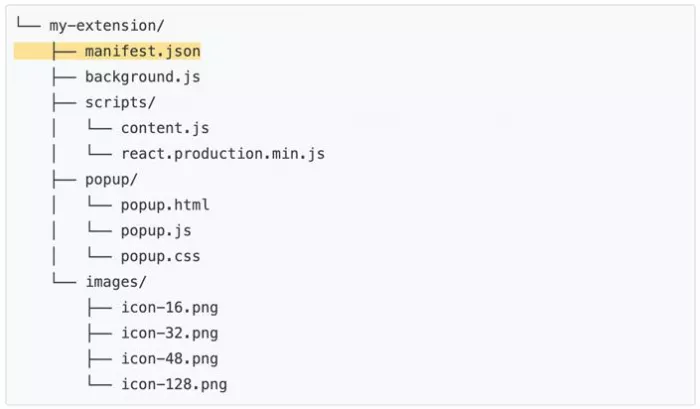
A minimal manifest.json looks like this. A good model writes it correctly the first time if you ask for V3 by name:
{ "manifest_version": 3, "name": "Tab Keeper", "version": "1.0.0", "action": { "default_popup": "popup.html" }, "permissions": ["storage", "activeTab"], "background": { "service_worker": "background.js" } } |
The AI tools, ranked
I have built with most of the mainstream options. They are not equal, and the right pick depends mostly on whether you can read code at all.
Below is how they stack up for extension work, scored out of ten on one thing: how fast they get a beginner to a working, store-ready extension.
| # | Tool | Where it shines | Score / 10 |
|---|---|---|---|
| 1 | Cursor (agent mode) | Building across many files and fixing its own errors | █████████░ 9.2 |
| 2 | Claude (chat or Claude Code) | Clean logic and getting Manifest V3 right | █████████░ 8.7 |
| 3 | ChatGPT | Quick one-off snippets and explaining concepts | ████████░░ 7.8 |
| 4 | GitHub Copilot | Autocomplete when you already know the plan | ███████░░░ 7.0 |
| 5 | One-click generators | Toy demos and learning the shape of a project | █████░░░░░ 5.0 |
A few notes from using them. Cursor’s agent mode edits across files and re-reads its own error output, which matters because an extension is never just one file. Claude tends to get the service-worker and storage patterns right on the first pass, so I reach for it when the logic is fiddly. ChatGPT is fine for a single popup but loses the thread on multi-file state. Copilot rewards people who already know what a correct manifest looks like. The one-click generators produce something that loads but rarely something that survives review.
The pattern worth keeping: pick a tool that can see your whole project and read errors, not one that answers a single question at a time. Extensions fail at the seams between files, and a plain chat window cannot see the seams.
The build loop that works
The workflow is short. You repeat it until the thing stops breaking. Most small extensions take five to fifteen laps.
1 Describe it in plain language. Be concrete about behavior. “A popup with a button that saves the current tab’s URL to a list, and the list stays after I close the popup.” The word “stays” nudges a good model toward chrome.storage instead of a variable that will vanish.
2 Let the AI scaffold the files. Ask for the manifest plus whatever the feature needs, and say “Manifest V3” out loud. Naming the version measurably cuts down on the V2 mistakes that older training data drags in.
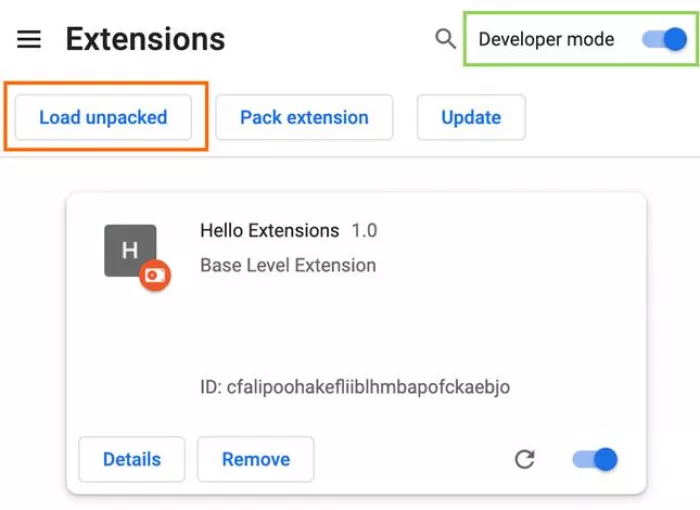
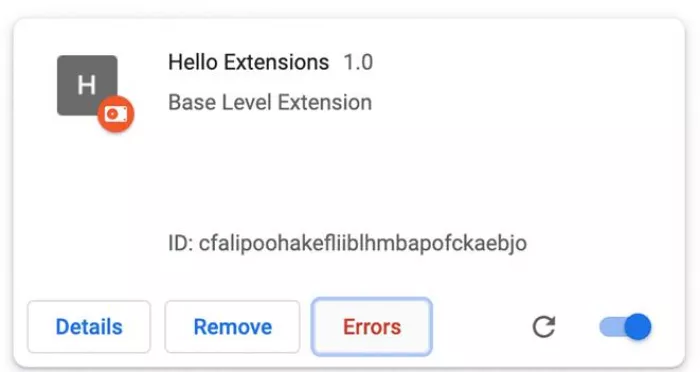
3 Load it unpacked. Open chrome://extensions, switch on Developer mode in the top right, click Load unpacked, and point it at your project folder. Your extension shows up in the toolbar. No packaging, no store, no waiting.
4 Break it on purpose. Click every button. Open the service-worker console from the extensions page. Reload the page your content script runs on. You want it to fail now, in front of you, not later in front of a user.
5 Feed the error back. This is the step people skip. Copy the raw console error and paste it into the AI. Do not retype it in your own words, because the stack trace carries detail the model can use to find the real cause.
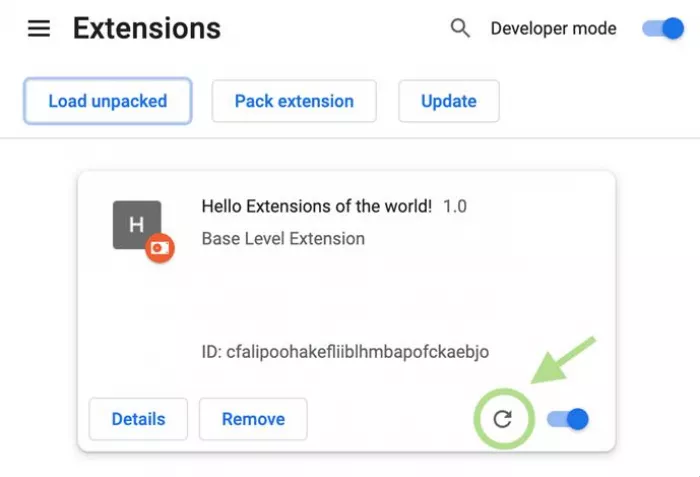
6 Reload and repeat. Hit the reload icon on your extension’s card to run the latest code, then go again. When it stops breaking, you have something worth publishing.
Where AI still gets it wrong
The demos make this look frictionless. Here is where I have watched it stumble, across every tool, more than once.
Hallucinated APIs Models invent Chrome methods that sound real, or use a signature from three versions ago. If a call throws “is not a function,” suspect the API before you suspect your setup. |
The worker that fell asleep Code that works for thirty seconds and then goes silent is almost always a global variable that died when the service worker shut down. The fix is storage, and the AI often needs telling twice. |
Permission creep Left to itself, AI requests broad permissions “to be safe.” Every extra permission means a slower review and a scarier install prompt. Trim them back to the minimum yourself. |
Remote code that fails review A model reaches for a hosted library because that is how normal web pages work. Extensions are not normal web pages. Everything ships inside the package, or it does not ship. |
Confident but stale store facts Ask an AI about current review times or fees and it answers from training data that may be a year old. Check store policy against Google’s own pages, not the chat window. |
None of these are reasons to skip AI. They are reasons to keep your hands on the wheel. The model is a fast, tireless junior who has never once shipped to the store. You are the one who has.
Publishing, step by step
This is the half tutorials rush past, because it is admin, not craft. It is also the half that decides whether anyone uses what you made.
1. Register and pay once
You register as a Chrome Web Store developer and pay a one-time five US dollar fee. No annual renewal, no per-extension charge, no hidden tier. If you distribute as a business, or the EU’s rules reach you, you may also need to complete separate trader verification, which is about proving who you are, not about the five dollars.
2. Package and upload
Zip your project folder and upload it in the Developer Dashboard. As of 2026, Google runs an automatic installation check the moment you upload a draft, so a package that fails to install on some platform gets flagged before you even submit. Fix, re-upload, then move on to the listing.
3. Fill in the listing
The listing is sometimes more work than the code. You will need every item below:
| Item | Detail |
|---|---|
| Name and description | Clear, honest, and matching what the extension does |
| Screenshots | At least one, ideally several, at the required dimensions |
| Icon | 128 pixels for the store |
| Category | Pick the closest fit |
| Privacy disclosure | Plus a hosted privacy policy URL if you touch any user data |
| Permission justifications | A written reason for each permission and any broad host access |
4. Submit and wait
Review runs on two tracks, and which one you land on depends almost entirely on how much your extension asks for.
| Your extension | Likely track | Realistic wait |
|---|---|---|
| activeTab only, clean code, established account | Automated | Minutes to a few hours |
| A few narrow permissions | Automated, sometimes manual | Hours to a couple of days |
| Broad host access or sensitive permissions, new account | Manual human review | Up to two to four weeks |
Google’s own guidance says most reviews finish within a few days but can stretch to a few weeks. A 2026 surge of submissions pushed those waits up before recent process changes pulled them back toward normal. One rule matters above the rest: do not resubmit to jump the queue. Resubmitting restarts the clock and can flag your account. Once it is in, leave it in.
Two more 2026 changes are worth knowing. New publisher accounts now start with a default cap of two published extensions, and you request more through the dashboard once you have a track record. The old “Featured” badge is also being retired, with Google steering developers toward a refreshed rating that leans on recent reviews.
The money side stays small for a simple extension:
| Cost | Amount | Required? |
|---|---|---|
| Developer registration | 5 dollars, once | Yes |
| Privacy policy hosting | Free on GitHub Pages and similar | Only if you handle user data |
| Domain for publisher verification | Roughly 10 to 15 dollars a year | Optional |
| Backend or API usage | Varies with use | Only if your extension needs one |
The part nobody warns you about
Publishing feels like the finish. It is closer to a starting gun that almost nobody hears.
14 median users on a live Chrome extension | 54% of live extensions have no ratings at all | 4 median users for extensions under two months old |
Out of roughly 254,000 live extensions counted on the store in September 2026, the middle of the pack has fourteen users. Not fourteen thousand. Fourteen.
That is not a reason to feel bad about your install count. It is a reason to build something you would use yourself, because for a while you might be the main person who does. The extensions that grow tend to do it over years, carried by the description you wrote, the screenshots you bothered to take, and reviews from people you helped. AI can build the thing in a night. It cannot do that slow, human part for you.
The honest verdict
So is building a Chrome extension with AI worth it in 2026? For me it turned a category of project I used to write off as “not worth the weekend” into something I can finish in an evening. The writing-the-code part has really changed. I describe, it drafts, I test, it fixes, and the friction that used to kill small ideas before they started is mostly gone.
What has not changed is everything around the code. AI will not tell you your permissions are too broad. It will not write your privacy policy. It cannot make Google’s reviewers move faster, and it will hand you last year’s facts about the store with total confidence. The thing I keep relearning is that the model is brilliant at the middle of the job and shaky at the edges, and the edges are where shipping actually happens.
If you have an itch, some small thing your browser refuses to do, describe it to a capable AI tonight and load it unpacked. You will have something running before you go to bed. Just walk in knowing that the last mile, the store, the review, the users, is yours to cover. That is the real deal on offer, and honestly, it is a good one.
Comments