Table of Contents
- Quick Tool Comparison
- 1. Sudowrite: Best for Fiction Drafting
- 2. Novelcrafter: Best for Complex Books
- 3. Squibler: Best for Fast Drafts
- 4. NovelAI: Best for Flexible Fiction Generation
- 5. LivingWriter: Best All-in-One Book Workspace
- 6. ProWritingAid: Best for Revision
- Which Tool Fits Where?
- Where AI Still Fails
- Memory Is Not Meaning
- Fluency Can Hide Weakness
- Voice Needs Restraint
- Research Still Needs Sources
- The Copyright Question
- A Better AI Workflow
- Final Verdict
Writing 80,000 words is no longer the impressive part of an AI book-writing demo. Several tools can generate pages of readable prose almost instantly. The harder problem is keeping a book coherent across dozens of chapters, protecting a distinctive voice, knowing when a scene is unnecessary, and recognizing when a technically correct paragraph simply does not belong.
The best AI tools for authors therefore do different jobs. Some are built around fiction and story continuity, some are better thinking partners, and others become useful only after a substantial draft exists. Here are six of the strongest options in 2026, judged by how they fit into an actual book-writing workflow rather than how quickly they can fill a blank page.
Quick Tool Comparison
| Tool | Best for | Strongest stage | Starting price | Main limitation |
| Sudowrite | Fiction writers | Planning + drafting | $19/month | Heavily fiction-oriented |
| Novelcrafter | Complex novels and series | Planning + continuity | $4/month | AI requires separate setup |
| Squibler | Rapid book creation | Outline + first draft | Free | Generated drafts need heavy editing |
| NovelAI | Interactive fiction writing | Scene drafting | $10/month | Requires active context management |
| LivingWriter | All-in-one author workflow | Planning + manuscript management | Free | Unlimited AI requires $30 plan |
| ProWritingAid | Manuscript editing | Revision | Free | Not designed for initial drafting |
The important distinction is that these tools are not interchangeable. A writer struggling with chapter structure needs something different from an author who already has a 90,000-word draft and wants to find repetition, pacing problems, weak scenes and stylistic clutter.
1. Sudowrite: Best for Fiction Drafting
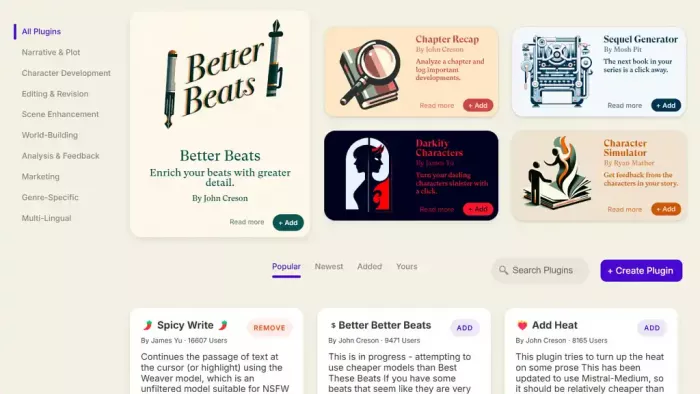
Sudowrite is one of the few major AI writing products designed around creative fiction rather than general-purpose text generation. Its advantage is not simply that it can generate prose. Story information, characters, worldbuilding, chapter outlines and previous writing can all become part of the context used during generation.
Its Story Bible is particularly important for longer fiction. It starts with a Braindump and can develop that material into a synopsis, characters, worldbuilding, an outline, scenes and eventually chapter prose. Sudowrite's Write feature can also look back at up to 20,000 words of preceding text and use Story Bible information and chapter continuity while extending a manuscript.
Key Features
● Story Bible keeps long-form context organized. Characters, worldbuilding, genre, synopsis and outline information can become reusable context instead of being repeatedly pasted into prompts.
● Write continues existing prose rather than starting every generation from zero. It considers previous text and, where configured, information from the Story Bible and earlier chapters.
● Outline generation works at both book and chapter level. Writers can generate a complete outline or develop chapters individually while retaining control over the larger structure.
● Rewrite handles targeted prose changes. Up to 6,000 selected words can be rephrased, shortened, made more descriptive or changed using custom instructions, although Rewrite itself does not currently use Story Bible context.
● Feedback can critique more than isolated paragraphs. As of 2026, it can leave story-aware feedback on a scene, chapter or entire book and can take Story Bible information into account.
Book-Writing Workflow
Idea → Story Bible → synopsis → characters/world → outline → scenes → prose → feedback → revision
Sudowrite is strongest from planning through first-draft development. Instead of asking for an entire novel from one prompt, a writer can define the book first, work chapter by chapter, and use AI selectively when a scene needs expansion, an alternative direction or another pass.
Pricing
Sudowrite gives all three subscriptions access to the same core features. The major difference is monthly credit allowance.
| Plan | Monthly billing | Annual equivalent | Included credits |
| Hobby & Student | $19/month | $10/month | 225,000/month |
| Professional | $29/month | $22/month | 1,000,000/month |
| Max | $59/month | $44/month | 2,000,000/month with rollover |
Professional is the more sensible tier for someone actively drafting a novel because Sudowrite itself positions it toward longer projects such as novels and screenplays.
Advantages and Limitations
| Advantages | Limitations |
| Story-specific context is built directly into the writing workflow. | Its strongest features are aimed at fiction rather than research-heavy nonfiction. |
| Excellent for moving between planning, scenes and prose without changing apps. | Heavy use of generation can consume credits quickly. |
| Feedback now works across chapters and whole books rather than only sentence-level editing. | Generated passages can still sound over-explained or too polished if the author accepts them without editing. |
| Useful for writers who know their story but occasionally get stuck on execution. | Story memory reduces continuity errors, but it does not understand which details are emotionally important. |
Best for: Novelists who want an AI writing environment built around scenes, characters and story development.
Verdict: Sudowrite is strongest when AI is used as an active fiction-writing partner rather than an automatic novelist. Story Bible and chapter continuity solve some of the context problems that make ordinary chatbots awkward for long fiction. The weak point remains creative judgment. It can produce five ways to continue a scene, but the author still has to recognize which one belongs in the book.
For writers who care more about preserving tone and voice than simply generating faster, comparing AI writing tools that actually sound human can help narrow down which platforms handle natural prose more convincingly.
2. Novelcrafter: Best for Complex Books
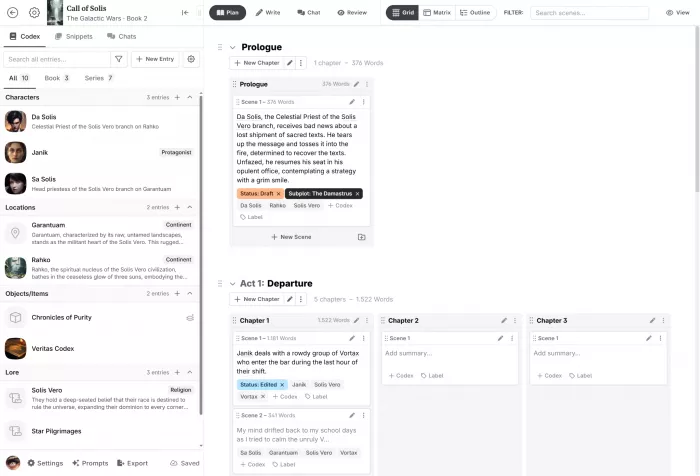
Novelcrafter approaches the problem differently. It is first a structured novel-writing environment, with AI added as one part of the workflow. That makes it particularly interesting for long books, complicated worlds and multi-book series where maintaining information can become almost as difficult as producing prose.
The Codex acts as a story bible for characters, places and other recurring information, while Novelcrafter's planning system organizes the manuscript around acts, chapters and scenes. AI-enabled tiers can summarize scenes, extract characters and generate prose from scene beats.
Key Features
● Codex stores reusable story information instead of leaving character biographies, locations and world rules scattered through separate notes.
● Scene-level planning makes structural editing easier. Writers can move through a novel as scenes rather than treating an 80,000-word manuscript as one continuous document.
● Scene Beats give generation more direction. AI can work from planned beats, reducing the need to ask for an entire chapter from a broad prompt.
● AI scene summarization and character extraction reduce manual context work once a manuscript starts becoming large.
● Bring-your-own-key support provides model choice. Hobbyist and higher plans can connect external AI services instead of locking the author into one underlying model.
Book-Writing Workflow
Premise → Codex → outline → scenes → scene beats → draft → summaries → continuity review → revision
Novelcrafter is particularly good at the organizational middle of this process. If a novel has multiple POV characters, locations, timelines or recurring story rules, the Codex and scene structure provide a cleaner foundation than maintaining one enormous conversation with a general chatbot.
Pricing
Novelcrafter offers a 21-day trial with all features unlocked, but no permanent free plan.
| Plan | Price | Most relevant feature |
| Scribe | $4/month | Unlimited books, Codex, series and basic review |
| Hobbyist | $8/month | Adds BYOK AI, scene summaries, character extraction and generation from beats |
| Artisan | $14/month | Adds Workshop Chat |
| Specialist | $20/month | Adds collaboration, teams and priority support |
For an individual author who wants actual AI generation, Hobbyist is the practical entry tier because Scribe does not include bring-your-own-key AI integration.
Advantages and Limitations
| Advantages | Limitations |
| Excellent organization for large manuscripts and connected book series. | Less immediate than opening ChatGPT and starting a conversation. |
| Codex provides structured context for recurring characters, places and concepts. | Writers must understand model connections and may pay the AI provider separately. |
| Writers can choose different AI providers and models for different tasks. | Some writers will find its prompting and configuration options unnecessarily technical. |
| Useful even if AI generates only a small portion of the final manuscript. | A detailed story database cannot determine whether a character arc actually works. |
Best for: Writers building large novels, fantasy worlds, mysteries, multi-POV fiction or connected series.
Verdict: Novelcrafter solves a different problem from most AI writers. Its value increases as the manuscript becomes more complicated. The Codex cannot make a book emotionally convincing, but it can stop the author from repeatedly explaining the world to an AI model. For a long series, that organizational advantage may be more useful than another prose-generation button.
3. Squibler: Best for Fast Drafts
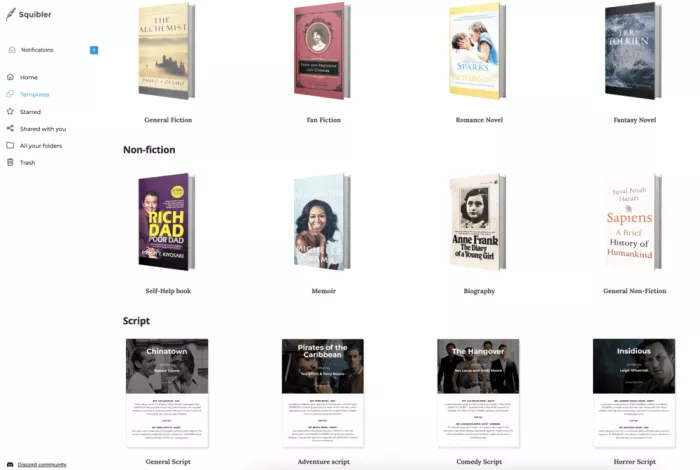
Squibler is the most aggressive book generator on this list. Rather than treating AI as an occasional assistant, it can take an idea through an outline and into a complete manuscript. Its paid plans explicitly support full-length book generation, including manuscripts in the 200 to 300-page range.
The platform has also changed substantially in 2026. Its Agentic Editor can create outlines, generate chapters, restructure material and edit content through natural-language commands, while built-in version control allows changes to be compared without simply overwriting the manuscript.
Key Features
● Full manuscript generation can turn a developed premise into chapters and a narrative structure rather than stopping after a short sample.
● Agentic editing lets the AI modify the working document through instructions instead of requiring writers to copy generated responses manually.
● Elements store important recurring information. For fiction these can include characters, settings and objects; nonfiction authors can use Elements for concepts, theories and factual material.
● Built-in collaboration supports co-authors and editors who need access to the same project.
● PDF, DOCX and ePub exports make Squibler more of a book-production environment than a simple text generator.
Book-Writing Workflow
Book idea → generated outline → Elements → manuscript generation → chapter edits → formatting → export
Squibler compresses the earliest stages more aggressively than Sudowrite or Novelcrafter. That makes it useful for quickly turning a concept into something that can be edited, but speed creates another problem: producing a complete draft can make weak structural decisions look more finished than they really are.
Pricing
Squibler currently offers three tiers.
| Plan | Monthly price | Annual equivalent | AI allowance |
| Free | $0 | $0 | 1,000 credits/month |
| Plus | $29.99/month | $15.83/month | 10,000 credits/month |
| Pro | $89.99/month | $49.17/month | Unlimited AI credits |
Plus adds full-length manuscript generation, while Pro mainly makes sense for heavy users producing multiple books or other long-form projects.
Advantages and Limitations
| Advantages | Limitations |
| One of the fastest routes from an idea to a complete editable draft. | Rapid generation can create a false sense that the difficult creative decisions are already solved. |
| Keeps drafting, editing, organization and export inside one environment. | A full AI-generated book usually needs far more developmental editing than a carefully authored draft. |
| Elements provide persistent information for characters, settings or nonfiction concepts. | Writers who prefer deliberate chapter-by-chapter development may find the automation excessive. |
| Agentic commands reduce repetitive document editing. | Pro is expensive if unlimited generation is not genuinely needed. |
Best for: First-time authors, rapid prototyping, ghostwriting workflows and writers who want a rough manuscript to react to rather than a blank page.
Verdict: Squibler is impressive for speed, but speed is also where authors need to be most careful. A 250-page draft appearing quickly does not mean the structural work of a book has been completed. Squibler is at its best when the generated manuscript is treated as raw material for revision, not as a finished publishing asset.
4. NovelAI: Best for Flexible Fiction Generation
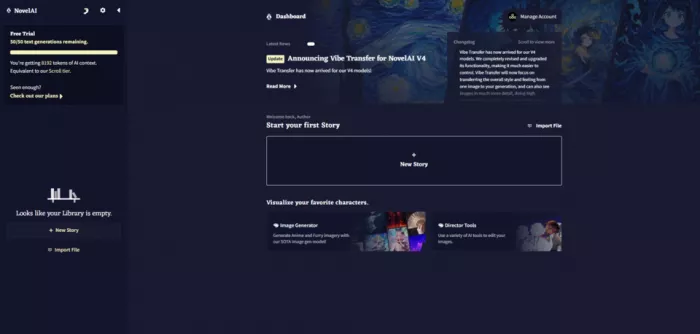
NovelAI is built around interactive fiction generation rather than traditional document editing. It is particularly useful for writers who want the AI to continue scenes while retaining important information about characters, locations and world rules.
Its biggest strength is the amount of control it gives writers over what information reaches the model. Memory can hold information that should remain consistently available, Author's Note can steer the immediate direction or tone of a scene, and Lorebook entries can automatically appear in context when relevant characters, places or concepts are mentioned.
Key Features
● Lorebook stores characters, locations, factions, objects and other recurring story information, then inserts relevant entries into the AI's context when their activation terms appear in the manuscript.
● Memory keeps major plot or character information available rather than relying entirely on the model to recover details from earlier prose.
● Author's Note gives writers stronger short-term control, allowing them to emphasize the mood, direction or details that should influence the next generation.
● Inline generation can fill text inside an existing passage, rather than limiting AI assistance to continuing from the end of a document.
● Stories can be exported with their associated settings and Lorebook information, which is useful for writers who build detailed reusable story setups.
Book-Writing Workflow
Story concept → Memory → Lorebook → Author's Note → manual drafting → AI continuation → editing
NovelAI works best when the writer remains closely involved in the prose. Instead of requesting an entire chapter and accepting the result, you can write part of a scene, let NovelAI continue it, reject or edit the generation, and then keep moving.
That makes it better suited to exploratory fiction than highly automated manuscript production.
Pricing
NovelAI currently has three paid tiers. Text generation is unlimited on paid subscriptions, while higher tiers mainly provide larger context capacity and other additional benefits.
| Plan | Price | Most relevant difference |
| Tablet | $10/month | Unlimited text generation |
| Scroll | $15/month | Larger story context |
| Opus | $25/month | Largest context, up to 28,672 tokens on supported models |
There is no permanent free plan, although NovelAI offers a limited text-generation trial.
Advantages and Limitations
| Advantages | Limitations |
| Lorebook gives fiction writers detailed control over recurring story information. | Requires more manual context management than some newer all-in-one book tools. |
| Unlimited text generation makes experimentation less restrictive than credit-based systems. | Primarily suited to fiction rather than research-heavy nonfiction. |
| Memory and Author's Note let writers separate permanent story facts from immediate scene instructions. | The interface and generation settings can feel technical to first-time users. |
| Particularly good for writers who like generating several possible continuations and choosing among them. | Context is still finite, so a Lorebook does not mean the AI literally remembers an entire novel. |
Best for: Fiction writers who want close control over AI continuation, lore and worldbuilding rather than automatic full-book generation.
Verdict: NovelAI is strongest when writing remains an interactive process. Its Lorebook system is more useful than simply giving an AI a giant prompt because relevant information can be introduced when the story actually needs it. The trade-off is that the writer has to manage that context deliberately. It is a good fit for authors who enjoy steering generation scene by scene, but less attractive if the goal is to automatically assemble a polished manuscript.
NovelAI works especially well for interactive fiction, but writers who need stronger outlining, editing or manuscript structure may get more value from exploring AI writing tools beyond NovelAI before settling on one platform.
5. LivingWriter: Best All-in-One Book Workspace
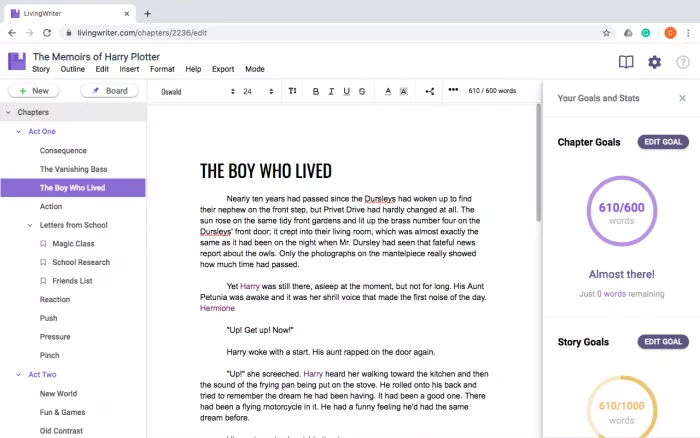
LivingWriter sits somewhere between a traditional manuscript editor and an AI writing platform. Instead of making AI the entire product, it combines chapters, outlines, research, story elements, plotting boards and manuscript organization with AI tools built into the same workspace.
That makes it a useful alternative for writers who do not want to keep one app for outlining, another for drafting and another chatbot open beside the manuscript.
Key Features
● AI Outline can turn an initial idea into a structured book plan, covering fiction, nonfiction and other long-form projects.
● Elements provide dedicated spaces for characters, locations, objects and other recurring information, with those elements linked back into the manuscript.
● AI Analysis examines chapters or manuscripts for issues such as pacing, tone and logical gaps, making it useful beyond initial generation.
● AI Manuscript Chat can discuss the manuscript in context, giving writers a way to investigate character motivation, missing information or structural concerns without constantly copying text elsewhere.
● Planning, Manuscript, Element and Research Boards keep different parts of the project connected inside one writing environment.
Book-Writing Workflow
Idea → AI outline → Elements → planning board → chapters → manuscript analysis → rewrite → export
LivingWriter is strongest for authors who want structure around their AI use. You can develop an outline, attach supporting information to characters or concepts, write individual chapters and then run analysis without moving the manuscript between several unrelated services.
Unlike Squibler, however, the workflow does not revolve around asking AI to generate an entire finished book as quickly as possible.
Pricing
LivingWriter currently offers three tiers.
| Plan | Price | AI access |
| Free | $0 | 3 AI requests per month, one manuscript up to 25,000 words |
| Pro | $15/month | 25 shared AI requests per month plus unlimited manuscripts |
| Pro + AI | $30/month | Unlimited AI requests across supported AI features |
For an author primarily interested in the writing environment, Pro provides most of the core manuscript tools. Writers planning to use AI regularly would get considerably more value from Pro + AI, since the 25-request allowance on Pro can disappear quickly during an active drafting or revision period.
Advantages and Limitations
| Advantages | Limitations |
| Combines manuscript writing, plotting, research and AI assistance in one workspace. | Pro's 25 AI requests per month are restrictive for frequent AI users. |
| Useful for both fiction and nonfiction rather than focusing exclusively on novel generation. | $30 per month for unlimited AI is more expensive than several dedicated generation tools. |
| Manuscript-aware analysis and chat are more practical than repeatedly pasting chapters into a separate chatbot. | Its AI prose generation is not as specialized toward fiction style as Sudowrite or NovelAI. |
| Strong organizational features remain useful even when the writer decides not to generate text with AI. | Writers who already have a preferred manuscript app may not need another complete writing environment. |
Best for: Authors who want outlining, manuscript organization, research, drafting and AI assistance inside one platform.
Verdict: LivingWriter is compelling because the AI features sit inside an actual authoring environment. Its manuscript boards, Elements and research tools still have a purpose even if you decide to write every sentence yourself. That makes it a more balanced choice than tools built almost entirely around generation. The main question is whether you will use enough of the wider workspace to justify paying $30 per month for unrestricted AI access.
6. ProWritingAid: Best for Revision
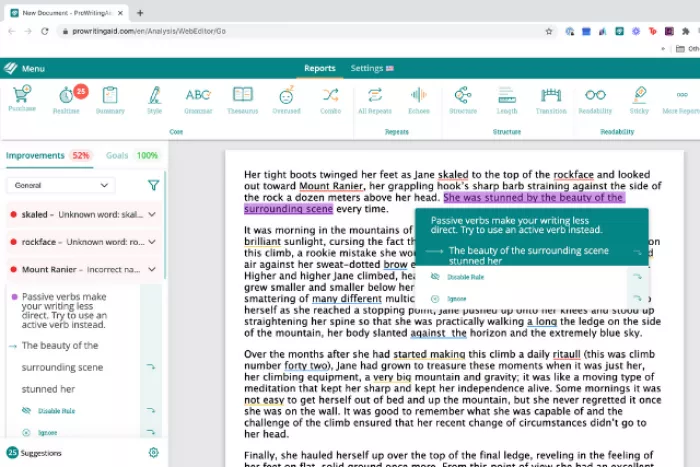
ProWritingAid belongs later in the process. It can generate and rewrite text, but its real value is examining prose that already exists.
The platform now goes considerably beyond grammar checking. Premium includes more than 25 writing reports and Chapter Critique, while broader Story Credits can be used for Manuscript Analysis, Virtual Beta Reader and Marketability Analysis. Manuscript Analysis considers the whole story rather than judging chapters independently.
Key Features
● More than 25 writing reports inspect specific weaknesses, including readability, repetition, style and other sentence-level patterns.
● Chapter Critique looks beyond grammar and provides story-focused feedback on individual chapters.
● Manuscript Analysis evaluates the complete story, prioritizing developmental issues across the book rather than simply listing sentence corrections.
● Virtual Beta Reader approaches the manuscript from the reader's perspective, including where interest may increase or fade.
● Rephrase and Sparks can help explore alternatives, although they are better treated as editing aids than automatic replacements for the author's prose.
Book-Writing Workflow
Completed draft → chapter critique → manuscript review → developmental revisions → line editing → final polish
This is where ProWritingAid differs most clearly from Sudowrite or Squibler. You do not need it to invent the book. You need it once enough writing exists for patterns to become visible.
Pricing
ProWritingAid has Free, Premium and Premium Pro tiers. Current monthly list prices are $30 for Premium and $36 for Premium Pro, with annual and lifetime options also available.
| Plan | Monthly price | Most useful difference |
| Free | $0 | Basic suggestions with a 500-word checking limit |
| Premium | $30/month | Unlimited word count, reports, Rephrase and Chapter Critique |
| Premium Pro | $36/month | More Sparks, more Chapter Critiques and larger Story Credit discounts |
Premium is enough for most manuscript editing. Premium Pro becomes more relevant for writers making frequent use of AI critique and whole-book analysis.
Advantages and Limitations
| Advantages | Limitations |
| Far more diagnostic than a basic grammar checker. | Most valuable after a substantial draft already exists. |
| Helps reveal repeated writing habits across thousands of words. | A report can identify a pattern without understanding why an author deliberately used it. |
| Whole-manuscript tools add developmental feedback beyond line editing. | Full manuscript tools can require separate Story Credits. |
| Particularly useful during the messy gap between first draft and professional edit. | Accepting every suggested improvement can flatten an author's style. |
Best for: Authors who already have a draft and need systematic revision before beta readers or professional editing.
Verdict: ProWritingAid is useful because it gives the writer evidence rather than simply another version of the paragraph. Seeing that a manuscript repeatedly uses the same sentence pattern is actionable. Automatically replacing every flagged sentence is not. Treat its reports as signals worth investigating, not instructions that must be obeyed.
Which Tool Fits Where?
The strongest book-writing workflow may involve more than one tool because planning, drafting and editing are separate problems.
| Writing task | Best options |
| Developing a fiction premise | Sudowrite, LivingWriter |
| Building characters and world rules | Novelcrafter, NovelAI |
| Creating a structured outline | Novelcrafter, Sudowrite, LivingWriter |
| Producing a fast rough draft | Squibler |
| Writing and extending scenes | Sudowrite, NovelAI |
| Managing research and manuscript notes | LivingWriter |
| Diagnosing a completed draft | ProWritingAid, LivingWriter |
| Managing a long series | Novelcrafter |
This also explains why there is no useful universal winner. A 100,000-word fantasy novel, a memoir and a practical business book may all be “books,” but the work that AI needs to assist with is completely different.
Where AI Still Fails
AI writing tools have become better at context. Story bibles, Projects, retrieval systems and whole-manuscript analysis reduce many of the obvious problems that earlier tools had with long-form work.
What they do not remove is judgment.
Memory Is Not Meaning
Suppose a character mentions in chapter three that she has not spoken to her father in six years. A good story system may retain that fact until chapter twenty-five.
The harder question is whether the father should appear again at all.
Bringing him back might complete the emotional arc. It might also make the story painfully predictable. No amount of context storage tells a model which interpretation is right because both can be structurally plausible.
This is the difference between remembering information and understanding its dramatic value.
Fluency Can Hide Weakness
AI-generated prose often reaches grammatical competence much faster than human first drafts. That can actually make editing harder.
An obviously bad paragraph invites revision. A smooth but unnecessary paragraph may survive because nothing appears technically wrong with it.
This matters especially when generating entire chapters. The chapter may contain clean descriptions, believable dialogue and logical transitions while contributing almost nothing the book actually needs.
Authors therefore have to ask a harsher question than “Is this well written?”
They need to ask “Would the book lose anything if I deleted this?”
AI is considerably less reliable at making that decision.
Voice Needs Restraint
Most writing assistants can make a sentence clearer. The problem is that clarity is not the only goal of literature. A strange rhythm, repeated phrase, abrupt transition or deliberately uncomfortable sentence may be part of a writer's voice. Editing software sees patterns. It does not always understand why the pattern exists.
If an author accepts every suggestion to shorten sentences, remove repetition and smooth transitions, the manuscript can become technically cleaner while becoming less recognizable.
A useful rule is to treat AI editing as diagnosis before correction. If a tool says the same phrase appears fifteen times, investigate it. Do not automatically replace all fifteen.
Research Still Needs Sources
This matters even more for nonfiction. AI can make research faster by identifying leads, organizing competing explanations and extracting information from documents, but it should not become the final authority for dates, quotations, statistics, medical claims or historical events.
A convincing invented citation is still invented. For nonfiction, a safer workflow is:
● Use AI to identify what needs researching, rather than asking it to manufacture supporting facts.
● Ask for primary sources whenever possible, then open and verify those sources yourself.
● Keep research notes separate from generated prose so assumptions do not quietly turn into “facts” several chapters later.
● Check numbers, quotations and names again during the final manuscript review, even if they looked correct during drafting.
AI reduces the cost of finding information. It does not transfer responsibility for getting that information right.
The Copyright Question
Authors also need to think about authorship itself, particularly when AI-generated passages move from brainstorming material into the published manuscript.
The U.S. Copyright Office's position remains centered on human authorship. Its AI report concluded that generative AI output can receive copyright protection where a human has determined sufficient expressive elements, such as through human-authored material, creative arrangement or meaningful modification. Merely supplying prompts is not enough by itself. Importantly, using AI as an assistive tool does not automatically prevent the larger human-authored work from receiving copyright protection.
The Authors Guild also updated its AI guidance in May 2026, reflecting the fact that authors now face practical legal and professional questions around different forms of AI use, rather than one simple question of whether AI is “allowed.”
For writers, the practical distinction is useful:
AI-assisted writing and AI-authored writing are not the same workflow.
Using an AI system to challenge an outline, locate repetition or suggest five alternatives to a sentence leaves much more creative selection with the author than generating fifty chapters and making light corrections afterward.
A Better AI Workflow
The most productive approach is therefore not to ask one tool to write the entire book. A stronger workflow looks more like this:
1. Define the book yourself.
Write the premise, intended reader, central argument or conflict, major characters and the reason the book needs to exist before large-scale generation begins. AI works much better when those choices are constraints rather than questions.
2. Use AI to widen options.
Generate alternative chapter arrangements, conflicts, examples or research directions. At this stage quantity is useful because you are choosing rather than publishing.
3. Narrow before drafting.
Decide which ideas survive. This is one of the most important human stages because generated options tend to look more equally viable than they really are.
4. Draft with controlled context.
Tools such as Sudowrite and Novelcrafter become valuable here because they can work from established story information instead of inventing everything again.
5. Diagnose before rewriting.
LivingWriter and ProWritingAid are particularly useful once the manuscript exists. Ask what is weak, repetitive, unsupported or confusing before asking for replacement prose.
6. Perform a human final pass.
Read the manuscript without requesting AI suggestions. A book eventually has to be judged as a reading experience, not as a sequence of prompts and improvements.
That final stage matters because AI has no natural stopping point. Ask it to improve a paragraph ten times and it can produce ten more versions. The author has to decide when version four was already finished.
Final Verdict
There is no single “best AI book writer” in 2026 because the best tool depends on which part of writing a book is actually slowing you down.
Sudowrite is the strongest choice for fiction writers who want AI integrated directly into story development and scene writing. Novelcrafter is better for authors who care about organization, continuity and maintaining complicated books or series. Squibler is the most appealing option when getting from an idea to a complete rough manuscript quickly is the priority.
NovelAI is the better choice for writers who want to work interactively with AI at the scene level, particularly when lore, characters and world information need to influence generation. LivingWriter takes the broader approach, combining outlining, manuscript organization, research and AI assistance in one environment. ProWritingAid remains the strongest fit later in the workflow, when the manuscript already exists and the job shifts from generating material to identifying what needs revision.
If I had to reduce the comparison to one rule, it would be this: use AI where writing involves processing information, generating possibilities or finding patterns; be much more cautious where writing involves taste, emotional judgment and deciding what deserves to remain on the page. The tools are getting better at remembering the book. They are getting better at seeing patterns across the book. Some can even generate most of the book. None of those abilities answers the most important editorial question: Is this the book you actually wanted to write?
Comments