Venice AI built its reputation on one clear promise: privacy is the product. Chats live in your browser instead of on a server, prompts travel through an encrypted proxy, and the models on offer are open source rather than locked black boxes. I get the appeal, and for a lot of people it genuinely delivers.
But no single tool fits everyone. Over the past few weeks I have been running the same set of writing, research, coding, and roleplay prompts through Venice and every serious rival I could get working, reading the privacy policies most reviews skip, and paying for the plans where the free tier was not enough to judge fairly.
Venice AI in 60 seconds
Before judging the alternatives, it helps to pin down exactly what they are being compared against.
| Quick facts | Details |
|---|---|
| What it is | A privacy-first AI platform for chat, images, and video, built on open-source and third-party models |
| Launched | 2024 |
| Free plan | Yes, with daily caps on text and image prompts |
| Paid plans | Pro at $18 per month, with higher tiers for power users that reach $200 per month (Max); annual billing discounts apply |
| Credits | Premium features like video generation run on credits, where 100 credits equal $1 |
| Privacy approach | No server-side storage of conversations; history stays in your browser and prompts route through an encrypted proxy |
| Strengths | Privacy by design, model choice, light content filtering for adults, image and video tools, an OpenAI-compatible API |
| Weak spots | Credit bookkeeping, open models can trail frontier models on hard reasoning, top tiers get expensive |
Why people go looking for an alternative
These are the friction points that came up again and again in my own use and in community feedback:
• Cost creep. Pro is $18 a month, and the credit meter for video and premium models is a second budget you have to watch.
• Free tier limits. The daily prompt caps disappear fast if Venice is your main assistant.
• Model ceiling. Open models have improved massively, but frontier models still win on hard reasoning, coding, and long documents.
• Niche needs. Venice is a generalist. Dedicated tools handle long-form fiction, character chat, or fully local privacy better.
• Trust preferences. Some people would rather run everything on their own machine than trust any no-logs promise, however credible.
Quick comparison: all 5 alternatives at a glance
| Tool | Best for | Free tier | Paid from | Privacy in one line |
|---|---|---|---|---|
| Duck.ai | Everyday private chat | Yes, no account needed | $9.99/mo | Anonymizing proxy, no training on your chats |
| LM Studio | Total local privacy | Fully free | Free | Runs offline on your own computer |
| OpenRouter | Developers, model variety | Free models with caps | Pay per token | You pick providers and data policies |
| NovelAI | Fiction and anime art | Small trial tier | $10/mo | Stories stored encrypted |
| Character AI | Ready-made characters | Yes, now with ads | $9.99/mo | Standard cloud data practices |
Duck.ai (DuckDuckGo AI Chat)
Best for: people who want the closest free swap for private, everyday AI chat
Duck.ai is DuckDuckGo's answer to the question Venice asks: can you use top AI models without being profiled? You chat anonymously, with no account, and every request passes through DuckDuckGo's proxy, which strips identifying metadata before it ever reaches the model provider. Providers are contractually barred from training on those chats, and your history is stored on your device, not on a server.

| Quick facts | Details |
|---|---|
| Platform | Web (duck.ai), the DuckDuckGo browser, and mobile |
| Free plan | Yes, several models with daily limits and no sign-up required |
| Paid plans | DuckDuckGo subscription from $9.99 per month (Plus); a higher Pro tier adds the top Claude model, deeper reasoning, and double the limits |
| Models | The free lineup rotates and has recently included small GPT-5 class models, Claude Haiku 4.5, Mistral Small, and open models like gpt-oss 120B; paid tiers add flagship GPT and Claude models |
| Privacy | Anonymizing proxy, no training on chats, local history, optional end-to-end encrypted sync |
| Standout | Frontier-quality answers with genuinely minimal data exposure, for free |
Where it shines
• Zero friction: open the site and start chatting, no email, no account, no onboarding.
• You get real GPT and Claude models through a privacy layer, which Venice itself cannot fully match for raw model quality at this price.
• Local chat history plus the Fire Button means one click wipes everything.
• The paid subscription bundles a VPN and identity tools, so the $9.99 covers more than AI.
Where it falls short
• Each provider's own moderation still applies, so this is a private tool, not an unrestricted one.
• Fewer power features than the big AI apps: lighter file workflows and no deep project memory.
Practical tip: pin your important chats (up to five) so the Fire Button does not take them with it when you clear everything else.
My score: 8.8 / 10 The best default replacement for most Venice users who mainly chat.
LM Studio (run models locally)
Best for: the absolute privacy ceiling, where nothing ever leaves your machine
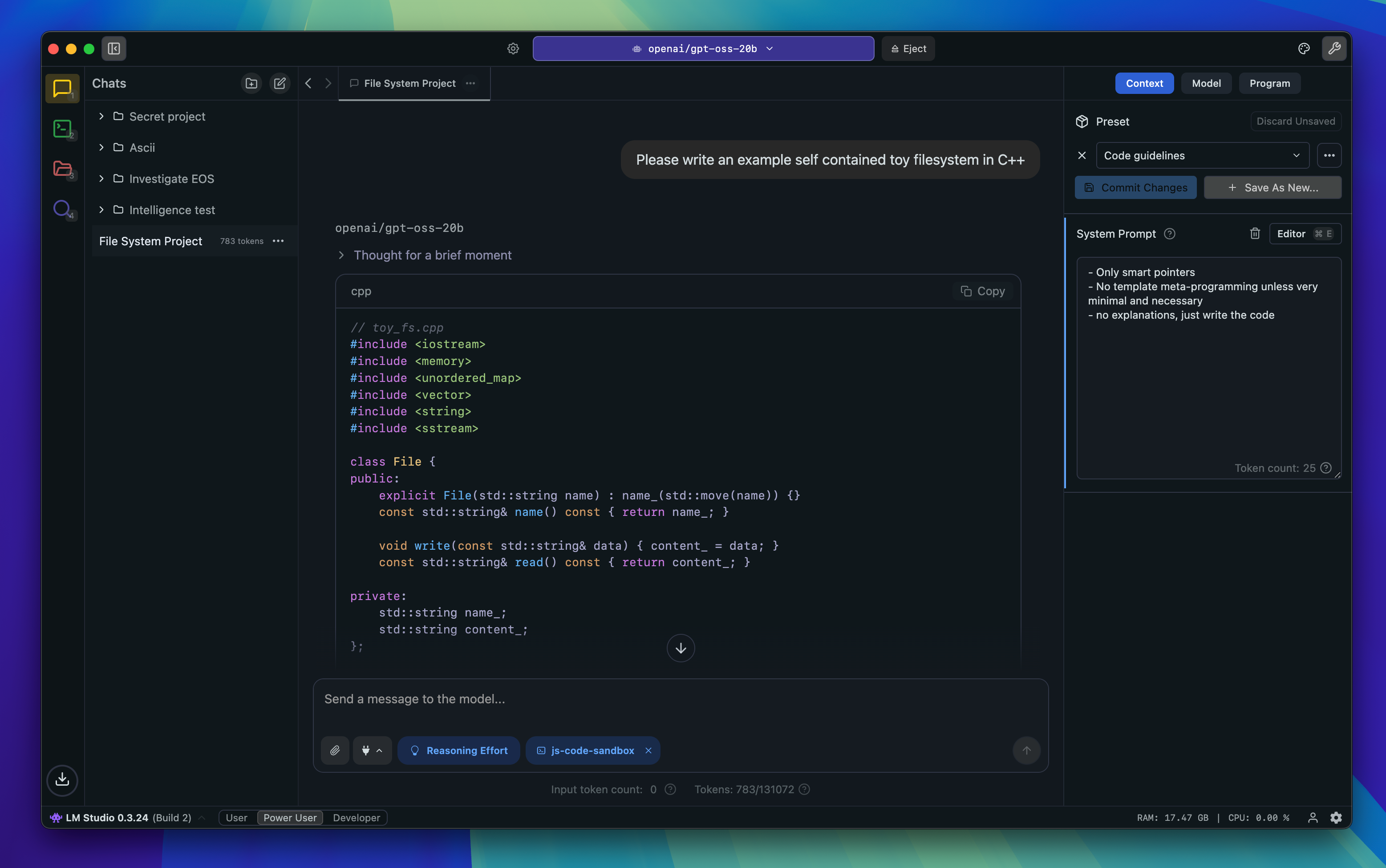
Venice promises your data never touches its servers. LM Studio removes the servers entirely. It is a free desktop app for Windows, macOS, and Linux that downloads open models (Llama, Qwen, Mistral, Gemma, DeepSeek variants and thousands more) and runs them fully offline on your own hardware, with a clean chat interface and a local OpenAI-compatible API for developers.
| Quick facts | Details |
|---|---|
| Platform | Desktop app for Windows, macOS, and Linux |
| Price | Free, including for use at work as of this writing |
| Models | Thousands of open models pulled from Hugging Face in GGUF and MLX formats |
| Privacy | Fully local; once a model is downloaded you can run it with the network off |
| Hardware | Realistically 16 GB of RAM for 7B to 14B models; a decent GPU or Apple Silicon helps a lot for bigger ones |
| Standout | You choose the model and the system prompt, so behavior is entirely under your control |
Where it shines
• Zero cloud, zero logs, zero subscription. This is the logical endpoint of the Venice pitch.
• Full control over model choice and system prompts, which also makes it the most flexible option for adult fiction writers who found cloud filters clumsy.
• The built-in local server means your private setup doubles as a dev backend.
• Prefer the command line? Ollama does the same job, and Open WebUI adds a slick browser interface on top of either.
Where it falls short
• Local models still sit below the big cloud models for complex reasoning and coding.
• There is a real setup and hardware cost; an old laptop with 8 GB of RAM will struggle.
• No built-in web search or image generation out of the box; you assemble those pieces yourself.
Practical tip: start with an 8B to 14B instruct model at 4-bit quantization. It is the sweet spot between quality and speed on mid-range machines.
My score: 8.9 / 10 The highest score on this list. Unbeatable privacy, honest about the effort it asks of you.
OpenRouter
Best for: developers and tinkerers who liked Venice for its API and model variety
OpenRouter is a unified, OpenAI-compatible gateway to more than 400 models from OpenAI, Anthropic, Google, Meta, Mistral, DeepSeek, and a long tail of open-source providers, including many community fine-tunes Venice users will recognize. There is no subscription: you buy credits and pay per token, and a rotating set of roughly 20 to 30 models is free with rate limits.

| Quick facts | Details |
|---|---|
| Platform | API plus a simple web chat playground |
| Free option | Around 20 to 30 free models, typically capped near 20 requests per minute with small daily quotas (higher once you have bought at least $10 in credits) |
| Paid pricing | Pay per token at close to provider rates, with about a 5.5% fee when purchasing credits |
| Models | 400+ across every major lab and the open-source ecosystem, switchable by changing one string |
| Privacy | Configurable: you can restrict routing to providers whose data policies you accept, and bring your own keys |
| Standout | One key, one bill, every model, with automatic fallback routing |
Where it shines
• Model variety nobody else on this list touches, which makes A/B testing models trivially easy.
• Costs scale with actual use; light users can spend a couple of dollars a month.
• Pairs beautifully with a self-hosted front end like Open WebUI for a private, Venice-style chat you fully control.
Where it falls short
• It is a router, not a polished consumer app. Non-technical users will bounce off it.
• Privacy depends on the downstream provider you select, so the burden of reading policies shifts to you.
• Heavy chat use can quietly cost more than a flat subscription would.
Practical tip: set your account's data policy filters on day one so requests only route to providers that match your logging and training preferences.
My score: 8.7 / 10 The power user's alternative. More capable than Venice's catalog, if you can live in an API.
NovelAI
Best for: long-form fiction writers and anime-style image generation
A lot of Venice users are really there for creative writing, and for that specific job NovelAI is the more purpose-built tool. It is a subscription storytelling platform with its own trained models, a Lorebook system that keeps characters and world details consistent across long projects, encrypted story storage, and a well-regarded anime image generator. It treats its adult users like adults within its fiction-focused terms of service.

| Quick facts | Details |
|---|---|
| Platform | Web |
| Free plan | Paper trial tier with about 50 text generations, enough to feel the writing style |
| Paid plans | Tablet $10, Scroll $15, Opus $25 per month; context size and model access scale by tier |
| Models | In-house storytelling models (Kayra, Erato, and the newer Xialong on Opus) plus NAI image models |
| Privacy | Stories are stored encrypted, and the platform does not train on your writing |
| Standout | Opus effectively includes unlimited standard-size image generation alongside unlimited text |
Where it shines
• The writing workflow (memory, Lorebook, author's notes) is built for novels, not chat, and it shows over long projects.
• Flat, predictable pricing with no credit meter for text generation.
• One of the strongest anime art generators available, and Opus makes it nearly unlimited.
Where it falls short
• It is a co-writer, not an assistant: no web search, and weak at factual Q&A or coding.
• Its text models trail frontier LLMs in raw intelligence, so it rewards steering and editing.
• Image generation below Opus consumes Anlas credits, which brings back the meter-watching problem.
Practical tip: spend your first hour building the Lorebook before a long project. Context limits are real, and pinned lore is how you beat them.
My score: 8.5 / 10 The best writing-first alternative, provided fiction is genuinely your use case.
Character AI
Best for: instant fun with the biggest character library in existence
Character AI is the opposite of Venice in philosophy but the overlap in audience is huge, which is why it belongs here. It hosts well over 10 million user-created characters, plus group scenes and voice calls, and getting started takes seconds. Just go in with clear eyes: 2025 and 2026 reshaped the platform significantly.

| Quick facts | Details |
|---|---|
| Platform | Web, iOS, and Android |
| Free plan | Yes, though free users now see mid-chat ads (rolled out in early 2026) and metered rerolls via the Charms system |
| Paid plans | c.ai+ at $9.99 per month or about $94.99 per year (roughly $7.92 per month) |
| Models | Proprietary in-house models; the same model on free and paid, so you pay for speed and comfort, not capability |
| Privacy | Standard cloud practices; per its policies, conversations can be used to improve the service |
| Recent changes | Open-ended chat for under-18 users was removed in late 2025; safety filters remain the strictest on this list |
Where it shines
• Unmatched scale: whatever character or scenario you can imagine, someone has probably already built it.
• Group chats, voice, and community remixing make it genuinely entertaining with zero setup.
• The paid tier is cheap by AI standards and removes the worst free-tier friction.
Where it falls short
• Strict content filtering is the number one complaint from users arriving from Venice; this is a firmly SFW platform.
• Privacy is not the pitch here: assume your chats inform the product.
• Monetization has tightened, with ads and metered features arriving through 2026, and community sentiment has noticeably cooled.
Practical tip: if you only want ad-free casual chat, try the free tier for a week first. Whether $9.99 is worth it depends entirely on your usage volume.
My score: 7.4 / 10 Great entertainment, weakest privacy fit. Know which of those you are shopping for.
Head-to-head: the 5 alternatives vs Venice AI
Deep dives are useful, but sometimes you just need everything lined up in one place. These two tables put Venice and all five alternatives side by side, first on the privacy questions that actually matter, then on features.
Comparison 1: privacy and data handling
| Tool | Where your chats live | Trains on your data? | Account needed? |
|---|---|---|---|
| Venice AI (reference) | In your browser, not on Venice's servers | No | Yes, free account |
| Duck.ai | On your device, with optional end-to-end encrypted sync | No, providers are contractually barred | No |
| LM Studio | On your own computer, full stop | No, nothing leaves the machine | No |
| OpenRouter | Depends on the provider you route to | Configurable via data policy filters | Yes |
| NovelAI | Encrypted on NovelAI's servers | No, stories are never training data | Yes |
| Character AI | On Character AI's servers | May be used to improve the service | Yes |
• The takeaway: only Duck.ai and LM Studio let you walk in without an account, and only LM Studio removes the need to trust anyone at all.
Comparison 2: features at a glance
| Feature | Venice AI | Duck.ai | LM Studio | OpenRouter | NovelAI | Character AI |
|---|---|---|---|---|---|---|
| Image generation | Yes, plus video | Yes, basic | No | Via image models | Yes, anime focus | Limited |
| File uploads | Yes, on Pro | Limited | Yes, local docs | Model dependent | Text import only | No |
| API access | Yes | No | Yes, local | Yes, core product | Limited | No |
| Mobile experience | Native app | Via DDG browser | Desktop only | Web only | Web only | Native app |
| Works offline | No | No | Yes | No | No | No |
| Free tier | Daily caps | Generous, no account | Everything is free | Rate-limited models | Small trial only | Yes, with ads |
• The takeaway: Venice still owns the widest creative toolkit in one consumer app. Each alternative wins a column decisively instead: LM Studio on offline use, OpenRouter on API depth, NovelAI on writing, Duck.ai on frictionless free access.
What these tools actually cost
Sticker prices only tell part of the story, but they are the right place to start. This chart shows the cheapest paid plan for each tool on monthly billing, with Venice AI included as the reference point.
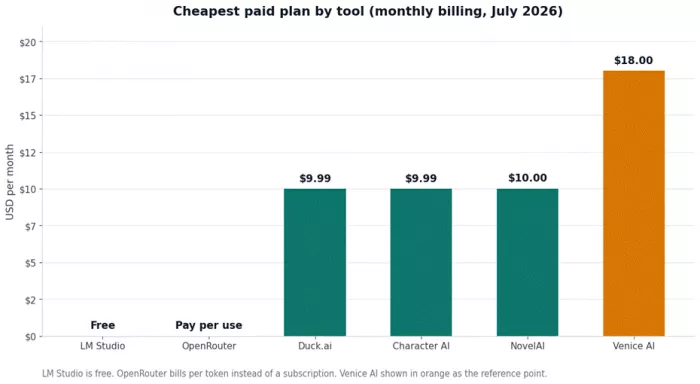
Figure 1: Cheapest paid plan per tool on monthly billing, verified July 2026.
Three things jump out of that chart:
• Free options set a high bar. Duck.ai and LM Studio deliver serious private AI for nothing, which changes what $18 a month has to justify.
• Venice sits at the top of the subscription pack. Every direct rival undercuts Pro on entry price, some by nearly half.
• Annual billing reshuffles the order. Character AI drops to about $7.92 per month on its yearly plan, and Venice offers annual discounts of its own.
Which alternative should you actually pick?
Skip the agonizing. Match your situation to a line below:
• You want the closest overall swap, free: Duck.ai. Private by design, no account, and better raw models than most people expect.
• You want maximum privacy and full control: LM Studio. Offline, free, and entirely yours, if your hardware can carry it.
• You are building something or love tinkering: OpenRouter. One key to 400+ models beats maintaining five provider accounts.
• You mostly used Venice for fiction: NovelAI. Purpose-built writing tools outclass a general chat window for long projects.
• You want instant character fun: Character AI. Just accept the filters and the ads going in.
Final verdict: the scorecard
After weeks of side-by-side use, here is how everything nets out. The overall score weights privacy at 30%, model quality at 25%, features at 20%, value at 15%, and control at 10%, as described in the methodology.
| Tool | Privacy | Quality | Features | Value | Overall |
|---|---|---|---|---|---|
| LM Studio | 10 | 8.0 | 7.5 | 9.5 | 8.9 |
| Duck.ai | 9.5 | 8.0 | 7.5 | 9.5 | 8.8 |
| OpenRouter | 7.5 | 9.5 | 8.0 | 9.0 | 8.7 |
| NovelAI | 9.0 | 8.0 | 8.5 | 8.0 | 8.5 |
| Character AI | 6.0 | 7.0 | 8.5 | 7.0 | 7.4 |
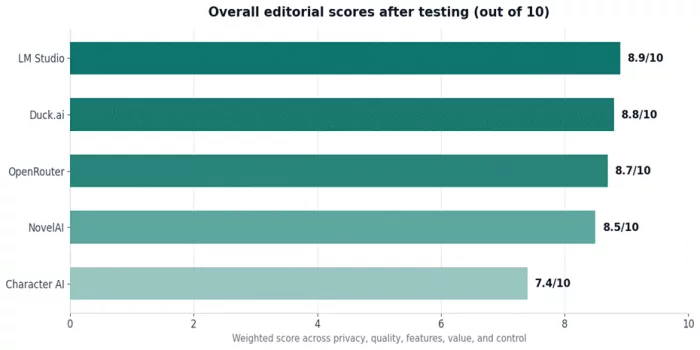
Figure 2: Overall editorial scores across the five weighted criteria.
And here is where I land after all of it. If I could only recommend one tool to a typical Venice user, it would be Duck.ai: it protects the two things Venice users care about most, anonymity and non-training, while quietly handing you stronger models for free. LM Studio edges it on pure score because nothing beats local, but it asks for hardware and patience that not everyone has to give.
OpenRouter is the sleeper pick if the API was ever part of your Venice workflow, and NovelAI remains the best writing-first alternative by a comfortable margin. Character AI is a genuinely fun product, but it solves an entertainment problem, not a privacy problem, and its score reflects that gap.
The honest closing note: no single tool replicates Venice exactly. Its particular mix of no-logs chat, image and video generation, and light-touch filtering in one consumer app is still unusual. Every alternative here trades away one piece of that to be better at another, and the right choice depends entirely on which piece you actually use.
Comments