Table of Contents
- What Edficiency actually is
- The problem it solves
- How it works, in six steps
- The engine doing the work: Autoassign
- Key features
- Does it actually move outcomes?
- What people are saying
- Review scorecard
- Pros and cons
- Pricing and plans
- Who it fits, and who it does not
- Edficiency versus the alternatives
- The verdict
Flex period, advisory, WIN time, Power Hour, Resource. Schools have a dozen names for that loose block in the middle of the day, and most of them run it the same way: one overwhelmed teacher, a shared spreadsheet, and a fair amount of hallway guesswork about who is supposed to be where.
Edficiency was built to replace that routine. The idea is simple: build the day's rosters automatically, put the students who need help where they need to be, and let everyone else choose. By design, rosters that once swallowed a planning period are generated in seconds, a student who failed Tuesday's chemistry quiz can be pulled into Wednesday's small group, and no one is left drifting between rooms when the bell rings.
This review draws on the product's own documentation, verified user reviews, and published school results to cover how the tool works, what it costs, where it frustrates people, and the detail plenty of search results still miss: Edficiency now lives inside Securly Flex.

| Quick answer. Edficiency is cloud-based flex scheduling software for middle and high schools. It automatically builds daily rosters for flex, advisory, and intervention periods, placing the students who need support first and letting everyone else choose their own session. Securly acquired Edficiency on February 1, 2024, and the product now runs as Securly Flex. |
| Category | K-12 flex and RTI/MTSS scheduling |
| Best for | Middle and high schools |
| Founded | Around 2015, Oshkosh, Wisconsin |
| Owned by | Securly (acquired Feb 1, 2024) |
| User rating | 4.9 / 5 across 45 verified reviews |
| Pricing | Custom quote (historically from ~$1,285/yr) |
| Access | Browser-based, any device |
| Availability | United States, English |
What Edficiency actually is
A flex period is a block of time carved into the regular school day for help and enrichment, instead of asking families to arrange tutoring before or after hours. One roster might hold a reading intervention, a test retake, a robotics build, a counselor check-in, and a quiet study hall, all running at the same time.
Coordinating that by hand is where schools drown. Edficiency handles the logistics: it assigns students to the right room each day based on priority, balances class sizes, catches scheduling conflicts, and tells every student and teacher exactly where to report.
The platform started around 2015 in Oshkosh, Wisconsin, and spent years focused on one job rather than trying to be a full student information system. In February 2024, Securly, a K-12 safety and wellness company, acquired it. Co-founder Joseph Connelly and the Edficiency team moved across, and the technology is being folded into Securly Flex. For anyone evaluating Edficiency today, that is the practical headline: the name on the login screen is Securly Flex, legacy customers are migrating to the combined product, and the scheduling engine underneath is the one Edficiency built.
The problem it solves
The case for a tool like this is easy to see once the manual version is in front of you. A paper or spreadsheet flex system asks a coordinator to reconcile hundreds of requests every single day. Teachers want specific students. Students want specific sessions. Rooms have seat limits. Certain kids cannot be placed together. Someone always forgets to sign up.
Do that by hand and two things happen. Staff lose hours they do not have, and the students who most need help are the easiest to lose in the shuffle. Edficiency's pitch is to automate the reconciliation so the adults spend their flex time teaching rather than sorting names.
How it works, in six steps
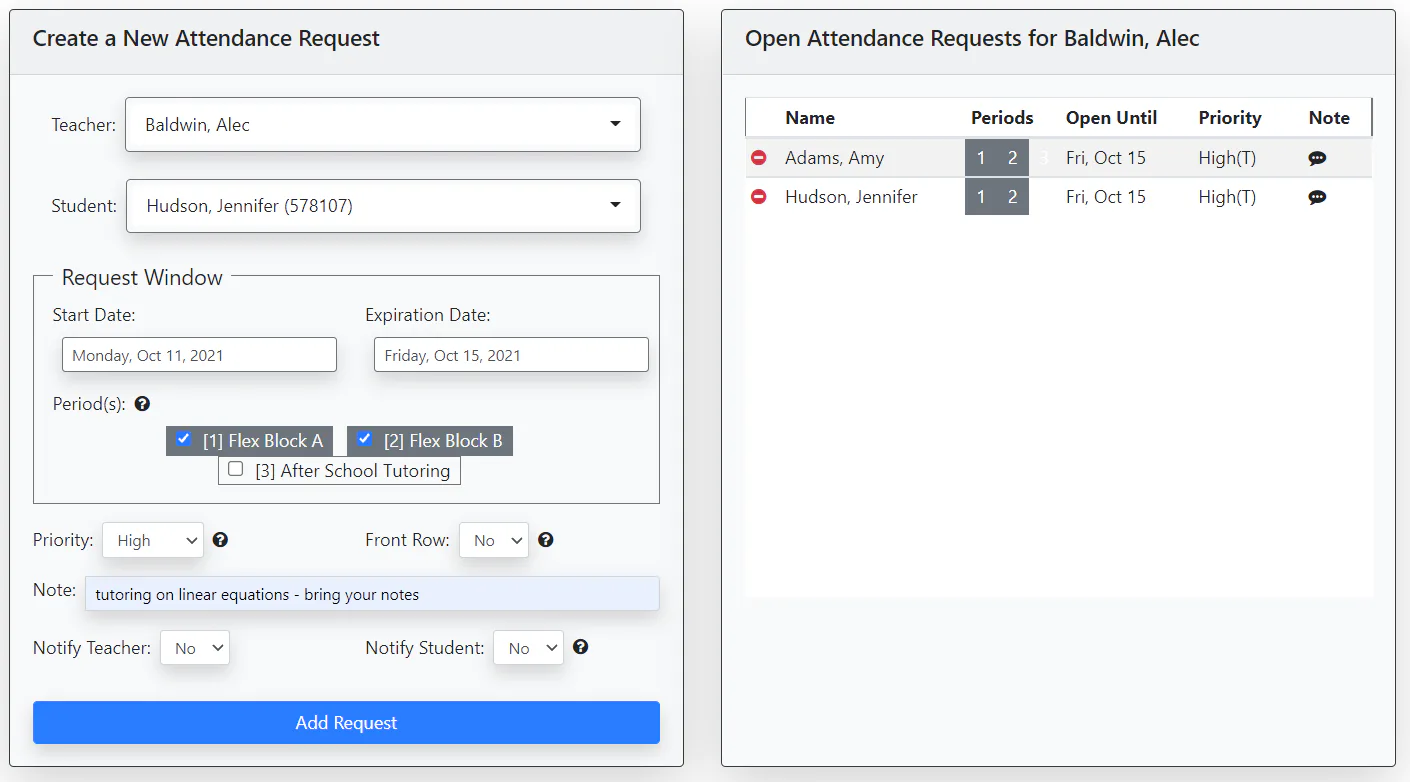
| 1 Set up the period Pick the days, the times, and the cutoff for sign-ups. | 2 Schedule activities Teachers post sessions with a room, a seat limit, and a priority level. |
| 3 Place the must-attends Required sessions and teacher requests outrank student choice. | 4 Let students choose They browse open sessions and sign up on web or mobile before the cutoff. |
| 5 Fill the gaps Autoassign seats every remaining student, and a catchall covers anyone still loose. | 6 Take attendance Teachers mark who showed with QR or barcode check-in, and records export to CSV for the SIS. |
The engine doing the work: Autoassign
The feature carrying the load is Autoassign. Before each flex period begins, it sweeps up every student who has not registered and drops them into an eligible session. It is not random. The engine weighs student preferences, teacher priorities, roster memberships, at-risk flags, seat limits, shared-room capacity, and rules about which students should be kept apart, then seats everyone at once.

Two details matter in daily use. Manual registrations are never overwritten, so a deliberate placement stays put. And an administrator can rerun Autoassign on demand or reshuffle its results, which means a last-minute change does not force a rebuild of the whole period.
Key features
| Autoassign Seats every unregistered student in an eligible session before the bell, balancing choice, priority, and capacity. | Priority placement Teacher requests beat student sign-ups, and admin must-attends outrank everything else. |
| Attendance tracking Mark every session, including QR and barcode check-in, lunch, and catchall attendance. | Automated notifications Students get their daily agenda and changes by email, in-product message, or mobile push. |
| Rosters and groups Reusable student groups for recurring interventions, advisories, and clubs. | Contact control Keep specified students out of the same activity or room. |
| Capacity controls Enforce seat limits per activity and shared limits when sessions use one room. | Conflict detection Competing placements are flagged and resolved by priority, so the highest-need seat wins. |
| Recurring activities Build a session once and repeat it across the week, month, or term. | Controlled access Restrict activities so only eligible students can see and join them. |
| Lunch scheduling Manage lunch registrations and attendance alongside flex sessions. | Reporting and exports Filter attendance by period, activity, date, or student, with export built in. |
Does it actually move outcomes?
1M+ Student and educator accounts | 1,000+ Schools using it | 27,000+ Activities on peak days | 4.9/5 Verified user rating |
Vendor figures put the combined Securly Flex footprint above a million student and educator accounts and more than a thousand schools, with peak days topping 27,000 scheduled activities. The more telling evidence sits at the classroom level. At Dickinson High School in Texas, where roughly 3,810 students use the tool for daily flex time, the share of Biology STAAR retesters who passed climbed from 25 percent to 76 percent over three years, according to the school's case study. That is the whole premise in one data point: move intervention into the day, make attendance automatic, and more of the students who were falling behind get caught.
What people are saying
| Courtney Ramirez Principal, Dickinson High School Runs a building of roughly 4,000 and leans on flex to keep every student accounted for. In her words, "there's 4,000 people in this building." Securly | Delaina Storey Chemistry teacher, Dickinson HS Can spot a student slipping, log in, and draft them into the next day's small group in under a minute. Credits the period for turning failing chemistry grades around. Securly case study |
| Ross Wason Assistant principal, Liberty Middle Says flex helped make a large school feel small by building relationships, and gave staff one place to run remediation, enrichment, and clubs. Securly | Stacie Kegley Instructional coach, Ballyshannon Middle Was never satisfied with how RTI ran until the switch, and inside a single year felt the tool met the school's needs. Securly |
| Mary Flex leader, education management Called the rollout the smoothest full-school software launch she had run, describing it as "the easiest and most satisfying full school implementation." GetApp, 2021 | Tim High school flex coordinator Found the scheduling genuinely intuitive for staff and students, praised fast and resolution-focused support, and summed it up as "making flex time scheduling a breeze." Software Advice, 2021 |
| Jessica Flex leader, Malden High School Liked the variety of sessions and the ease of use, but wished staff had more hands-on training before the first round of flex began. Software Advice, 2021 | Across review sites Aggregated verified reviews On Capterra and GetApp, Edficiency holds 4.9 out of 5 from 45 verified reviews, with 100 percent rated positive and a 90 percent likelihood to recommend. Capterra / GetApp |
Review scorecard
| Measure | Result |
| Overall rating | 4.9 / 5 |
| Verified reviews | 45 |
| Positive reviews | 100% |
| Features rating | 4.6 / 5 |
| Likelihood to recommend | 90% (9 / 10) |
| Ease of use and support | Consistently praised |
Aggregated from Capterra and GetApp listings for Edficiency before the acquisition. Securly Flex is now sold by quote, so these figures reflect the Edficiency product reviewers were using.
Pros and cons
Pros
| Cons
|
Pricing and plans
Edficiency never published a public price list, and that has not changed under Securly. Historically, software directories listed it starting around 1,285 dollars per year, scaled by a school's enrollment and how often it runs flex. In practice, pricing is quote-based: a school books a demo, the team scopes the number of students, session types, and schedule, and a figure follows.
That is normal for K-12 scheduling software, but it means budgeting takes a conversation rather than a checkout page. Schools weighing the tool should plan to request a demo and a written quote, and ask directly about migration terms if they are coming in as a legacy Edficiency customer.
Who it fits, and who it does not
A strong fit for
| A weaker fit for
|
Edficiency versus the alternatives
| Tool | What it really is | Best fit |
| Edficiency / Securly Flex | Purpose-built flex and intervention scheduler with auto-assign and attendance | Schools running a structured flex block |
| PowerSchool / Skyward | Full student information systems where scheduling is one module | Districts wanting everything in one SIS |
| Alma | An SIS with built-in scheduling features | Smaller schools needing SIS plus scheduling |
| Spreadsheets | The manual status quo, free but labor-heavy | Very small or brand-new programs |
Edficiency's edge is focus and its limit is scope. It schedules flex time well and does not try to replace a student information system.
The verdict
4.6 / 5 editorial rating, from verified reviews and features Taken together, the feature set points to something more than scheduling: a logistics layer for the middle of the day. The pieces that sound small on a list are the ones reviewers credit with saving a coordinator's afternoon, such as Autoassign clearing the unregistered pile in a single pass, separation rules keeping two students apart, and a cut list showing exactly who never turned up. The balance it strikes is the real design win, handing the neediest students a seat they cannot trade away while letting everyone else choose enough to stay bought in. The honest caveats are worth stating plainly. Setup rewards patience, and reviewers note a first rollout goes better with real staff training than a quick walkthrough. Attendance exports rather than syncing live into every SIS. Pricing hides behind a demo. And the Edficiency name is on its way out as the product merges into Securly Flex, so new buyers are really buying Securly's roadmap. For a middle or high school that has built flex time into the day and is tired of running it on spreadsheets, it earns a serious look. The verified user scores sit near the top of the category for a reason, and the classroom results behind them are hard to argue with. |
Comments