I made a Teachmate account the way I suspect a lot of teachers do. It was the back end of a long day, report season on the horizon, and I was quietly sceptical that one more tool with AI in the name would earn its place. The question I actually cared about was the plain one on the tin. Is Teachmate AI free to use, or is free a two click trap that drops you onto a payment form?
So I signed up properly rather than skimming a landing page. I gave it an email, chose a country and a curriculum, set a password, and arrived at the plan screen. There is a Basic plan that costs nothing, and you can stay on it for as long as you like without handing over card details. That settled the headline in about ninety seconds. The far more useful question, and the one this review spends most of its time on, is what the free plan lets you do and where it stops.
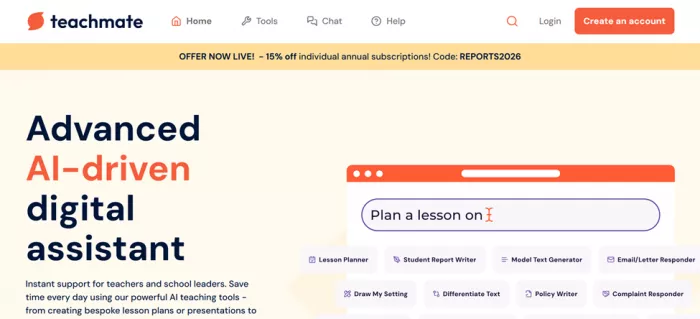
Across a few sittings I pointed the free tier at the jobs teachers reach for first: a batch of end of year report comments, a lesson plan on a topic I know well, comprehension questions built from a passage I pasted in, and a parent email I had been putting off. Some of it saved me real time. Some of it sat behind a Pro wall the moment I got curious. Here is the honest version of both.
What you get on the Teachmate free plan
The surprise for me was that the free tier is generous on the supporting features and stingy in exactly one place: breadth. You keep the tracker, the downloads and the support. You do not keep the full toolbox.
Included on Basic (free) • A core set of the AI teaching tools, enough to try report writing and planning • Curriculum specific outputs mapped to the curriculum you pick at sign up • Downloadable, editable content you can lift into your own documents • A responsive support team, not a bot queue • Free access to the CPD webinar • Time saved tracking that adds up the hours the tools claw back • Rolling AI improvements as the platform updates | Locked until you upgrade • The full library of 160 plus tools rather than a core slice • Open Chat, the GDPR safe general assistant • The slideshow generator that turns a topic into a ready deck • Early access to features as they launch • School controls for managing your own licences • Reduced per seat pricing for schools and trusts |
Teachmate pricing: Free vs Pro vs Whole School
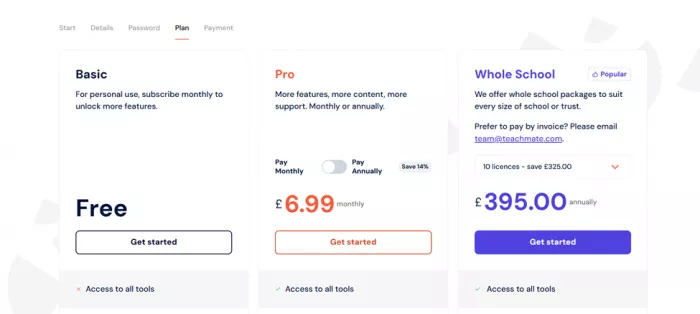
This is the current feature split from Teachmate’s own pricing page. Green means included, red means not.
| Feature | Basic Free | Pro £6.99 / mo | Whole School from £395 / yr |
|---|---|---|---|
| Access to the full tool library | No | Yes | Yes |
| Open Chat assistant | No | Yes | Yes |
| Slideshow / presentation generator | No | Yes | Yes |
| Curriculum specific outputs | Yes | Yes | Yes |
| Downloadable, editable content | Yes | Yes | Yes |
| Responsive support team | Yes | Yes | Yes |
| Free CPD webinar access | Yes | Yes | Yes |
| Time saved tracking | Yes | Yes | Yes |
| Rolling AI improvements | Yes | Yes | Yes |
| Early access to new features | No | Yes | Yes |
| Schools manage their own licences | No | No | Yes |
| Reduced per seat pricing for schools | No | No | Yes |
| Plan | Price | What you get |
|---|---|---|
| Basic | Free | Core AI tools, curriculum specific output, downloads and support, and the time saved tracker. No card needed to start. |
| Pro | £6.99 / mo ~£6 / mo billed yearly (14% off) | The full 160 plus toolkit, Open Chat, the slideshow generator and early access to new tools. 14 day refund window. |
| Whole School | from £395 / yr entry package, 10 licences | Managed staff licences, reduced per seat pricing and invoicing, plus everything in Pro. Larger sizes priced per school. |
How I set up a free Teachmate account
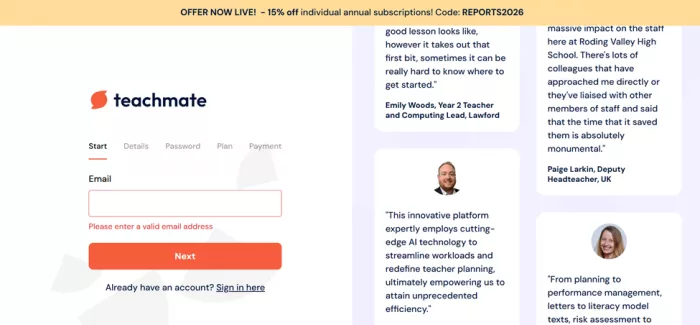
The flow is five short screens, and the only one that asks for money is the plan screen, which you can skip by choosing Basic. Worth knowing, because the payment step sits far enough along that it looks compulsory, and it is not.
1. Enter an email. The first screen only wants an address. If you already have an account there is a sign in link on the same page.
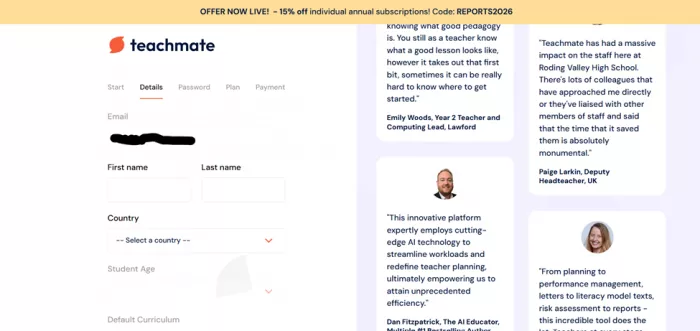
2. Add your teaching details. Name, country, student age and a default curriculum. This tailors output later, so if you teach the English national curriculum, set it here.
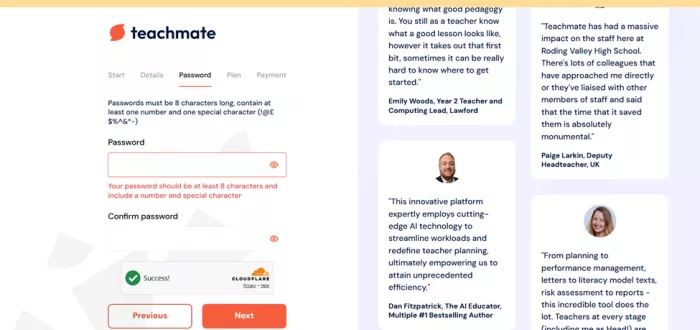
3. Set a password. Eight characters with at least one number and one special character. A Cloudflare check runs in the background.
4. Choose your plan. Pick Basic to stay free. Card details are only requested if you select Pro on this screen, so free users are not asked to pay.
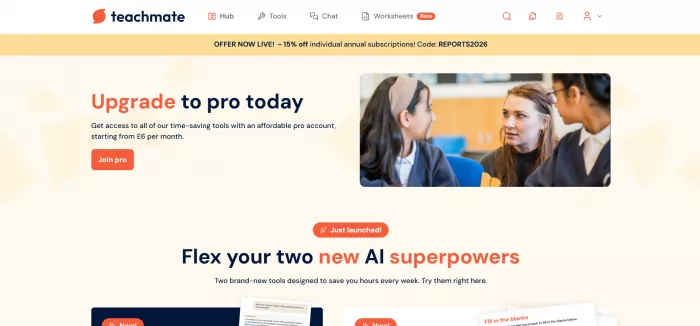
5. Land in the Hub and start generating. You drop into the dashboard with a search bar and the tool list. Typing a task, for example plan a lesson on, is the fastest way in.
The tools I tested on the free tier
Teachmate is not one chatbot with a teacher costume on. It is a shelf of narrow, task shaped tools, and that focus is the point. The two marked Pro are the ones I hit a wall on.
| Tool | What it does |
|---|---|
| Student Report Writer | Report comments with a tone you choose, in roughly twenty seconds per pupil. |
| Lesson Planner | A structured plan mapped to your topic and curriculum that you edit rather than write from scratch. |
| Comprehension Questions | Questions generated from a text you paste in, with an answer sheet alongside. |
| Email / Letter Responder | First drafts of replies to parents and colleagues that you tidy and send. |
| Model Text Generator | Worked examples and model answers to show a class what good looks like. |
| Differentiate Text | Rewrites a passage up or down a reading level for mixed ability groups. |
| Policy Writer | Draft school policies and guidance, aimed at the leadership admin pile. |
| Complaint Responder | Measured, calm replies to difficult messages you would rather not draft cold. |
| Clone My Tone | Teaches the AI your own writing style so output sounds less like a template. |
| Slideshow Generator · Pro | Turns a topic into a ready slide deck. Locked on the free plan. |
| Open Chat · Pro | A general assistant kept inside the platform data rules. Pro only. |
| Leadership toolkit | SEF and SIP writers, a Pupil Premium planner and more, part of the wider 160 plus set. |
Free or Pro: which one do you actually need?
Here is the tension I ran into, and it is worth naming plainly. The free plan is real and genuinely useful for the bread and butter jobs. A pile of report comments went from a dreaded evening to a task I finished over a coffee, and the tone control meant they did not all read identically, which is the usual giveaway with generated reports. For that alone, a free account is worth having on the shelf.
The catch is that the two features most likely to make you say oh, this changes things are the two you cannot reach without paying. Open Chat is the flexible, ask it anything tool, and the slideshow generator is the one that saves the most raw minutes on a busy week. Free lets you judge the report writer and the planners. It cannot show you the platform at full stretch, which means the free tier is a fair trial of the floor, not the ceiling.
So the sensible route is the obvious one. Start on Basic, spend a week running your actual work through it, and watch the time saved tracker. If it is clawing back a couple of hours a week, Pro at around six pounds a month billed yearly pays for itself against a single evening of your time, and the 14 day refund window means an upgrade is low risk if it does not click. If you only need the occasional report paragraph, free may be all you ever touch, and that is a legitimate outcome rather than a bait.
Is Teachmate AI safe and legit?
This matters more here than for most tools, because teachers type things about real children into it. On that front Teachmate has done the unglamorous work, and it is the strongest reason I would trust it over a general chatbot for school tasks.
At a glance: UK data residency · UK GDPR compliant · BESA certified · Cyber Essentials certified · No training on your inputs · Payments via Stripe
The founding story backs this up. Teachmate was co founded by Jon Chippindall, its chief executive, and Lee Parkinson MBE, both classroom educators rather than technologists who wandered into schools. That heritage shows in how task specific the tools are, and in a recurring line the team repeats: when you use a free public chatbot, your inputs can become training data, whereas Teachmate states plainly that it does not use your content to train models. It keeps data in the UK, aligns with the Department for Education’s expectations on AI, and the platform was named EdTech Company of the Year at the Network for Education Excellence awards, which is a reasonable third party signal that it is a serious operation.
None of that removes your own duty of care. You should still avoid pasting a child’s full name next to sensitive detail where you do not need to, the same as with any system. But as tools for school work go, the compliance posture here is well ahead of typing the same prompt into a consumer chatbot.
How Teachmate rates across platforms
Teachmate is a fast growing but still fairly young product, so you will not find the thousands strong rating counts that older software carries, and it does not yet hold a big volume score on directories like G2 or Capterra. Most of the signal sits on Trustpilot, social platforms, independent teacher blogs and one school pilot. Here is what each actually says, with hard numbers where they exist and an honest verdict where they do not.
★★★★☆ 4 / 5. This review’s overall score. Sentiment across the wider web reads as mostly positive, with a small but vocal set of critical voices.
| Source | Verdict | What it highlights |
|---|---|---|
Scamadviser Website safety scan | 77% · Legit | Flags the site as probably legitimate and low to medium risk, with a valid SSL certificate and a long registered domain. |
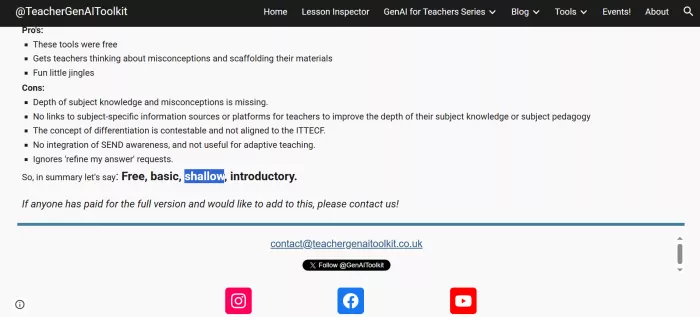
Teacher GenAI Toolkit Independent UK review | Mixed | Calls the free account a fair introduction but shallow on subject depth, and found the refine bar clunky in places. |
Workload Reduction Pilot Schools North East | Positive | Reports feedback from pilot schools as positive across the board, praising the teacher first interface and curriculum tailoring. |
User review aggregators 5app.ai, SourceForge, blogs | Mostly positive | Strong on time saved and tool range, with a minority calling some tools basic or raising billing and support complaints. |
nEdEx Awards Industry recognition | Award | Named EdTech Company of the Year at the Network for Education Excellence awards. |
TikTok, Instagram, Facebook Social platforms | Positive, caveat | A large, active teacher following posts warm recommendations, though some clips are sponsored or from brand ambassadors. |
What teachers are saying
I pulled these from independent reviews, a school pilot and public review sites rather than the testimonials on Teachmate’s own homepage, and I kept the critical ones in. The picture is broadly happy, with two consistent grumbles worth hearing before you commit.
POSITIVE · AGGREGATED REVIEWS A helpful time saver for lesson planning and reports, with an impressive spread of tools for everyday teaching. User review summary, 5app.ai |
POSITIVE · SCHOOL PILOT Pilot schools were positive across the board, singling out how closely the tools matched their curriculum and key stages. Workload Reduction Pilot, Schools North East |
POSITIVE · INDEPENDENT REVIEWER Outputs come back polished enough to use with only small edits, and some teachers report clawing back hours each week. Independent review, StackMyAI |
CRITICAL · INDEPENDENT REVIEWER Their verdict on the free account was blunt: free, basic, shallow, introductory, with a wish for more subject depth. Independent review, Teacher GenAI Toolkit |
CRITICAL · REVIEW SITE One reviewer was charged for an annual plan by mistake, felt support was unhelpful, and rated the tool basic. User review, SourceForge |
COMMON THEME The recurring niggle across sources is that a handful of tools feel basic and could use more customisation. Recurring in user reviews |
Teachmate free plan: pros and cons
What works • The free plan is genuinely free, with no card to begin and no time bomb on the account • Even on free you keep the useful bits: curriculum output, downloads, support and the time saved tracker • Built and run by working teachers, which shows in how sharply the tools fit real jobs • Strong data posture: UK residency, GDPR, BESA and Cyber Essentials, and no training on your content • Fast where it counts, with a report comment or a first draft plan in seconds and tone set before it writes | What to weigh up • The two features people most want to trial, Open Chat and the slideshow generator, are Pro only, so free cannot show the full platform • The free tier caps how much of the 160 plus library you can reach, and heavier users meet that limit fast • Output is a confident first draft, not a finished report, so a teacher’s edit is still part of the job • It is UK first by design, and while US and Canadian curricula are supported, the framing leans British • Pro is billed per person, so a few colleagues without a whole school budget can add up quickly |
Who Teachmate is best for
• Primary and secondary teachers: anyone losing evenings to report comments, planning and parent emails will feel the difference first.
• Middle and senior leaders: the SEF, SIP, policy and Pupil Premium tools take aim at leadership paperwork that rarely fits a school day.
• Schools and trusts: the Whole School package adds managed licences, reduced per seat pricing and invoicing, which suits a shared rollout.
• Less of a fit for: higher education researchers and anyone working outside a school curriculum, since the tools assume a classroom context.
Final VerdictFree is real, and it is worth setting up today After a few sessions of feeding it my own work, my answer to the headline is a clean yes. Teachmate AI is free to use in the way that word should mean: a Basic plan with no card, no countdown, and enough tool to judge whether the platform earns a place in your week. I got a batch of report comments done without the usual dread, drafted a parent email I had been avoiding, and pulled comprehension questions out of a passage in the time it takes to reread it. For zero pounds, that is a fair trade. The honest asterisk is that free shows you the floor, not the ceiling. The features that made me sit up, Open Chat and the slideshow generator, are the ones the free plan will not open, so the paywall lands exactly where the excitement builds. That is a deliberate design, and a defensible one, but it is worth going in knowing it. My advice is unfussy. Make the free account, run a real week of work through it, and let the time saved tracker make the case. If it is saving you evenings, Pro at around six pounds a month is one of the easier yeses in the edtech aisle. If it is not, you have lost nothing but a sign up. |
Comments