Table of Contents
- Kling AI vs Pika at a Glance
- Two Different Philosophies of AI Video Creation
- First Impressions and Workflow
- Generating Your First Video
- Image-to-Video: Where the Differences Become Clear
- Motion, Realism, and Visual Quality
- Creativity and Experimentation
- How Much Control Do You Really Get?
- Which Tool Handles Different Projects Better?
- Pricing and Value
- Where Kling AI Feels Like the Better Choice
- Where Pika Feels Like the Better Choice
- Conclusion
A creator starts with a simple idea: turn a prompt or image into a short video that looks usable, not just impressive for a few seconds. That is where the difference between Kling AI and Pika becomes clear.
Kling AI is better suited to creators who want realism, atmosphere, and more controlled cinematic movement. Pika feels more useful when the goal is quick experimentation, creative edits, and short-form content.
Both tools can produce strong results, but they fit different workflows. Kling rewards planning and careful prompting. Pika rewards speed and iteration. This comparison looks at how both tools feel in actual use, so creators can decide which one matches the way they make videos.
Kling AI vs Pika at a Glance
| Category | Kling AI | Pika |
| Primary focus | Realistic, cinematic AI video with stronger scene control | Fast AI video creation with creative editing and effects |
| Ease of use | More deliberate and settings-conscious | Easier to understand quickly |
| Learning curve | Moderate. Better results need stronger prompts and references | Lower. Easier for casual testing |
| Text-to-video quality | Better for detailed prompts with clear motion and camera direction | Better for short, simple, stylized concepts |
| Image-to-video quality | Stronger for preserving mood, detail, and subject presence | Faster for animating stills and testing creative variations |
| Motion realism | More natural and grounded | More playful, but less reliable with complex movement |
| Prompt adherence | Stronger when the request is specific and visually directed | Good with simple prompts, less steady with layered scenes |
| Character consistency | Better with references, though still imperfect | More likely to drift in faces, clothing, or body details |
| Camera controls | Better for cinematic movement and shot planning | Better for quick camera-style effects than precise direction |
| Editing tools | Focused more on generation control, extension, and output quality | Stronger for swaps, additions, transitions, and effects |
| Rendering speed | Can vary by model, quality, and queue | Often better for quick experimentation |
| Creative flexibility | Better before generation through prompt and image control | Better after the first idea through editing tools |
| Best use cases | Product visuals, cinematic B-roll, short-film tests, realistic image-to-video | Social clips, fast concepts, creative effects, animated images |
| Free plan | Available with limits | Available with monthly credits |
| Starting price | Commonly around $10/month, depending on region and billing | $8/month when billed yearly |
The table shows the main split clearly. Kling AI feels stronger when the clip needs to look polished and physically believable. Pika feels stronger when the creator needs speed, a lighter workflow, and more room to play with the result after generation.
Two Different Philosophies of AI Video Creation
Kling AI and Pika approach AI video from different directions.
Kling feels closer to a shot-building tool. It works best when the creator has a visual plan: the subject, the camera move, the lighting, the mood, and the kind of motion the scene should have. If you describe a slow product reveal on a reflective surface, Kling is more likely to treat the prompt like a directed shot. It often gives the object more weight, the lighting more depth, and the camera movement more purpose.
Pika feels closer to a creative editing space. It is less concerned with making every clip look cinematic and more interested in helping creators move quickly from one idea to the next. You can animate an image, swap an object, add an element, try an effect, or reshape a clip without treating every generation like a major production decision.
That difference affects almost everything.
Kling suits creators who want control before the render. Pika suits creators who want flexibility after the first result appears. Kling is more useful when the goal is a polished clip that can sit inside an edit. Pika is more useful when the goal is fast testing, short-form output, or visual surprise.
The difference also changes how failure feels. A weak Kling result can be frustrating because it often costs more time and credits to refine. A weak Pika result feels easier to discard because the tool encourages another attempt.
For planned visual work, Kling feels more serious. For loose creative exploration, Pika feels easier to keep using.
First Impressions and Workflow
Kling’s workflow asks for more intention. The interface is not difficult, but it nudges you toward thinking about the scene before generating. A prompt benefits from details about movement, framing, lighting, and subject behavior. Reference images also matter more because Kling’s image-to-video workflow is one of its strongest areas.
That makes the first experience feel slightly slower. You are not simply typing an idea and watching what happens. You are trying to direct the model.
Pika feels more immediate. Its interface makes it easier to test a prompt, retry a result, change the direction, or use one of its editing tools without overthinking the setup. It feels friendlier for creators who want to move quickly and see several options before deciding which one deserves more attention.
The difference becomes obvious during the first session. With Kling, the question is usually, “How do I make this shot better?” With Pika, the question is more often, “What else can I try with this?”
Kling feels stronger when the creator already knows what the video should look like. Pika feels stronger when the idea is still forming.
For beginners, Pika is easier to approach. For creators who already understand shot direction, Kling feels more capable.
Generating Your First Video
Give both tools the same prompt and they tend to reveal their priorities quickly.
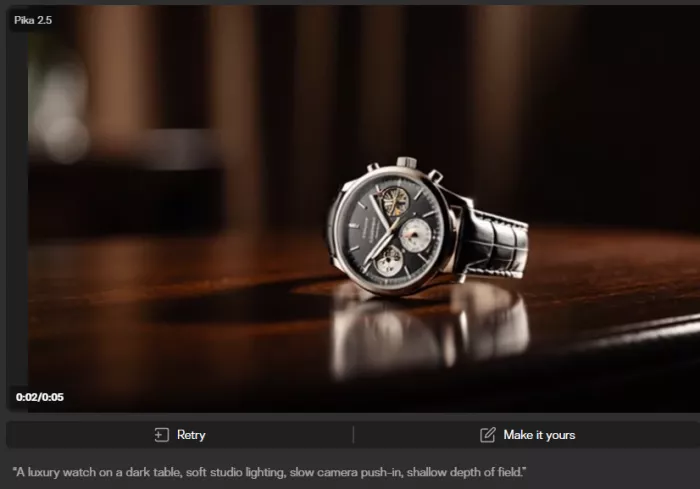
I tested the prompt: “A luxury watch on a dark table, soft studio lighting, slow camera push-in, shallow depth of field.”
Kling Output:
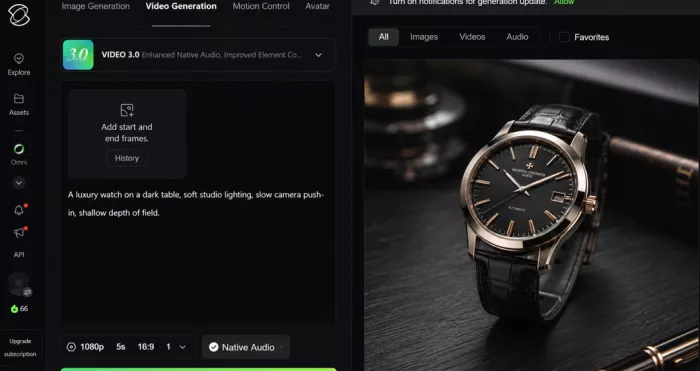
Kling is more likely to focus on the shot. The watch may hold its shape better. The lighting may feel more controlled. The camera movement may look closer to a deliberate product reveal. It can still produce odd reflections or small object distortions, but the overall intent usually feels more production-oriented.
Pika may create a visually appealing clip faster, but the result can feel more like a stylized animation than a carefully controlled product shot. It may be useful for a quick social teaser, especially if the creator wants a short visual hook rather than a polished brand asset.
Pika Output:
Now try a different prompt: “Turn this character image into a fun short clip with a surreal transformation effect.”
Pika feels more at home there. Its tools are built for quick changes, playful motion, and visual effects. Kling can animate the image, but it may feel too serious for a concept that depends on speed and surprise.
Prompt interpretation follows the same pattern. Kling handles detailed visual direction better. Pika handles simple creative requests more easily.
Neither tool removes the need for retries. Kling’s retries are often about refining realism. Pika’s retries are often about finding the most entertaining variation.
Image-to-Video: Where the Differences Become Clear
Image-to-video is one of the clearest areas where Kling and Pika feel different.
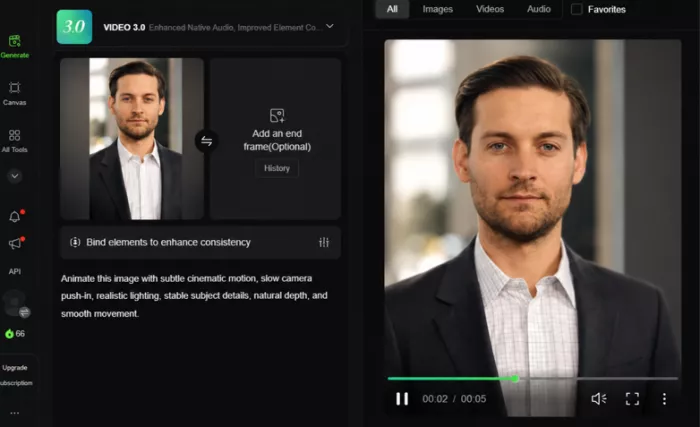
Kling usually does better when the still image already has a strong composition. A product render, a character portrait, a cinematic landscape, or a concept-art frame can be animated with more respect for the original mood. Kling tends to preserve visual depth and subject presence more convincingly, especially when the movement is subtle.
That makes it useful for creators who design the still image first. If the image is the foundation of the shot, Kling gives you a better chance of keeping the original look intact while adding motion.
Kling Output :
Pika Output:
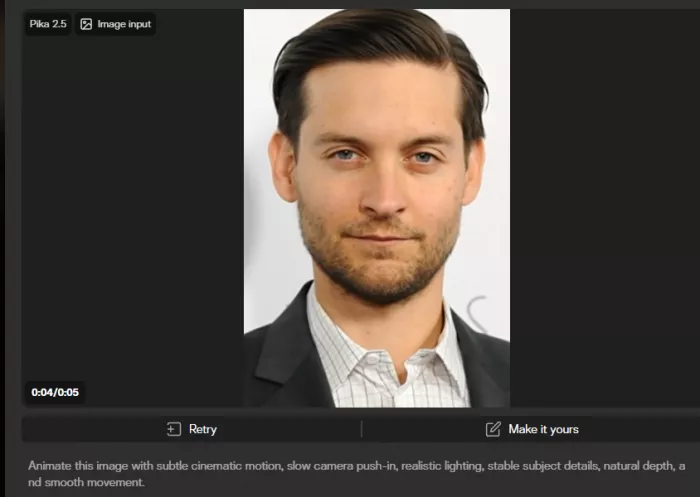
(Image-to-video test using the same reference image. Kling is better for preserving mood and detail, while Pika is useful for quick animated variations.)
Pika is faster and more playful with image-to-video. It is useful when the creator wants to animate a still, test an effect, or turn a static visual into something short and shareable. It may not preserve every detail as carefully, but it makes the process feel lighter.
The difference matters in real work. A product designer trying to animate a clean bottle render will probably prefer Kling because object shape and lighting consistency matter. A social creator animating a poster, meme, or stylized character may prefer Pika because speed matters more than perfect preservation.
Kling is better when the image needs to become a shot. Pika is better when the image needs to become content.
Motion, Realism, and Visual Quality
This is where Kling usually has the advantage.
Kling’s best clips have a stronger sense of physical space. A person walking through rain, a car moving through a city street, or a camera pushing through a dim hallway tends to feel more grounded. The background, subject, and camera movement often appear more connected.
Viewers notice this in small ways. Clothing moves with more weight. Fog and light feel more integrated into the scene. A product on a table looks more like it occupies the surface instead of floating above it. The camera does not always behave perfectly, but it often feels like it belongs inside the scene.
Pika can produce attractive visuals, but realism is less consistent. It works well for short clips and stylized motion. When the prompt asks for complex physical movement, multiple subjects, or strong continuity, the illusion can break sooner. Faces may shift. Hands may look awkward. Objects can lose detail as motion increases.
That does not make Pika weak. It means Pika is strongest when the viewer is not judging the clip like a film shot. A surreal transformation, a short animated image, or a quick product effect does not need the same physical realism as a cinematic sequence.
Character consistency follows the same pattern. Kling is usually better with references and controlled movement, though it still makes mistakes. Pika is more likely to change facial details or outfit elements when the scene becomes busy.
For cinematic framing, Kling feels more confident. For stylized impact, Pika can be more fun.
Creativity and Experimentation
Pika’s biggest advantage is not realism. It is momentum.
The platform makes it easier to keep trying things. A creator can test a prompt, retry the clip, add an object, replace something, create a transition, or apply an effect without feeling locked into one direction. That matters for social content, where the best idea is often discovered through quick attempts rather than careful planning.
Pika’s creative tools also make it feel less like a pure generator. Features built around swaps, additions, frames, transformations, and effects give creators more ways to work with a clip after the first result. If a scene is not perfect, it may still become useful after a quick edit.
Kling is less playful. It can create striking visuals, but it does not invite the same kind of fast remixing. Its creative strength is atmosphere, not rapid variation.
This is why some creators will prefer Pika even if Kling produces more realistic footage. A social media creator making daily posts may not need the most cinematic output. They need a tool that helps them create, test, discard, and repeat.
Kling is better for building a serious shot. Pika is better for finding a quick idea that works.
How Much Control Do You Really Get?
Kling gives more control before the generation. Pika gives more control after it.
With Kling, control comes through prompt direction, reference images, camera movement, and scene planning. If you know you want a slow dolly-in, a low-angle product shot, or a character walking toward the camera, Kling gives you more room to shape that intention.
The limitation is that correction often means generating again. If the camera moves too far or the subject changes slightly, you may need another attempt. That can be expensive in credits and time.
Pika’s control feels different. Its editing tools make it easier to adjust the idea after the first output. If you want to add something, replace an object, create a transition, or push the clip in a stranger direction, Pika gives you more hands-on flexibility.
The trade-off is precision. Pika may let you edit more easily, but it does not always give the same control over cinematic realism. Kling may be harder to revise, but it often gives a stronger base shot.
For creators who storyboard, Kling feels better. For creators who improvise, Pika feels better.
Which Tool Handles Different Projects Better?
| Project Type | Better Choice | Why |
| YouTube Content | Kling AI | Better for intros, cinematic B-roll, and polished visual inserts |
| Product Videos | Kling AI | Stronger object preservation, lighting, and controlled camera movement |
| Social Media Clips | Pika | Faster for short posts, effects, and quick variations |
| Marketing Campaigns | Depends | Kling works better for premium visuals; Pika works better for rapid concept testing |
| Storytelling Projects | Kling AI | Better atmosphere, motion realism, and shot coherence |
| Experimental Visuals | Pika | Stronger for transformations, playful edits, and visual remixing |
| Short Films | Kling AI | More suitable for cinematic framing and scene mood |
| Quick Concepts | Pika | Easier to test multiple ideas quickly |
The marketing category is the most split. A brand making a polished hero shot will likely prefer Kling. A team testing five social ad concepts before a campaign meeting may get more value from Pika.
YouTube creators also need to separate use cases. Kling is better for atmospheric cutaways and opening visuals. Pika is better for quick animations, thumbnails brought to life, or short visual jokes.
For short films, Kling is the stronger starting point because cinematic consistency matters more. For experimental visuals, Pika is easier to recommend because the work often benefits from surprise.
Pricing and Value
Both Pika and Kling use credit-based pricing, so the real value depends on how many usable videos you can create before credits run out. Pika is easier for beginners because its plans are simple and cheaper to start with. Kling usually feels more expensive, but it can offer better value when you need polished, production-ready video clips.
| Tool | Plan | Price | Monthly Credits | Best For |
| Pika | Basic | Free | 80 credits | Testing the tool |
| Pika | Standard | $8/month, billed yearly | 700 credits | Beginners and regular testing |
| Pika | Pro | $28/month, billed yearly | 2,300 credits | Frequent creators |
| Pika | Fancy | $76/month, billed yearly | 6,000 credits | Heavy video creation |
| Kling AI | Free | Free | Limited/free credits | Trying basic features |
| Kling AI | Standard | Around $10/month | Around 660 credits | Casual creators |
| Kling AI | Pro | Around $37/month | Around 3,000 credits | Regular creators |
| Kling AI | Premier | Around $92/month | Around 8,000 credits | High-volume creators |
| Kling AI | Ultra | Around $180/month | Around 26,000 credits | Studios and heavy production |
Pricing Note: These prices were checked in 2026 from official pricing or membership-related pages where available. Pricing, credits, discounts, billing cycles, model access, and regional offers can change anytime, so always check the official pricing page before subscribing.
Where Kling AI Feels Like the Better Choice
Kling makes more sense when the creator needs the clip to hold up visually.
A product marketer creating a premium watch shot, a filmmaker testing a night scene, or a YouTuber building cinematic B-roll will get more from Kling’s strengths. It handles the atmosphere better. It gives movement more weight. It is more likely to make a scene feel like it was filmed rather than animated from a still.
Kling is also the better option when the creator starts with strong reference material. If you already have a product render, character concept, or mood image, Kling’s image-to-video workflow can preserve more of that original intent.
It is not the best tool for casual play. It asks for more planning and more patience. But when the goal is polish, that slower workflow can be worth it.
Choose Kling when the final clip matters more than the number of attempts.
Where Pika Feels Like the Better Choice
Pika makes more sense when the creator needs speed and flexibility.
A social media creator trying several post ideas, a marketer testing campaign concepts, or an educator making a quick visual example will probably appreciate Pika’s lighter workflow. It is easier to start, easier to retry, and easier to treat results as drafts rather than final shots.
Pika is also better when editing matters as much as generation. If the plan involves adding objects, swapping elements, creating transformations, or experimenting with effects, Pika feels more natural than Kling.
It is not the better choice for every realistic scene. If a character must stay consistent or a product must look exact, Pika can become frustrating. But for fast creative work, it keeps the process moving.
Choose Pika when iteration matters more than cinematic control.
Conclusion
AI video tools are now good enough that the first impression can be misleading. A clip can look impressive for two seconds and still fail as usable footage. The real test is what happens after that first generation: how quickly you can refine it, how much control you have, how often the result holds together, and whether the tool fits your creative rhythm.
Kling AI is stronger when the work needs realism, atmosphere, and a more cinematic finish. Pika is stronger when the work needs speed, editing flexibility, and room to experiment.
The best AI video generator is rarely the one with the most features. It is usually the one that aligns with the way a creator prefers to work.
For planned shots, Kling feels more dependable. For rapid creative testing, Pika feels easier to keep open.
Comments