Six weeks of running both tools side by side shaped this comparison: a 180,000 line Django monolith that pays the bills, and a scrappy Next.js side project that breaks every other weekend. Claude Code lived in a terminal tab the whole time, Cursor sat in the dock, and both got handed the same tickets, the same bugs, and the same late night refactors.
A pattern showed up by week two. Cursor kept winning the small moments: renaming a prop across twelve files, nudging a stubborn Tailwind layout, accepting a tab completion mid thought. Claude Code kept winning the big ones: a three hour database migration it finished alone while dinner happened, and a test backfill it wrote, ran, and fixed without a single file ever being opened in an editor.
So the useful answer to "which one is better" turns out to be a question pointed back at you: how do you actually work? This breakdown covers what each tool is, how the testing was run, what they cost in November 2026, where the alternatives sit, and what developers on the big forums keep reporting, so the decision takes ten minutes instead of two subscriptions.
The quick answer
Claude Code
Pick it when you delegate
- You want to describe an outcome, walk away, and review a finished diff
- You work in large or legacy codebases that need repo-wide changes
- The terminal already feels like home, or you want agents running in CI and Slack
Cursor
Pick it when you steer
- You think while typing and want world class tab autocomplete
- You review every change as it lands, inside a familiar VS Code style editor
- You want a free tier to trial and a choice of models, including Cursor's own Composer
Review scores after six weeks
| Criterion | Claude Code | Cursor |
| Everyday editing speed | 3.5 / 5 | 4.8 / 5 |
| Autonomous task handling | 4.9 / 5 | 4.2 / 5 |
| Large codebase understanding | 4.8 / 5 | 4.3 / 5 |
| Setup and first hour | 4.0 / 5 | 4.7 / 5 |
| Pricing predictability | 4.3 / 5 | 3.6 / 5 |
| Team and enterprise controls | 4.4 / 5 | 4.4 / 5 |
| Overall | 4.6 / 5 | 4.4 / 5 |
What each tool actually is
Claude Code
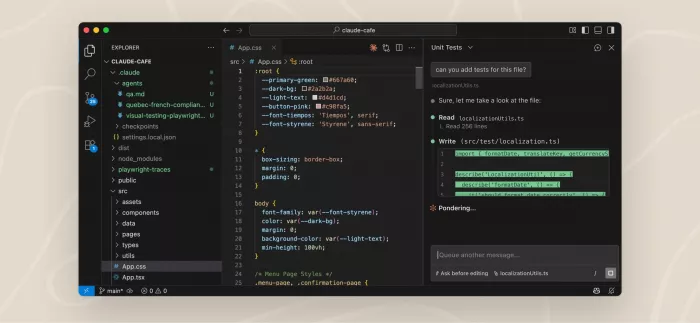
Anthropic's agentic coding tool. It began as a terminal CLI in early 2025, and by late 2026 it also runs through VS Code and JetBrains extensions, a desktop app, the web, a mobile app, Slack, and GitHub Actions. You describe an outcome; it plans, edits files, runs commands and tests, then reports back. It extends through MCP servers, subagents, hooks, skills, and plugins, and learns project conventions from a CLAUDE.md file in the repo.
Cursor
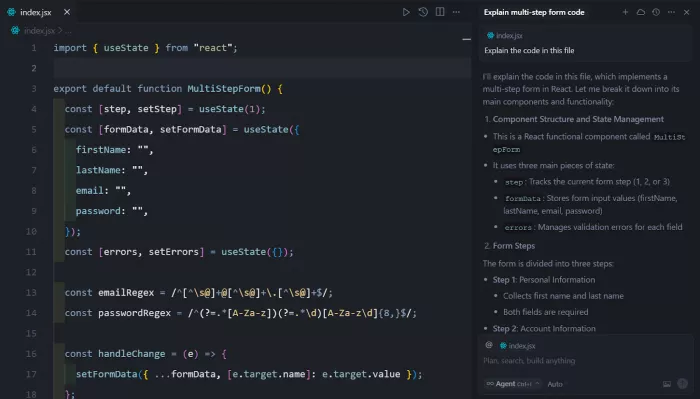
An AI-first code editor forked from VS Code, known for its Tab autocomplete, inline edits, and Agent mode. Version 2.0 introduced Composer, the company's own model tuned for fast agentic coding, plus support for up to eight agents working in parallel on git worktrees or remote machines, with a built-in browser so agents can test their own output. Through 2026 the interface kept moving in that agent-first direction, with the classic IDE view always one switch away, and it runs Composer alongside frontier models from OpenAI, Anthropic, and Google.
The workflow difference that decides everything
Strip away the features and one difference remains: Claude Code is built for delegation, Cursor is built for supervision.
A Claude Code session starts with a sentence. "Migrate the billing tables to the new schema, update every caller, and make the test suite pass." It reads the repo, proposes a plan, then grinds through it: editing files, running commands, rerunning failing tests, and asking permission before anything risky. During testing, the longest unattended run went two hours and seventeen minutes and came back with a clean diff touching 94 files. The work of the human shifts from writing code to writing briefs and reviewing results, which is a different skill and takes a week or two before it stops feeling strange.

Cursor keeps you in the driver's seat. Tab completion predicts the next edit with uncanny accuracy, inline chat rewrites a selected block, and the agent panel handles multi-file tasks while the code stays visible the whole time. Nothing lands without scrolling past your eyes, which is exactly what some developers want and exactly what slows others down. Developers moving up from autocomplete style assistants usually find Cursor the gentler step, and this earlier breakdown of Cursor vs GitHub Copilot covers that particular switch in detail.
A rule of thumb emerged by the end of the test: when you already know what the code should look like, Cursor gets you there faster. When you only know what the outcome should be, Claude Code gets there with less of your attention.
Feature comparison
| Feature | Claude Code | Cursor |
| Core interface | Terminal first, plus IDE extensions, desktop, web, mobile | Full VS Code style editor |
| Autocomplete | None; the agent writes whole changes | Tab model, its strongest feature |
| Agent mode | The entire product is the agent | Agent panel plus classic editing views |
| Parallel agents | Subagents, background tasks, cloud sessions | Up to 8 agents on git worktrees |
| Models | Claude models only (Haiku, Sonnet, Opus) | Composer plus OpenAI, Anthropic, Google |
| Extensibility | MCP, hooks, skills, plugins, Agent SDK | MCP support, rules, shared team commands |
| Agent self-testing | Sandboxed browser pane in the desktop app | Native browser tool for validating output |
| Code review help | Review flows in terminal and GitHub | Improved diff views; BugBot as a paid add-on |
Pricing in November 2026
Claude Code
| Plan | Price |
| Claude Pro | $20/mo |
| Max 5x | $100/mo |
| Max 20x | $200/mo |
| Team and Enterprise | Per seat |
| API billing | Pay per token |
Cursor
| Plan | Price |
| Hobby | Free |
| Pro | $20/mo |
| Pro+ | $60/mo |
| Ultra | $200/mo |
| Teams / Enterprise | From $40/seat |
Both start at $20 a month, which makes the entry decision feel easier than it is. The real difference is how usage gets metered. Claude plans bundle Claude Code with Claude chat under shared session and weekly limits; heavy agent weeks on Pro can hit the ceiling mid-task, which is what the Max tiers exist to fix. Cursor runs on usage pools roughly tied to plan price, with Pro covering around $20 of model usage per month, Pro+ around $70, and Ultra around $400, then on-demand billing beyond that. During testing, two days of continuous agent work burned through most of a Pro pool, and Cursor's BugBot review bot costs extra on top of the subscription. Both vendors have adjusted their metering more than once this year, so a glance at the official pricing pages before committing is worth the two minutes.
Strengths and trade-offs
Claude Code: strengths
- Finishes whole tasks unattended, including running and fixing tests
- Strongest repo-wide reasoning of any tool in this test
- Runs everywhere: terminal, IDEs, web, mobile, Slack, CI pipelines
- Deep customization through CLAUDE.md, hooks, skills, and MCP
Claude Code: trade-offs
- No tab autocomplete; quick manual edits still need an editor
- Usage caps on Pro can interrupt heavy weeks at the worst moment
- Big unattended diffs demand disciplined review habits
- Locked to Claude models; no mixing in GPT or Gemini
Cursor: strengths
- Best in class autocomplete and inline editing flow
- Composer is fast, with most agent turns landing in under 30 seconds
- Familiar editor; VS Code extensions and settings carry over
- Free Hobby tier makes trialing zero risk
Cursor: trade-offs
- Credit math is hard to predict; agent-heavy days drain Pro fast
- Output quality swings with which model you route tasks to
- BugBot code review sits outside the base subscription
- Another editor to maintain if your team standardizes elsewhere
If neither fits: the alternatives
Both headliners earned their place, but the field around them is crowded and trials are mostly free, so sampling two or three before subscribing costs little more than a weekend.
| Tool | What it is | Starting price | Standout trait |
| GitHub Copilot | Autocomplete, chat, and a coding agent inside editors and GitHub | Free tier; paid from $10/mo | Cheapest paid entry, lives where the code already is |
| OpenAI Codex | OpenAI's coding agent across CLI, IDE, desktop, and cloud | Bundled with ChatGPT plans from $20/mo | Closest rival to Claude Code for delegated work |
| Gemini CLI | Google's open source terminal agent | Free with generous limits | Hard to argue with the price of nothing |
| Windsurf | An agentic AI editor in the Cursor mold | Free tier; paid from $15/mo | Smooth agent experience for less money |
| Cline | Open source agent extension for VS Code | Free; bring your own API key | Full control over models and spend |
What people are saying
Marketing pages reveal very little. Forum threads where developers argue about their own money reveal a lot more, and the same themes keep surfacing across the big communities.
r/ClaudeAI
The recurring "is Claude Code better than Cursor" threads draw hundreds of upvotes, and heavy users who tried both report ending up mostly in Claude Code. One widely echoed comment noted that the same Claude model feels like "a completely different experience" inside each tool. The common gripe: terminal-only diffs felt clumsy until the VS Code and JetBrains extensions arrived.
r/cursor
Even on Cursor's home turf, "who is moving to Claude Code" threads come back every few weeks, with pricing changes to the $20 tier cited as the push for several switchers. The defense is consistent too: nothing matches Tab completion for flow, and reviewing an agent's work is simply easier inside an editor than in a terminal.
Hacker News
Cost dominates the HN threads. One commenter who had been spending heavily on premium models in Cursor reported being "equally as prolific and paying 1/10th the price" after moving to Claude Code Max, while others pushed back that an agent-first interface removes the supervision that makes AI output trustworthy in the first place.
The balanced middle
Across both Reddit and HN, the most upvoted compromise is the same one this test landed on: keep Claude Code for the hardest, longest tasks and lean on an editor for routine edits and review. Plenty of commenters describe paying for a Cursor plan and a Claude plan together, treating them as different modes rather than rivals.
Which one fits your situation

The solo builder shipping fast
Cursor Pro. Tab completion plus the agent panel covers most days, the free tier works as a real trial, and switching costs from VS Code are close to zero. Move up only when the credit pool starts running dry before month end.
The engineer in a legacy monolith
Claude Code. Repo-wide refactors, migrations, and test backfills are where it ran away with this comparison, and a well kept CLAUDE.md file teaches it house conventions once instead of every session.
The automation heavy team
Claude Code with MCP. Teams wiring agents into Jira, databases, and internal APIs will feel at home here, and this guide to connecting your AI tools so they actually talk to each other explains why that plumbing ends up mattering as much as the model.
The team standardizing tooling
Cursor Teams if the editor is the standard, with shared rules, team commands, and admin controls. If the standard is outcomes rather than editors, Claude Code's Team seats and CI integrations fit cleaner.
Final verdict
After six weeks, the ending is less dramatic than the headline suggests: both subscriptions survived. Cursor earned its place on the days built around direct editing, the UI polish, the quick fixes between meetings, the moments where watching every change land actually matters. Claude Code earned its place on everything that could be described and handed over: the migration, the test backfill, the dependency upgrade that touched ninety files while the evening went on without it.
If only one fits the budget, the deciding question is control. Developers who think while typing, who want the editor itself to feel faster, should start with Cursor Pro, or with the free tier first. Developers who think in outcomes, who would rather review a finished diff than babysit one, should put the same twenty dollars into Claude Pro and open a terminal.
The setup that won: Cursor as the editor, Claude Code running inside its terminal panel, each doing the job the other does worse. At forty dollars a month combined, it costs less than a single Ultra or Max plan and removes the need to choose at all. Learn how Claude Code turns complex coding tasks into a smoother workflow here.
Comments